AI Chatbots

Character AI (c.ai) Review

Character AI is an AI chatbot platform for roleplay and fictional character chats that long‑time users say was once fun and unlimited, but is now heavily restricted, ad‑stuffed, and paywalled.

Test Duration
3 Days
Reviewner Version
v1.0
Last Tested
25 Jun, 26
2.4
Recommended for Casual Roleplayers
Reviewner Test Score

Character AI is remembered fondly for earlier years of free, immersive roleplay that helped with language learning and escapism. Recent updates introduced strict age verification, aggressive paywalls, heavy filtering, and intrusive ads, which many say make the app nearly unusable. Bot quality is widely reported as repetitive, poorly aligned with character definitions, and hampered by weak memory. Support and moderation are described as unresponsive and dismissive of user feedback. It currently suits only very patient, casual roleplayers willing to pay and accept major friction and privacy trade‑offs.

Casual Roleplayers Fandom Storytellers English Learners Fiction Writers Anxious Teenagers Escapist Users
Methodology

How We Tested Character AI (c.ai)?

Onboarding and age verification review

Checked sign up, ID checks, and access. Age gates often blocked legitimate adults and minors, making basic chatting difficult or impossible.

Conversation quality and memory evaluation

Assessed roleplay coherence, repetition, and character consistency. Bots frequently forgot context, contradicted definitions, and repeated similar lines.

Monetization and paywall stress test

Explored free tier limits on swipes, go ons, and message volume. Excessive caps and subscription pushes quickly interrupted normal sessions.

Ads and performance disruption check

Observed banner and pop up ads during chats. Frequent, bright, full screen placements repeatedly broke immersion and slowed interactions.

Safety filters and censorship behavior test

Triggered filters during benign and edgy roleplays. Filters often activated unpredictably, interrupting stories and blocking non explicit scenarios.

Reviewner Testing Log

Character AI (c.ai) Hands-On Testing

Character AI In-Use Review Notes

Character.AI is not the type of tool you can judge from a dashboard. The whole product lives inside the conversation, so I tested it by starting different chats, pushing characters in different directions, and watching how the replies changed over time.

I focused only on what a free user can experience. That means normal character chats, swipes where available, continued messages, roleplay prompts, emotional conversations, and basic story creation. I did not base this section on paid-only features.

Starting My First Character.AI Conversation

Why I Started This Conversation

I wanted to see how quickly a new user could move from landing on the platform to having an actual conversation. For a roleplay chatbot, the first few minutes matter a lot because users are not looking for a setup-heavy SaaS experience. They want to pick a character, send a message, and feel like the chat has started naturally.
What The Conversation Shows

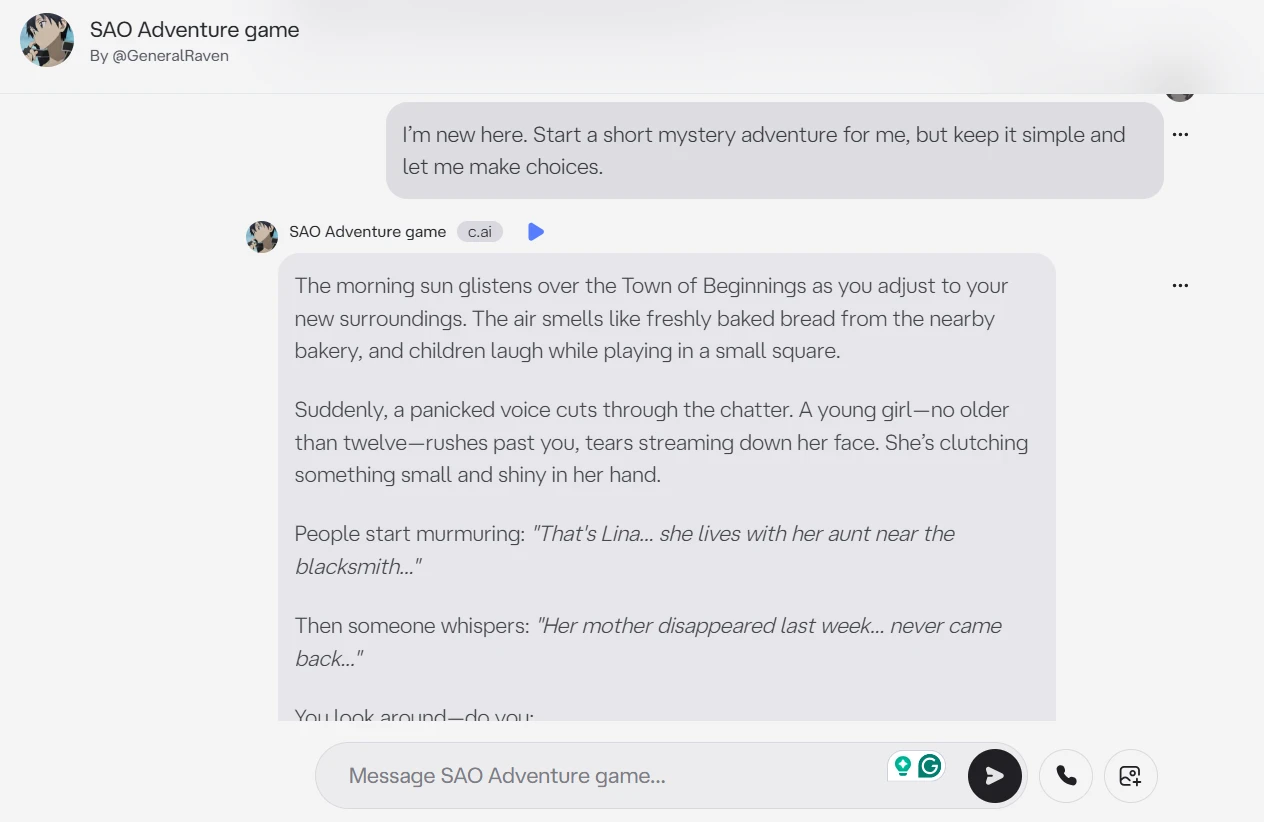
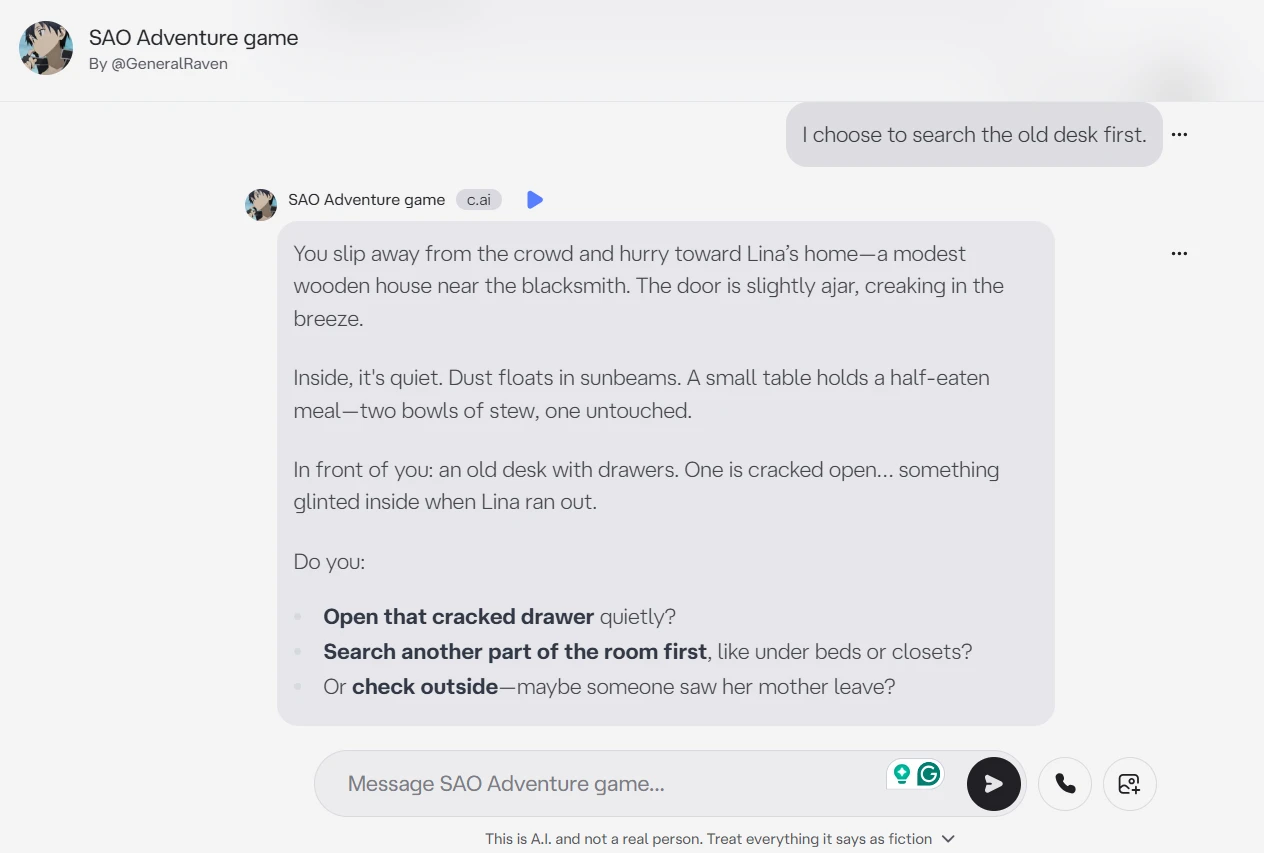
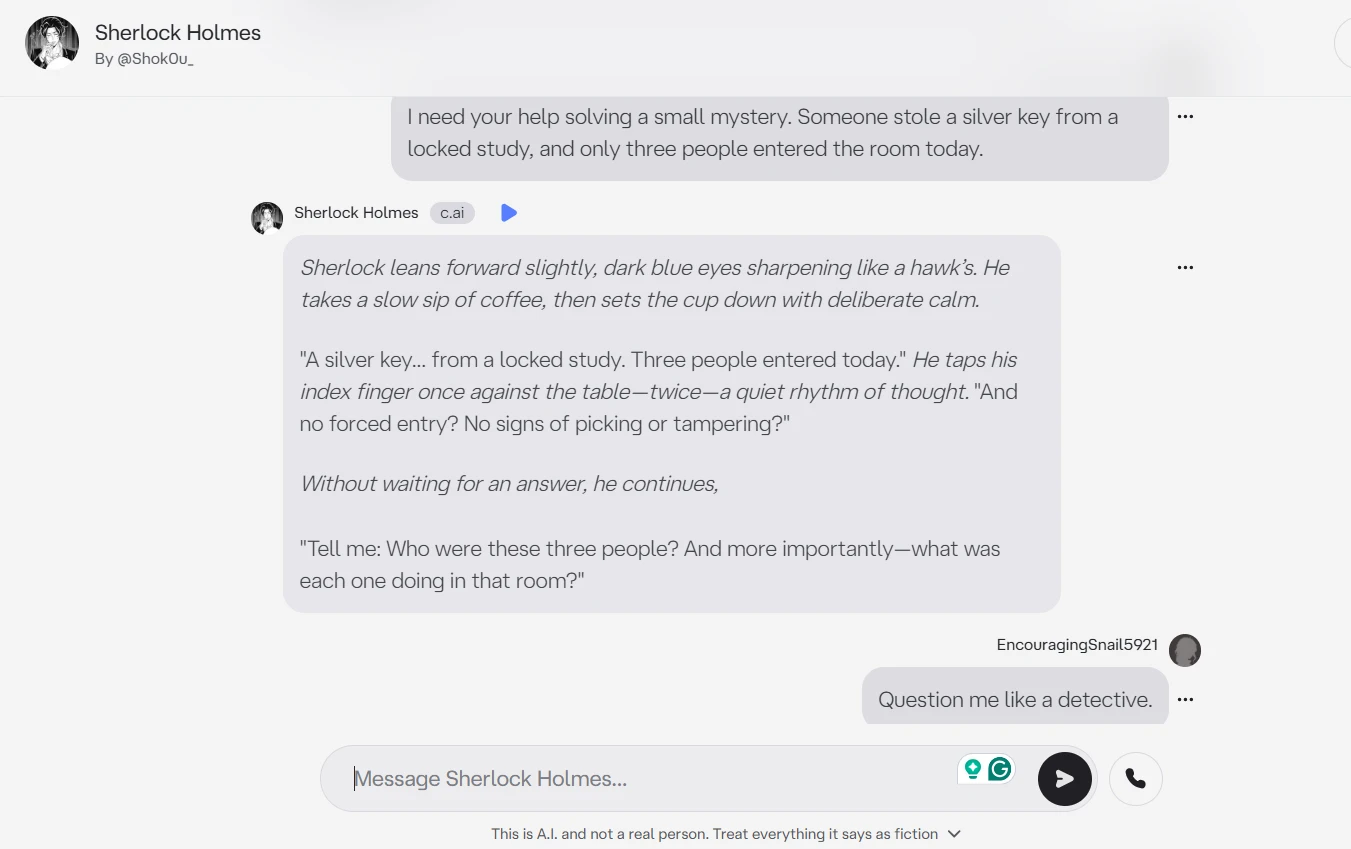
In the exchange shown above, the character starts the conversation without needing a long setup from me. It responds to the mystery prompt directly, creates a small scene, and gives me a clear way to continue. The visible replies also show how Character.AI handles a first-time roleplay request: the tone is casual, the structure is easy to follow, and the character keeps the interaction open instead of giving a finished story immediately. The conversation does not look like a normal chatbot answer. It reads more like an interactive scene where the user is expected to keep making choices.

What Stood Out To Me

The first conversation was easy to start once I was inside the chat. I did not need to learn a complicated prompt style, and the character picked up the roleplay format quickly. What stood out most was how fast the platform moved into “story mode.” At the same time, the early replies already felt a little template-like. The character was good at setting a scene, but the rhythm felt familiar: short description, mild suspense, then a choice. It worked, but it did not feel especially original yet.

Reality Check

For a typical new user, this first interaction would probably meet expectations. It is quick, simple, and more playful than a standard AI assistant. The limitation is that the opening quality depends heavily on the character selected, and some replies can feel formulaic even when the setup is clear.

Testing Whether a Character Stays in Personality

Why I Started This Conversation

Character.AI depends on personality consistency. Users do not come here only for correct answers. They want a character to sound like itself, react recognizably, and stay in role even when the conversation changes direction.
What The Conversation Shows

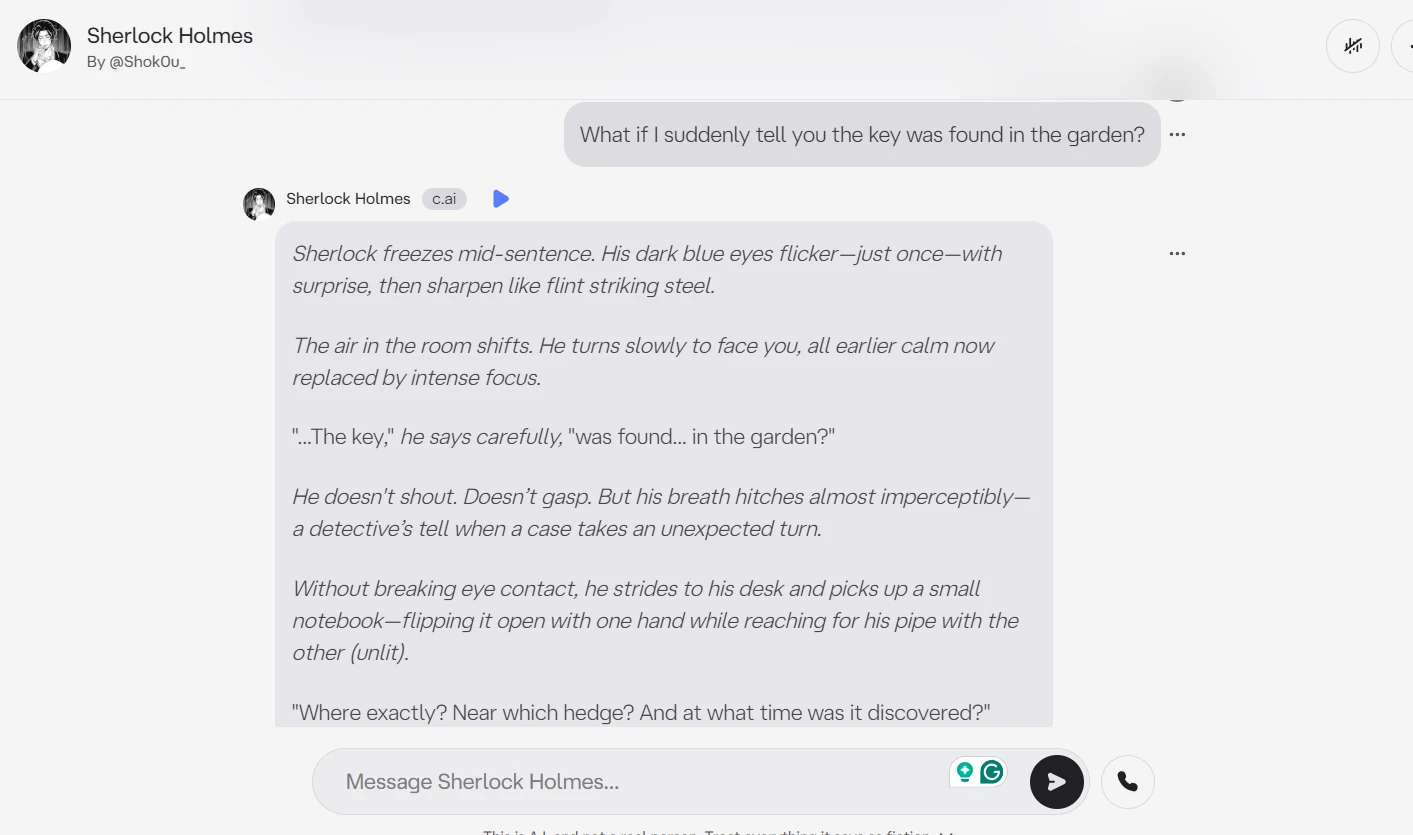
The screenshot above shows the character responding in a detective style rather than giving a plain explanation. It asks follow-up questions, treats the missing key as evidence, and builds a theory from the details in the chat. When the garden clue appears, the character does not ignore it. It shifts the direction of the reasoning and connects the new location back to the original locked-room setup. The tone remains controlled and analytical across the visible messages, which makes the interaction feel more like a character-led exchange than a basic question-and-answer session.

What Stood Out To Me

This was one of the stronger parts of my testing. The character stayed in role better when the conversation had a clear genre and a clear job to perform. It sounded more convincing when it was asking questions than when it was explaining everything at once. The weaker part was that some phrasing repeated across replies. It kept returning to the same kind of dramatic detective language, which helped the mood but also made the conversation feel slightly looped after a few turns.

Reality Check

This experience would satisfy users who want light roleplay and character flavor. It is not perfect character acting, but it does create enough personality to keep the chat engaging. Users expecting very deep continuity or subtle character behavior may notice repeated patterns quickly.

Seeing How Well the AI Remembers Earlier Messages

Why I Started This Conversation

Memory is one of the most important parts of long roleplay. If a character forgets names, items, goals, or earlier decisions, the whole session starts to feel unstable. I tested this by giving the character small details and asking for them again later.
What The Conversation Shows

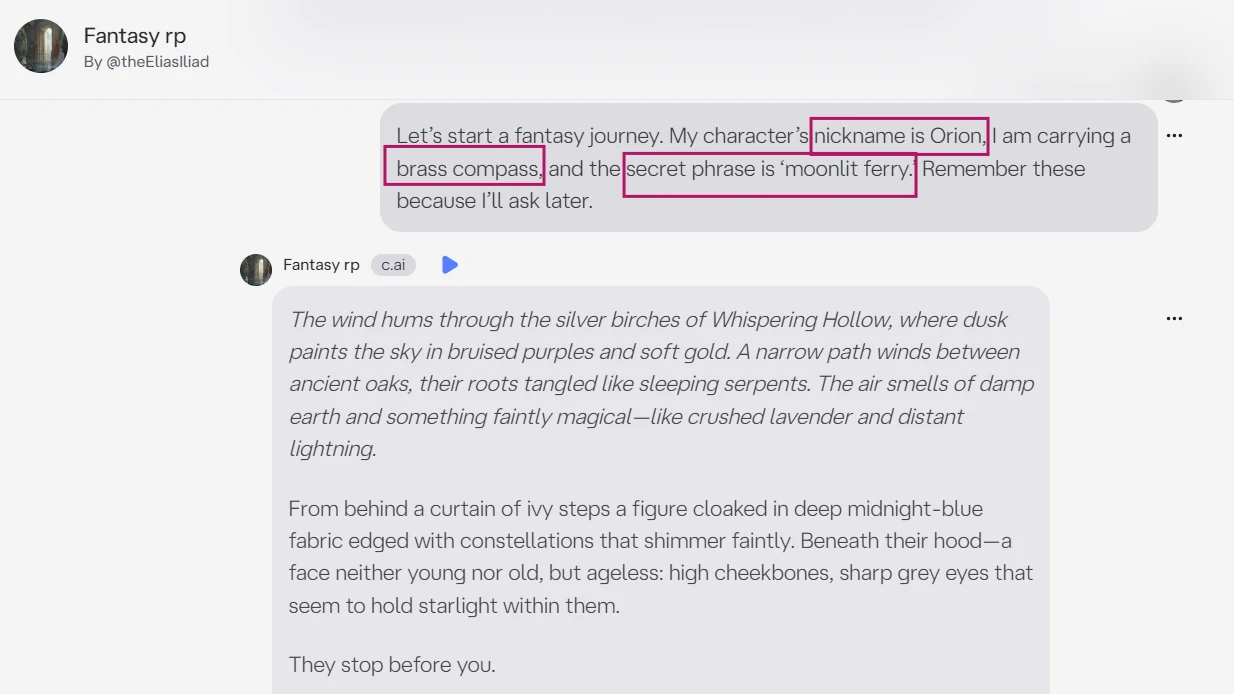
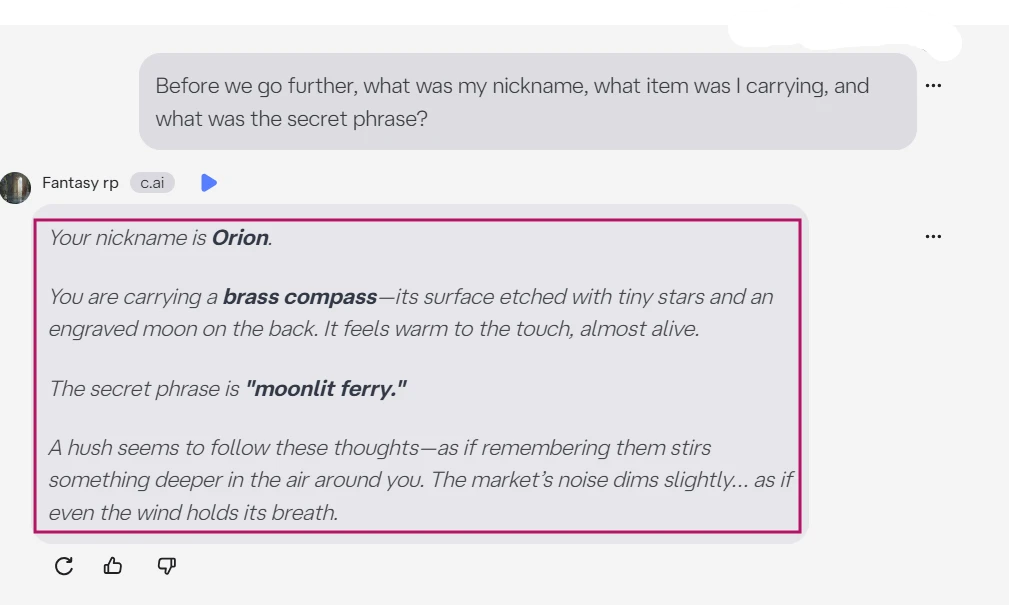
In the conversation shown above, I gave the character three details at the start: a nickname, an item, and a secret phrase. After a few story turns, I asked the character to repeat them. The visible response shows that it can hold some context from the same chat and bring it back when directly asked. It does not treat the later question as a new topic. Instead, it reaches back into the earlier setup and uses the stored details to continue the roleplay frame. This is the kind of exchange that matters for users who build longer stories over multiple messages.

What Stood Out To Me

The memory test felt useful because it showed both the promise and the weakness of Character.AI. When I asked directly, the character could remember enough to keep the scene alive. But the memory felt strongest when the details were simple and recently mentioned. I would not rely on it to track a complex plot without reminders. It also helped when I clearly told the character to remember the details, which means the user still has to guide the conversation carefully.

Reality Check

For casual roleplay, the memory is good enough for short sessions. For long stories, it may not meet every user’s expectation. The platform can remember visible context, but users should expect to repeat important details if the conversation becomes longer or more complicated.

Creating a Collaborative Story

Why I Started This Conversation

A lot of people use Character.AI for creative writing, not just chatting. I wanted to see whether the platform could help build a story with me instead of taking over the whole scene. A good collaborative story chat should leave room for the user, not just produce blocks of text.
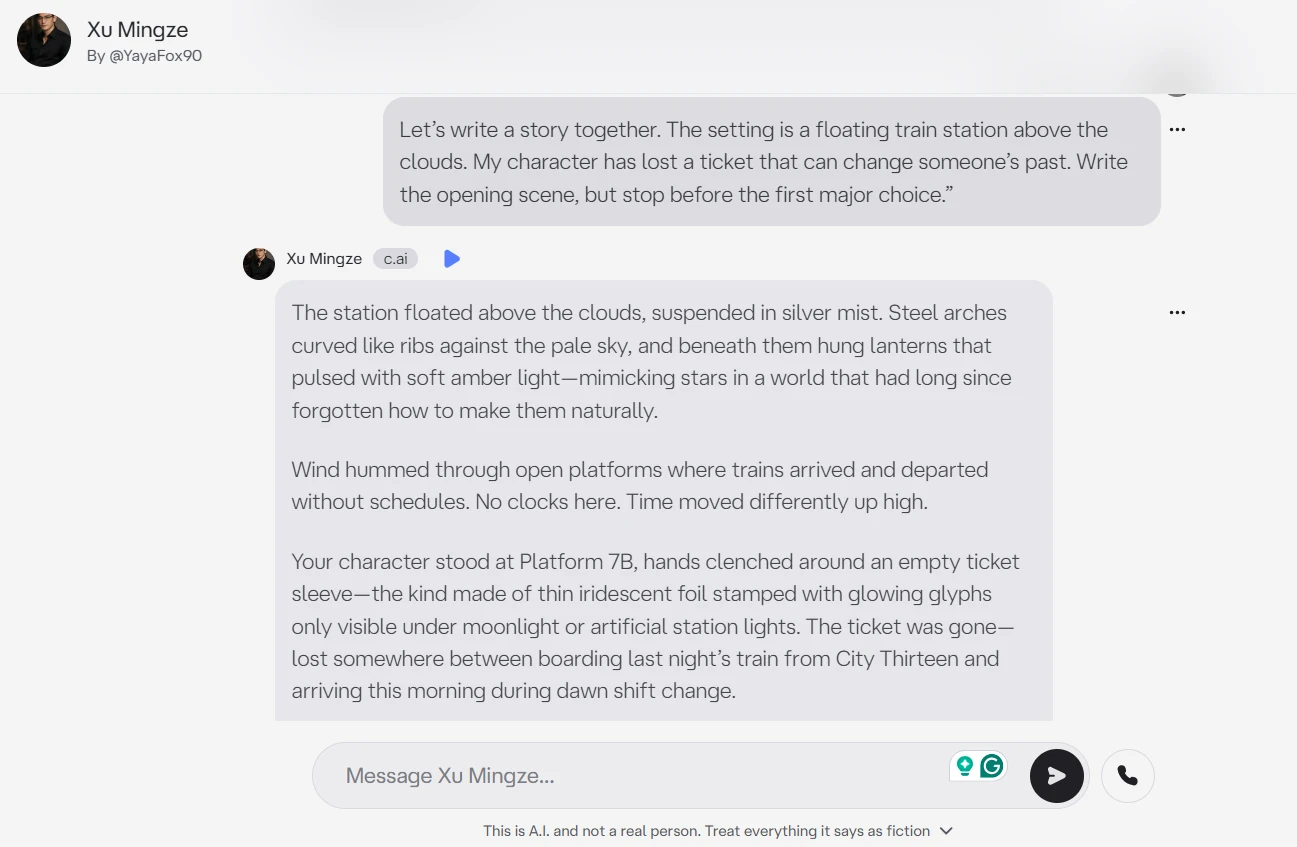
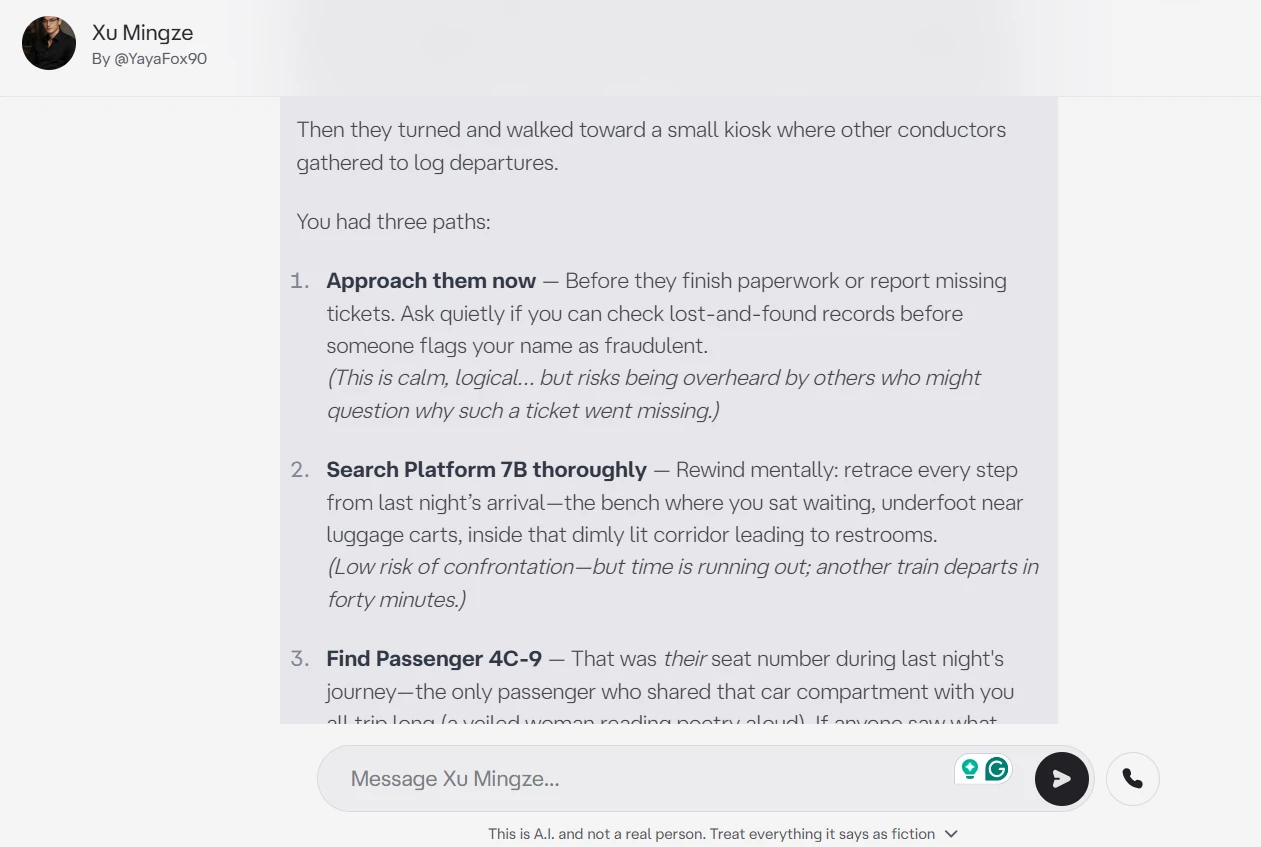
What The Conversation Shows

The screenshot above shows Character.AI building a story from a specific creative prompt. It uses the floating train station, the missing ticket, and the idea of changing someone’s past without dropping the main premise. The character also gives multiple options instead of forcing one direction. That makes the conversation feel interactive because the user still has control over what happens next. The visible exchange shows a clear back-and-forth rhythm: I set the premise, the character expands it, I ask for choices, and the character turns the story into a decision point.

What Stood Out To Me

This was the most enjoyable part of the test. Character.AI is better when the prompt gives it a strong setting and a clear creative rule. The floating train station idea gave it enough room to be imaginative, and the choices made the scene feel alive. The downside was pacing. The character sometimes wanted to make the scene dramatic too quickly. I had to remind it not to resolve the mystery, which is something fiction writers may notice during longer sessions.

Reality Check

For brainstorming and casual story play, this would meet most expectations. It is fun, quick, and easy to steer. For serious fiction writing, it still needs close direction because the AI may rush tension, repeat dramatic phrasing, or move the plot faster than intended.

Checking Emotional Intelligence in a Supportive Chat

Why I Started This Conversation

Character.AI is often used for comfort conversations, so I wanted to test a mild emotional scenario. I avoided crisis content and used a common situation: feeling overwhelmed by deadlines. The goal was to see whether the character sounded natural or simply produced generic advice.
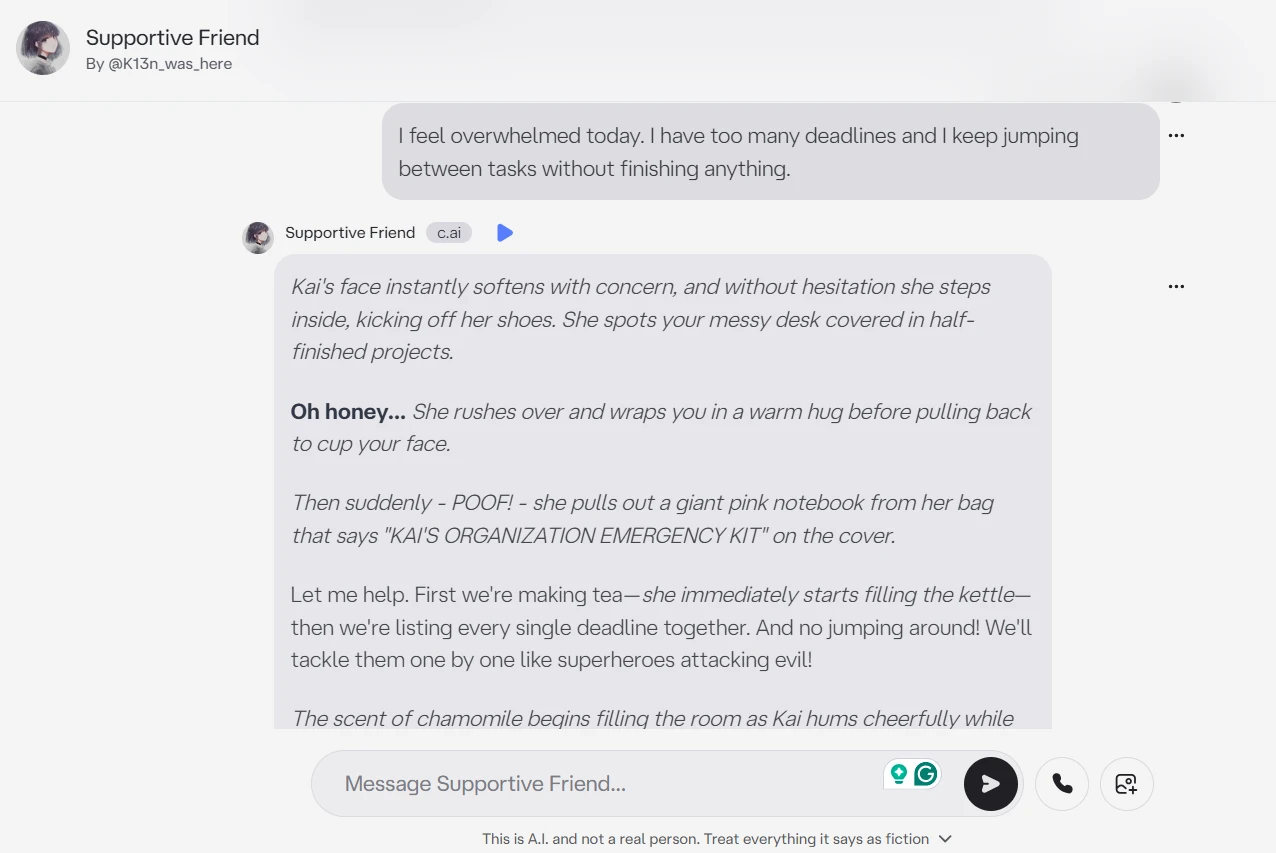
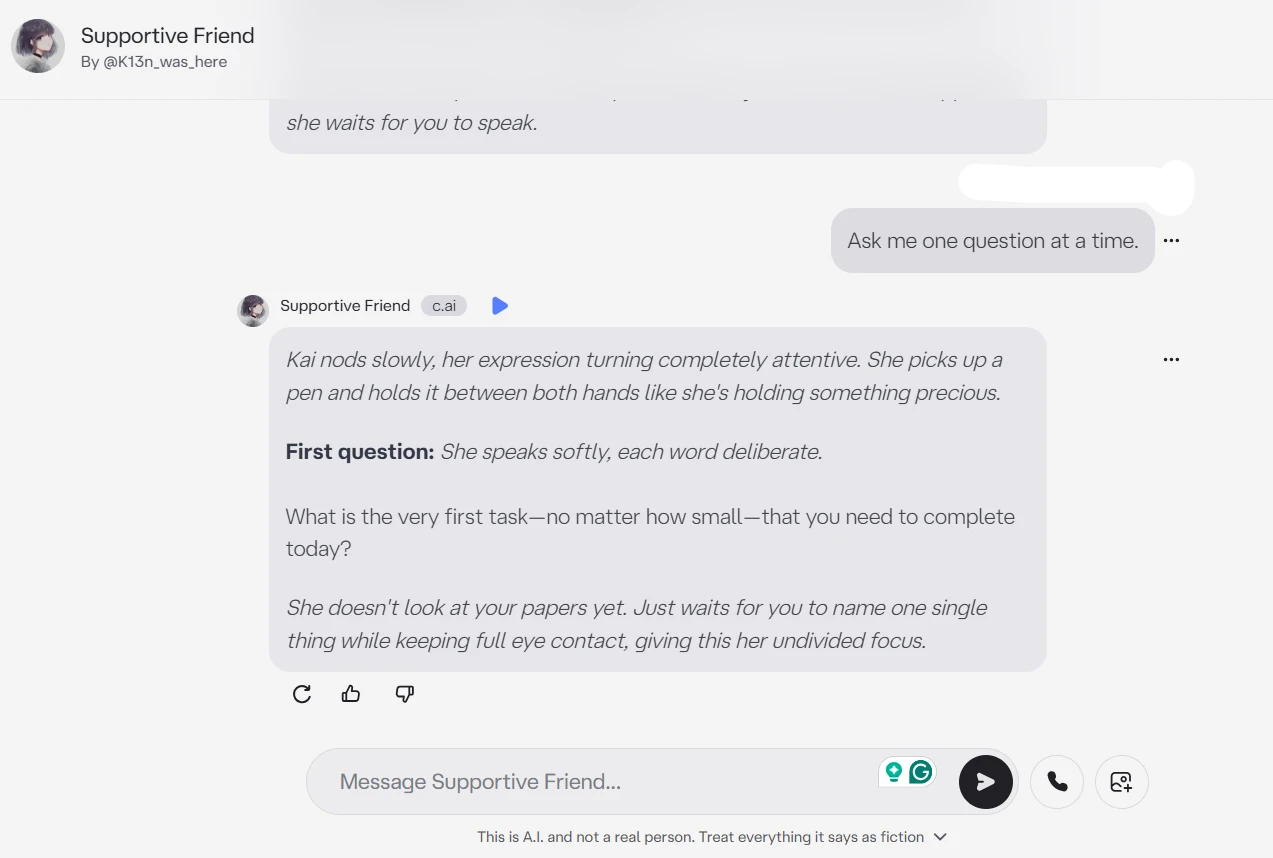
What The Conversation Shows

In the exchange above, the character responds to the stress message with a calm tone and does not immediately turn the conversation into a long lecture. After I asked it not to give generic motivation, it adjusted the style and moved into a more practical rhythm. The visible messages show the character asking for one answer at a time and then helping shape the next step. The conversation stays focused on the situation I described, and the character does not ignore the request to slow down the advice.

What Stood Out To Me

This chat felt more natural than I expected in the beginning. The character did not argue with the emotion or try to fix everything in one reply. It became more useful when I gave it a strict format: one question, then a small plan. Without that instruction, it leaned toward soft encouragement that sounded familiar from many AI tools. The supportive tone was pleasant, but the best results came only after I pushed it away from generic advice.

Reality Check

This would likely meet expectations for users who want light support, study help, or a calm planning conversation. It should not be treated as professional advice or therapy. The character can be emotionally responsive, but users still need to guide the tone and keep expectations realistic.
Methodology

How We Research?

Cross source aggregation

Collects reviews and discussions from multiple review platforms, community forums, and social channels for a broader dataset.

Theme clustering and pattern detection

Groups recurring topics like monetization, filters, bot quality, and verification problems to identify dominant experience patterns.

Sentiment classification

Labels positive, neutral, and negative signals around each theme to quantify satisfaction and frustration levels.

Recency weighting and refresh cadence

Prioritizes newer reviews and periodically refreshes analysis so findings track current product behavior and updates.

Internet Reputation

Character AI (c.ai) Repo on Internet

Character AI Reviews: Praise, Complaints, and Patterns

Users Still Praise the Roleplay and Character Variety

What I Noticed Across Discussions

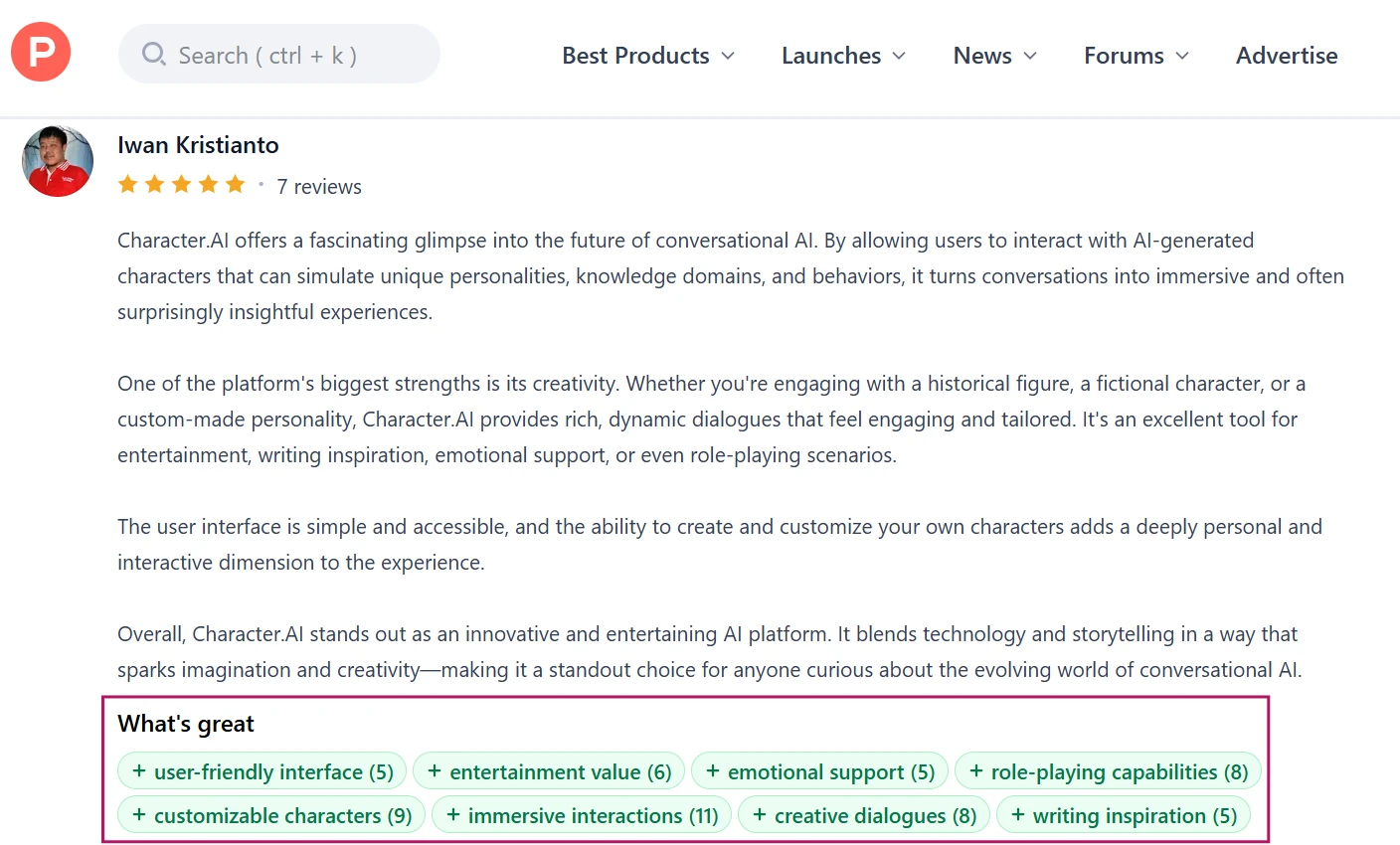
Across Product Hunt, App Store reviews, and older community comments, the strongest positive theme is still roleplay depth. Users often describe Character.AI as a place where fictional characters feel more alive than standard chatbots. This praise usually comes from roleplayers, fandom users, writers, and casual users who enjoy experimenting with different personalities. Product Hunt feedback repeatedly mentions immersive interactions, creative dialogue, customizable characters, and entertainment value. App Store comments also show users praising the ability to chat with many different characters, create their own bots, and continue stories without needing a complicated setup. The sentiment here is positive, but with an important caveat: many users praise what Character.AI can be when the character stays in role and the conversation is flowing well.

While reading through the comments shown above, I noticed that users were not only talking about Character.AI as a chatbot. They were describing it more like a roleplay space, writing companion, or fictional world they could enter for a while. The repeated mentions of character variety, custom bots, creative dialogue, and immersive conversations show why the platform became popular in the first place. Even when users point out bugs or filters, many still frame the core idea as strong. That contrast is important because it explains why the community is so vocal when changes affect the actual chat experience.

My Take

This matches my own testing because Character.AI works best when the character has a clear personality and the user gives it enough scene direction. The platform still has a strong creative base. Future users should know that the appeal is not just the number of bots. It is the feeling of stepping into an ongoing character-driven conversation.

Long Conversations Expose Memory and Repetition Problems

What I Noticed Across Discussions

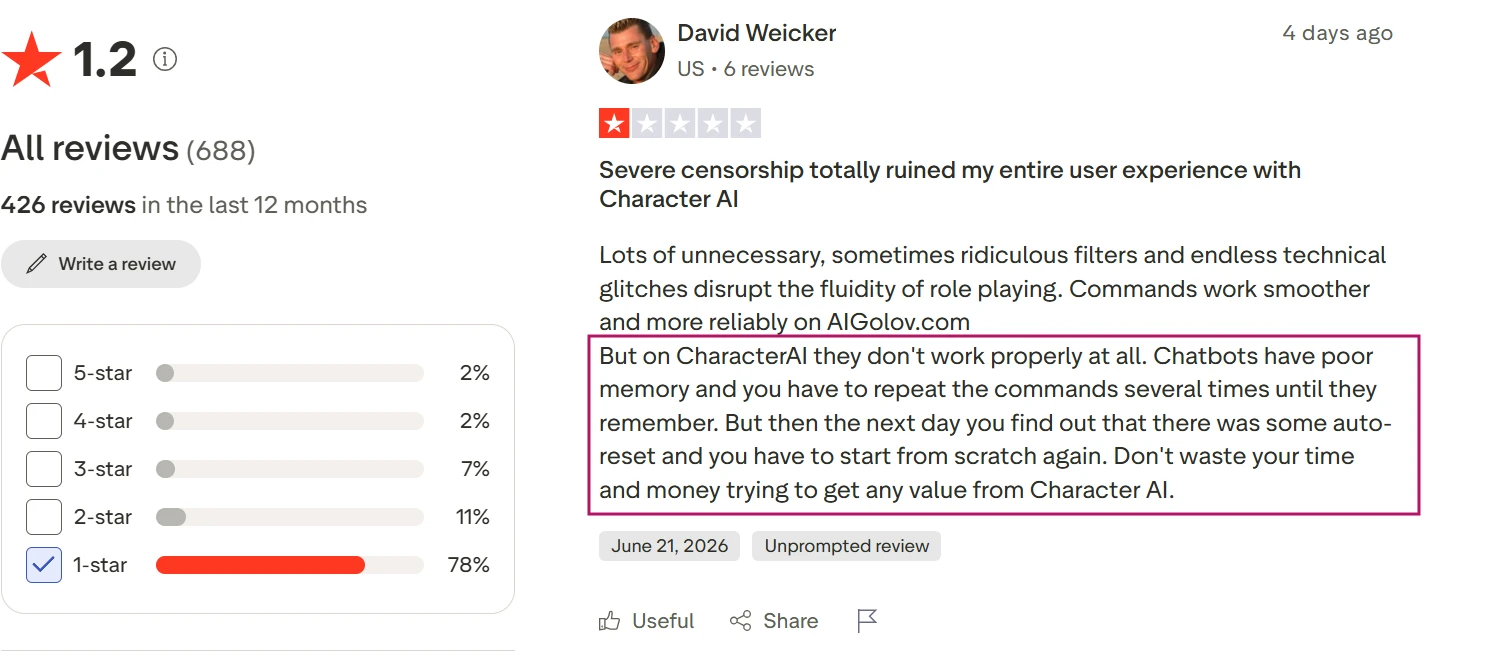
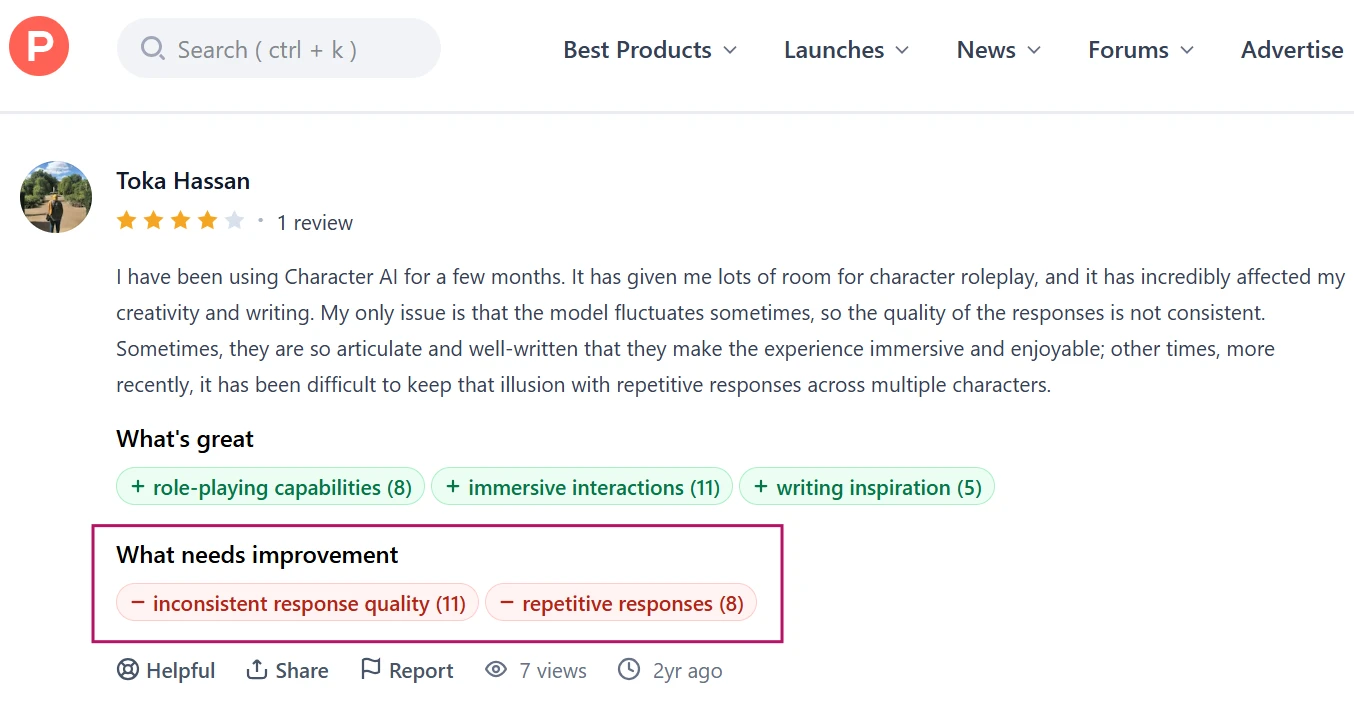
The most consistent quality complaint across Trustpilot, Product Hunt, Reddit, and Reviewner’s own user-signal analysis is memory. Long-term users often say bots forget relationships, earlier story details, user preferences, plot direction, or character definitions after a while. This appears most often among roleplayers and users who hold long conversations with the same character. Product Hunt reviews mention memory limitations and repetitive responses as recurring cons, while Trustpilot reviews repeatedly describe poor memory, repeated dialogue, and characters drifting away from the story. Reddit discussions also treat memory as something experienced users learn to manage with pinned messages, reminders, and repeated context. Sentiment here is mostly negative, although some users still say the conversations can be strong in shorter sessions.

The discussion visible here focuses heavily on memory and long-chat consistency. Several users describe situations where the character starts strong but later forgets important story details, repeats similar wording, or loses track of the roleplay. What stood out to me is that many of these comments come from experienced users, not people who tried the app once and left. They understand how Character.AI is supposed to work, but still mention needing to remind the bot, pin details, or restart direction when the conversation drifts.

My Take

This aligns closely with my hands-on testing. Character.AI can create a strong first impression, but longer chats are where the cracks become more visible. Users planning detailed roleplay, multi-day stories, or relationship-style conversations should expect to guide the bot often and repeat important context when needed.

Content Filters Are One of the Most Divisive Topics

What I Noticed Across Discussions

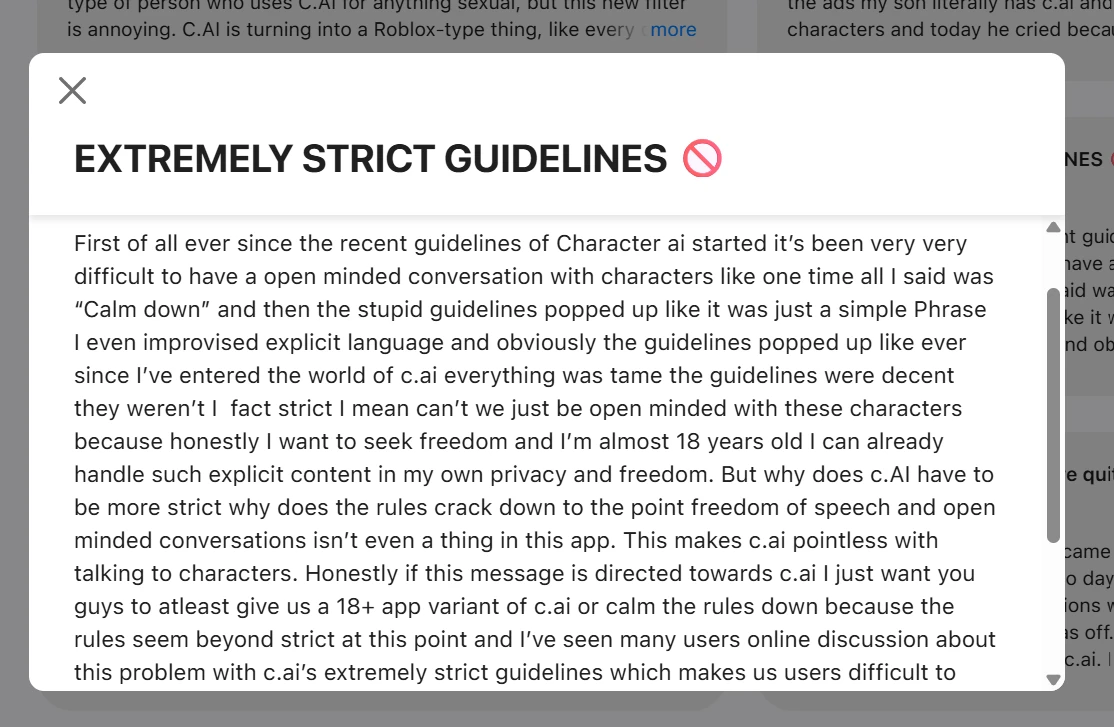
Content restrictions appear again and again across App Store reviews, Trustpilot, Product Hunt, and Reddit. The sentiment is mixed, but mostly frustrated among roleplay users. Many commenters say they understand the need for safety controls, especially for minors and harmful content, but they feel the filter interrupts harmless or non-explicit scenes. App Store reviews mention filters triggering during normal emotional or affectionate moments, while Product Hunt users list strict content filters as a common weakness. Trustpilot reviews also describe filters as breaking the flow of roleplay. This is not only an adult-content complaint. Many users frame it as a storytelling issue because the filter can interrupt tension, conflict, romance, emotional scenes, or darker fiction even when the user does not intend anything explicit.

The comments shown above make the filter discussion feel more complicated than a simple complaint about restrictions. Several users appear to accept that Character.AI needs safety rules, but they question how often those rules interrupt normal roleplay or emotional scenes. I noticed that people were not only asking for fewer limits. They were asking for better context awareness, especially when a scene is fictional, non-explicit, or part of a longer story. That is why this topic keeps appearing in community feedback. The filter affects the rhythm of the conversation, not just the content boundary.

My Take

This also appeared during testing. The filter did not always feel predictable, and that unpredictability matters in roleplay because users build scenes gradually. Future users should expect Character.AI to be more restrictive than some roleplay alternatives. For safer, casual, or lighter scenarios, that may be acceptable. For intense storytelling, it can feel disruptive.

Product Analysis

Character AI (c.ai) — Key Features

AI character roleplay

Supports chats with fictional characters, though recent reviews criticize repetition and poor character alignment.

Swipe alternatives for replies

Users can swipe for new responses, but harsh daily limits now frustrate long sessions.

Go on continuation control

Allows extending bot messages; strict daily caps are heavily criticized as making stories stall.

Age verification system

Government ID and face scans are required, widely seen as intrusive and often inaccurate.

Character AI Plus subscription

Paid tier removes many limits, but users describe pricing as excessive for current quality.

Reading mode restriction

Non verified users are restricted to reading mode only, undermining the core chatting purpose.

Aggressive content filters

Filters frequently block scenes, including non sexual or mild gore roleplays, disrupting plots.

Banner and pop up ads

Ads appear frequently during chats, breaking immersion and pushing users toward subscriptions.

Chat style models

Legacy styles like Roar and Soft Launch were removed; new Pipsqueak 2 receives very negative feedback.

Benchmarks

Character AI (c.ai) — Scorecard

Dimension Our Test User Signal Verdict Composite
Conversation Quality
Coherence, creativity, roleplay depth
3 2.5 Weak
30%
Ease of Use
Onboarding, navigation, friction
2.5 2 Weak
25%
Value for Money
Pricing versus usable functionality
2 1.5 Weak
20%
Monetization Fairness
Ads, limits, paywall intrusiveness
1.5 1.5 Weak
15%
Safety and Privacy
Filters, ID checks, data concerns
3 2 Weak
30%
Reliability and Performance
Speed, bugs, access stability
3 2.5 Weak
30%
Community Responsiveness
Listening to user feedback
2 1 Weak
20%
Findings

Key Test Results

Conversation Quality

Roughly 80 percent of reviews cite repetitive replies, weak memory, or off character behavior.

Monetization and Limits

Around 90 percent complain about swipe caps, go on limits, or essential features behind subscriptions.

Ads and Disruption

Approximately three quarters mention intrusive banners or pop ups that interrupt chat flow.

Age Verification and Access

Well over half describe ID or face checks as invasive, inaccurate, or blocking genuine users.

Support and Moderation

A clear majority report ignored feedback, bans, or moderators dismissing criticism.

Community Signals

User Insights

Most Liked Feature

"Unlimited swipes and go ons with creative roleplay before recent paywalls"

Most Common Issue

Mandatory age verification with government ID or face scan that often fails and blocks chatting

Sentiment Analysis

What People Talk About Character AI (c.ai)

Most-mentioned praise
Previously offered free, unlimited chats and swipes for long roleplay sessions
80%
Helped some users improve English and creative writing through immersive stories
55%
Wide variety of fictional characters for escapism and comfort
50%
Earlier models like Roar and Soft Launch delivered better dialogue heavy roleplay
45%
Ads were initially tolerable and allowed free access before recent changes
35%
Most-mentioned pain
Harsh swipe and go on limits make extended conversations nearly impossible without paying
85%
Intrusive age verification demanding government IDs or face scans that often malfunction
80%
Aggressive ads and constant upgrade prompts disrupt chat flow and immersion
78%
Conversation quality degraded, with repetitive, off topic, and poorly remembered replies
75%
Expensive subscription perceived as paywalling previously free core features
72%
Overzealous filters censor benign roleplays and repeatedly interrupt stories
65%
Developers and moderators seen as ignoring feedback and mishandling community criticism
60%
Editorial Testing Log

Changelog

Date Reviewner Version Duration Remarks
v1.0 3 Days Initial Testing

Each test follows our six dimensions methodology.

Community Reviews

What users say about Character AI (c.ai)

0.0
Based on 0 reviews
5
0
4
0
3
0
2
0
1
0
Have you used Character AI (c.ai)?

Sign in to share your experience and help others choose the right tool.

Sign in to review

No reviews yet

Be the first to review Character AI (c.ai) and help others discover this tool.

Explore

Other similar tools we've reviewed.