

Text To Speech

DupDub Review

DupDub is an AI dubbing and text to speech studio aimed at creators who need many voices, fine grained control, and talking avatars, but with reliability, pricing, and support concerns.

Test Duration
3 Days
Reviewner Version
v1.0
Last Tested
09 Sep, 26
6
Recommended for Content Creators
Reviewner Test Score

DupDub delivers a flexible text to speech editor with many voices, accent choices, and detailed controls that some reviewers find very useful. However, others report unreliable avatars, inconsistent voice pitch and speed, confusing trials, and strict refund rules. Complaints about navigation issues, credit limits, and slow or unresponsive support are common. It suits budget conscious creators who prioritize voice variety and granular control, and who can tolerate experimentation and occasional failures.

YouTube Creators Solo Content Creators Ecommerce Marketers Podcast Producers Online Course Instructors Social Media Managers
Reviewner Testing Log

DupDub Hands-On Testing

I Tried DupDub AI for Transcription, Here’s What Happened

I signed up for DupDub, ran a short video through its speech to text tool, and tried to export the result. This is a step by step account of what happened, with the exact screens I saw and a short note on what worked and what did not at each stage. I did not use any paid credits; everything here was done on the 10 free credits a new account gets.

Signing up

The sign up page offers Google, Facebook, or email. I went with email. You enter an address, set a password of at least six characters, then click Get Code and paste in the verification code that lands in your inbox. The whole thing took under two minutes and no card details were asked for.
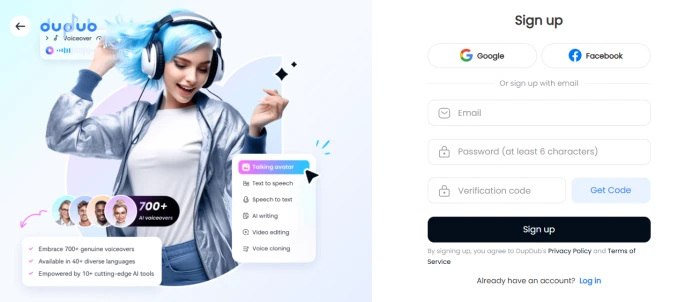
Figure 1: DupDub sign up screen with Google, Facebook, and email options

What I liked

  1.  No credit card required to get started.
  2.  Social login options are there if you want to skip the OTP step.
  3. The left panel tells you upfront what the suite covers: voiceovers, TTS, speech to text, cloning, video editing.

What I did not like

  1.  The email code step adds friction compared to tools that just send a magic link.
  2.  The password minimum of six characters is on the weak side.

The onboarding questions

Before reaching the dashboard, DupDub asks three questions: who you are, what type of business you are in, and what content you plan to make. I picked Personal Use, Advertising, and Social Media Content. There is a progress bar and a back arrow, and each screen took a few seconds.
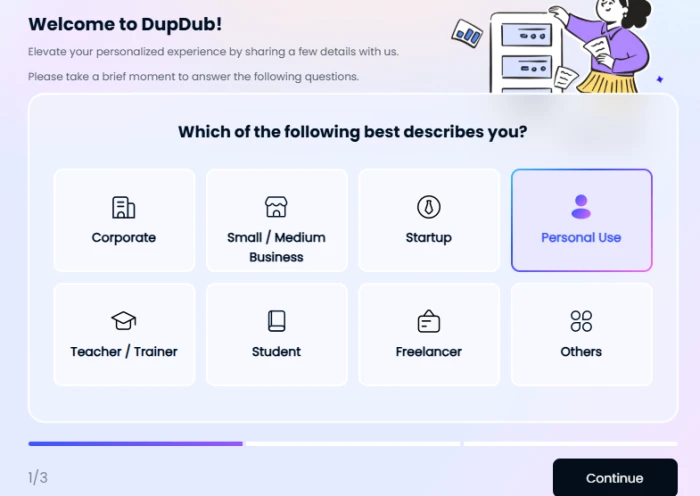
Figure 2: Question 1 of 3, user type
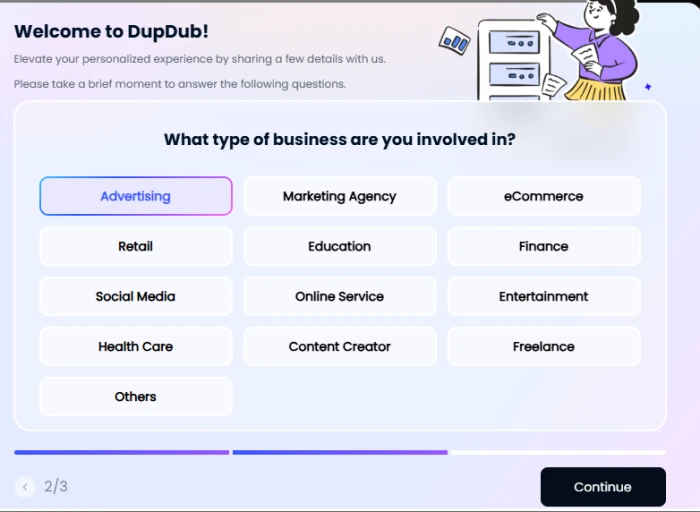
Figure 3: Question 2 of 3, business type
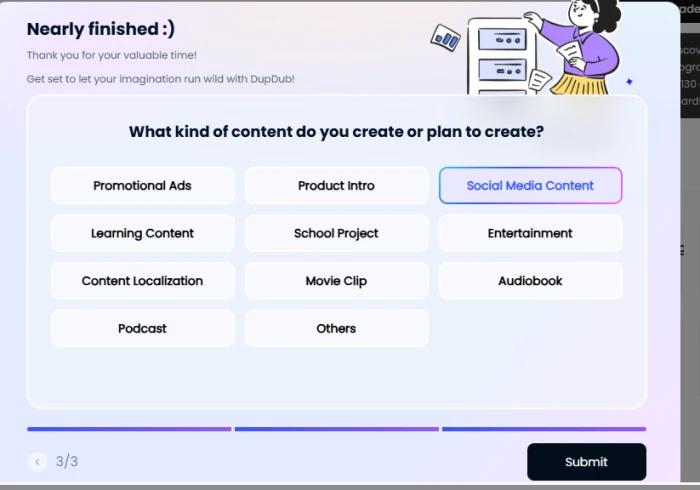
Figure 4: Question 3 of 3, content type

What I liked

  1. Clear progress indicator so you know it is only three screens.
  2. Single tap answers, nothing to type.

What I did not like

  1. There is no visible skip button, so you have to answer all three before you can do anything.
  2. I could not tell what actually changes based on my answers. The dashboard looked generic afterwards.

Opening the speech to text tool

The tool landing page is simple: a headline, a one line promise that it turns audio or video into editable text in seconds, and an upload box directly below.
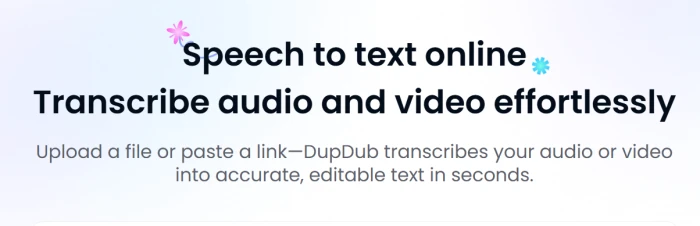
Figure 5: Speech to text landing page

The upload box accepts a local file or a link. The link tabs cover YouTube, TikTok, Facebook, Instagram, X, Douyin, Kuaishou, Redbook, Bilibili, and a generic Other URL option. I uploaded a 10 second MP4 called Face_Shapes_vs_Frame_Styles.mp4, 2.48 MB. The language dropdown defaults to Auto detection, and a small note says it will also translate if the detected language differs from the one you select.
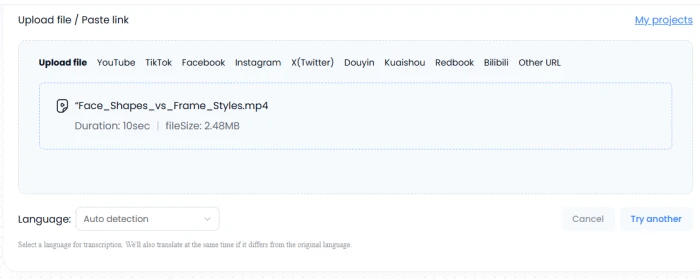
Figure 6: Upload panel with the test file loaded and language set to Auto detection

What I liked

  1. Paste a link support is broad, including Chinese platforms most Western tools ignore.
  2. Auto detection means you do not have to know the source language.
  3. The translate at the same time option is a nice bonus that surprised me. Most transcription tools make translation a separate paid step.

What I did not like

  1. No drag and drop hint or supported format list on the upload box itself.
  2. Auto detection is the default, which turned out to matter later.

Credit confirmation

Before anything runs, a confirmation box shows the file title, duration, size, the credit cost, and your remaining balance. My 10 second clip cost 0.2 credits, leaving 9.8 from the 10 free credits.
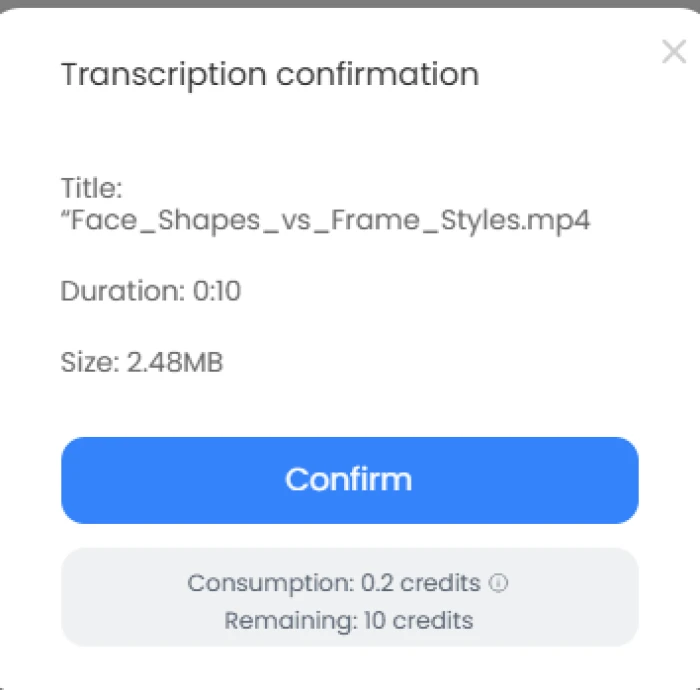
Figure 7: Transcription confirmation with credit consumption

What I liked

  1. Cost is shown before you commit. You will not be surprised by a drained balance.
  2. At 0.2 credits per 10 seconds, the free allowance works out to roughly eight minutes of audio, which is enough to test properly.

What I did not like

  1. The info icon next to Consumption does not explain how credits scale with longer files.

The transcript

Processing finished in a few seconds. The result screen shows the title, a language badge, duration, character count, and a timestamped transcript on the left with AI editing tools on the right: Rewrite, Summarize, Make longer, Make shorter, Ask AI to write, Convert text to speech, Download SRT, Copy text, Move to, and Rename.
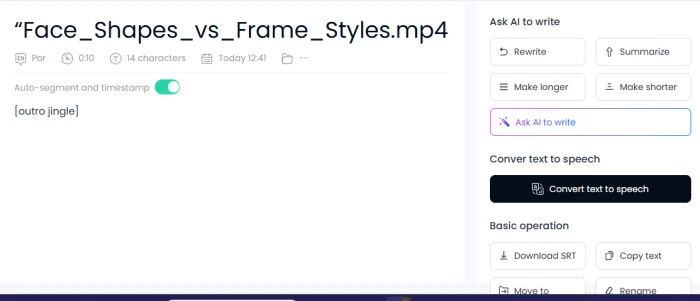
Figure 8: Transcript result page

Here is the honest part. The transcript that came back was a single line reading [outro jingle], 14 characters in total. The language badge read Por, meaning DupDub decided my clip was Portuguese. The file name is English and the clip is 10 seconds long. The tool clearly picked up on the music bed and tagged it as a sound event, which is a fair thing to do, but the Portuguese label is wrong and there was no prompt to check or correct the detected language.

What I liked

  1. Non speech audio gets tagged rather than turned into gibberish words. That is the right behaviour.
  2. Auto segment and timestamp is on by default, so longer files would come back structured.
  3. The edit sidebar is genuinely useful. Summarize and Convert text to speech sitting next to the transcript saves a lot of copy pasting between tools.

What I did not like

  1. Language auto detection misfired on a short clip and the interface did not flag low confidence.
  2. For a 10 second video, 14 characters of output is thin. I would want to see at least a note that no speech was detected.
  3. There is no inline audio player to scrub through and check the transcript against the source.

Trying to download

I clicked Download SRT to grab the caption file. Instead of a download, a red banner appeared at the top of the screen.
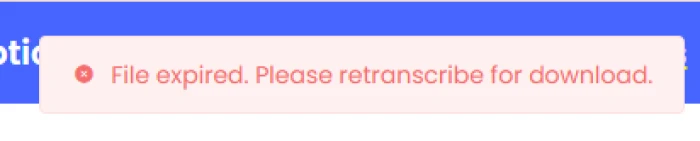
Figure 9: Error shown when clicking Download SRT

The message said the file had expired and that I needed to retranscribe to download. This happened within minutes of the transcription finishing, in the same session. Retranscribing would cost another 0.2 credits. I did not expect a result to expire that quickly, and nothing on the result page warns you that downloads are time limited.

What I liked

 Copy text still worked, so the content itself was not lost.

What I did not like

  1. This is the concrete flaw of the test. An export option that fails minutes after processing, with no warning and a re-run cost attached, is a real problem for anyone working with longer files.
  2.  The error gives no time window, so you cannot plan around it.

My verdict

The setup and interface are among the smoother ones I have used. Cost transparency before every job, broad link support, and having summarise, rewrite, and text to speech right next to the transcript are all things I would happily keep using. The part that surprised me most was the built in translation offer on the upload screen, which competitors usually gate behind a higher plan.

The core job, though, had two problems in one short test: language detection got it wrong with no way to catch it, and the SRT download expired almost immediately. On a 10 second clip those are annoyances. On a 40 minute interview, paying credits twice because the first export timed out would be a genuine cost.

If you are evaluating DupDub, my advice is to set the language manually rather than trusting auto detection, and to download or copy your output the moment it finishes. I will run a longer clip with clear speech next and update this once I see how accuracy holds up on real dialogue.
Methodology

How We Research?

Cross source aggregation

Collects reviews and comments from multiple review platforms, community forums, and social channels for a broader perspective.

Theme clustering and pattern detection

Groups recurring mentions of features, problems, and praise to identify dominant usage patterns and edge case experiences.

Sentiment classification

Classifies statements into positive, neutral, and negative sentiment, weighting by detail and specificity of each comment.

Recency weighting and refresh cadence

Gives recent feedback more influence and refreshes synthesized findings on a regular schedule for continued relevance.

Internet Reputation

DupDub Repo on Internet

The Good & Bad

My test covered one feature on one afternoon, so I went through DupDub's listings on Trustpilot, Product Hunt, AppSumo, G2, and Capterra to see whether my experience lines up with people who have used it longer. Ratings below were checked on 9 September 2026.

PlatformRatingReview countWhat stands out
Trustpilot2.5 / 5837% five star, 38% one star, nothing posted in the last 12 months
Product Hunt5.0 / 524All positive, mostly from the 2023 launch window
AppSumo4.2 / 525 verified buyers18 five star, 4 one star, deal now sold out
G25.0 / 51Single organic review from January 2023
Capterra5.0 / 51Single review from January 2024, lists $15 per month starting price

The spread is the first thing to notice. Product Hunt sits at a perfect five, Trustpilot at a poor 2.5, and the honest number is probably somewhere in between. The Product Hunt reviews cluster around the 2023 launch, and at least one reviewer there openly says they were offered a free month of premium in exchange for writing one. The Trustpilot page is unprompted and much harsher, but has had zero new reviews in a year. G2 and Capterra have one review each, both five star, so neither tells you much on its own. AppSumo is the most useful set because every reviewer is a verified buyer and the split is wide.

Attributed reviews worth reading

Richard L., Senior Education Consultant on G2 (5 stars, Jan 2023): Uses DupDub on a Premium plan for Business English dialogues. Praises the pause, speed, and phonemic pronunciation controls, and says the only gap is that the Emphasis option is missing on the voices he uses. Took a year's subscription after the trial.

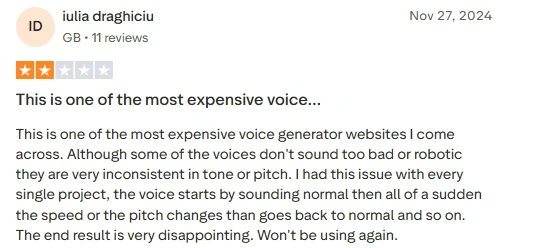
iulia draghiciu on Trustpilot (2 stars, Nov 2024): Calls it one of the most expensive voice generators she has tried. Her main complaint is consistency: on every project the voice drifted in speed or pitch partway through and then snapped back. Says she will not use it again.

antoine.leminh, verified buyer on AppSumo (1 star, Feb 2024): Found the standard plan voices mispronounce words and only the premium voices on a monthly subscription are usable. Describes the lifetime deal as a trip wire to upsell buyers.

Bria on Product Hunt (5 stars, 2023): Highlights the 300 plus voices with emotion and language options, and specifically the subtitle alignment tool for syncing captions to video. Says it saved both time and money.

Two more recent AppSumo reviews deserve a mention. In January 2025 a buyer reported that non English voices had been removed from the lifetime deal and that German pronunciation was wrong. In January 2026 another said the lifetime deal now shows zero monthly credits and support did not restore them after being sent proof of purchase. I could not verify either claim independently, but both are from verified purchasers and both are about the same thing: what you bought changing after you paid.

Pros, based on my test and the reviews

  1. Voice controls go deeper than most rivals. Reviewers on G2, Product Hunt, and Trustpilot repeatedly praise pause, speed, pitch, emphasis, and phonemic pronunciation settings.
  2. Language and accent coverage is wide. Users cite 40 plus languages for voices and 90 plus for translation and dubbing, with specific praise for American English and Hindi accents.
  3. One workflow for transcription, voice over, and editing. The Capterra reviewer and my own test both found the transcribe then convert to speech loop convenient.
  4. No card needed for the trial, and credit costs are shown before every job. Trustpilot and Reddit users called out this transparency, and I saw it too.
  5. Interface is easy to pick up. Ease of use is the single most repeated positive across all five platforms.
  6. Support gets some praise. AppSumo and G2 reviewers mention prompt, helpful responses.

Cons, based on my test and the reviews

  1. Output consistency is the most serious recurring complaint. Trustpilot users describe voices shifting speed or pitch mid project, and AppSumo buyers say standard plan voices mispronounce words.
  2. Pricing feels high for what you get. Multiple reviewers call it expensive, and the credit model means even a $150 plan comes with limits rather than unlimited use.
  3. Trial credits run out fast. One Trustpilot reviewer burned the trial on a single avatar mistake and could not retry. In my case, a failed SRT download would have cost credits to fix.
  4. Downloads can expire. Nothing in the reviews mentioned this, but I hit a File expired message minutes after transcribing, which is the concrete flaw from my own session.
  5. Language auto detection is unreliable on short clips. My 10 second English clip was tagged Portuguese with no warning.
  6. The avatar and talking photo tools draw the harshest feedback. Three separate Trustpilot reviews and the Capterra review flag avatars as broken or in need of work.
  7. Lifetime deal buyers report features and credits being removed after purchase, with the most recent complaint from January 2026.
  8. Support and refunds are hit and miss. One Trustpilot user was refused a refund because the request came after a three day window, and describes support as slow or unresponsive.
  9. The review base is thin. Outside AppSumo there are fewer than ten substantive reviews per platform, so treat every rating, including the perfect fives, with caution.
Product Analysis

DupDub — Key Features

Large voice library

Offers 130 to 150 plus voices with multiple accents, frequently praised for range but not always for consistency.

Granular voice editor controls

Allows emphasis, speed tweaks, pauses, and background music, highlighted positively by experienced users.

Voice cloning capability

Supports cloning a personal voice, though some users reported inaccurate accent reproduction and unusable results.

Talking avatar creation

Generates talking avatars from photos, but several reviewers report broken outputs or mismatched appearance and voice.

Credit based trial system

Trial uses limited credits, heavily criticized for expiring before meaningful testing or simple correction attempts.

Tiered paid plans

Paid tiers up to around 150 dollars, perceived as expensive and restrictive by dissatisfied customers.

Accent and language options

Provides accents like American English and Hindi, appreciated for variety when reading stories or endorsements.

Web based studio interface

Studio runs in browser, described as hard to navigate and confusing in several negative reviews.

Benchmarks

DupDub — Scorecard

Dimension Our Test User Signal Verdict Composite
Voice Output Quality
Naturalness, stability, clarity
6.5 6 Moderate
63%
Avatar Performance
Accuracy and reliability
4 3.5 Weak
38%
Ease of Use
Navigation and workflow simplicity
4.5 4 Weak
43%
Value for Money
Pricing against capabilities
4 3.5 Weak
38%
Feature Depth
Editing and customization richness
7.5 7 Good
73%
Customer Support
Responsiveness and fairness
3.5 3 Weak
33%
Findings

Key Test Results

Voice Output Quality

Around half of detailed reviews mention inconsistent pitch or speed, despite some praise for natural sounding voices.

Avatar Reliability

Multiple reports describe avatars not updating, misaligned faces, or mismatched gender, indicating frequent failures.

Pricing and Restrictions

One reviewer calls it among the most expensive, another highlights heavy restrictions even near 150 dollar plans.

Trial Experience

At least one user exhausted trial credits after simple corrections, preventing meaningful evaluation before purchase.

Support and Refunds

Refunds reportedly denied outside a three day window, with slow or missing responses to functional complaints.

Community Signals

User Insights

Most Liked Feature

"Extensive text to speech voice options with detailed editing controls"

Most Common Issue

Unreliable avatars, strict credits, and inconsistent voice behavior combined with weak refund and support experience

Sentiment Analysis

What People Talk About DupDub

Most-mentioned praise
Wide selection of 130 to 150 plus voices and accents
80%
Detailed control of emphasis, speed, pauses, and background music
70%
Text to speech fits specific storytelling and endorsement needs
55%
Voice editor considered best in market by some reviewers
50%
Ability to clone a personal voice within the platform
40%
Most-mentioned pain
Talking avatars frequently fail or look incorrect based on uploaded photos
80%
Voices can change pitch or speed mid script, reducing professional quality
75%
Customer support response is slow or absent for some issues
55%
Refund policy is strict even when features reportedly do not work
50%
Some users perceive the service as untrustworthy or scam like
40%
Editorial Testing Log

Changelog

Date Reviewner Version Duration Remarks
v1.0 3 Days Initial Testing

Each test follows our six dimensions methodology.

Community Reviews

What users say about DupDub

0.0
Based on 0 reviews
5
0
4
0
3
0
2
0
1
0
Have you used DupDub?

Sign in to share your experience and help others choose the right tool.

Sign in to review

No reviews yet

Be the first to review DupDub and help others discover this tool.

Explore

Other similar tools we've reviewed.