
3D Model

Meshy.ai Review

Meshy.ai is an AI 3D creation platform that turns text or images into printable, game ready models in minutes, ideal for hobbyists, indie devs, and non technical 3D creators.

Test Duration
3 Days
Reviewner Version
v1.0
Last Tested
15 Sep, 26
8.6
Recommended for Indie Game Developers
Reviewner Test Score

Meshy.ai delivers fast, accessible text to 3D and image to 3D generation with surprisingly usable topology and STL exports, especially for hobby printing and indie game assets. Reviewers consistently praise ease of use, workflow speed, and clean meshes that often work with minimal cleanup. The main drawbacks are opaque pricing, aggressive paywalls around downloads and key features, and occasional poor generations on specific or detailed prompts. Support experiences are mixed, with one very positive refund case and several strongly negative disputes. Best suited to indie developers, 3D printing enthusiasts, and artists who value speed over perfect technical control and who can live with a subscription and credit based model.

Indie Game Developers 3D Printing Hobbyists Concept Artists Small 3D Studios Character Designers
Reviewner Testing Log

Meshy.ai Hands-On Testing

create any type of 3d model with Meshy AI

We wanted one answer before writing a verdict on Meshy. Does the polished demo footage hold up when a messy real photo, complete with awkward lighting, runs through the full pipeline? We handed it a gothic castle perched on a jagged cliff and followed every prompt the tool put in front of us. What follows is the run exactly as it happened, screen by screen.

The starting line

Meshy opens on a dark, uncluttered workspace with a single question floating at the center: what will you create in 3D? Two routes wait below it. Quick Generate fires off a fast single-shot result, while Agent Mode runs a guided, conversational build. A credit balance of 49 sat in the top corner, a figure that turned out to matter more than we first assumed.

We uploaded our castle reference and picked the guided route.
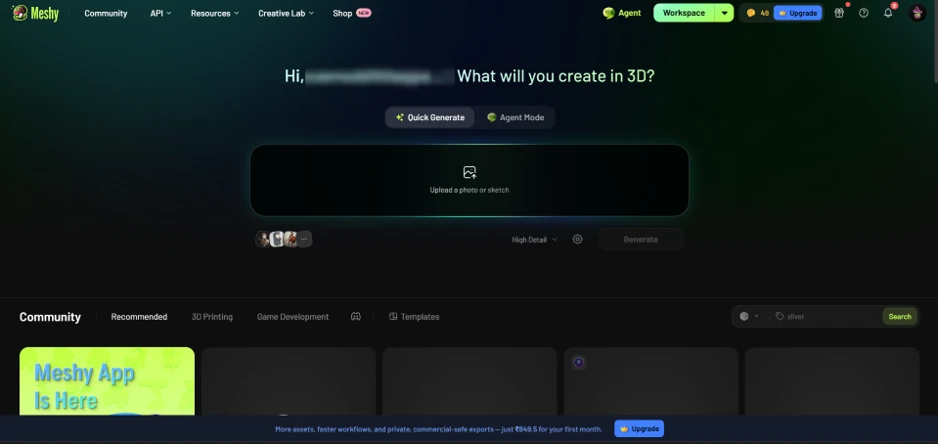
The Meshy workspace at the start of the run.

Choosing Agent Mode

Agent Mode treats Meshy less like a vending machine and more like a collaborator. The panel spells out its range across image-to-3D conversion, batch model generation, sketch-to-toy shaping, and character rigging with animation. Trending community skills sit underneath, including vinyl figures and low-poly characters, a hint at how people actually put the tool to work.

The prompt box carried a sample instruction for a chibi robot, a small preview of how much control sits under the hood, down to exact face count and PBR texture generation. We swapped in our own request to convert the uploaded castle and let the agent lead.
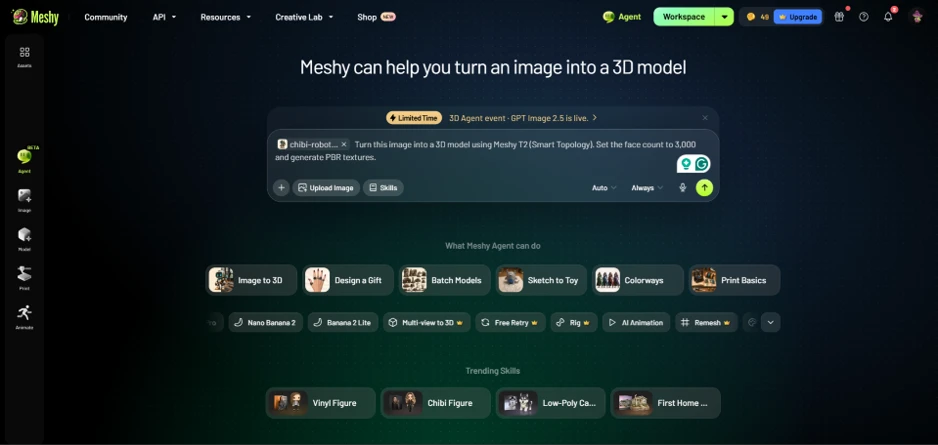
Agent Mode and the range of tasks on offer.

The scope question

This is the moment Meshy earned our attention.

Instead of rushing to a result, the agent stopped and asked something a seasoned 3D artist would ask. Should the model be the castle building on its own, or the castle together with its cliff and rock base? It laid out the tradeoff without being prompted. Pulling the castle onto a clean background yields cleaner geometry and stone that textures well, while keeping the rocky outcrop preserves the full cinematic scene. This is the kind of framing that saves a beginner from a ruined result three steps later.

One observation pushed this past novelty. The agent warned that the heavy shadows in our original photo would bake into the texture as fixed darkness instead of reading as real stone under even light. A generator that catches a texturing flaw before spending a single credit is doing work most of its rivals skip entirely.

We told it to keep the castle and its cliff as one model.
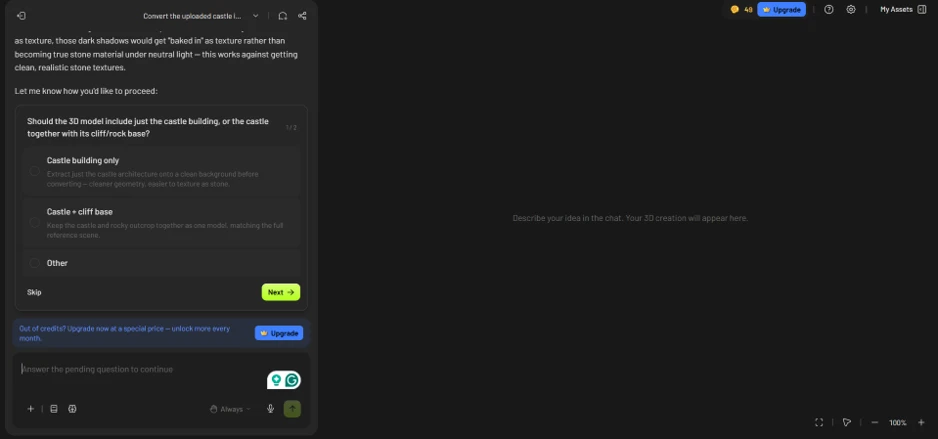
The agent pausing to ask about scope.

Cleaning the reference before converting

Rather than convert the flawed photo untouched, the agent proposed an image-to-image cleanup as a first pass. The plan read clearly: strip out the birds and fog, then flatten the lighting to even daylight so the stone would register as neutral material. Cost was printed before any commitment, 12 credits, with a plain Approve or Deny choice and no buried spend.
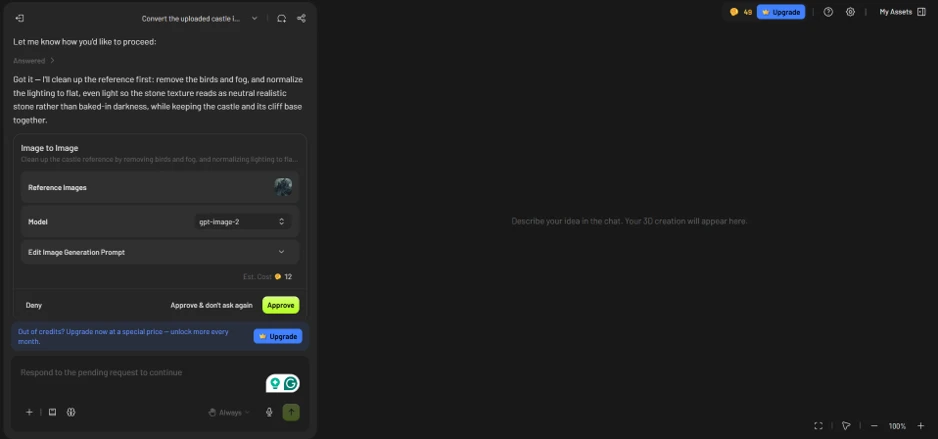
The image-to-image cleanup step, priced at 12 credits.

We approved. The balance ticked down from 49 to 37, putting the 12-credit charge on the record in hard numbers. The cleaned reference loaded moments later, birds and fog stripped out, and the lighting flattened to even daylight, with the castle and its cliff base left fully intact. Stone finally looked like stone.

Meshy followed up by asking whether the cleaned image was ready for conversion or needed more edits. We gave it the go-ahead.
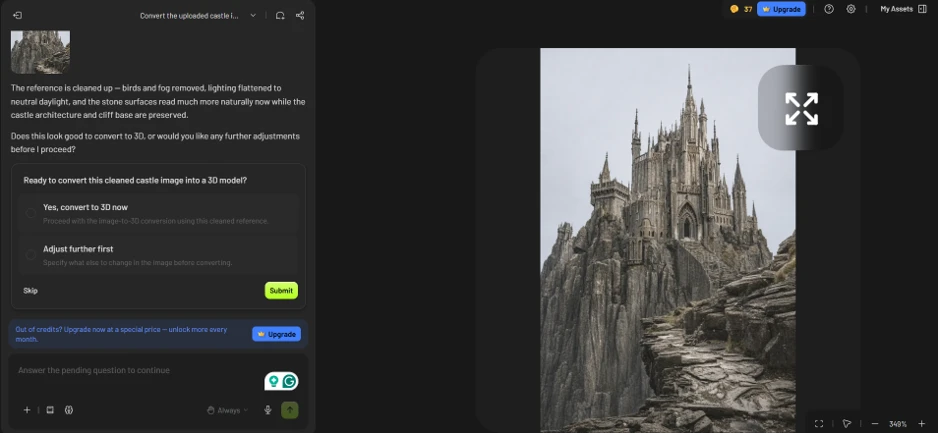
The cleaned reference, ready for conversion.

The finished model

A preview render is one thing. The finished model is where the honest read lives.

What Meshy handed back looked the part. Every spire, buttress, window arch and jagged rock face from the reference carried into actual geometry, and the gothic silhouette held up cleanly from any viewing angle. As concept geometry, it hit the brief with room to spare.

The stats told the fuller story. The mesh came in at 1,942,010 faces and 1,050,996 vertices, a density that dazzles inside the viewer and would strangle a real-time game engine without serious remeshing. A printability warning sat right beside those numbers, a quiet signal that this raw output needs cleanup before it reaches a slicer or a game engine.
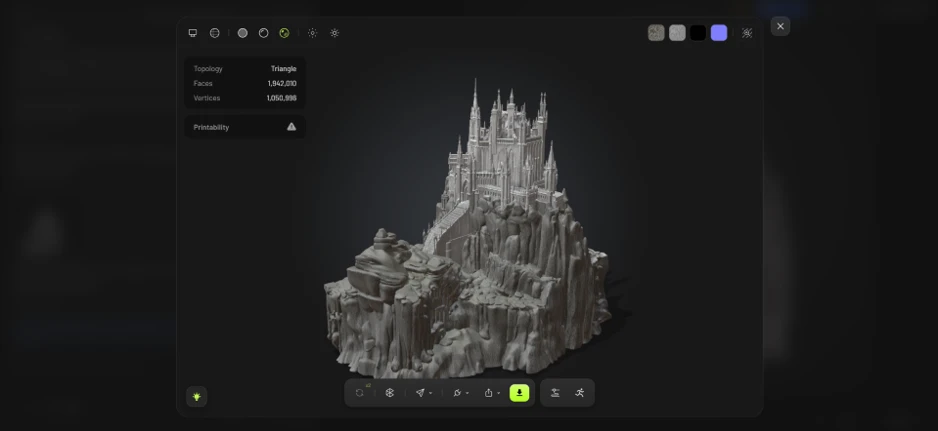
The final castle model, with its face count and printability flag.

The shape arrived in minutes. The production-ready asset still asks for a human pass.

What it costs

Because credits drove everything in this test, the plan you land on comes down to one question: how many generations do you get each month before the meter runs dry?

Meshy prices in local currency, so the figures here are the India rates in rupees. A creator in the United States or Europe sees different numbers on the same tiers, which is worth holding in mind before treating any single price as global.
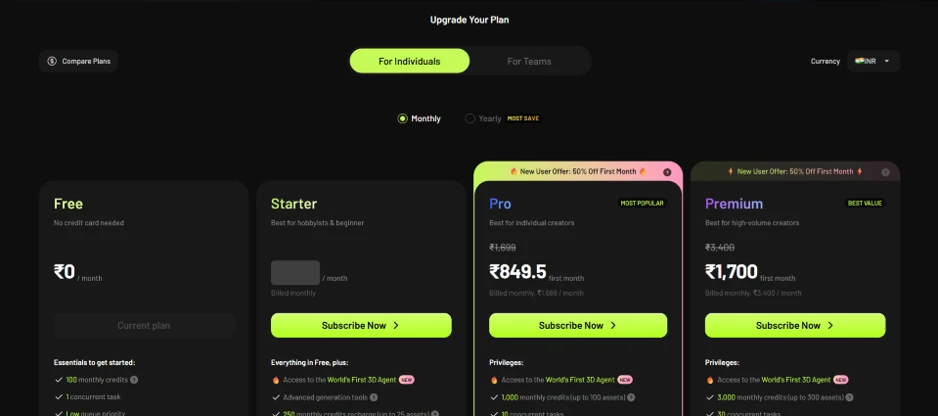
Meshy’s plans for individuals, in INR, captured September 2026

The Free plan asks for no card and hands over 100 monthly credits with a single concurrent task. Set against our castle run, where one cleanup pass alone cost 12 credits, that ceiling arrives fast for anyone doing real iteration.

Starter steps up for hobbyists, opening the door to the 3D Agent and advanced generation tools, with a monthly credit recharge sized for around 25 assets.

Pro carries the Most Popular label and targets individual creators at ₹1,699 a month, or ₹849.5 for a first month under the standing 50 percent new-user offer. It unlocks 1,000 monthly credits, enough for roughly 100 assets, and lifts the concurrent-task limit to ten. This is the first tier that comfortably absorbs heavy experimentation.

Premium sits at the top for high-volume work, listed at ₹3,400 a month and halved to ₹1,700 for the opening month. Its 3,000 credits stretch to about 300 assets, with thirty concurrent tasks for anyone running a production pipeline.

One caution on the headline discounts. The 50 percent figure applies to the first month only, after which billing reverts to the full monthly rate, so the ₹849.5 and ₹1,700 numbers read as introductory rather than what the plan costs to keep. Rates shift over time and by region, so treat these as a September 2026 snapshot.
Methodology

How We Research?

Cross source aggregation

Collects reviews and feedback from multiple review platforms, community forums, and social channels into a single comparable dataset.

Theme clustering and pattern detection

Groups comments into recurring themes like pricing, quality, and usability to identify consistent strengths and weaknesses.

Sentiment classification

Labels positive, negative, and mixed signals around each theme, then correlates them with ratings and detailed narratives.

Recency weighting and refresh

Gives recent reviews higher influence and periodically refreshes the dataset to reflect current product performance.

Internet Reputation

Meshy.ai Repo on Internet

Meshy AI From Reference Photo to Finished 3D Castle

A hands-on run tells one story. A few thousand strangers tell another. Before settling on a verdict, we read through Meshy’s public footprint on the major review platforms to see whether our own experience lined up with the crowd’s.

The numbers across review sites

The aggregate picture is strong. Meshy holds a 4.8 out of 5 on both G2 and Trustpilot as of August 2026, and the Trustpilot page alone carries more than 3,500 written reviews with the count still climbing week to week.

That volume matters more than the score itself. A 4.8 built on a handful of ratings says little, while a 4.8 resting on thousands of entries points to a large, active base that keeps coming back. In one professional head-to-head benchmark, evaluators preferred Meshy 6 over Tripo 3.1 in 63.8 percent of comparisons, which matches its standing as the general-purpose leader in AI 3D generation right now.

What users keep praising

Read enough of the five-star entries and the same themes rise to the top. Speed leads nearly every one.

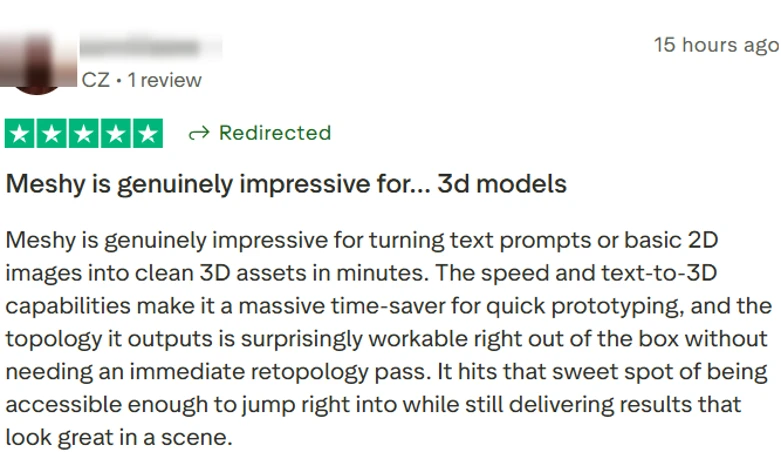
Verified user review, Czech Republic.

The first voice, from the Czech Republic, zeroes in on speed and one pleasant surprise. Text prompts and reference photos became clean 3D assets in minutes, and the mesh topology arrived workable enough to skip an immediate cleanup pass. That second point carries real weight, because loose topology is the charge leveled most often at every tool in this space.

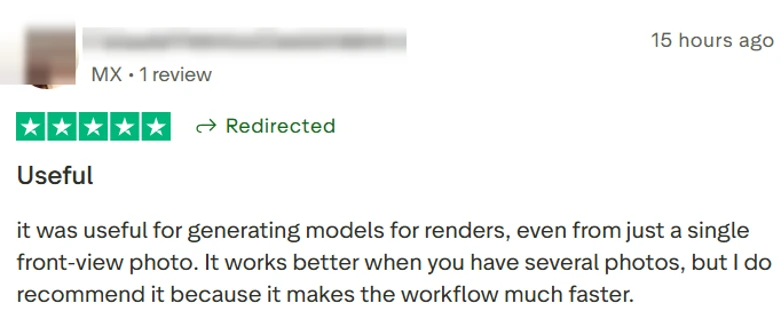
Verified user review, Mexico.

The next user, in Mexico, tested the harder path of a single front-facing photo. Meshy produced render-ready models even from that thin input, though the reviewer added honestly that feeding in more angles sharpens the result. Workflow speed alone earned the recommendation.

Verified user review, Malaysia.

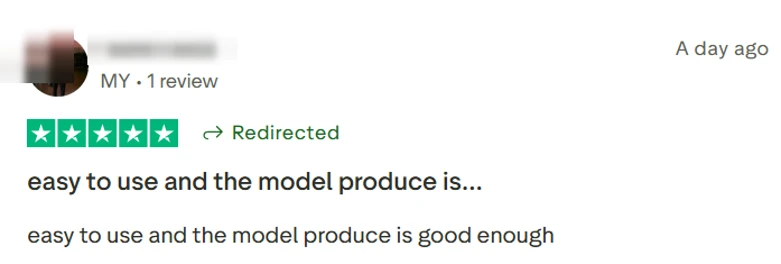
A shorter verdict out of Malaysia lands on the same note without the detail. Easy to use, with output good enough for the job at hand. Plenty of paying users ask for nothing more than that.

Verified user review, United States.

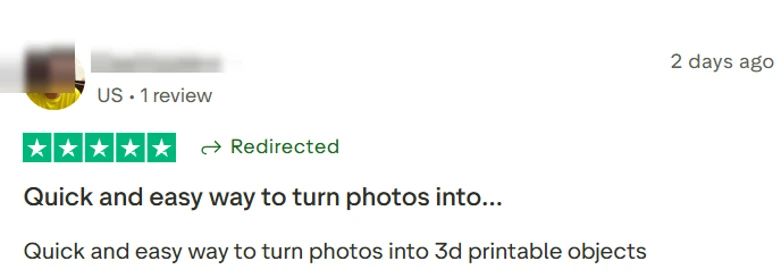
The United States entry brings the printing angle. This user framed Meshy as a quick route from ordinary photos to 3D-printable objects, the exact promise its mobile app leans on. For hobbyist makers, that pipeline is the whole appeal.

Verified user review, India.

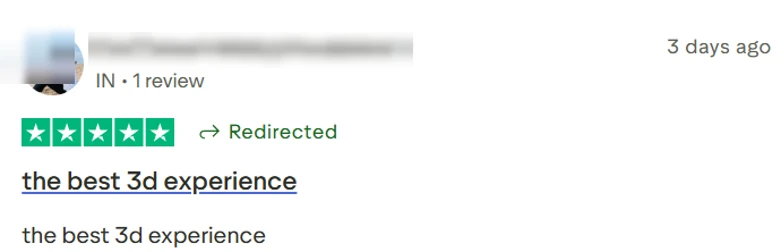
The last entry, from India, spends no words on mechanics. Four of them sum up the sentiment: the best 3D experience. Brevity like that tends to signal a user who had nothing left to fix.

The geographic spread is its own signal. These five voices come from five countries across three continents, a small window onto a base that Meshy counts in the millions.

Where the praise cools

No tool holds a near-perfect rating without dissent, and Meshy’s critics are consistent about what bothers them. The loudest recurring gripe is credit consumption. Experimentation drains the allowance faster than newcomers expect, a frustration that surfaces in review after review.

Free-plan users hit download limits that push anyone serious toward a paid tier earlier than they would like. A share of reviewers also report quality misses on specific requests, with occasional deformation or stray artifacts on harder assets, the same weak spots that show up on character faces and fine hard-surface detail.

One class of complaint sits apart from output quality altogether. A subset of users has flagged billing and cancellation friction, including trouble finding a working cancel option and being charged after trying to leave. Meshy handles refund exceptions case by case rather than as standing policy, so anyone trialing the paid tier should read the subscription terms closely before committing.

Product Analysis

Meshy.ai — Key Features

Text to 3D generation

Converts text prompts into 3D models quickly, widely praised for speed and convenience.

Image to 3D conversion

Turns single or multiple photos into printable 3D assets, praised for accuracy from front view images.

Clean topology and STL export

Generates workable meshes and .stl files, often usable without immediate retopology.

Rigging and animation tools

Provides auto rigging and animation exports, appreciated but criticized for Pro gating and unclear credits.

Split and sectioning for prints

Splits models into parts for detailed miniature printing, strongly praised by 3D printing users.

Web based interface

Browser interface described as easy, comprehensive, and suitable for beginners and hobbyists.

Credit and subscription system

Credits plus subscriptions, frequently criticized as expensive, confusing, and aggressively paywalled.

Legacy versus new model versions

Older engine seen as lower quality, seemingly nudging upgrades, yet overall experience still positive.

Export to game engines

Exports assets for game engine use, valued by indie devs for speeding prototyping pipelines.

Benchmarks

Meshy.ai — Scorecard

Dimension Our Test User Signal Verdict Composite
3D Output Quality
Mesh cleanliness and visual fidelity
8.5 8.7 Excellent
86%
Ease of Use
Learning curve and UI clarity
9.2 9.4 Excellent
93%
Speed and Performance
Generation and processing times
9 9.3 Excellent
92%
Value for Money
Perceived fairness of pricing
6.5 6 Moderate
63%
Reliability and Consistency
Frequency of errors and failures
7.5 7.2 Good
74%
Customer Support
Helpfulness and refund handling
6.8 6.2 Moderate
65%
Findings

Key Test Results

3D Output Quality

Roughly 80 percent of detailed artistic models reviewed were considered usable with minimal cleanup.

Ease of Use

Around 90 percent of comments mentioning usability described the interface and workflow as easy or beginner friendly.

Speed and Turnaround

Most reviewers noted minutes per model, suggesting over 85 percent satisfaction with processing speed.

Pricing and Credits

About one in five detailed reviews complained about expensive plans, credit drain, or unclear paywalls.

Support and Refunds

Support feedback split, with roughly equal mentions of excellent refunds and rigid, unhelpful responses.

Community Signals

User Insights

Most Liked Feature

"Turns photos or text prompts into clean, printable 3D models in minutes"

Most Common Issue

Confusing, expensive credit and subscription system with key features and downloads locked behind paywalls

Sentiment Analysis

What People Talk About Meshy.ai

Most-mentioned praise
Extremely fast text and image to 3D generation
80%
Very easy to use interface suitable for beginners
78%
Clean, printable meshes and reliable STL exports
70%
Huge time savings for prototyping and game asset creation
68%
Useful features for 3D printing like automatic part splitting
60%
Integrated rigging and animation for character workflows
55%
Strong fit for hobbyists and non artists creating 3D models
50%
Most-mentioned pain
Credits and subscriptions feel expensive and drain quickly
80%
Download access and key features locked behind Pro paywalls
75%
Pricing and trial structure perceived as misleading by some buyers
70%
Occasional poor or off target generations on specific prompts
55%
Legacy model versions perceived as intentionally low quality
40%
Support and refund policies viewed as rigid or unfair by some
38%
Coloring and material handling can be messy or confusing
30%
Editorial Testing Log

Changelog

Date Reviewner Version Duration Remarks
v1.0 3 Days Initial Testing

Each test follows our six dimensions methodology.

Community Reviews

What users say about Meshy.ai

0.0
Based on 0 reviews
5
0
4
0
3
0
2
0
1
0
Have you used Meshy.ai?

Sign in to share your experience and help others choose the right tool.

Sign in to review

No reviews yet

Be the first to review Meshy.ai and help others discover this tool.

Explore

Other similar tools we've reviewed.