Testing the Integration Layer for AI Agents
Pipedream markets itself as the plumbing that sits between an AI agent and the outside world, it handles the OAuth, tokens and API calls so your agent can act inside thousands of apps without you wiring each one by hand. To see how that promise holds up in practice, we ran through the product ourselves, from the first screen a new user sees all the way to the paywall. Below is what each step looked like, followed by our read on it.
First impressions: the landing page
The homepage leads with a single, confident claim — “The integration layer for AI agents” and backs it with a concrete number: managed auth and 10,000+ tools across 3,000+ APIs. There are two doors in: a green “Start building” button for people ready to sign up, and a lower-commitment “Try the MCP demo” link for those who want to poke around first. The install line at the bottom (npm i @pipedream/sdk) signals immediately that the intended audience is developers, not point-and-click users.

The Pipedream hero: positioning, scale claims, and two clear calls-to-action.
Our take — The copy is doing its job, it names the audience (people building agents), the value (managed auth), and the scale (thousands of tools) in one glance, with no marketing fog. Offering an MCP demo before asking for a sign-up is a smart trust move, and dropping the npm command on the hero tells developers exactly what they’re getting into. The only thing missing at this altitude is a hint of what a “tool” or a “credit” actually costs, which becomes relevant a few screens later.
Getting in: creating an account
Clicking through lands you on a clean “Create your free account” form. The fast paths are social sign-up with Google or GitHub, with a traditional email-and-password option below the divider. GitHub sitting right next to Google is another tell that this is aimed at developers. The footer keeps it honest with links to the Terms of Service and Privacy Policy.
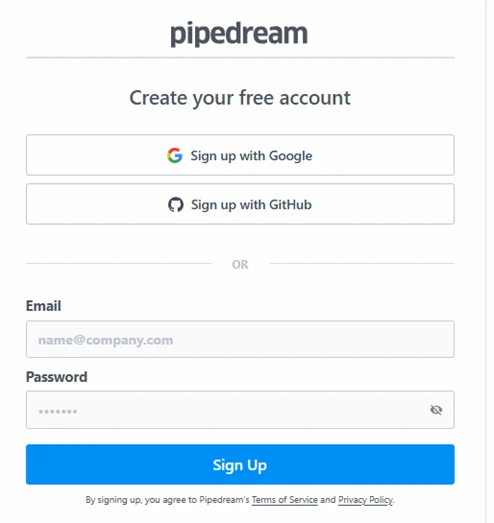
Sign-up: Google, GitHub, or email — free to start, no card requested up front.
Our take — Frictionless and familiar, nothing here slows a developer down, and there’s no credit card wall at the door, which lowers the barrier to just trying it. Leading with GitHub OAuth is well judged for the audience. The one small caution is that social sign-up quietly ties your Pipedream identity to a Google or GitHub account, so for a production workspace it’s worth deciding up front which identity you want this attached to.
Inside Connect: the workspace
Once you’re in, the Connect area is the heart of the product. The left rail is split into two groups, a project-level set (Home, Users, Accounts, Triggers, Logs, Configuration) and a workspace-level set (General, Team, API, App Configs, Networking). The main panel nudges you to “Add Connect to your codebase,” and this is where Pipedream shows its 2026 colours: instead of a manual-only setup, it offers a “Copy agent prompt” button that hands the whole integration to your coding agent, with “Follow the quickstart” as the do-it-yourself alternative. Note the environment is already set to Production by default.
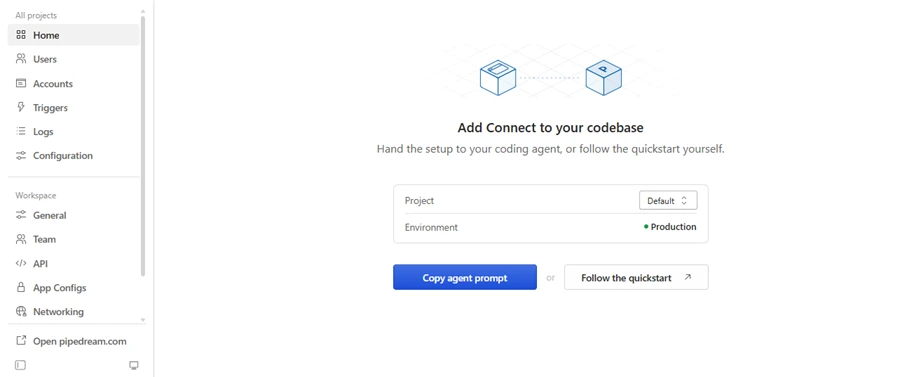
The Connect workspace — project and workspace navigation, with an agent-first setup flow.
Our take — This screen is the most telling of the five. The “Copy agent prompt” option is Pipedream leaning fully into the agent era — you can effectively let Claude or Cursor bootstrap the integration for you rather than reading docs. The navigation also reveals the real feature surface: Users and Accounts point to managing end-users’ connected accounts (the multi-tenant use case), while Triggers, Logs and Networking show this is built for real production workloads, not toy demos. One thing to flag: the environment defaults to Production, so anyone testing should consciously switch to a dev/test environment before wiring live credentials.
What the free tier actually gives you
The Billing page is refreshingly blunt. You’re on the Free plan, and the credit meter reads 0 of 100 credits used, sitting at 0% of the monthly quota. The detail that matters is the line just below: “0 credit resets remaining.” In other words, the free allotment is a small, essentially one-time pool of 100 credits rather than a recurring monthly grant.
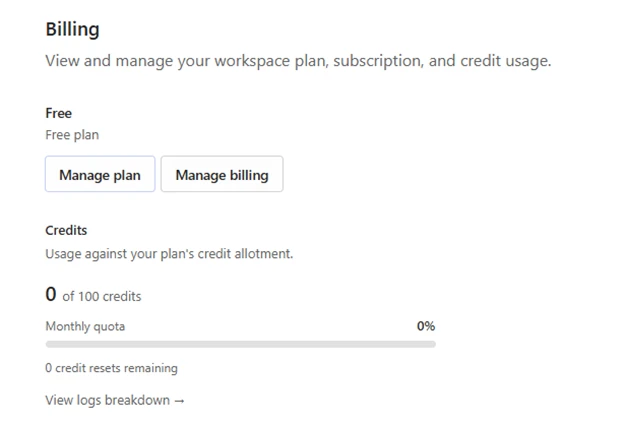
Free plan billing — 100 credits, and crucially, zero resets remaining.
Our take — This is where the model gets honest, and it’s worth reading carefully. 100 credits with “0 resets remaining” means the free tier is a trial-sized sandbox, not a sustainable free plan, enough to prove the concept and run a few flows, but you’ll hit the wall quickly on any real usage. That’s a reasonable way to run a business, but it does mean you should treat the free credits as a proof-of-concept budget and plan to pay the moment you move toward production. Credits, not seats, are clearly the real currency here.
Pricing: where it starts to cost
The paid tiers make the credit-based model explicit. Basic runs $29/mo ($348 billed annually) for individuals with growing needs. Advanced — flagged “Popular” is $49/mo ($588 annually) and is aimed at teams running production workflows. Connect, the developer-focused tier for building integrations, jumps to $99/mo ($1,188 annually). The eye-catching detail: Basic and Advanced both include 2,000 credits per month, while Connect includes 10,000. Each card carries a slider that runs from 0 to 10M+, signalling that credits scale well beyond the headline numbers on a metered basis.
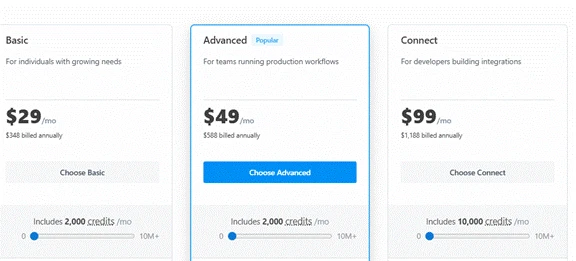
The three paid plans — note Basic and Advanced share the same 2,000-credit allotment.
Our take — The pricing tells you what you’re really paying for at each step. Because Basic and Advanced include the same 2,000 credits, the extra $20/mo for Advanced buys team and production features, not more usage, so a solo builder with modest volume can happily sit on Basic. Connect’s 5x credit jump (and its “building integrations” framing) marks it as the tier for anyone embedding Pipedream into their own product for end-users. The 0–10M+ sliders confirm this is fundamentally usage-based pricing, so the honest question isn’t “which plan?” but “how many credits will my agent actually burn?” and that’s the number to model before committing annually.
Hands-on verdict
Across five screens, Pipedream comes across as a serious, developer-first integration layer that has clearly repositioned around AI agents, the “copy agent prompt” flow is the standout. Getting started is genuinely frictionless, but the economics reveal themselves fast: the free tier is trial-sized, and the paid plans are built on metered credits rather than seats. For anyone giving an agent real reach into 3,000+ APIs, the product delivers on its headline; the work on your side is estimating credit consumption before you scale. Worth trialling on the free credits first, then modelling your real usage against the 2,000- vs 10,000-credit tiers.