
The first time I opened Descript's pricing page, I did the thing most people do. I read every tier twice, hovered over the words "media hours," squinted at a little toggle that quietly rewrote all the numbers, and closed the tab no wiser than when I arrived.
That confusion is avoidable. Descript's pricing is logical once you know which parts to read first and which parts are just scenery. This article is the walk-through I wish I had found: plain language and current figures, with a clear path from the free plan up to the team plans.
A quick promise before we start. By the end you will know what each plan costs and which tier matches your work, with the two usage meters demystified along the way. Every figure here reflects the prices published on 22 June 2026, and I link to the live page near the end so you can confirm them yourself.
The lineup, and the toggle that changes everything
Descript sells one free plan and four paid plans. Reading down the page you meet Free first, then Hobbyist, then Creator, then the team-focused Business, and finally Enterprise for large organizations. That part is straightforward.
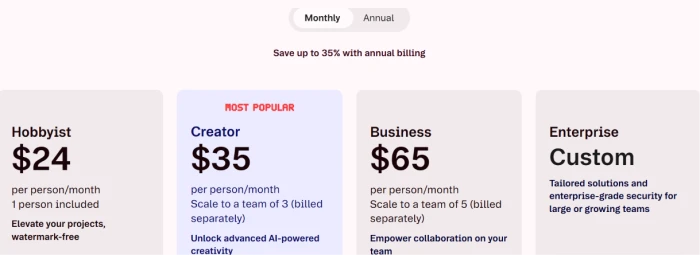
The toggle is what trips people. Near the top sits a small switch between "Monthly" and "Annual." Flip it and every price on the page changes at once. Annual billing is cheaper per month, and Descript advertises savings of up to 35%. I will break down the exact difference in its own section later, because the billing choice deserves a proper look. For now, the thing to hold onto is this: the lower number attached to each plan is the annual rate, and the higher one is the month-to-month rate.
Once you accept that the toggle exists, the prices stop sliding around under your cursor, and the rest of the page becomes readable.
The two meters that actually run your bill
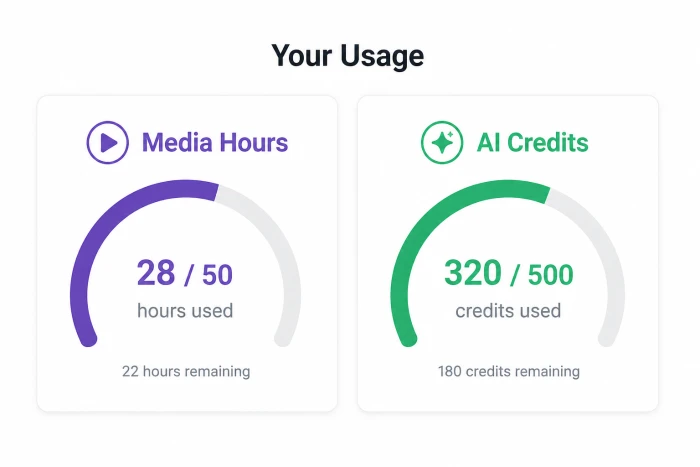
Here is the single idea that makes the whole pricing page click. Every plan is really a bucket holding two things: media hours and AI credits. Learn those two, and the tiers turn into simple arithmetic.
Media hours measure the footage you bring into Descript. Anything you upload or record inside the app counts against this allowance, whether or not you transcribe it. Descript also labels this in minutes on its big comparison table, so when you see "10 media hours" in one place and "600 media minutes" in another, those are the same thing.
AI credits are the second meter. They get spent when you use the smart features: cleaning audio with Studio Sound, lifting a background with Green Screen, correcting your gaze with Eye Contact, generating media, building avatars, or handing work to Underlord, which is Descript's AI co-editor. The heavier the feature, the more credits it burns.
That framework is the whole game. As I walk through each plan below, watch how the price climbs in step with these two allowances. Features pile up between tiers too, though the meters are what you will actually bump into from one month to the next.
Free: the on-ramp
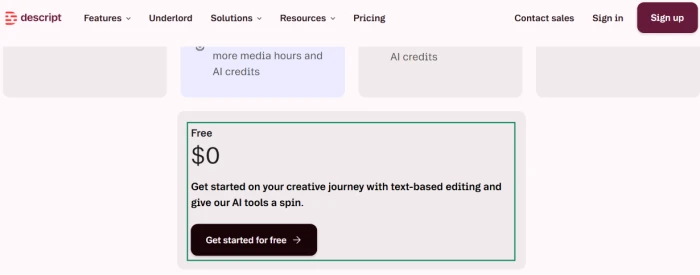
Almost everyone begins on the Free plan, and it costs nothing. You do not even need a card to sign up.
What you get is an honest taste of the software. You can edit by text, record your screen, and try the AI tools in a limited form. The ceiling is deliberately low: 1 hour of media a month, a one-time grant of 100 AI credits instead of a monthly refill, exports capped at 720p, and a Descript watermark stamped on your video. Cloud storage sits at 5GB.
For kicking the tires or finishing a single small project, Free is plenty. The moment you want a clean export without that watermark, or more than an hour of footage, you have outgrown it. That is exactly where the first paid tier steps in.
Hobbyist: the first step up
Hobbyist runs $16 a month on annual billing, or $24 a month if you pay month to month. One person is included.
The jump from Free is mostly about polish and headroom. The watermark vanishes and exports rise to 1080p. Your media allowance grows to 10 hours a month. The one-time credit grant becomes a recurring 400 AI credits every month, so the smart tools stop being a one-off novelty. Cloud storage climbs to 100GB. You also get full access to Underlord along with the core editing helpers like Remove Filler Words and Studio Sound.
This is the plan for a solo creator who publishes on a schedule but has no need for 4K or a team. If that sounds close but you keep wishing for sharper exports or more room to work, the next tier is built for you, as I will discuss below.
Creator: the popular middle
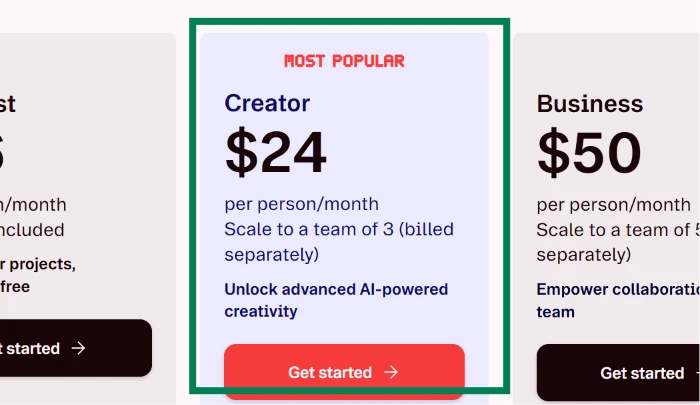
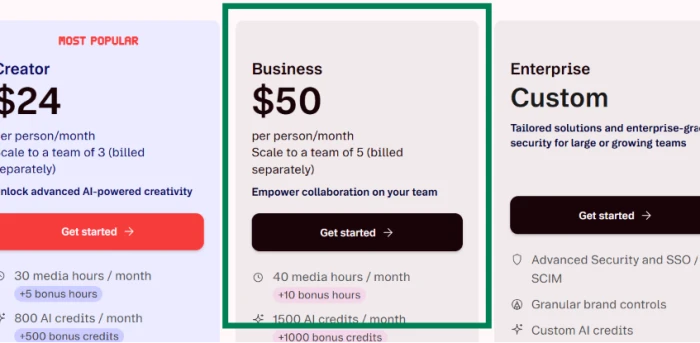
Creator is the plan Descript flags as "most popular," priced at $24 a month annually or $35 a month on the monthly cycle. It covers a team of up to three people, each billed separately.
This is where the tool stops feeling like a starter kit. Exports reach 4K. Your media allowance leaps to 30 hours a month with an extra 5 bonus hours layered on top, and AI credits rise to 800 a month plus a 500-credit bonus. The royalty-free stock library, limited to a handful of search results on cheaper plans, opens up completely. You can generate video with current AI models, and you gain the option to buy top-ups once you run past your monthly allowances.
Choosing between Hobbyist and Creator usually comes down to two questions: resolution and volume. 4K output and triple the media hours are the headline reasons people pay the gap.
Business: built for teams
Business sits at $50 a month annually, or $65 a month billed monthly, and scales to five people.
The allowances grow again, to 40 media hours a month plus 10 bonus hours and 1,500 AI credits plus a 1,000-credit bonus. The real reason to pick Business, though, is the team layer stacked on top. You get Brand Studio to keep a whole team on-brand, video translation and dubbing across more than 30 languages with a proofreading pass, custom avatar generation from a photo or a text prompt, and priority support backed by a service-level agreement. Cloud storage reaches 2TB.
A solo creator rarely touches any of this. A small studio or a marketing team shipping video every week will feel the difference fast.
Enterprise: the custom tier
Enterprise carries no public price. You contact Descript's sales team and they assemble a quote around your organization.
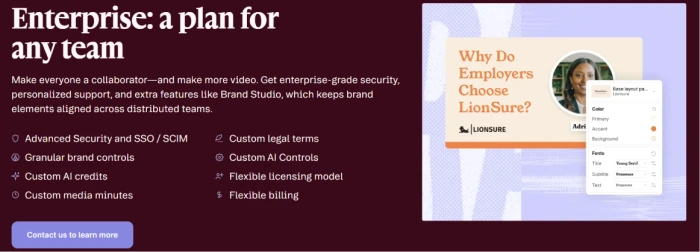
What you pay for here is control and security: single sign-on with SCIM provisioning, granular brand controls, custom credit and media allowances, bespoke legal terms, and flexible billing. The tier exists for large or fast-growing teams with procurement and compliance demands, so if you find yourself wondering whether you need it, you almost certainly do not.
The toggle, resolved: monthly versus annual
Earlier I promised to return to that billing switch, so here is the math it hides.
Paying annually lowers the monthly rate on every plan. Hobbyist falls from $24 to $16 a month. Creator drops from $35 to $24. Business goes from $65 to $50. In percentage terms that is roughly a third off on the cheaper plans and a little less on Business, which lines up with the "up to 35%" Descript puts on the page.
The trade-off is commitment. Annual billing means paying for twelve months in advance, so the discount only pays off if you are confident you will keep using the tool. Still deciding? The monthly rate buys flexibility for a few extra dollars, and you can move to annual once you are sure.
Where the bill can creep up on you
Two details catch people out after they subscribe, and both are easy to plan around.
The first is that paid plans are priced per person. Every figure I have quoted is per seat. When Creator says it covers "up to three" and Business "up to five," that means the plan can hold that many people, with each added teammate billed on top. A three-person Creator team pays three times the single-seat rate, not one flat fee for the group.
The second is the usage meters from earlier. Run past your monthly media hours or AI credits and you will not get cut off mid-project on Creator or Business, because both let you buy top-ups. Handy, certainly, though those top-ups are extra money on top of the subscription. If a given month involves a heavy editing push, check your allowance before you dive in so the cost does not surprise you. A predictable bill comes down to reading your own usage, since there are no hidden fees waiting beyond the meters and the seats.
Which plan actually fits you
Strip away the feature grids and the choice usually reduces to a few honest questions about your own work.
I have kept this piece pinned to the money rather than the editing experience. For the other half of the picture, how the features actually hold up once you sit down to cut a video, I go deep in our full Descript review. Pricing tells you what you will pay; that review tells you what you get for it. Testing Descript or finishing the occasional short clip? Stay on Free until the watermark or the 1-hour cap starts to annoy you. A solo creator publishing every week and happy at 1080p fits Hobbyist neatly.
The moment you need 4K output or room for a collaborator or two, Creator earns its higher price, which is why Descript sees it picked most often. Business answers to teams that live inside the tool together and need brand consistency, multi-language dubbing, real-time collaboration, and dedicated support. Enterprise is for security and procurement at scale.
Reading the page yourself
Prices move, and a pricing article is only as trustworthy as its date. Everything above reflects Descript's published rates as of 22 June 2026, and the screenshots throughout were captured on the same day.
Before you commit, open the source and confirm the figures for yourself on Descript's pricing page. It is the authority if anything here has shifted since publication. One thing worth a glance while you are there: Descript offers discounted rates for people in education and for non-profits through a separate application, which the page links to.
Match those two meters against a normal month of your own footage and credit use, and the right plan tends to pick itself.



Comments 0
Join the discussion and share your perspective.
Sign in to post a comment and reply to other readers.
No comments yet
Be the first to share your perspective on this article.