

Thousands of products launched in the last two years describe themselves as artificial intelligence tools. A large share of them share a single design: a sign-up page, a text box, and a hidden call to a foundation model that someone else trained and hosts. That pattern is known as an API wrapper. The wrapper itself is not the problem. Most useful software sits on top of infrastructure it did not build. The problem is paying a product price, handing over sensitive data, and building a workflow around a layer that adds almost nothing, can break the moment its upstream provider changes a setting, and can disappear when a free trial elsewhere makes it redundant.
This guide sets out what an API wrapper actually is, why the distinction carries real cost, and a repeatable procedure for telling a thin reseller apart from a substantive product. It closes with precautions to take before committing budget and the evaluation mistakes that trip up even experienced buyers.
What an API Wrapper Actually Is
An API wrapper is software whose core function is to forward a request to a third party model provider, such as a large language model API, and return the response with light cosmetic changes. In its thinnest form the entire product is a prompt template, a front end, and a billing layer. The intelligence, the training data, and the compute all belong to the upstream provider.
Wrapping is a spectrum, not a binary. On one end sits a rebranded chat box that could be reproduced in an afternoon. On the other sits a product that calls the same external model but wraps it in retrieval systems, evaluation pipelines, domain data, integrations, and guardrails that took a team months to build. The figure below shows where the engineering effort tends to sit in each case.
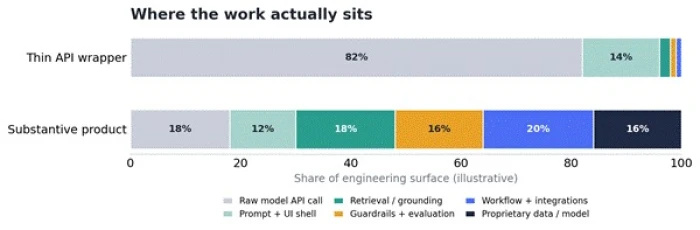
Figure 1. Illustrative composition of a thin wrapper against a substantive product. The wrapper is mostly a raw call; the product spreads effort across many layers.
The distinction that matters: A tool is worth its price when the value lives in the layers it added, not in the model it borrowed. The question to answer is not does this call an external API. Almost everything does. The question is what would remain if that API call were removed. |
Why the Difference Is Worth the Effort to Detect
Four concrete risks separate a thin wrapper from a real product. Each one translates into money, downtime, or exposure.
Cost stacked on cost
A wrapper pays the upstream provider per request and then charges a markup on top. Buyers effectively pay twice for the same inference, once through the wrapper and once, indirectly, for the provider it resells. When the same model is available directly or through a general assistant already in the subscription stack, the markup buys very little.
Reliability tied to a supplier the buyer cannot see
When the upstream model changes its pricing, deprecates a version, tightens rate limits, or suffers an outage, a thin wrapper has no cushion. A substantive product can route around a failing provider, fall back to a second model, or degrade a feature gracefully. A wrapper simply stops working.
Data control and privacy
Every prompt entered into a wrapper usually travels to at least two companies: the wrapper operator and the model provider behind it. Thin operators rarely document where data goes, whether it is retained, or whether it is used for further training. For regulated or confidential work, an undocumented second hop is a serious liability.
Longevity and lock-in
Thin wrappers have short lifespans. Their entire moat can vanish when the underlying provider ships the same feature natively. Building a workflow, training a team, and importing data into a tool that may not exist next year is an expensive mistake that a short investigation can prevent.
The Tell-Tale Signals
A handful of surface signals reliably separate the two categories. None is conclusive on its own, but several appearing together is a strong indication of a thin wrapper. The checklist below groups the most reliable red flags with the reassuring counter-signals to look for.
| Signal to inspect | Red flag (likely a wrapper) | Counter-signal (likely a product) |
| Feature surface | A single chat or prompt box and little else | Structured workflows, dashboards, and outputs beyond raw text |
| Pricing logic | Priced per message with an unexplained markup | Priced around a job done, seats, or measurable outcomes |
| Roadmap and changelog | No public changelog or version history | Regular, dated release notes and a visible roadmap |
| Documentation | Vague claims of proprietary intelligence | Named model providers, limits, and clear data handling |
| Behavior under error | Breaks or returns a raw provider error | Retries, falls back, or degrades a feature cleanly |
| Model identity | Admits it is a specific external model when asked | Behaves consistently and refuses to leak system details |
| Team and support | Anonymous operator, no company footprint | Named team, support channels, and security posture |
Table 1. Signal-by-signal comparison for a first-pass screen.
The Detailed Investigation Procedure
The following five-step procedure moves from the easiest checks to the most technical. Work through them in order and stop early only when the evidence is already overwhelming. The decision path in Figure 2 summarises the logic.
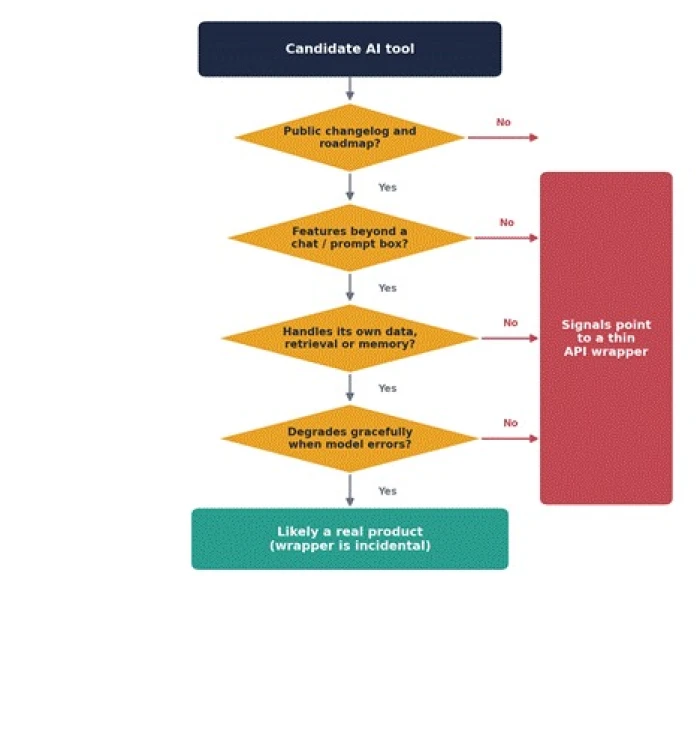
Figure 2. A decision path for classifying a candidate tool. A single No does not condemn a product, but a cluster of them is decisive.
Step 1. Read the pricing page and terms first
1. Check whether pricing is tied to messages or tokens. Per-message pricing that mirrors a known provider's structure suggests a pass-through model with a margin added on top.
2. Read the terms of service and privacy policy for the names of sub-processors. A wrapper that is transparent will name the model provider it relies on. Silence about where prompts travel is itself a signal.
3. Look for a data retention and training statement. The absence of any statement about whether inputs are stored or used for training is a common wrapper trait.
Step 2. Inspect the product surface
1. Count the features that exist beyond entering a prompt and reading a reply. Memory, retrieval over uploaded documents, structured outputs, collaboration, and integrations all represent real engineering.
2. Test whether the tool holds context across a session and across sessions. Persistent, well-managed memory is difficult to build and rare in thin wrappers.
3. Look for domain specialisation. A tool that has ingested a specific body of data, tuned its prompts for a narrow task, and validated its outputs has done work that a generic assistant has not.
Step 3. Probe the behavior
1. Ask the tool directly which model powers it. Many thin wrappers answer honestly or reveal the provider's characteristic phrasing and refusal style.
2. Push an edge case that a raw model handles poorly. If the tool fails in exactly the way the underlying model fails, little sits between the buyer and that model.
3. Trigger an error deliberately, for example with an oversized or malformed input. Watch whether the tool surfaces a raw upstream error message, which exposes the provider directly.
Step 4. Check the technical footprint
1.Open the browser developer tools and watch the network tab while the tool runs. Requests routed straight to a known provider domain, or response shapes that match a provider's schema, are strong evidence of a pass-through.
2. Compare latency against the raw provider. A wrapper that adds retrieval, safety checks, or post-processing will show measurably different timing than a bare API call.
3. Inspect response headers and streaming behavior. Token-by-token streaming that matches a provider's exact format, with no added structure, points to a thin layer.
Step 5. Assess the team and trajectory
1. Find the people behind the product. A named team with a track record signals durability; a fully anonymous operator does not.
2. Read the changelog. A steady history of dated releases shows sustained engineering. An empty or non-existent changelog is common among wrappers built for a quick launch.
3.Check whether the product has a security page, a status page, and documented support. These artifacts cost effort that thin operators rarely invest.
Hands-On Tests Anyone Can Run
The table below turns the procedure into concrete checks that require no special access, only a browser and a few minutes. Each test maps an observation to what it suggests about the layer under inspection.
| Test | How to run it | What the result suggests |
| Model fingerprint | Ask the tool to describe itself and note its refusal style and phrasing | Matching a known model's voice points to a direct pass-through |
| Error passthrough | Submit a malformed or oversized request | A raw provider error exposes the upstream model with no shield |
| Network trace | Watch the developer-tools network tab during a request | Calls to a provider domain confirm where the work is done |
| Latency delta | Time responses against the raw model on the same prompt | Similar timing implies little added processing |
| Feature stress | Attempt a task needing memory, retrieval, or tools | Failure suggests nothing exists beyond a single call |
| Continuity check | Return after a day and test recall of earlier context | Real persistence is hard to fake and rare in wrappers |
Table 2. A quick test matrix that needs only a browser.
Scoring a candidate across the signals produces a profile. The chart below contrasts the typical shape of a thin wrapper with that of a substantive product across seven dimensions. The wrapper hugs the centre on everything except raw output; the product extends outward where real engineering lives.
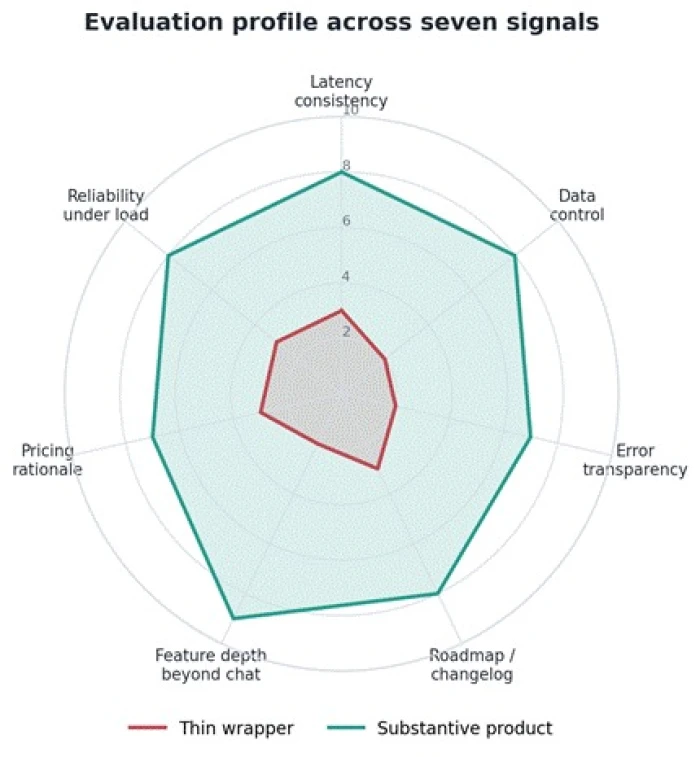
Figure 3. Illustrative evaluation profiles. A thin wrapper scores low on every axis that rewards engineering beyond the model call.
Precautions Before Committing
- Detection is only half the task. The following precautions protect a buyer even when a tool turns out to be thinner than hoped.
- Run a scoped trial before importing real data. Keep confidential material out of a tool until its data handling is understood.
- Confirm an export path. A tool worth adopting lets its data and outputs leave in a standard format, which limits lock-in if it fails.
- Verify the data trail. Establish which companies see each prompt and whether inputs are retained or used for training before any sensitive use.
- Price against the alternative. Compare the cost against calling the underlying model directly or using a general assistant already owned. Pay the markup only for layers that genuinely add value.
- Prefer month-to-month at first. Avoid annual commitments to young tools whose upstream dependency could be absorbed by the provider at any time.
- Document the dependency. Record which provider sits underneath so an upstream outage or price change can be traced quickly.
Mistakes to Avoid During Evaluation
Even careful buyers fall into predictable traps. Watching for these keeps an assessment honest.
Mistake 1: Treating every wrapper as worthless. Wrapping is normal and often the right architecture. The goal is not to reject tools that call an external model but to check that the price matches the value added on top of that call. |
Mistake 2: Judging a tool by its output quality alone. A wrapper inherits the quality of a strong upstream model, so a polished answer proves nothing about the layer being paid for. Assess durability, data handling, and depth, not just the first response. |
Mistake 3: Trusting proprietary AI claims without evidence. Marketing language about a bespoke model is cheap. Verify with the network trace, the changelog, and the behavior tests rather than the landing page. |
Mistake 4: Ignoring the data path. Focusing on features while overlooking where prompts travel is the most costly oversight, because it surfaces only after confidential data has already been exposed. |
Mistake 5: Committing budget before a fallback plan exists. Adopting a tool with no export path and no alternative supplier turns an upstream change into an emergency. Plan the exit before the entry. |
Thin Wrapper Against Substantive Product
The summary below consolidates the framework into a side-by-side reference for a final judgement.
| Dimension | Thin API wrapper | Substantive product |
| Core value | The borrowed model | Layers built on top of the model |
| Data handling | Often undocumented | Named processors and clear retention terms |
| Reliability | Fails with its single provider | Fallbacks and graceful degradation |
| Pricing | Markup on pass-through inference | Tied to an outcome or job done |
| Longevity | At risk from upstream native features | Defensible through proprietary layers |
| Evaluation verdict | Pay direct or skip | May justify its price |
Table 3. A consolidated reference for the final decision.
Verdict
The line that matters is not whether a tool calls an external model, because nearly all of them do. The line is whether anything of value would survive if that call were taken away. A thin wrapper collapses to a login screen; a substantive product keeps its retrieval, its data, its integrations, and its guardrails. Working through the five-step procedure, running the browser-level tests, and checking the team and changelog will classify almost any candidate within an hour.
Spend that hour before the budget, the data, and the team's habits are committed. The cost of the check is minutes. The cost of skipping it is a workflow built on a layer that can vanish the moment its supplier ships the same feature for free.



Comments 0
Join the discussion and share your perspective.
Sign in to post a comment and reply to other readers.
No comments yet
Be the first to share your perspective on this article.