
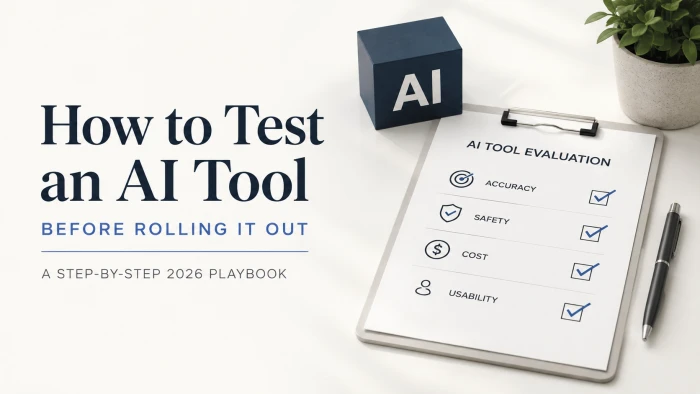
Testing an AI tool before rolling it out means running a scoped pilot on your own real data and scoring the results against fixed thresholds for accuracy, safety, cost, and everyday usability before anyone depends on it. The mistake most teams make is trusting the demo.
A polished demo tells you what a tool can do on a good day. It says almost nothing about what it will do inside your workflow, with your messy inputs, on a Tuesday afternoon when someone pastes half a spreadsheet into it and expects magic. The gap between those two moments is where budgets disappear.

Why AI tools fall apart after a great demo
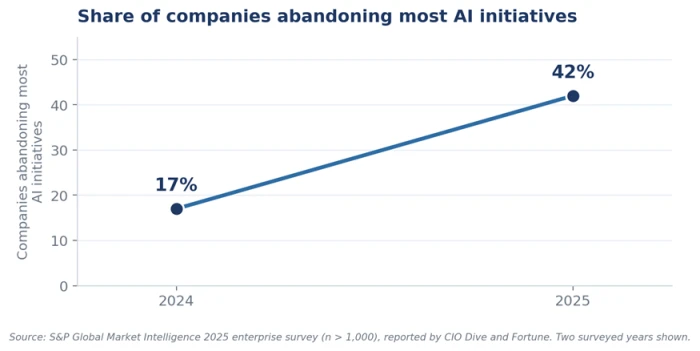
The numbers are blunt about how often this goes wrong. A 2025 S&P Global Market Intelligence survey of more than 1,000 enterprises found that the share of companies abandoning most of their AI initiatives jumped to 42 percent, up from 17 percent a year earlier, with the average organization scrapping 46 percent of its proofs of concept before they ever reached production.
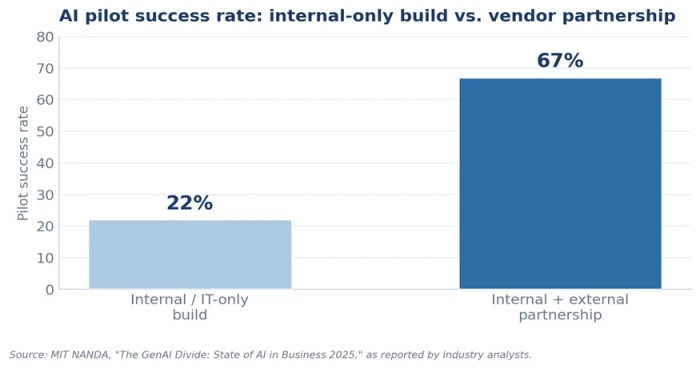
MIT’s NANDA initiative put an even sharper edge on it. Its report The GenAI Divide: State of AI in Business 2025, built on roughly 300 public AI deployments plus interviews and surveys of enterprise leaders, found that 95 percent of generative AI pilots produced no measurable impact on profit and loss, despite an estimated 30 to 40 billion dollars in enterprise spending.
So the demo is not the problem. The handoff to production is. Two forces explain most of the wreckage.
Demos are rehearsed; production is not
In a demo the vendor knows the questions and can pick favorable examples. In production, users misspell words, drop context, ask for exceptions, and combine goals in ways nobody scripted. The Spanish consultancy Ideasweb makes the point plainly: the conditions of a demo and the conditions of real use share almost nothing, which is exactly why a tool that dazzles in a sales call can stumble the first week it meets your actual customers.
You are testing a system, not a model
The second trap is treating the model as the whole product. Final quality depends on the instructions you give it, the reference sources it can reach, its permissions, the way it retrieves documents, its integrations, and the escalation rules behind it. Change any single one of those and the output changes, even when the underlying model stays identical. A test that measures the model in isolation measures the wrong thing.
Start with the task, not the tool
The strongest testing programs begin before any software is switched on. The first step is not writing test prompts. It is producing a precise definition of the task. A goal like "help the support team" is too vague to test, because you can never say whether it was met. Write a single sentence that names the outcome you want and the workflow it touches, then hold every later decision against it.
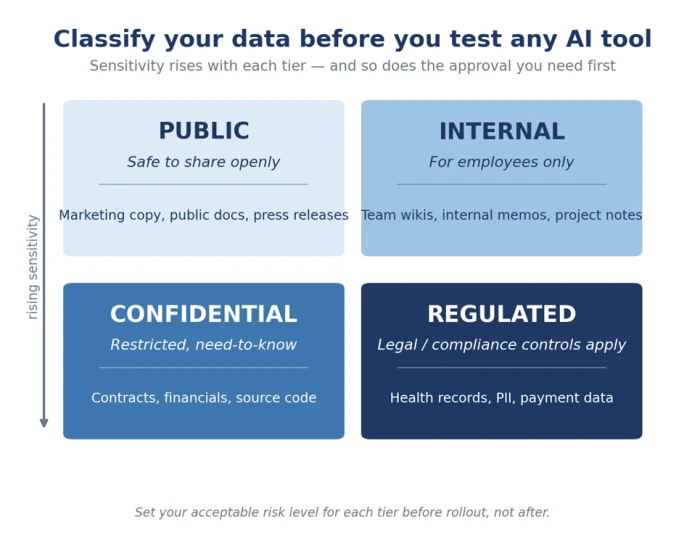
Once the task is defined, classify the data it will handle. Walk through your data categories and label them as public, internal, confidential, or regulated. That labeling tells you which tools can be tested immediately and which need legal or security approval first. It also forces the decision that teams most often skip: setting the acceptable level of risk before rollout instead of discovering it after employees have already come to rely on the tool.
Build your test set from real work, not sample prompts
A vendor’s sample prompts are marketing. Your test set should be built from real examples pulled from your own organization, then scored against clear standards you define in advance. The practical move is to assemble a fixed set of representative cases and grade the tool’s output the same way every time, so you are comparing like with like across versions and vendors.
A useful test set covers four kinds of input, and skipping any one of them hides a failure mode you will meet in production anyway:
● Normal cases: the everyday requests the tool will see most often.
● Edge cases: empty fields, extremely long documents, and inputs that contradict themselves.
● Sensitive cases: personal data, consequential decisions, and anything that needs authorization.
● Adversarial cases: deliberate attempts to override the rules or extract information the tool should refuse.
Worked example (illustrative). A mid-size insurer testing a claims-summary assistant seeds its test set with 40 normal claims, 15 messy ones (blank adjuster notes, 30-page attachments), 10 involving medical records, and 8 prompts trying to make the tool approve a payout it should escalate. The tool scores 96 percent on the clean 40 and 61 percent on the messy 15. That 61 percent, not the 96, is the number that predicts the first month of production.
Score every tool on the same five dimensions
This is the heart of the playbook. A single "does it work?" verdict is useless because tools fail in different directions. Score each candidate on five dimensions, and treat a weak score in any one of them as a reason to pause rather than an average to smooth over.
1. Accuracy and truthfulness
Start with the basic question: does it tell the truth? Validate answers against known ground truth using offline tests and side-by-side human review. An AI judge can scale this up, but calibrate it against human graders and use it mainly for comparing versions, not for declaring absolute correctness.
2. Robustness
Accuracy on clean data describes the tool on its good days. Robustness describes it on the bad ones. Watch how the success rate holds when input is malformed, ambiguous, adversarial, or simply unlike the examples in your test set. A tool that shines on tidy samples and buckles on real-world mess will erode your team’s trust within days.
3. Human oversight load
This dimension separates real automation from theater. A tool that nominally automates a workflow but needs a human to catch its errors on one task in three has not automated anything. It has added a review step. Measure how often a person has to intervene, because a tool that quietly shifts work onto your reviewers can look productive while making the team slower.
4. Safety and compliance
Measure how often the tool does something it should not: leaking data, taking an irreversible action without confirmation, or crossing a policy line. For anything touching regulated or confidential data, this is the dimension that can turn a productivity win into a legal incident, so score it strictly.
5. Cost and latency
Even an accurate, safe tool fails if it is too slow or too expensive to use at scale. Track where the money and time actually go: input tokens, output tokens, model rates, retries, and retrieval overhead. Costs that look trivial in a pilot can multiply once every employee runs the tool dozens of times a day.
Run the pilot so the result actually means something
A well-scored dimension list is worthless if the pilot itself is designed badly. Three rules keep the signal clean.
Keep the scope narrow. A pilot fails when the team tries to learn too many things at once. Pick one workflow and one clear rollout decision, and resist the pressure to test "everything."
Baseline before you start. You cannot claim the tool improved anything if you never measured the old way. Capture current speed, error rates, and cost first, then compare against them.
Give it long enough to be honest. For most workflows, two to four weeks is enough to see steady-state behavior. Shorter windows mostly capture novelty and the learning ramp, not how the tool performs once the excitement wears off. Where you can, use randomized or phased access so tool impact is not confused with normal week-to-week variance.
Stage the rollout from offline to live
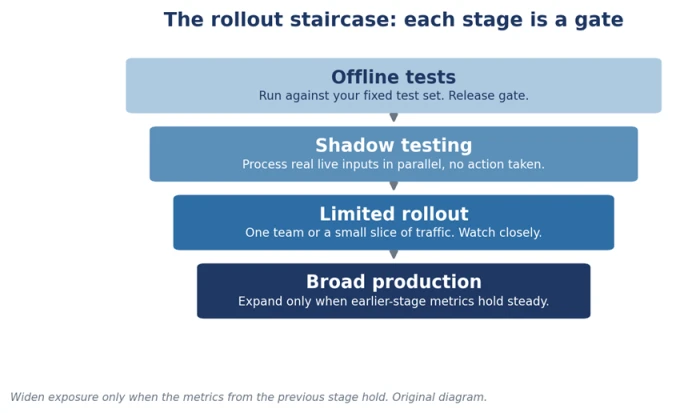
The safest path to production is a staircase, and each step should have to earn the next. Layer your evaluation so exposure widens only when the metrics hold steady.
● Offline tests: run the tool against your fixed test set with no live consequences. This is your release gate.
● Shadow testing: let the tool process real, live inputs in parallel without acting on them, so you see production behavior before it can cause harm.
● Limited rollout: release to one team or a small slice of traffic, watch closely, then widen, revise, or pull it.
● Broad production: expand only after the earlier stages produce steady numbers.
Behind all four stages, keep the safety nets that let you fail without a crisis: circuit breakers, fallback paths, and a kill switch that stops the tool the moment something breaks. Being able to roll back in seconds is what makes a limited rollout a calculated bet instead of a gamble.
The Green-Light Scorecard
Pull the five dimensions into one table and give each a weight and a pass threshold. The rule is simple and strict: a tool rolls out only when it clears the threshold on every dimension, not when its weighted average happens to look acceptable. A tool can be brilliant on accuracy and still be unsafe to ship.
| Dimension | Weight | Pass threshold | What a failing score looks like |
|---|---|---|---|
| Accuracy / truthfulness | 25% | Meets or beats your ground-truth benchmark | Confident answers that are wrong on cases a human would get right |
| Robustness | 20% | Holds up on messy, ambiguous, adversarial input | Works on clean samples, collapses on real inbox text |
| Human oversight load | 20% | Runs the target task without frequent correction | Needs a reviewer so often it only adds a step |
| Safety & compliance | 20% | No data leaks or irreversible actions without sign-off | Acts outside policy or exposes regulated data |
| Cost & latency | 15% | Fits budget and response-time limits under load | Costs balloon with retries or slows past usable limits |
Fill in the actual score for each candidate, mark pass or fail against the threshold, and let the table make the decision for you. The weights are a starting point; a customer-facing legal or financial use case should push safety and accuracy higher, while a low-stakes drafting tool can tolerate more oversight. Whatever you choose, decide it before you see the scores so the thresholds cannot quietly drift to fit a tool you already like.
The one line to remember: scaling should depend on evidence, not enthusiasm. A signed-off scorecard is much harder to argue with than a room full of people who liked the demo.
Testing does not stop at launch
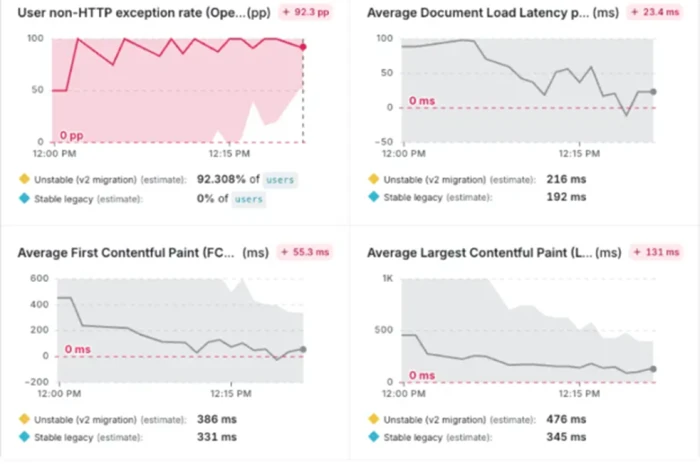
A green light is a checkpoint, not a finish line. Production is where the long tail of strange inputs finally shows up, so the pilot’s discipline has to survive the rollout. Mature teams treat offline evaluation as the release gate and online monitoring as the continuous check, feeding interesting production failures back into the offline test set so it grows harder over time.
A workable cadence for most teams is a weekly health check on latency, cost, and error rates, with a deeper review whenever a metric drifts. This is also where formal guidance lines up with practice. The U.S. National Institute of Standards and Technology’s AI Risk Management Framework recommends testing AI systems before deployment, documenting the metrics and methods used, evaluating systems under conditions close to real use, and continuing to monitor them once they are live. The playbook in this article is one concrete way to satisfy that expectation.
If there is a single habit that separates the teams shipping useful AI from the 42 percent walking away from it, it is this: they run the smaller test. The instinct under board pressure is to prove value fast with an ambitious, everything-at-once pilot. The evidence points the other way. Narrow scope, a test set built from real work, a strict scorecard, and a rollback switch will teach you more in three weeks than a sprawling rollout teaches you in three months, and it will do it before the mistakes reach anyone who matters.



Comments 0
Join the discussion and share your perspective.
Sign in to post a comment and reply to other readers.
No comments yet
Be the first to share your perspective on this article.