

I opened Krea’s pricing page expecting a ten minute decision. I closed it two hours later with a spreadsheet open next to it.
Nothing on the page is hidden. The numbers are large and legible: $0, $5.25, $21, $63, $160, and a Contact Sales button for anyone whose lawyer needs to be involved. Reading them took thirty seconds. Working out what they buy took the rest of the afternoon, because Krea does not sell you images or videos. It sells compute units, and the same unit buys three times more output on a still image than it does on a video clip.
So this article is the map I wish somebody had handed me. I walk through every tier in the order I evaluated them, starting with the unit system that governs all of them, because once that clicks the entire page reads in five minutes. Along the way I get into the parts most pricing roundups skip: the ninety day expiry clock on top up packs, the $1,000 per month license for running Krea’s models on your own servers, and the annual discount on the Business plan that turns out to be half of what the banner promises.
Prices move. Verify before you pay.
Every Krea AI plan on one screen
Before the detail, here is the whole page compressed into a single table. These are annual prices, which is the view Krea AI loads by default.
| Plan | Price | Compute | Built for |
|---|---|---|---|
| Free | $0 / mo | 100 units per day | Testing the interface |
| Basic | $5.25 / mo | 5,000 units per month | Solo image work with a commercial license |
| Pro | $21 / mo | 20,000 units per month | Anyone touching video |
| Max | $63 / mo | 60,000 units per month (40k to 100k) | Batch work and parallel generations |
| Business | $160 / mo | 80,000 units per month (up to 1.5M) | Teams of up to 50 seats |
| Enterprise | Custom | Custom | SSO, indemnification, procurement |
Two flags before we go further. The Basic plan card displays US$5, while the itemised comparison table further down the same page displays US$5.25. I have used $5.25 throughout, since that is the figure Krea puts in the table it asks you to compare against. Second, Max and Business both carry sliders, so the unit counts above are starting points rather than fixed allowances.
Compute units: the currency underneath everything
Krea prints two reference conversions on every plan card. One tells you how many Nano Banana 2 image generations the plan buys. The other tells you how many Seedance 2.0 videos. Line all six tiers up and the exchange rate underneath falls straight out.
| Plan | Monthly units | Nano Banana 2 images | Seedance 2.0 videos |
|---|---|---|---|
| Free | 100 per day | 1 per day | Under 1 per day |
| Basic | 5,000 | 64 | 20 |
| Pro | 20,000 | 257 | 83 |
| Max | 60,000 | 771 | 250 |
| Business | 80,000 | 1,028 | 333 |
Divide through and the same two numbers surface on every row. A Nano Banana 2 image costs roughly 78 units. A Seedance 2.0 video costs roughly 240. One video eats a little over three images.
That ratio is the most useful fact on the page, and Krea never states it directly. A Pro subscriber generating stills has a comfortable month with 257 images. The same subscriber generating video runs dry after 83 clips, which is fewer than three a day. If video sits anywhere near the centre of your workflow, read every unit allowance in this article and quietly divide by three.
The caveat is worth spelling out. Nano Banana 2 and Seedance 2.0 are two models out of dozens. Veo3, Sora, Kling and the rest of the premium video catalogue sit behind the Pro paywall discussed in section 5, and Krea does not publish their unit costs on the pricing page. Assume they consume more than Seedance rather than less.
Free: $0, and two hard walls
One hundred units a day. Using the exchange rate from section 2, that is exactly one Nano Banana 2 generation, and slightly less than one Seedance video. The allowance resets daily and does not accumulate, so there is no saving three days of credits for a weekend project.
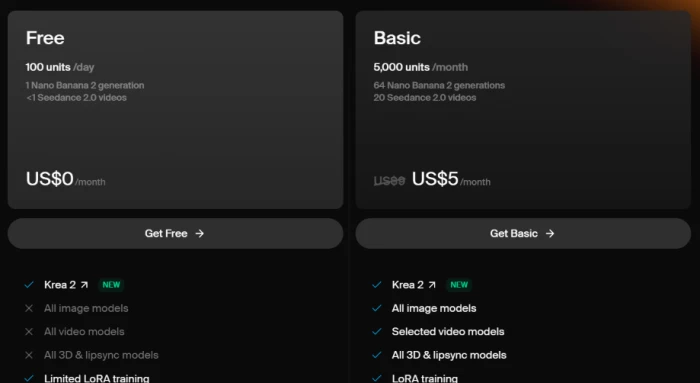
The feature grid does the rest of the talking. Krea 2 is open to everyone. Every other row carries a Limited tag: image models, video models, LoRA training, real time models, 3D, lipsync.
- Two restrictions matter far more than the unit ceiling:
- No commercial license. Anything you generate on Free cannot legally be used in paid work.
Upscaling caps at 2K. Every paid tier lifts that ceiling to 22K.
Free is a demo. Judged as a demo, it does its job, and it is the only tier where I would tell you to ignore the unit maths entirely.
Basic at $5.25: the cheapest commercially usable tier
The step from Free to Basic reads small on the unit counter and large everywhere else.
You get 5,000 units a month, which buys 64 Nano Banana 2 images or 20 Seedance videos. Alongside that, Basic unlocks the commercial license, every image model, all 3D and lipsync models, LoRA training, and upscaling up to 22K. That is the wall between hobby and invoice, and it costs $5.25.
One thing stays locked. Video access reads Selected video models on the plan card and Limited in the comparison table. The engines people actually want are still out of reach at this price, which is the subject of the next section.
A small piece of arithmetic that reframed the tier for me: twelve months of Basic costs $63, which is what a single month of Max costs. If your deliverables are stills, thumbnails, product shots, moodboards or LoRA-trained brand assets, a year of legal cover costs less than one month of the power tier.
Pro at $21: where video stops being a preview
Krea flags Pro as Most popular, and the feature grid explains why in exactly one row. This is the tier where Access to video models flips from Limited to a checkmark. Veo3, Sora, Kling and the rest of the video catalogue become available here and nowhere cheaper.
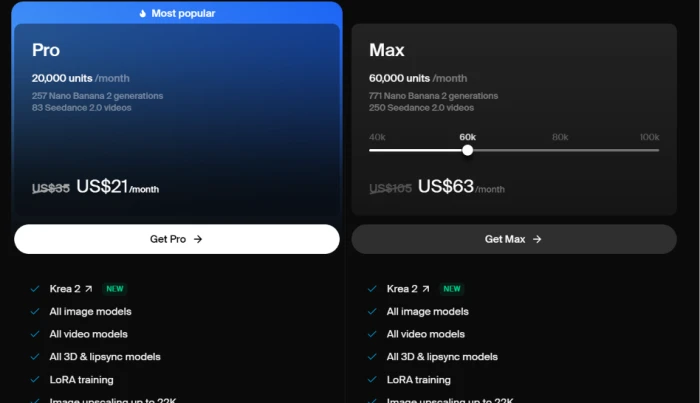
Twenty thousand units a month. Applying section 2’s rate, that is 257 images or 83 videos.
The gap between Basic and Pro is $15.75 a month. The gap in capability is the entire video product. If video appears anywhere in your pipeline, Basic is a false economy and Pro is the genuine entry price for using Krea.
Max at $63: paying for concurrency, not volume
Max ships with 60,000 units and a slider that runs from 40k up to 100k, so the $63 headline is the midpoint of a range.
Volume is the obvious upgrade: 771 images or 250 videos. The upgrade that changed my thinking is concurrency. Pro caps how many generations you can run in parallel. Max removes that cap on both image and video, and it raises the LoRA training ceiling to 2,000 images per model.
That distinction decides who Max is for. Somebody producing 300 images a month, one at a time, gains almost nothing. Somebody who queues forty variations at once and needs them back before a client call gains a working day. You are buying wall clock time.
Business and Enterprise: where the seat maths gets interesting
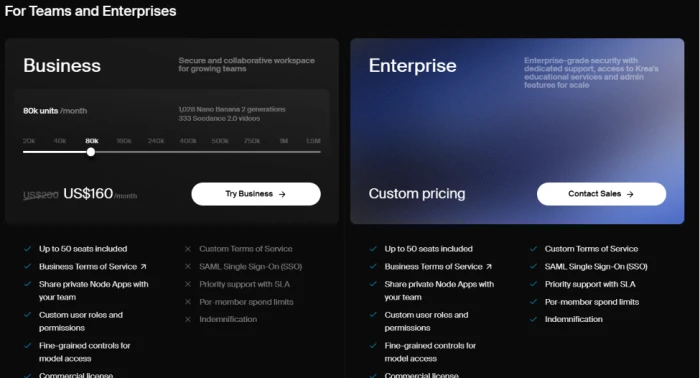
Business starts at 80,000 units a month, carries a slider that stretches all the way to 1.5 million, and includes up to 50 seats in the flat $160 price.
Run it against a five person team. Five Pro subscriptions cost $105 a month and give you 100,000 combined units. Business costs $160 for 80,000 pooled units, plus shared private Node Apps, custom user roles, permissions, and fine grained control over which models each person can reach. You pay $55 more and receive fewer units. What you actually buy is administration.
At fifty seats the flat $160 works out to $3.20 per person, which is the single strongest number on Krea’s pricing page.
Business stops short of five things, and every one of them stays dark until Enterprise:
- Custom Terms of Service
- SAML Single Sign On
- Priority support with an SLA
- Per member spend limits
- Indemnification
None of those are creative features. They are procurement requirements. If your legal team needs indemnification, or your IT team will not approve a tool without SSO, the Contact Sales button stops being optional.
Compute packs, and the ninety day clock
Sections 3 through 7 all assume you stay inside your allowance. Krea sells a way out of that, and the terms deserve attention.
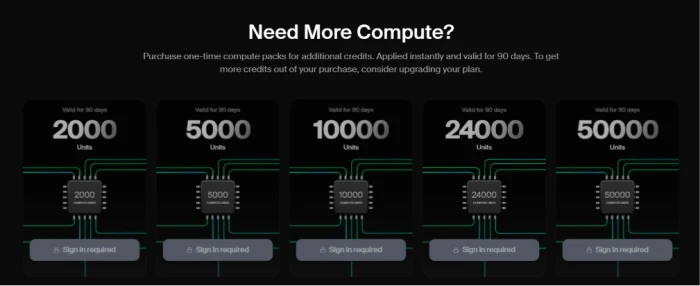
Top ups come in five sizes: 2,000, 5,000, 10,000, 24,000 and 50,000 units. They apply instantly. Prices only reveal themselves once you sign in.
Two details in the fine print do most of the work here.
- They expire after 90 days. Buy 50,000 units for a project that slips a quarter, and you watch a meaningful share of them evaporate.
- Krea tells you not to rely on them. Its own copy on the packs section advises upgrading your plan if you want more credits out of a purchase. A vendor admitting its top ups are priced worse per unit than its subscriptions is unusual, and you should take the hint.
Packs earn their place for one shot overflow: a single client deliverable landing in a month you would otherwise never exceed your allowance. Sustained overflow is a signal that you are sitting on the wrong tier.
The full feature matrix, transcribed
Krea’s comparison table is the densest artefact on the page, and images do not get indexed, so here it is in text.
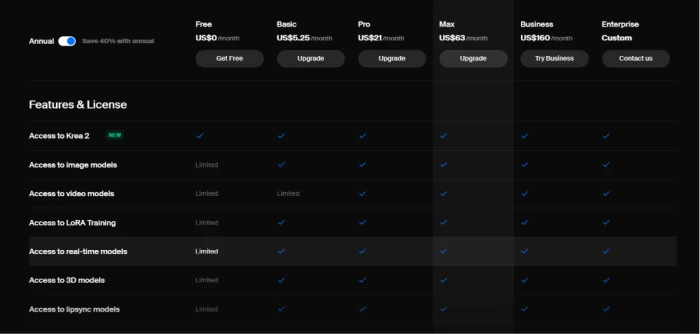
| Feature | Free | Basic | Pro | Max | Business | Enterprise |
|---|---|---|---|---|---|---|
| Access to Krea 2 | Yes | Yes | Yes | Yes | Yes | Yes |
| Access to image models | Limited | Yes | Yes | Yes | Yes | Yes |
| Access to video models | Limited | Limited | Yes | Yes | Yes | Yes |
| Access to LoRA training | Limited | Yes | Yes | Yes | Yes | Yes |
| Access to real-time models | Limited | Yes | Yes | Yes | Yes | Yes |
| Access to 3D models | Limited | Yes | Yes | Yes | Yes | Yes |
| Access to lipsync models | Limited | Yes | Yes | Yes | Yes | Yes |
Read it left to right and the shape resolves. Free limits everything. Basic limits video and nothing else. Every row turns into a checkmark once you reach Pro, and the separation between Pro, Max, Business and Enterprise comes down to volume, concurrency, seats and legal terms rather than access.
10. The annual discount, checked tier by tier
The toggle above that table defaults to annual billing and promises 40% savings. I checked the promise against the struck-through monthly prices on each card.
| Tier | Monthly | Annual | Actual discount |
|---|---|---|---|
| Basic | $8.75 (implied) | $5.25 | 40% |
| Pro | $35 | $21 | 40% |
| Max | $105 | $63 | 40% |
| Business | $200 | $160 | 20% |
Business is struck through at US$200 and sells at $160. That is 20% off, half the headline rate. The 40% banner sits directly above a table in which one of the six columns discounts at half that figure.
Annual billing also commits you for twelve months to an allowance that does not roll over. Unused units expire at the end of each month, so an underused annual plan gives the money back to Krea twelve separate times.
Renting the models outright: Maker at $1,000
Beneath the subscription tiers sits a section almost everyone scrolls past. Krea will license its models to run on infrastructure you control.
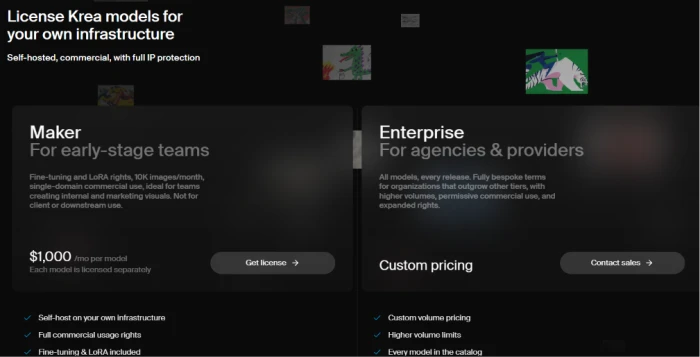
Maker costs $1,000 a month per model, and each model is licensed separately, so a two model stack is $2,000. It includes self hosting, full commercial usage rights, fine tuning and LoRA rights. The ceiling is 10,000 images a month, and commercial use is restricted to a single domain.
Read that last restriction twice. Maker explicitly excludes client and downstream use. An agency generating assets for its customers does not qualify, no matter how much it pays. Krea positions Maker for early stage teams making internal and marketing visuals for themselves.
Enterprise licensing lifts those limits with bespoke terms, higher volumes, expanded rights and access to every model in the catalogue on every release. Pricing is by conversation.
What subscribers say when the billing goes sideways
Everything up to here comes off Krea’s own page, and pricing pages describe the happy path. So I went looking for the other one, reading Trustpilot with a narrow filter: billing complaints only, ignoring opinions about output quality.
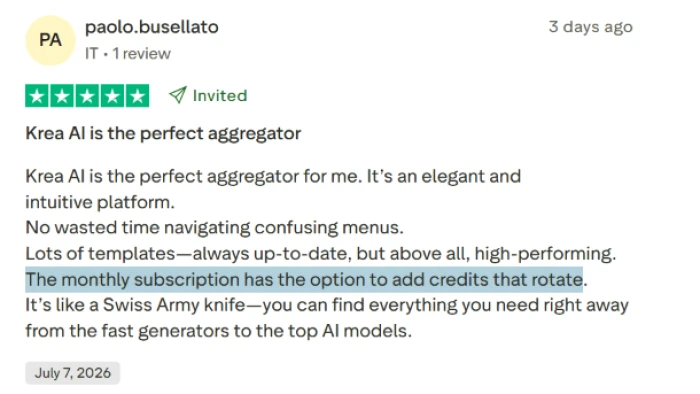
The positive case first, because it exists and it is specific. A reviewer writing on 7 July 2026 gave five stars, described Krea as an aggregator that saves him from navigating half a dozen separate tools, and praised the template library. He also singled out the way his monthly subscription lets him add credits that rotate.
The complaints cluster around two moments: what happens at checkout, and what happens at renewal.
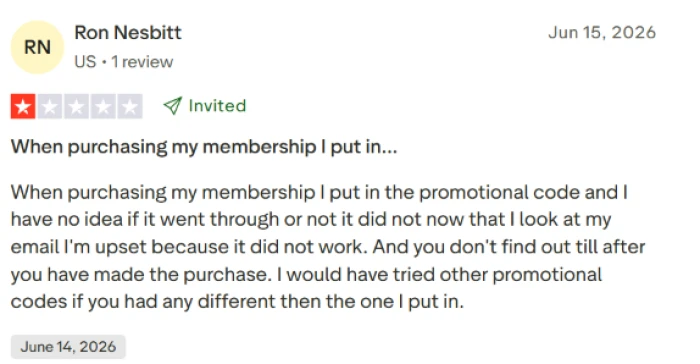
A reviewer in June 2026 entered a promotional code while purchasing his membership, received no clear signal either way, and worked out later from his email that the code had not applied. His frustration was procedural rather than financial. The failure only surfaced after the money had left his account, by which point trying a different code was no longer an option.
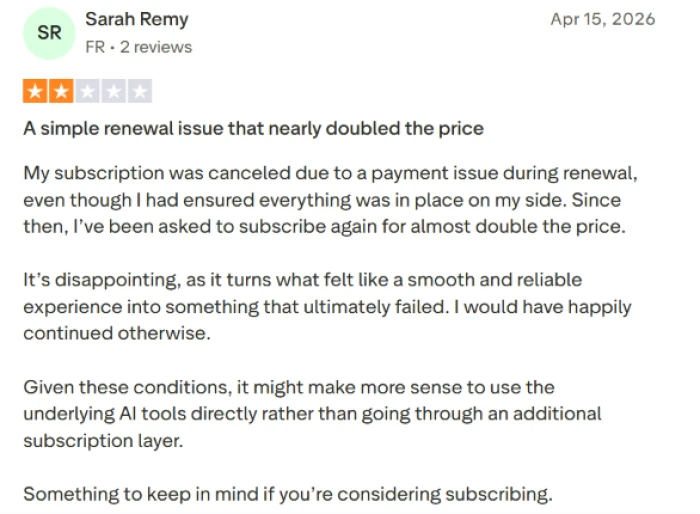
A French subscriber writing in April 2026 described a payment problem during renewal that cancelled her subscription outright, despite everything being in order on her end. When she went to resubscribe, the price quoted was close to double what she had been paying. Her conclusion was blunt: going directly to the underlying AI tools may beat paying for an aggregation layer that loses your pricing the moment a card fails.
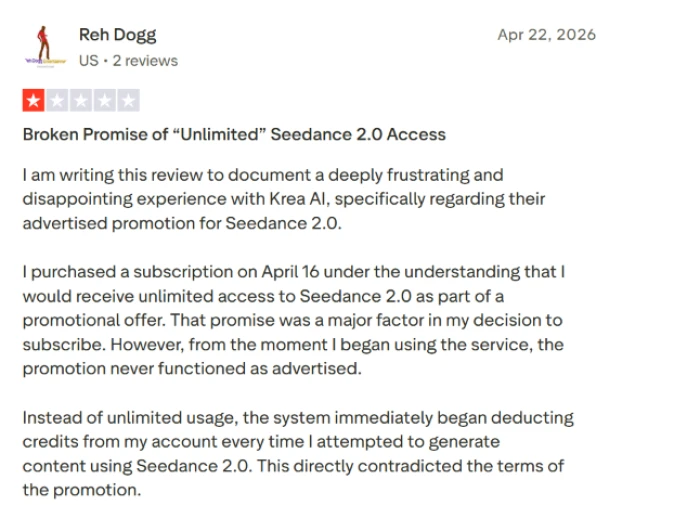
The sharpest complaint concerns a promotion. A reviewer who subscribed on 16 April 2026 says the advertised unlimited access to Seedance 2.0 was a deciding factor in his purchase, and that credits were deducted from his balance on every Seedance generation from the first attempt onward.
These are four individual accounts on a public review platform, and I cannot verify any of them. Krea may have resolved all four privately. What they describe is a pattern worth defending against, and the defence costs nothing:
- Screenshot the checkout screen showing your promo code applied, before you authorise the payment.
- Open your first invoice and reconcile it against the price you expected to pay.
- Watch your unit balance during the first few generations under any promotional offer, using the exchange rate from section 2 to know what a normal deduction looks like.
- Understand that an annual price is attached to a live subscription. Let it lapse and you renegotiate at whatever the current rate happens to be.
Which tier I would pick, and why
Every section above feeds into this one. Here is where each tier earns its money.
Testing the interface
Free. One image a day is enough to judge whether Krea 2 and the node editor suit the way you work. Build nothing you intend to sell, because of the license restriction covered in section 3.
Stills for paying clients
Basic at $5.25. The cheapest commercial license Krea sells, and a full year of it costs the same as a single month of Max.
Any video at all
Pro at $21. The video paywall sits between Basic and Pro, and no volume of top up packs will move it. Budget 83 Seedance clips a month and plan around that ceiling rather than discovering it on day nineteen.
Batch work under deadline
Max at $63. You are paying for unlimited concurrency and a 2,000 image LoRA ceiling. The 60,000 units are close to incidental, and the slider means you can dial them down to 40k if the parallelism was the only thing you came for.
Teams of four or more
Business at $160. Five Pro seats cost $105 and give you nothing shared: no workspace, no role permissions, no model access controls, no pooled billing, no way to stop one person burning the month’s units in an afternoon. The administration is what you are buying, and past roughly four people it pays for itself.
Anything that passes a legal review
Enterprise. SAML SSO, indemnification, custom terms and per member spend limits exist on exactly one column of Krea’s comparison table, and no budget on the Business plan conjures them into being. If those words appear in your vendor questionnaire, section 7 already told you the answer.
The Bottom Line
The question I never asked when I opened that pricing page was whether I should be paying Krea at all.
Krea is an aggregation layer. Nano Banana 2, Seedance, Veo3, Sora and Kling are not Krea's models. You can reach most of them directly, at their own list prices, without a subscription in the middle. The reviewer in section 12 who walked away after a renewal dispute landed on exactly this point, and she was right to raise it.
What the $21 buys is the absence of six billing relationships, one interface instead of six, and a credit balance that moves between models without you thinking about it. That has real value if you switch engines often. It has almost none if you have already settled on one model and generate the same thing every week. Somebody producing forty Seedance clips a month and nothing else should price Seedance directly before renewing Pro.
My honest read after the spreadsheet: Krea's pricing is fair and its packaging is where the pain sits. The 40% banner overstates the Business discount. The 90 day pack expiry works against the customer. The Basic card and the comparison table disagree about the price by twenty five cents. None of those are predatory. All of them mean you cannot skim the page and trust what you skimmed.
So price your actual month before you price the plan. Count how many videos you will render, multiply by 240 units, add your images at 78, and buy the tier that covers the number with a little room. Everything else on that page is upsell.



Comments 0
Join the discussion and share your perspective.
Sign in to post a comment and reply to other readers.
No comments yet
Be the first to share your perspective on this article.