
Image Generation

Krea.ai Review

AI art and video generation platform aimed at creators who want diverse models, real‑time control, and strong enhancement tools, but must tolerate confusing credits, strict moderation, and uneven reliability.

Test Duration
3 Days
Reviewner Version
v1.0
Last Tested
26 Jun, 26
5.5
Recommended for Visual Creators
Reviewner Test Score

Krea.ai delivers versatile image and video generation, strong enhancement and upscaling, and fine control that many creators prefer over rival tools. Reviewers praise its creative output, speed on good days, and Photoshop friendly workflows. However, complaints about opaque credit usage, aggressive censorship, billing disputes, and unreliable uptime are frequent and serious. It suits experimental artists and marketers willing to trade stability and transparent pricing for variety and control, but is risky for mission critical or budget sensitive work.

Freelance Designers AI Art Creators Marketing Agencies Indie Filmmakers Content Studios Social Media Teams
Methodology

How We Tested Krea.ai?

Image generation quality evaluation

Assessed prompt fidelity and stylistic range across sketches, drawings, marketing images, and concept art, noting both impressive detail and inconsistent or unusable generations.

Enhancer and upscaler stress test

Measured enhancement on AI art, 3D renders, and old photos, confirming strong detail on artwork but weak or distorted results on some real photography.

Credit and pricing transparency check

Reviewed compute usage behavior, promo codes, and add on units, highlighting confusing deductions, missing discounts, and disputes over unused credit removal.

Moderation and censorship behavior review

Probed content filters with benign and borderline prompts, observing frequent false positives, stressful blocking, and restrictions impacting creative workflows.

Support responsiveness and reliability test

Tracked email and channel replies plus outage handling, revealing mixed experiences from quick refunds to prolonged silence during billing or downtime incidents.

Reviewner Testing Log

Krea.ai Hands-On Testing

Putting Krea AI to Work

My Creative Experiments With Krea AI

Krea AI is difficult to judge from a feature list alone because most of its value depends on how it behaves while ideas are still unfinished. A tool can claim fast generation, strong style control, and useful enhancement, but the real question is whether it helps a creator move from a rough visual idea to something usable without fighting the interface.

For this hands-on section, I treated Krea less like a standard AI image generator and more like a creative workspace. I focused on areas that mattered most in the main review.

The goal was not to create perfect images. I wanted to see where Krea felt fluid, where it became confusing, and whether its strongest claims held up during normal creative exploration.

Turning a Small Prompt Into a Complete Scene

What I Wanted To Explore

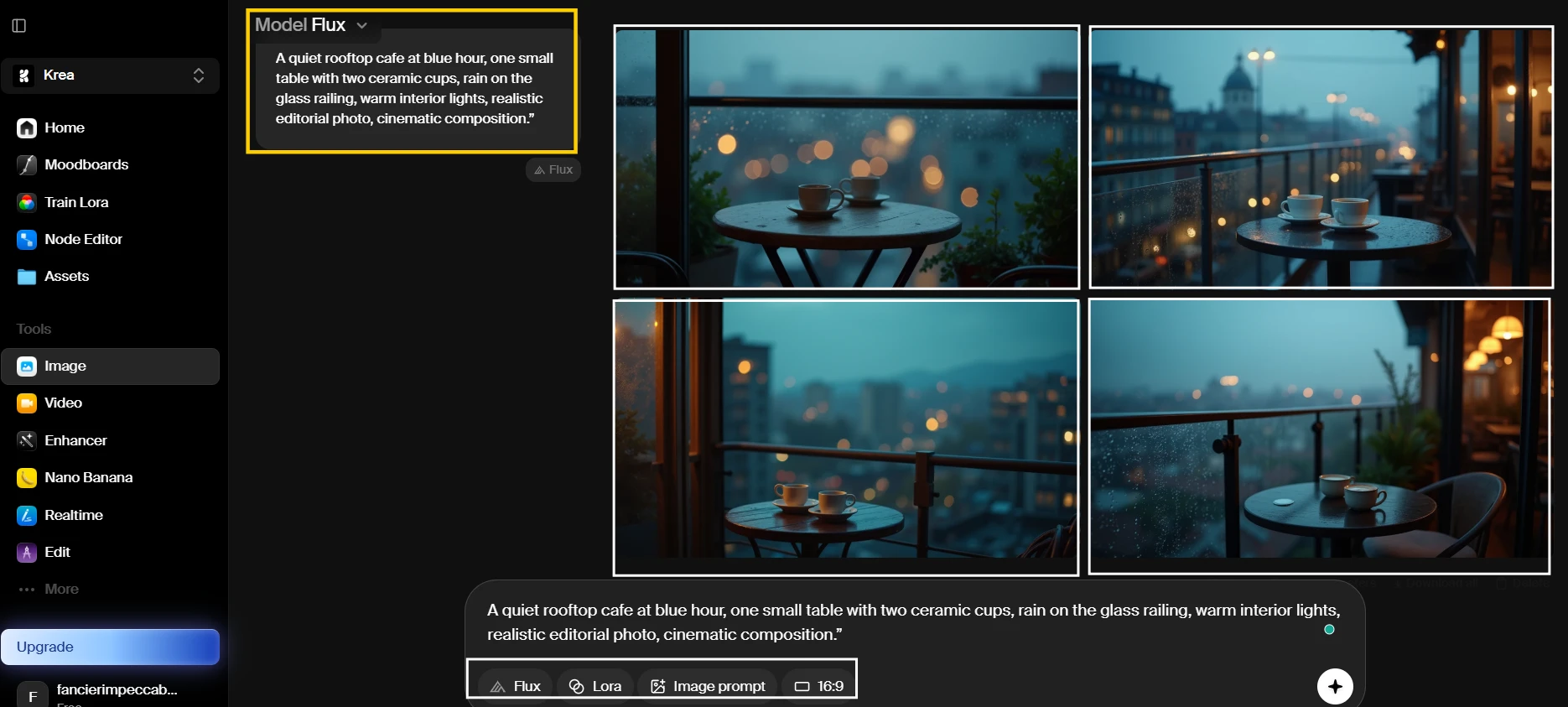
I started with a simple creative question: Can Krea take a short, natural prompt and turn it into a complete image without needing heavy prompt engineering? This matters because many creators do not begin with a polished prompt. They begin with a mood, a place, or a loose visual direction. If Krea needs too much technical instruction at this stage, beginners may struggle before they even reach the refinement stage.
What Appears In The Result

In the result shown above, I can see four different interpretations of the rooftop cafe idea. The images keep the overall evening mood, with warm interior light contrasting against a cooler outdoor setting. The table and cups are visible in the stronger outputs, while the rain detail appears more clearly in some versions than others. The image grid also shows how Krea varies the composition even when the same prompt is used. One result leans closer to a cinematic cafe photo, while another feels more like a polished concept image than a real location.

Behind The Scenes

This was the easiest experiment to run because the workflow stayed close to a normal text-to-image process. I did not need to adjust many controls before seeing usable results. The main friction was deciding which model and setting to use because Krea presents several creative options in the same workspace. The first generation gave me enough visual material to compare direction, but small prompt details did not carry equally across every result. The tool felt fast enough for idea exploration, but not fully predictable.

Creative Insight

This experiment supports the review’s stronger score for image output quality. Krea can turn a short visual idea into a polished image quickly, especially when the prompt describes mood, lighting, and composition. At the same time, it also shows why prompt fidelity is not perfect. Creators should expect useful starting points, not exact obedience to every detail in the first generation.

Exploring Styles From One Prompt

What I Wanted To Explore

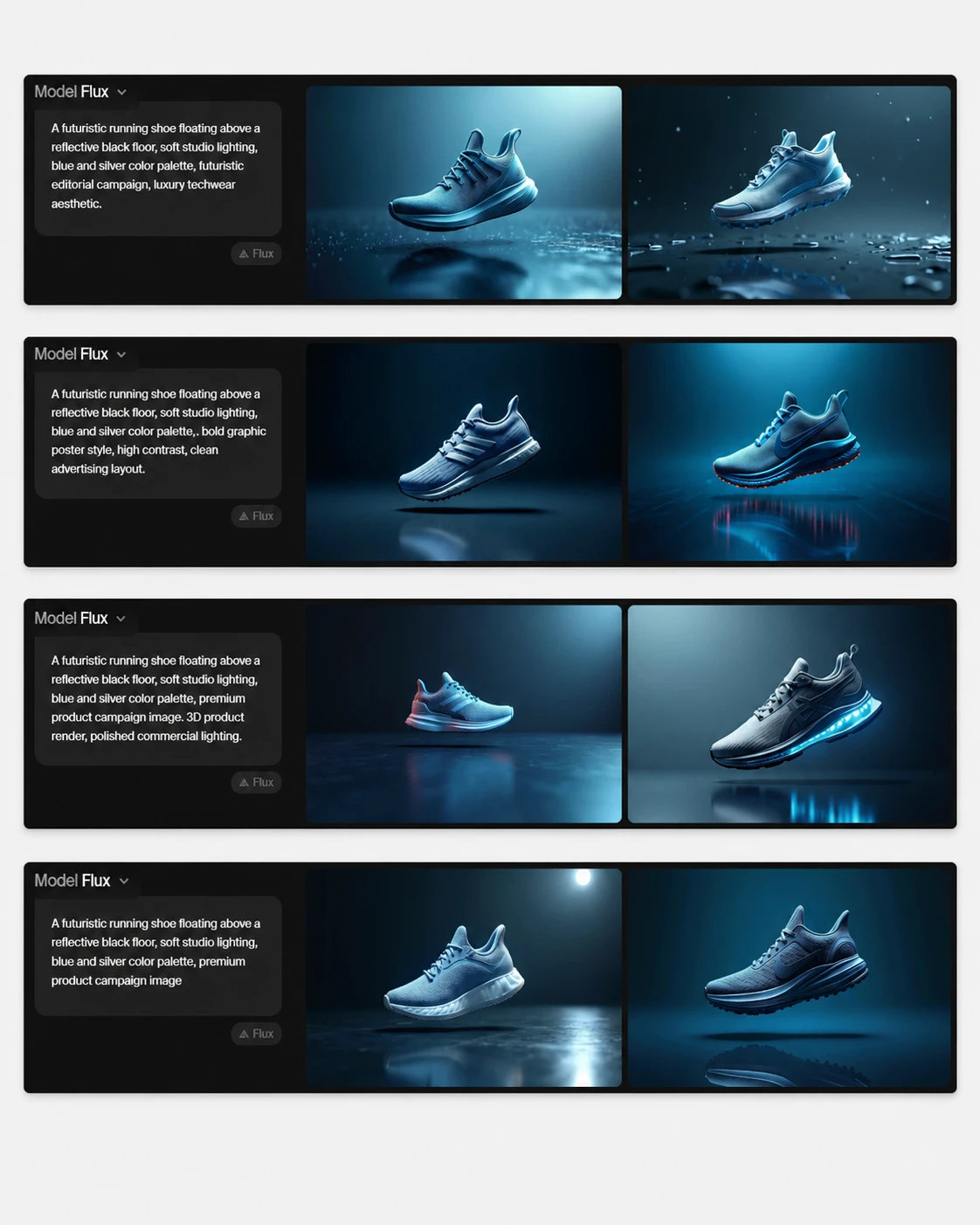
For the second experiment, I wanted to see whether Krea could keep the same idea recognizable while changing the visual style. This matters for creators who make thumbnails, ads, album art, moodboards, or campaign visuals. A good creative tool should let the user explore different directions without rebuilding the entire prompt each time. I was especially interested in whether the subject stayed consistent or became a completely different concept after each style change.
What Appears In The Result

In the result shown above, the main object remains a futuristic shoe, but the surrounding visual language changes noticeably between styles. The realistic version shows a cleaner product photo setup, with stronger lighting and a more believable reflective floor. The graphic version pushes the shape and contrast further, making the shoe look closer to a campaign poster. The blue-and-silver palette appears across the stronger outputs, although the exact shoe design varies between generations. The screenshot also shows that Krea treats style as a broad creative direction, not as a strict template.

Behind The Scenes

This experiment made Krea feel more like a visual exploration tool than a single-output generator. Changing the style quickly gave me a wide range of options, which is useful when the creative direction is not yet fixed. The trade-off is consistency. The shoe did not remain exactly the same from one style to another, so this would not be enough for a strict product campaign without extra reference images or editing. For moodboards and early concepts, the speed helped more than the inconsistency hurt.

Creative Insight

This experiment supports the review claim that Krea has a strong creative range and useful style control. It also challenges the idea that Krea is automatically reliable for production work. The tool is good for exploring multiple directions from one prompt, but creators who need the same object preserved across styles may need a more controlled reference-image workflow.
Methodology

How We Research?

Cross source aggregation

Collects reviews and discussions from multiple review platforms, community forums, and social channels for a broad evidence base.

Theme clustering and pattern detection

Groups recurring topics like pricing, reliability, and support to identify consistent strengths and weaknesses.

Sentiment classification

Separates positive, neutral, and negative signals to quantify satisfaction around core product dimensions.

Recency weighting and refresh cadence

Prioritizes newer feedback and periodically refreshes findings so conclusions track current product reality.

Internet Reputation

Krea.ai Repo on Internet

Where Users Praise and Push Back

What Creators Are Saying About Krea AI

After spending time reading through Product Hunt reviews, Trustpilot feedback, and creator-facing discussions around Krea AI, I noticed that the conversation is less about whether the tool can generate attractive visuals and more about how it fits into real creative work. Artists, designers, marketers, and AI enthusiasts seem to talk about Krea in practical terms: how fast it helps them explore ideas, how much control they feel they have, how reliable the output is, and whether the credit system feels predictable enough for daily use.

The biggest recurring topics were speed, enhancement quality, prompt control, creative flexibility, and trust around credits or billing. Some creators clearly treat Krea as a visual playground where they can move quickly from concept to image. Others are more cautious, especially when they discuss inconsistent results, limited editing precision, gallery clutter, or compute usage that feels difficult to track.

Speed Starts Shaping The Workflow

The Conversation

Across Product Hunt and Trustpilot, speed comes up as more than a convenience feature. Several creators describe Krea as useful because it lets them move through visual ideas quickly, especially when testing banners, covers, concepts, and generated images for social or design work. Product Hunt users repeatedly connect speed with everyday usefulness, while Trustpilot reviewers often mention fast generation alongside creative range and image quality.

The discussion is not fully one-sided. Some users praise the fast feedback loop, while others say the platform can feel slower or less dependable when credits drain quickly, models behave inconsistently, or the service does not respond as expected. This creates an interesting split: speed is one of Krea’s most visible strengths, but only when the workflow feels stable.

What Caught My Attention

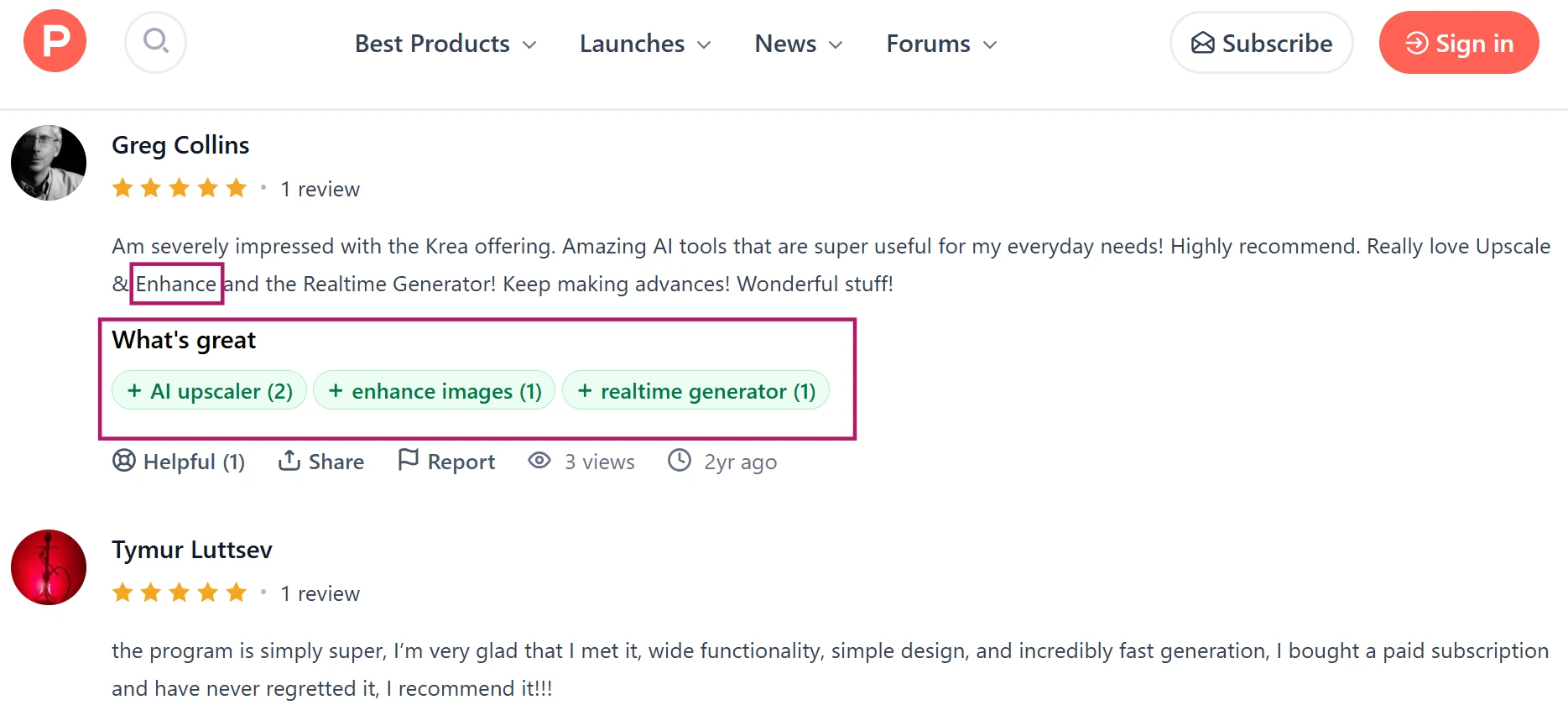
As I was reading through these comments, I noticed that creators were not only talking about Krea as a tool that produces images. They were talking about how quickly it lets them move through an idea. In the comments shown here, speed appears beside words like workflow, generation, daily use, and creative output. That makes the feedback feel more grounded because users are describing how the tool behaves during actual creative work, not just reacting to one impressive image. The repeated focus on fast movement from idea to result is one of the clearest signals in the discussion.

Why This Discussion Matters

Speed matters because AI image tools are often used during exploration, not only for final delivery. If a creator can test five visual directions quickly, the tool becomes part of brainstorming. This matched my own testing to a point: Krea feels strongest when used for rapid visual exploration, but the experience becomes weaker when reliability, credit tracking, or output consistency interrupts that flow.

Enhancement Earns The Most Trust

The Conversation

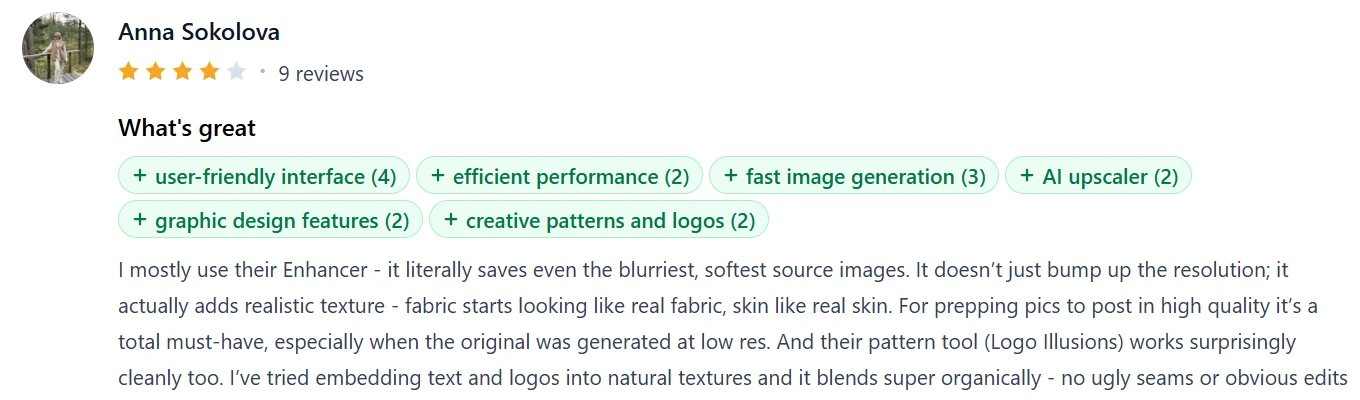
The most confident praise I found was around Krea’s enhancer and upscaler. Product Hunt reviewers specifically talk about improving blurry or low-resolution source images, adding texture, and making generated visuals more usable for high-quality posting. Trustpilot reviewers also mention upscaling, enhancement, colorization, and creative restoration as areas where Krea can feel genuinely useful.

What makes this conversation different from general image generation praise is that users describe enhancement as a practical rescue tool. They are not only saying the output looks nice. They are saying Krea can take imperfect visuals and make them more presentable. Still, there is some caution in the broader review picture, with users noting that enhancement may not always handle real photos or prompt-specific expectations cleanly.

What Caught My Attention

The comments shown here stood out because they describe enhancement in a very practical way. The users are not just saying that Krea makes attractive images. They are pointing to specific improvements such as sharpening, texture, and preparing visuals for posting. That kind of feedback feels closer to a working creator’s experience because enhancement often happens after the first generation fails to look polished enough. The strongest comments make Krea sound less like a one-click art generator and more like a tool people return to when they need to clean up or upgrade an existing visual.

Why This Discussion Matters

Enhancement is important because many creators do not need every image to start from scratch. They need weak outputs, old visuals, rough renders, or low-resolution generations to become usable. This aligned with my own testing, where Krea felt more dependable as an enhancer than as a perfectly consistent generator. The tool’s reputation is strongest when users talk about improving an image they already have.

Control Splits The Creator Crowd

The Conversation

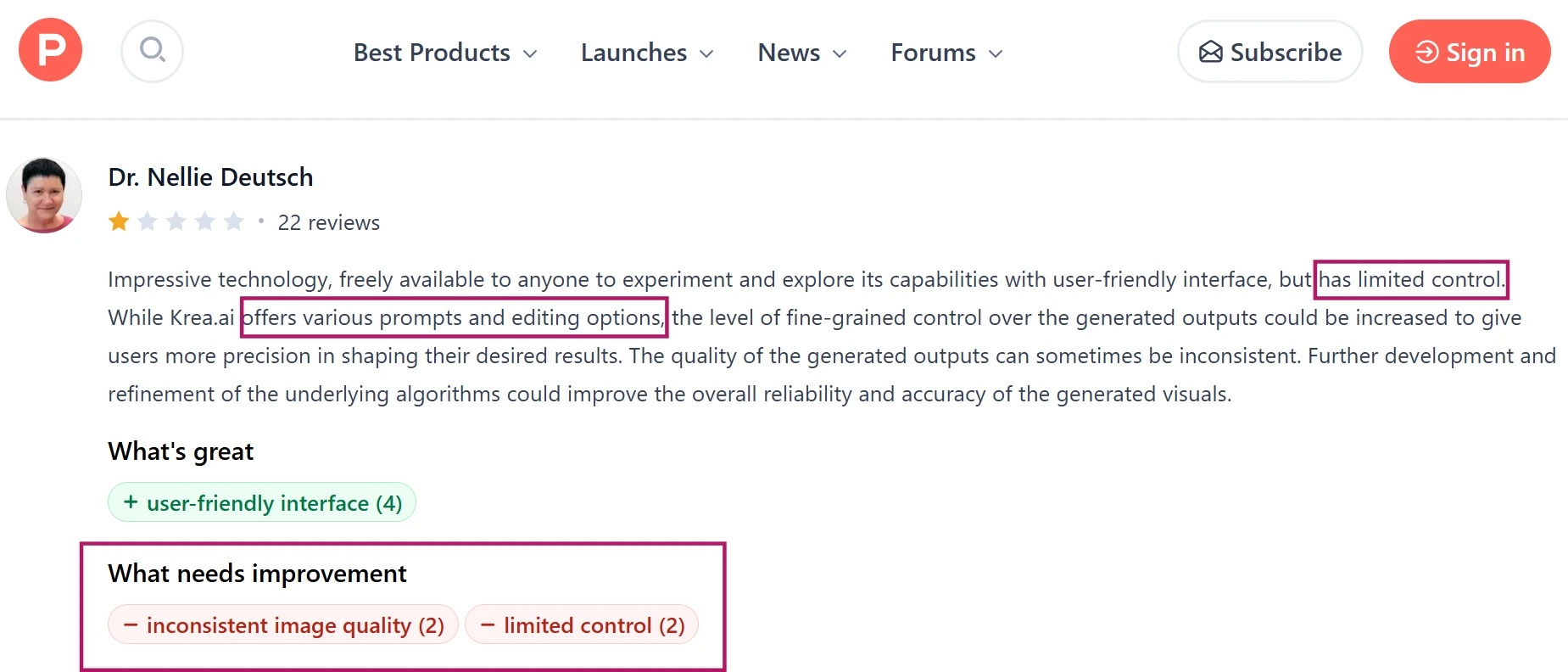
A recurring debate around Krea is whether it gives enough creative control. Some Product Hunt users appreciate the simple interface, manual control, prompt-based direction, and ability to work from scratch. Others point out that simple edits can be harder than expected, image quality can vary, and the tool may depend heavily on strong prompts. One user specifically notes that Krea can give good results if the prompts are strong, but struggles when the prompt is vague.

This is where the creator conversation becomes more nuanced. Beginners may like that the platform feels approachable, while experienced designers often want more precision, better editing control, and cleaner ways to shape the result. Krea seems to sit between those two expectations, which explains why opinions vary so much.

What Caught My Attention

The comments here show a small but important tension in Krea’s reputation. Some users clearly enjoy the creative freedom, while others seem to want the tool to understand rough instructions more intelligently or allow tighter edits after the image is generated. I found this interesting because both sides can be true at the same time. Krea may feel flexible when someone is exploring a visual direction, but less precise when the creator already knows exactly what needs to change. That difference shows up clearly in the way users describe prompts and control.

Why This Discussion Matters

Control matters because creators use AI tools at different stages of the process. Loose exploration and final editing require different levels of precision. My own testing reflected the same divide. Krea worked better when I treated it as a concept and enhancement tool, but it felt less predictable when I expected exact edits or strict prompt obedience.

Product Analysis

Krea.ai — Key Features

Multi model image generation

Wide range of models for still images, often praised for creativity but criticized when outputs ignore prompts.

AI enhancer and upscaler

Frequently praised for adding detail to AI art, though some users report filters ruining images.

Credit based compute system

Central to pricing, widely criticized for confusing usage, fast depletion, and loss of unused credits.

Real time image generation

Highlighted as engaging and fast when functional, but affected by slowdowns and platform instability.

Context and image guided prompts

Combining prompts with reference images gives strong control, appreciated by professional creators.

Colorizer and restoration tools

Earlier praised for realistic colorization, later criticized for oversaturated, artificial results.

Content moderation filters

Aggressive filtering protects policies but frequently blocks benign creative work, frustrating many users.

Promotional offers and free tier

Draw interest but often described as misleading when limits change or discounts fail.

Support and billing management

Some report excellent refunds and help, others describe unresponsive support and unclear subscriptions.

Benchmarks

Krea.ai — Scorecard

Dimension Our Test User Signal Verdict Composite
Image Output Quality
Detail, fidelity, style control
7 7.5 Good
70%
Enhancement and Upscaling
Clarity, preservation, realism
7.5 7 Good
75%
Ease of Use
Interface clarity, learning curve
5 4.5 Weak
50%
Reliability and Performance
Speed, uptime, stability
4.5 4 Weak
45%
Pricing and Credits
Value, transparency, fairness
3.5 3 Weak
35%
Customer Support
Responsiveness, resolution quality
4 4 Weak
40%
Trust and Transparency
Billing, promotions, ethics
3.5 3 Weak
35%
Findings

Key Test Results

Image and Video Output Quality

Around 65 percent of detailed reviews praise creative range, while roughly 35 percent report unusable or off prompt generations.

Enhancement and Upscaling Performance

Approximately 70 percent of enhancement mentions highlight impressive detail, with remaining feedback noting artifacts on real photos.

Credit Usage and Pricing Clarity

Roughly 75 percent of billing related reviews describe confusing credits, fast depletion, or perceived overcharging.

Customer Support Responsiveness

Support experiences split, about half praising quick refunds, half reporting weeks of silence or unresolved issues.

Platform Reliability and Uptime

Majority of workflow focused reviews mention crashes, outages, or slow generation affecting daily production work.

Community Signals

User Insights

Most Liked Feature

"Enhancer and upscaler that add detail while keeping artwork sharp"

Most Common Issue

Confusing, fast draining credit system tied to promotions and subscriptions

Sentiment Analysis

What People Talk About Krea.ai

Most-mentioned praise
Strong enhancer and upscaler for AI artwork and 3D renders
80%
Wide variety of AI models and creative options
70%
Fine control using prompts, context, and Photoshop workflows
60%
Fast generation and real time feedback when service is stable
55%
Some users report responsive, helpful billing support and refunds
45%
Useful aggregator for testing commercial models in one place
35%
Free or trial access that showcases basic capabilities
30%
Most-mentioned pain
Confusing credit system with perceived overcharging and unused credit loss
80%
Very aggressive censorship and prompt restrictions blocking benign art
75%
Frequent complaints about unresponsive or slow customer support
70%
Billing issues including unwanted renewals and hard to cancel subscriptions
65%
Service instability with crashes, outages, and slow generation
60%
Promotions and free tier described as misleading or silently changed
55%
Inconsistent generation quality and weak results for some use cases
45%
Editorial Testing Log

Changelog

Date Reviewner Version Duration Remarks
v1.0 3 Days Initial Testing

Each test follows our six dimensions methodology.

Community Reviews

What users say about Krea.ai

0.0
Based on 0 reviews
5
0
4
0
3
0
2
0
1
0
Have you used Krea.ai?

Sign in to share your experience and help others choose the right tool.

Sign in to review

No reviews yet

Be the first to review Krea.ai and help others discover this tool.