
I needed to pick one AI image tool and commit, and I kept circling the same two: Krea AI and getimg.ai. Both get recommended as the serious multi-model platforms that aren't Midjourney, and their marketing reads almost the same. So I compared them properly.
A note on how, because it shapes what this article is. I didn't stage a beauty contest of matching prompts, and here's the reason. Both platforms pull from the same underlying models, the same Flux and Seedream weights, so line their outputs up on identical settings and you mostly get twins. A prompt-by-prompt scorecard would tell you less than the thing that actually differs, which is how each tool is built to work. So I compared them on their models, editing, finishing, and official pricing, using each platform's own tools.
One finding shapes the rest. These two overlap heavily, so the decision comes down to a few real splits, and to which side of them your work falls on.
My quick verdict (for the impatient)
Here's the short version. Every call is defended below.
- Best free way in: Krea, easily. It has a free tier with daily credits, and getimg's pricing page shows no free plan at all.
- Cheapest entry: Krea again. Its lowest paid tier undercuts getimg's, and you can test for free first.
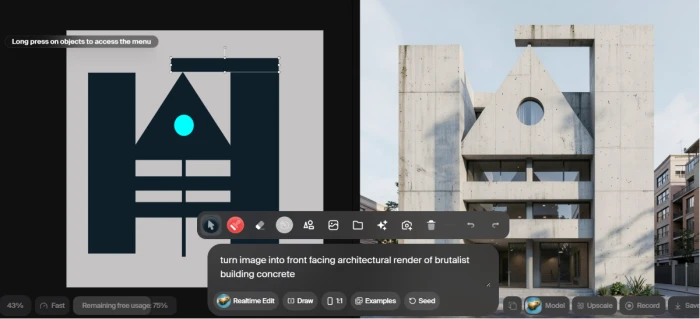
- Best real-time generation: Krea. The sketch-to-image canvas is its whole identity.
- Best for simple editing: getimg. Its editor runs on plain text prompts with no masking.
- Best for audio: getimg. It generates music and speech, which Krea doesn't do.
- Best for 3D and node workflows: Krea, which getimg doesn't offer.
- Best image quality: a tie. They share the same models, so raw output is close.
- Best all-round value: it splits. Krea for a free start and real-time work; getimg for transparent per-image credits and the easiest editing.
Krea AI vs getimg.ai at a glance
The overview I wanted on day one.
| Feature | Krea AI | getimg.ai |
|---|---|---|
| Best known for | Real-time canvas and creative suite | Fast, simple multi-model creation |
| Free plan | Yes, 100 units per day | None on the pricing page |
| Starting paid price | $5.25 / mo, billed yearly | $8 / mo, billed yearly |
| Image models | Large roster, plus its own Krea 2 | Broad roster, auto model picker |
| Real-time generation | Yes, market-leading canvas | Yes, lighter preview |
| Image editing | 10 models, masking optional | Text-based, no masking |
| Upscaling | Topaz, up to 22K | Topaz, up to 16K |
| Video | Deep roster, plus real-time video | Deep roster, in one prompt box |
| Audio (music, speech) | No | Yes |
| 3D and node workflows | Yes | No |
| Developer API | Yes, separate product | Yes, separate product |
| Commercial rights | Paid plans only | Paid plans only |
What each platform is built around
The homepages hide the split that matters, so here it is plainly. Both grew into large creative suites, but from opposite starting points.
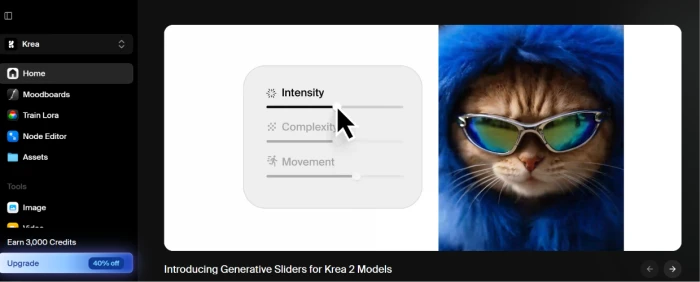
Krea AI is built around real-time generation. Its Realtime Canvas is a split screen where you sketch or type on one side and a photorealistic image forms on the other in milliseconds, updating live. Around that sit its own Krea 2 model, a deep video roster, Topaz-grade upscaling, LoRA training, 3D object generation, and a node editor for chaining models together. It feels like a design tool that runs on AI.
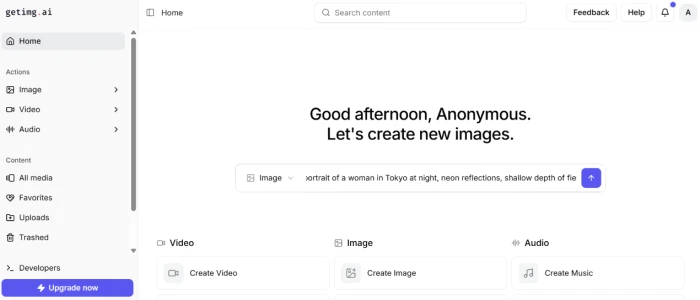
Getimg AI starts from speed and simplicity. It moves you from a prompt to a finished, licensed image fast, and its editor is the standout: inpainting, background swaps, object removal, and outpainting all happen through plain language, with no masking. It also does something Krea doesn't, generating music and speech alongside images and video. Where Krea reaches into 3D and node workflows, getimg reaches into audio.
So both are far past plain image generation, and neither is missing much the other has. Think of Krea as the deeper workshop and getimg as the faster counter. Krea rewards someone who wants to build custom pipelines and iterate visually, while getimg rewards someone who wants a clean prompt box with quick edits and audio in the same tab. The real differences are narrower than the homepages suggest, which the next sections walk through, starting with the question everyone asks first.
Image quality: what to expect
I'll be straight about this, since it's the first thing people ask: after testing both, there's no clean winner on raw image quality, and once you see why, it stops being a mystery.
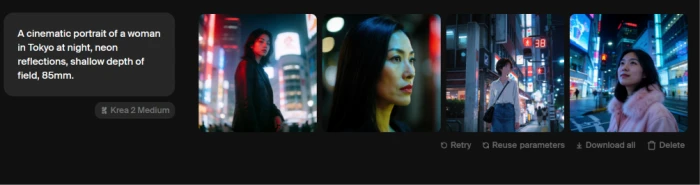
Both platforms are aggregators, so I checked the obvious thing first. I ran a handful of matched Flux prompts on getimg and then on Krea, and the images came back as near-twins — same composition, same faces, the gap no bigger than what you'd get re-rolling on a single tool. That's the finding in one sentence: same weights in, essentially the same image out. It's also why I didn't build this comparison around a prompt-by-prompt scorecard. Quality only shifts where the model menus differ.
So I stopped comparing the pictures and started comparing how each tool gets you to them, and two things actually moved the needle. First, model selection: getimg's auto mode picked a model for me on every prompt, so I could type and go, which is the friendlier path starting out. Krea handed me its own Krea 2 plus a longer menu and let me choose, more to learn, but more control once you know what you're after. Second, finishing, covered under upscaling below, is where Krea edged ahead in my runs: pushing a detail-heavy image up, its tools held texture that getimg's left a touch softer.
The unique pieces are worth flagging. On getimg, GPT Image rendered clean, readable text where plain Flux tends to garble it, and getimg alone does music and speech; Krea brings its in-house Krea 2 and a wider video and 3D lineup. If your work leans on one particular model, that roster is what should decide you, not the raw image quality and confirm the platform you pick actually hosts it, because the lineups overlap without being identical. For most prompts, expect comparable results from both, and decide on everything around the generation rather than the generation itself.
Real-time generation and the canvas
Real-time is the clearest single reason to pick Krea, so it earns its own stop. getimg has a live preview that refreshes as you adjust a prompt, but Krea built its identity here.
On Krea you draw a rough shape, a few blobs for a composition, and the model renders a photorealistic version in milliseconds, updating as you drag. It's the kind of tool where you nudge a subject left or right and watch the lighting re-render live, a quick spatial decision that a type-and-wait tool makes slow and clumsy. For visual thinkers this turns the usual prompt-and-wait cycle into something closer to sketching. If your process is iterative and you think in pictures, this alone can justify the choice.
If you mostly type a prompt and want a clean result, getimg's lighter preview is enough, and you won't miss a canvas you weren't going to use.
Editing, upscaling, video, and audio
Past generation, a handful of tools decide daily usefulness, and this is where the two clearly separate. I'll take them in turn.
Editing
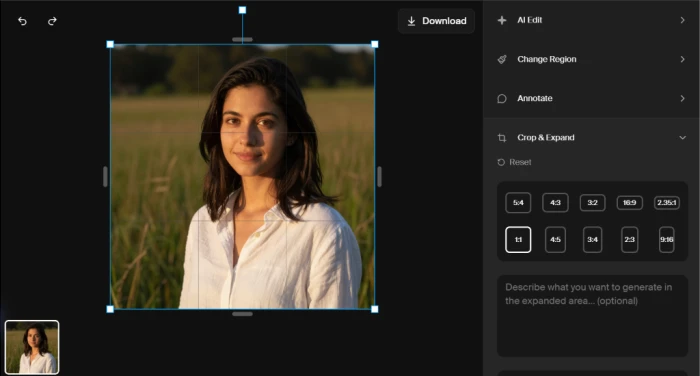
getimg's home turf. Its editor works from plain-language prompts with no masking, so fixing a detail or swapping a background takes seconds. Krea's editor offers ten models with optional masking for precision, trading ease for control. For quick fixes getimg is faster; for controlled edits Krea gives you more handles.
Upscaling and finishing
Closer than I expected. Both bundle Topaz-based upscaling, so this isn't the one-sided win it's sometimes described as. The difference is the ceiling: Krea enhances up to 22K, getimg up to 16K. For most print work either is plenty; for extreme enlargements Krea edges ahead.
Video
Both carry deep video rosters now, including Kling, Seedance, Veo, and more, so neither is the light option. Krea adds real-time video and pulls in Sora and Runway; getimg keeps its video inside the same simple prompt box. Call it a near-draw, with Krea slightly deeper for people who want every model.
Audio
One clean difference. getimg generates music and speech from text, a whole media type Krea doesn't touch. If your projects need a soundtrack or a voiceover in the same tool, that is a getimg-only reason to choose it.
Custom models
Both let you train a private model on your own images, which matters for brand or character consistency. Krea uses LoRA training, getimg uses DreamBooth, and the idea is the same: feed it a set of reference shots and it learns to reproduce a specific face or product style on demand. Krea folds this into its node workflows for repeatable pipelines, while getimg keeps it inside the main dashboard. For a studio that needs the same character across fifty images, either works. Krea gives more control, getimg gets you there with less setup.
Speed, ease, and who should start where
Two big suites feel different the moment you click, and that feeling decides who should begin where.
getimg is the gentler on-ramp for editing. Its plain-language, no-masking editor means a newcomer can fix an image on day one, and the auto model picker removes the guesswork of choosing a model.
Krea's beginner advantage is different: it's free to start. You get daily credits without paying, so you can learn the tool and its real-time canvas before spending anything. getimg has no free tier at all, so a beginner there is paying from the first day.
One caveat on Krea from heavier users: at peak load, generations can slow, and the depth of the suite takes a little longer to learn. getimg's narrower focus makes it feel quicker to master, even if it does less at the edges.
That reframes the beginner question. For someone who wants to try before buying, Krea wins on the free tier. For someone paying anyway who wants the simplest editing, getimg wins on the no-masking workflow. Pricing makes the trade concrete, so that comes next.
Pricing and free plans
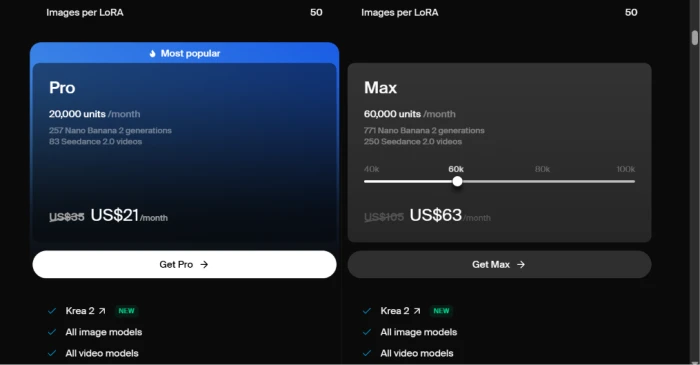
I pulled these from each platform's official pricing page in July 2026. Both localize prices, so you may see your own currency, and both meter usage in credits or compute units. The figures below are the yearly-billing rate per month. Confirm the live numbers before paying.
Krea keeps a free tier, then scales up on compute units.
| Plan | Price | Notes |
|---|---|---|
| Free | $0 | 100 units/day, no commercial license |
| Basic | $5.25 / mo | 5,000 units/mo, commercial license |
| Pro | $21 / mo | 20,000 units/mo, all video models |
| Max | $63 / mo | 60,000 units/mo, unlimited concurrency |
| Business | $160 / mo | 80,000 units/mo, up to 50 seats |
| Enterprise | Custom | SSO and IP indemnification |
Krea advertises roughly 40% off with yearly billing, so monthly rates are higher. One-time compute packs stay valid for 90 days.
getimg has no free plan; it starts at Entry.
| Plan | Price | Notes |
|---|---|---|
| Entry | $8 / mo | 3,000 credits/mo, 4K upscaling |
| Core | $25 / mo | 15,000 credits/mo, 8K upscaling, teams |
| Plus | $55 / mo | 35,000 credits/mo, 16K upscaling |
| Ultra | $150 / mo | 100,000 credits/mo, 10 teams |
getimg's monthly billing runs higher, from $10 up to $175, with yearly billing saving 20%. No free plan appears on its pricing page, which matches what you'll find if you sign up expecting free credits and get none. Both platforms also sell a developer API as a separate product, billed apart from these plans. Two takeaways: Krea is the cheaper way in and the only one of the two you can try without paying, while getimg's fixed credit pools are easier to budget once you're a paying user.
Commercial rights, quickly
One licensing point, since it trips people up. On both platforms, commercial rights come only with a paid plan. Krea's free tier is for personal use, so anything you make there isn't licensed for client work, paid ads, products, or anything you sell. getimg puts commercial rights on every paid tier from Entry up. If you're generating for a business, budget for at least the entry paid plan on whichever you choose, and read each platform's use policy, because both restrict certain kinds of content.
Alternatives worth a look
Krea and getimg are not the only options, and a few names deserve a mention before you commit.
- Midjourney: the benchmark for consistent, stylized quality, though it lacks the editing suite and real-time canvas of these two.
- Leonardo AI: strong value and fine-grained controls, popular with game and concept artists.
- Adobe Firefly: the safe pick if you live in Photoshop and want commercially-clean training with Creative Cloud integration.
- Ideogram: worth a try if readable in-image text is your main pain point.
A note on Flux, which you'll see recommended as an alternative: Flux is a model, not a rival platform, and both Krea and getimg already run it. Choosing Flux means choosing one of these tools anyway.
Who each one is for
To make it concrete, here's how the choice tends to break down by the kind of work you do.
- Designers and visual thinkers: Krea. The real-time canvas suits people who explore compositions by eye rather than by typing paragraphs of prompt.
- Marketers and social teams: close, but getimg's auto model picker and no-masking edits make fast, high-volume output painless, and its audio tools help if you also cut short video.
- Developers: either, since both sell an API. Pick on model access and per-call pricing rather than the app itself.
- Hobbyists and first-timers: Krea, because you can start free and learn the canvas before you pay a cent.
- Studios needing brand consistency: both train custom models, so weigh Krea's deeper controls against getimg's simpler setup.
So which should you pick?
After comparing both closely, my answer to the title is that neither is simply better, because they're built for different halves of the same job.
Pick Krea AI if you want a free way in, real-time creative iteration, 3D or node workflows, or the lowest entry price. It's the tool for visual thinkers who explore on a canvas and want to grow into depth without paying to start.
Pick Getimg AI if you want the simplest editing, audio generation in the same place, or transparent per-image credits once you're paying. It's the cleaner everyday workhorse for someone who edits by describing the change and wants predictable costs.
On the pictures themselves, expect a tie, since both draw from the same models. So the honest decision rule is to match the tool to the parts of the job that actually differ. A free start and real-time work point to Krea; simple editing and audio point to getimg. Either way you land on one of the two strongest multi-model platforms available.
Comments 0
Join the discussion and share your perspective.
Sign in to post a comment and reply to other readers.
No comments yet
Be the first to share your perspective on this article.