
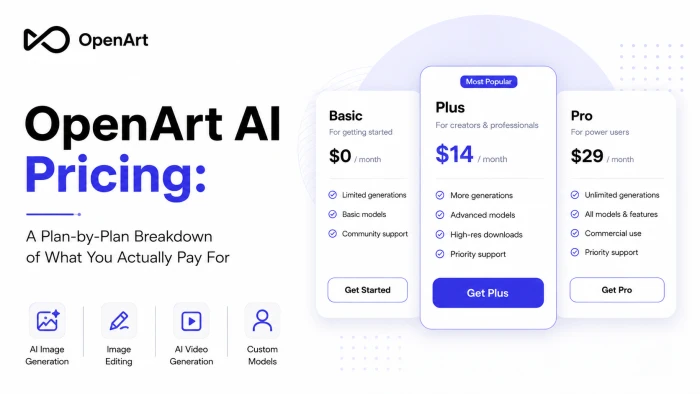
OpenArt bills itself as an all-in-one creative studio, but the question that matters most to anyone deciding whether to sign up is a practical one: what does it actually cost?
This article is the answer. I went through every plan on OpenArt's pricing page, broke down the credit system sitting underneath all of them, and worked out which tier earns its price for which kind of creator. By the end, you'll know exactly what your money buys and where the line sits between a plan that fits and one you'll outgrow in a week.
One thing explains every number on that page, so I will start there.
Credits: The Currency Behind Every Price
OpenArt does not bill you per image or per video. It runs on credits. Each plan drops a monthly allowance into your account, and every creation you make spends from it. Learn the exchange rate and the whole pricing page starts making sense.
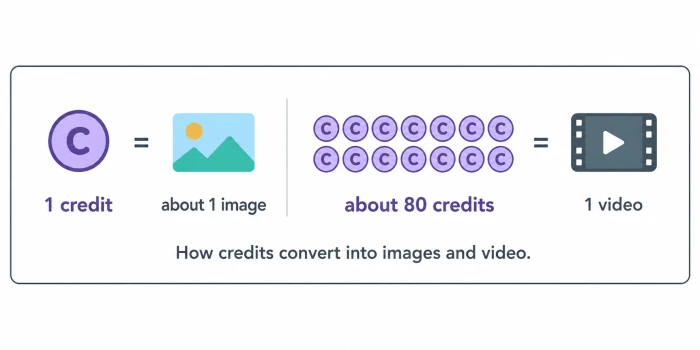
Here is the math I pulled from OpenArt's own figures. Roughly one credit gets you one image. A video runs closer to 80 credits. So a 4,000-credit plan works out to about 4,000 images or near 50 videos, or any mix of the two.
That ratio matters more than the sticker price. A plan can look generous until you lean on video, at which point the credits drain fast. Keep the exchange rate in your head as we move through each tier below. It is what separates a plan that lasts the month from one that has you buying top-ups by the third week.
The Free Way In
Before you pay anything, OpenArt lets you start for free. It is the low-stakes way to test the interface and see whether the output holds up for what you need. I would treat it as a test drive rather than a permanent setup, because the real capacity lives behind the paid tiers we are about to walk through.
Essential at $14: The Testing Ground
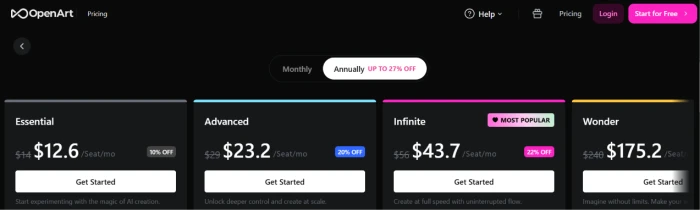
The first paid step up is Essential. It costs $14 a month, or $12.60 a month billed annually, which is a 10% saving. For that you get 4,000 credits each month.
Run that through our exchange rate and you are looking at about 4,000 images or roughly 50 videos. The plan also covers up to 13 consistent characters, around 13 personalized models, 8 parallel generations, and access to the full library of 100+ premium models across images, video, and audio.
So who is it for? Someone testing OpenArt on personal projects, or using it lightly and irregularly. The ceiling is real, though. There are no commercial use rights at this tier, which knocks it out the moment you want to sell your work or use it inside a business. That single gap is what pushes most serious users one rung higher, to the plan we look at next.
Advanced at $29: Where It Gets Serious
Advanced is the tier where OpenArt stops feeling like a sandbox. It is $29 a month, falling to $23.20 with annual billing, a 20% saving, and it triples your monthly credits to 12,000.
Two things appear here that Essential never offered. Commercial use rights arrive first, so everything you produce is cleared for business and client work. The second addition is the option to add credits as needed instead of being capped at your monthly allowance. I will come back to those add-on credits in a later section, because there is a catch attached worth knowing about.
The output scales to match the price: around 12,000 images or 150 videos, up to 40 consistent characters, about 40 personalized models, and 16 parallel generations. Advanced also introduces Director, giving you up to 2 minutes of total video. For freelancers and small creators who have moved past experimenting, this is the realistic starting line.
Infinite at $56: The Popular Middle
OpenArt flags Infinite as its Most Popular plan, and once you set it beside Advanced, the label makes sense.
For $56 a month, or $43.70 annually (a 22% saving), you get 24,000 credits. That is double Advanced's allowance for less than double the price. Everything from Advanced carries over, and Infinite adds priority support, 32 parallel generations, and up to 4 minutes of Director time. There is also room for around 80 consistent characters.
This is the plan I would steer most working creators toward. It sits at the point where the value per credit starts bending in your favor: the step up from Advanced costs $27 more and hands you 12,000 extra credits. Producing content every week rather than now and then? Then the popular tag is earned.
Wonder at $240: The Studio Tier
Then there is Wonder, labeled Best Value, and built for people whose work depends on sheer volume.
It runs $240 a month, or $175.20 with annual billing, which is a 27% saving and the steepest discount on the page. In return you get 106,000 credits. The output ceilings are huge. You are looking at roughly 106,000 images or 1,300 videos, with capacity for up to 353 consistent characters and Director time reaching about 17 minutes.
The headline feature is Unlimited Creation, which lifts the usual generation ceilings entirely. Wonder also stacks a 10% discount on credit packs on top of everything else. For a studio, a busy agency turning out client work at scale, or a heavy solo creator who would otherwise burn through add-ons every week, this is the lowest per-credit cost OpenArt offers. For anyone outside that group it is more than needed, and one of the cheaper plans above will serve you better.
That covers the four paid tiers. Before we get to the two levers that decide your final bill, here is the whole ladder in one view.
| Plan | Monthly | Annual / mo | Credits / mo | Best for |
|---|---|---|---|---|
| Essential | $14 | $12.60 | 4,000 | Testing and personal use |
| Advanced | $29 | $23.20 | 12,000 | Freelancers and commercial work |
| Infinite | $56 | $43.70 | 24,000 | Regular working creators |
| Wonder | $240 | $175.20 | 106,000 | Studios and high-volume output |
Monthly or Annual: The Discount Ladder
You will have spotted the pattern in the table: every plan is cheaper paid yearly, and the discount grows as you climb. It opens at 10% on Essential and reaches 27% on Wonder.
The takeaway is simple. The more you spend, the harder annual billing works for you, and on Wonder that 27% turns into a meaningful chunk of money across a year. The cost is commitment, since annual locks you in for twelve months. If OpenArt is already part of how you work, the yearly rate is the obvious pick. If you are still making up your mind, monthly stays the safer option even at the higher rate.
The Extra Credits Add-On (and Its Catch)
Back in the Advanced section I mentioned add-on credits and said I would return to them. Here is the part worth knowing.
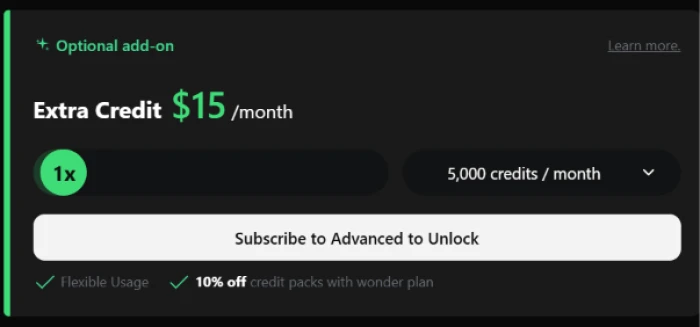
OpenArt sells an Extra Credit add-on at $15 a month for 5,000 extra credits. It is flexible and sits on top of whatever your plan already gives you. The catch is the gate around it. You have to be on Advanced or higher to buy it at all. Essential subscribers cannot top up, so they either ration their 4,000 credits or move up a tier.
That detail quietly explains why Essential only works for light use. The moment you need a little more, you cannot simply pay for it. You are nudged toward Advanced, which we covered earlier.
Team and Enterprise: Custom Territory
Past the individual plans, OpenArt runs Team and Enterprise options aimed at groups. These add shared credit pools and collaborative workspaces on top of the same 100+ model library, with pricing scoped to the size of your team rather than a fixed sticker price.
There is no public figure here. A small agency or a larger organization contacts OpenArt, and they build a plan around the headcount and usage. I would only go this route once a single seat clearly cannot keep pace with what the team is producing.
Is the Price Worth It?
A price only means something next to the alternatives, so here is where OpenArt sits.
Most rival tools specialize. One nails image generation, another is built for video. OpenArt's pitch is putting images, video, characters, audio, and editing under a single subscription, which reshapes the comparison. Rather than paying for two or three separate tools, you pay once.
Set against a dedicated image generator, OpenArt's Essential tier lands in similar monthly territory while bundling far more than image output. Set against video-first tools, its credit system lets you push spend toward video only in the months you need it, instead of carrying a flat video subscription all year. The trade-off is focus. See our end to end Openart AI review to decide whether it will be worth paying. A specialist tool can still produce a stronger single output type, so if you only ever need one thing, a dedicated tool may win. OpenArt's value shows up the moment your work crosses more than one medium.
Which Plan Actually Fits You
We have walked the full ladder, so here is how I would settle the choice. Two questions do most of the work.
First: do you need commercial rights? If the answer is no and you are creating for yourself, Essential at $14 is enough. If the answer is yes, your floor is Advanced at $29, because that is where commercial use and credit top-ups switch on.
Second: how much do you actually produce? Occasional output sits comfortably on Advanced. Regular, weekly creation is where Infinite at $56 starts paying for itself on value per credit, which is exactly why it is the popular choice. And full-time, high-volume work belongs on Wonder at $240, where the add-on treadmill stops being a problem.
One practical note before you commit.
Prices and credit allowances on tools like this move often, and the numbers here reflect OpenArt's pricing page at the time I wrote this. Before you hand over any money, open the live pricing page and check the current figures against what you have read. The shape of the decision will hold. The exact dollars are the part most likely to shift.
Comments 2
Join the discussion and share your perspective.
Sign in to post a comment and reply to other readers.
YVBSSV PRASAD
No Proper Open Chat for Basic Questions Another major frustration is the lack of a proper open chat experience for simply asking questions and clearing doubts. When you're working with complicated AI tools, you naturally need to ask questions. Sometimes you don't need another generation—you just need an answer. But when basic interaction itself is tied to the platform's usage model, it makes the whole experience feel unnecessarily restrictive. Users shouldn't have to worry about the cost of every question while trying to understand a product they've already paid for. Don't Confuse "Everything in One Place" With "Best Value" This is probably my most important advice to other users. Don't subscribe simply because OpenArt gives you many AI tools under one roof. It sounds attractive. It feels convenient. It looks like you're getting a luxury package. But ask yourself: How many of those tools will you actually use seriously? If you're primarily interested in cinematic video, use a strong dedicated video-generation platform. If you primarily need image generation, look at platforms that specialize in that. If you need animation, character consistency, editing, or another specific workflow, compare dedicated solutions for that particular requirement. Luxury doesn't necessarily fulfill your actual requirement. Sometimes paying for a large collection of tools you barely use is worse value than paying for two or three specialized tools that genuinely solve your problems.
YVBSSV PRASAD
My own support experience has added to that frustration. I reported an issue, received a response about high email volume, and followed up later with “I am still waiting for your response.” I'm still waiting for a proper resolution. For a paid service, support delays like this directly affect ongoing projects. I also have concerns when credits are consumed because of technical failures. Technical problems happen, but the customer shouldn't have to chase support to get back credits for problems they didn't cause. My Advice Don't subscribe just because OpenArt offers “everything in one place.” That sounds convenient, but luxury doesn't necessarily fulfill your actual requirement. If you seriously need video, image generation, animation, or another specific capability, compare dedicated tools that specialize in that area. You may get better value by paying for a few tools you actually need rather than a large collection you barely use. Test first. Calculate your real credit consumption. Understand the rollover rules. And don't underestimate the importance of customer support. For me, the combination of non-rollover credits, expensive additional usage, limited basic interaction, and delayed support makes the platform difficult to justify for serious long-term projects. Creators need tools that help them finish projects—not a system that makes continuing those projects increasingly expensive.