Video Generation

HeyGen AI Review

AI video creator focused on talking avatars and script to video. Strong for fast explainer, course, and marketing clips, less suited to complex cinematic or music driven projects.

Test Duration
3 Days
Reviewner Version
v1.0
Last Tested
18 Jun, 26
8.1
Recommended for Content Creators
Reviewner Test Score

HeyGen delivers impressive avatar based videos, significant time savings, and standout customer support, which many reviewers rely on for daily workflows. Output quality on short scripted content is strong, but prompt adherence, motion realism, and technical glitches still appear, especially on complex or music driven clips. Pricing and credit policies are frequent pain points, with several users feeling blocked or overcharged when fixing AI mistakes. Best suited to creators, educators, and small teams producing short to mid length scripted videos who can tolerate occasional retries and cost constraints.

YouTube Creators Course Instructors Solo Marketers Small Agencies Corporate Trainers
Methodology

How We Tested HeyGen AI?

Avatar output quality evaluation

Testing focused on facial realism, lip sync, and movement. Expressions impressed on simple scripts, while walking, dancing, and body language often looked stiff or inconsistent.

Prompt handling and script alignment

Assessment covered script to video accuracy, music prompts, and correction attempts. Simple narratives worked, but complex instructions, music clips, and revisions frequently misfired.

Workflow reliability and credits behavior

Examination tracked glitches, lost projects, autonomous generations, and credit deductions. Time saving potential was clear, yet errors, repeats, and lost credits undermined reliability.

Usability and learning curve review

Analysis compared first session friction, navigation, and interface consistency. Non technical users eventually succeeded, but changing layouts and sparse documentation slowed mastery.

Support responsiveness and issue resolution

Observation covered live support access, response times, and credit reimbursements. Support agents responded quickly and generously, although some integration and account issues lingered.

Reviewner Testing Log

HeyGen AI Hands-On Testing

Our HeyGen Test Journey: Prompt, Login, Setup, and Video Plan

Test: Video Agent Prompt Creation

What we tested:
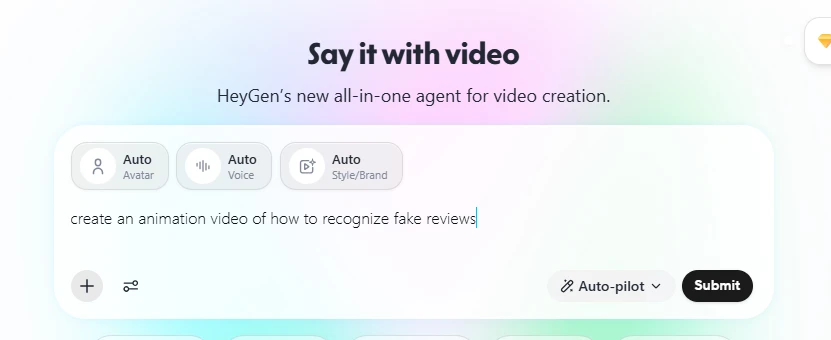
We started with HeyGen’s main “Say it with video” prompt box and entered a simple request: “create an animation video of how to recognize fake reviews.”

Steps performed:

  1. Opened HeyGen video creation page.
  2. Typed the video idea inside the prompt box.
  3. Kept Auto Avatar, Auto Voice, and Auto Style/Brand enabled.
  4. Clicked Submit to generate the video plan.
Commentary:
HeyGen keeps the starting process simple. Instead of asking for script, avatar, voice, and layout separately, it allows the user to enter one idea and lets the AI decide the video direction automatically. This is useful for beginners who want to create a video quickly without setting up every element manually.

Sign-Up and Magic Link Login

What we tested:
We checked how easy it is to create or access an account before generating the video.

Steps performed:

  1. Clicked submit after entering the video idea.
  2. HeyGen opened a login/sign-up popup.
  3. Selected the email login option.
  4. Entered the email address.
  5. Clicked Send a secure magic link.
  6. Opened the email and clicked Log in with magic link.

Commentary:
HeyGen uses a magic link login system, which makes sign-in quick because users do not need to remember a password. The process is smooth, but it does add an extra step before the user can continue generating the video.

Onboarding Questions

What we tested:
We completed HeyGen’s onboarding flow to see how it personalizes the video creation experience.

Steps performed:

  1. Selected Social Media as the video creation purpose.
  2. Chose Education & Training as the role.
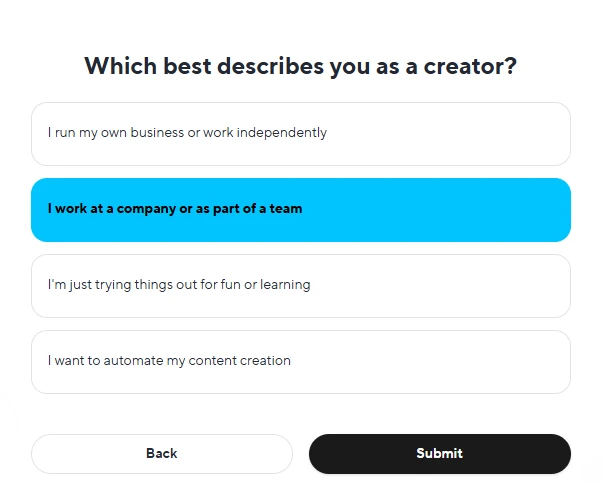
  3. Selected I work at a company or as part of a team as the creator type.
  4. Submitted the onboarding form.

Commentary:
HeyGen asks a few simple questions before opening the workspace. These choices help the platform understand whether the user is creating videos for marketing, education, social media, ads, or business use. The onboarding is clean and easy to follow, although users who want to test quickly may feel it adds a few extra clicks.

Pricing Plan Screen

What we tested:
We checked whether HeyGen clearly shows free and paid plan options during the setup process.

Steps performed:

  1. Completed onboarding.
  2. Reached the plan selection page.
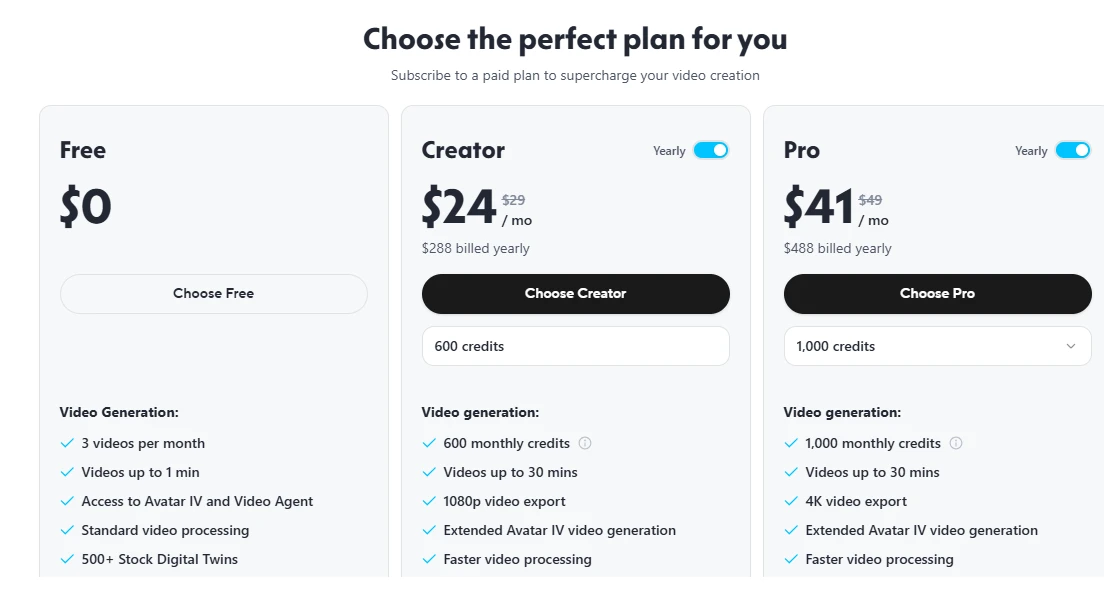
  3. Reviewed the Free, Creator, and Pro plans.
  4. Checked video limits, monthly credits, export quality, and processing features.
Commentary:
HeyGen clearly displays its plan structure. The Free plan allows limited video generation, while Creator and Pro plans offer more credits, longer videos, faster processing, and better export quality. This makes it easier to understand what is available before upgrading.

AI Video Plan Generation

What we tested:
We checked how HeyGen turns a simple prompt into a structured video plan.

Steps performed:

  1. Submitted the topic: How to Detect Fake Reviews.
  2. Waited while HeyGen generated the plan.
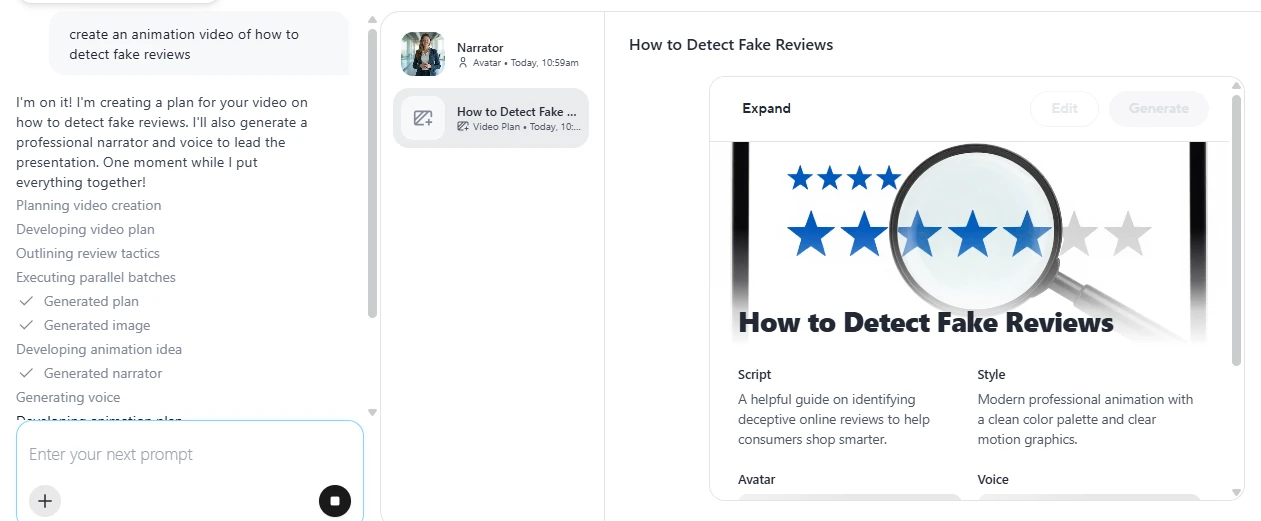
  3. Observed the progress steps such as planning, developing video plan, generating image, creating narrator, and generating voice.
  4. Reviewed the final video plan card.

Commentary:
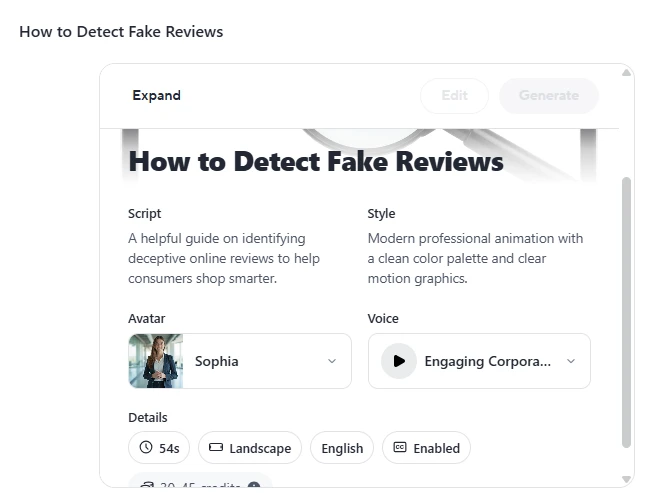
HeyGen automatically created a full video plan from a basic prompt. It selected a title, generated a visual cover, added a script summary, chose a style, and assigned an avatar and voice. This shows that HeyGen is useful for users who have an idea but do not already have a complete video script.

Script, Style, Avatar, and Voice Review

What we tested:
We reviewed the generated video settings before final video creation.

Steps performed:

  1. Opened the generated video plan.
  2. Checked the script summary.
  3. Reviewed the selected animation style.
  4. Checked the assigned avatar.
  5. Checked the selected voice.
  6. Reviewed video details such as duration, landscape format, language, and captions.
Commentary:
HeyGen gives a clear preview of the video setup before generation. The script explains the topic in a simple way, while the avatar and voice are automatically selected. Users can still review these choices before moving forward, which is helpful if they want more control over the final video.

Final Hands-On Verdict

HeyGen performed well in this test for turning a simple content idea into a structured AI video plan. The platform handled prompt understanding, script planning, visual generation, avatar selection, voice selection, and format setup automatically. The login and onboarding steps are simple, but they do slow down the first-time testing experience slightly.

Overall, HeyGen is strong for users who want to create quick educational, social media, or explainer-style videos without writing a full script manually.
Methodology

How We Research?

Cross-source aggregation

Data is collected across multiple review platforms, community forums, and social channels for a broad perspective.

Theme clustering and pattern detection

Feedback is grouped into recurring themes, highlighting consistent strengths, weaknesses, and commonly mentioned features.

Sentiment classification

Comments are tagged as positive, neutral, or negative to quantify satisfaction across different product dimensions.

Recency weighting and refresh cadence

Newer feedback receives higher weight, and analyses are refreshed periodically to capture product updates.

Internet Reputation

HeyGen AI Repo on Internet

HeyGen Online Reputation and User Feedback

1. G2 Review Snapshot

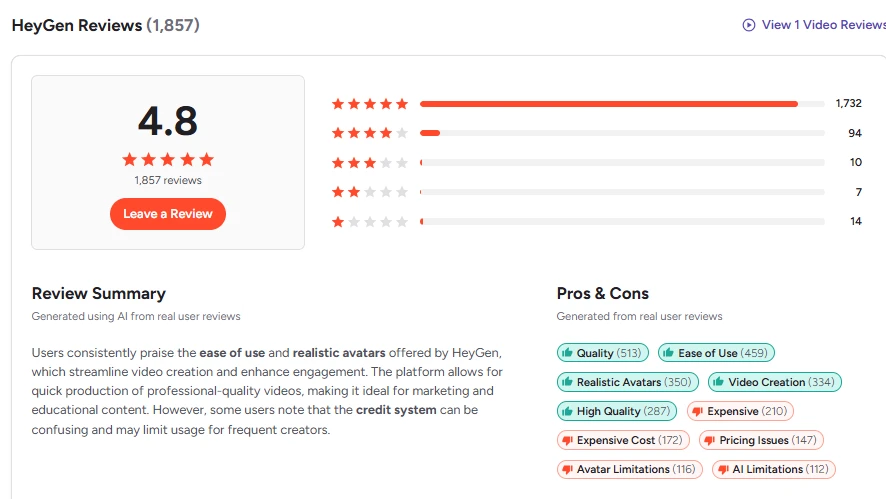
  • Overall rating: 4.8
  • Total reviews: 1,857
  • Rating distribution
  • Review Summary
  • Pros & Cons tags

Commentary:
HeyGen has a strong reputation on G2, with users mainly praising its ease of use, realistic avatars, video creation quality, and professional output. The review summary suggests that many users find HeyGen helpful for quickly creating marketing, training, and educational videos. However, the common complaints include pricing, credit limits, avatar limitations, and AI limitations, which are important for buyers to consider before choosing a paid plan.

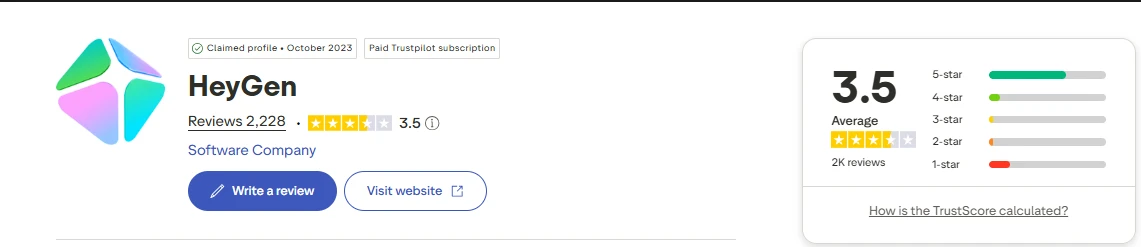
2. Trustpilot Rating Overview

  • Trustpilot rating: 3.5
  • Total review count
  • 5-star to 1-star rating breakdown
  • Claimed profile / paid Trustpilot subscription label

Commentary:
Trustpilot shows a more mixed picture of HeyGen compared with G2. The platform has many positive reviews, but the overall rating is lower because some users report issues with subscriptions, credits, product reliability, and user experience. This makes Trustpilot useful for showing the less polished side of HeyGen’s customer feedback, especially from users who faced billing or workflow problems.

3. Trustpilot User Review Examples

Commentary:
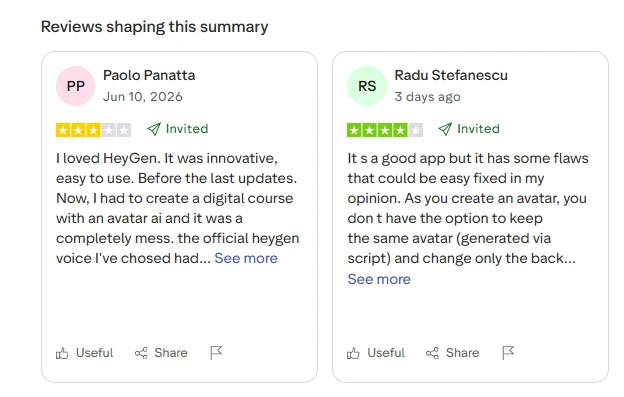
Recent Trustpilot reviews show both appreciation and frustration. Some users say HeyGen is innovative and easy to use, while others mention that updates, avatar control, credit limits, or generated output quality can create problems. This section is useful because it gives readers real examples of how users describe HeyGen after actually trying it.

4. Reddit Community Discussion

What to screenshot:
Open the Reddit thread and screenshot:

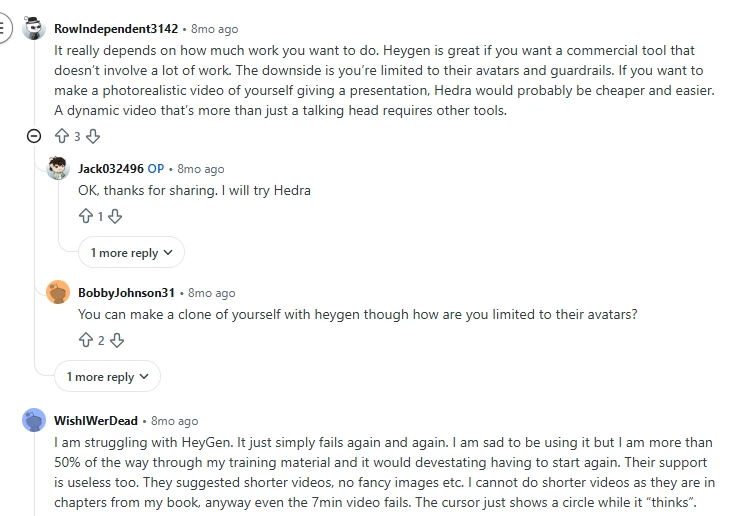
  • The post title: “Anyone here actually using HeyGen? Looking for honest”
  • A few visible user comments discussing real usage
  • Any comments mentioning avatar limits, guardrails, pricing, or workflow quality

Commentary:
Reddit discussions give a more informal view of HeyGen. Users often describe HeyGen as useful for commercial video creation when someone wants a ready-made tool without doing too much manual work. At the same time, Reddit users also point out limits such as being restricted to HeyGen’s avatars, platform rules, and controlled workflows. This helps balance the review with practical opinions outside polished review platforms.

Product Analysis

HeyGen AI — Key Features

Script to video creation

Highly praised for turning written scripts into videos quickly for courses, outreach, and explainers.

AI avatar realism

Avatars and faces often described as impressive, though motion and natural body language need improvement.

Custom avatar and voice cloning

Users value cloning themselves and voices, but report occasional voice drift and inconsistency.

Credit based pricing model

Frequently criticized as expensive, confusing, and unforgiving when AI generations fail.

Customer support and live chat

Repeatedly praised for fast, kind, and generous responses, especially around credit refunds.

Interface and workflow tools

Interface seen as clean and simple by many, yet some find navigation unintuitive or inconsistent.

Avatar motion and walking

Walking and movement options exist, but reviewers note robotic motion and desire for dancing avatars.

Long form and multi avatar limitations

Users report difficulty creating movies, multi character scenes, and longer uninterrupted clips.

Prompt responsiveness and music generation

Tool follows straightforward prompts acceptably, but struggles with music clips and precise directions.

Benchmarks

HeyGen AI — Scorecard

Dimension Our Test User Signal Verdict Composite
Avatar Visual Quality
Realism of faces and motion
8.5 8.7 Excellent
85%
Voice and Lip Sync
Speech naturalness and sync
7.5 7.2 Good
75%
Ease of Use
Learning curve and interface
7.8 8 Good
78%
Workflow Reliability
Glitches, losses, consistency
6 6.2 Moderate
60%
Value for Money
Pricing fairness and credits
5.5 5 Weak
55%
Customer Support
Speed and helpfulness
9 9.3 Excellent
90%
Advanced Control
Pro features and precision
6.2 6 Moderate
62%
Findings

Key Test Results

Avatar Output Quality

Roughly 70 percent of users praise visual realism, with remaining feedback focused on robotic motion and walking.

Prompt Accuracy and Control

Around one third of detailed reviews cite hallucinations, music misunderstandings, or prompts not fully followed.

Pricing and Credits Experience

Approximately 40 percent of critical reviews mention expensive plans, aggressive credit usage, or unclear limits.

Platform Stability and Reliability

Several neutral or negative reviews report glitches, lost videos, or regeneration loops wasting credits.

Support Responsiveness

Majority of comments on support describe fast responses and credit reimbursements in most minor cases.

Community Signals

User Insights

Most Liked Feature

"Customer service is fast, responsive, and generous with credit reimbursements"

Most Common Issue

Expensive, credit limited pricing that still charges when AI generations fail or require corrections

Sentiment Analysis

What People Talk About HeyGen AI

Most-mentioned praise
High quality avatar visuals that impress viewers
80%
Significant time savings compared with traditional filming
75%
Consistently praised, responsive customer support team
72%
Easy script to video workflow for non technical users
68%
Effective for educational, course, and storytelling content
60%
Interface generally simple and quick to learn
55%
Strong fit for YouTube and marketing style clips
48%
Most-mentioned pain
Pricing and credit system feels expensive and restrictive
80%
Glitches, lost videos, and unreliable generations waste credits
72%
Prompt adherence, music clips, and detailed directions often misinterpreted
65%
Avatar motion, walking, and realism can appear robotic
60%
Limited tools for long form, multi avatar, or cinematic projects
55%
Interface inconsistency and learning curve reported by some
40%
Watermarks and branding on some outputs feel unprofessional
30%
Editorial Testing Log

Changelog

Date Reviewner Version Duration Remarks
v1.0 3 Days Initial Testing

Each test follows our six dimensions methodology.

Community Reviews

What users say about HeyGen AI

0.0
Based on 0 reviews
5
0
4
0
3
0
2
0
1
0
Have you used HeyGen AI?

Sign in to share your experience and help others choose the right tool.

Sign in to review

No reviews yet

Be the first to review HeyGen AI and help others discover this tool.