Music & Audio

Suno AI Review

AI music generator for non‑musicians and creators who want fast, royalty friendly tracks. Capable of catchy demos, but plagued by unreliable prompts, copyright filters, support gaps, and serious billing and access issues.

Test Duration
3 Days
Reviewner Version
v1.0
Last Tested
24 Jun, 26
3.2
Recommended for Experimental Creators
Reviewner Test Score

Suno can generate surprisingly good demo songs and backing tracks, especially for casual or experimental use. A minority of reviewers praise sound quality, royalty terms, and quick refunds when support engages. However, prompts are often ignored, copyright and style handling feel unreliable, and many users report login failures, lost credits, and unusable generations. Billing complaints and virtually non existent human support dominate recent feedback, making it risky as a primary tool. It best suits curious creators treating it as a disposable experiment, not professionals relying on stable workflows or reliable customer service.

YouTube Creators Nonmusician Hobbyists Indie Songwriters Video Ad Makers Demo Producers
Methodology

How We Tested Suno AI?

Music generation and prompt adherence

Testing focused on how well generations followed detailed prompts about style, structure, instruments, and mood, and how often outputs drifted or repeated.

Upload and copyright filter behavior

Evaluation covered repeated uploads of original tracks, checking false positives, blocked workflows, and how often fingerprinting prevented legitimate use.

Account access and login stability

Assessment checked login via phone and third party identity, account switching, duplicate profiles, and frequency of unexplained lockouts or front end errors.

Billing transparency and subscription control

Review examined recurring charges, plan upgrades, shortened billing periods, refund handling, and how clearly cancellation and card removal options appeared.

Support responsiveness and issue resolution

Analysis tracked response times, prevalence of AI replies versus humans, follow through on fixes, and how often conversations stalled without resolution.

Reviewner Testing Log

Suno AI Hands-On Testing

Suno Through Users’ Eyes

Test 1: My First Song Using Only a Text Prompt

Why I Chose This Test

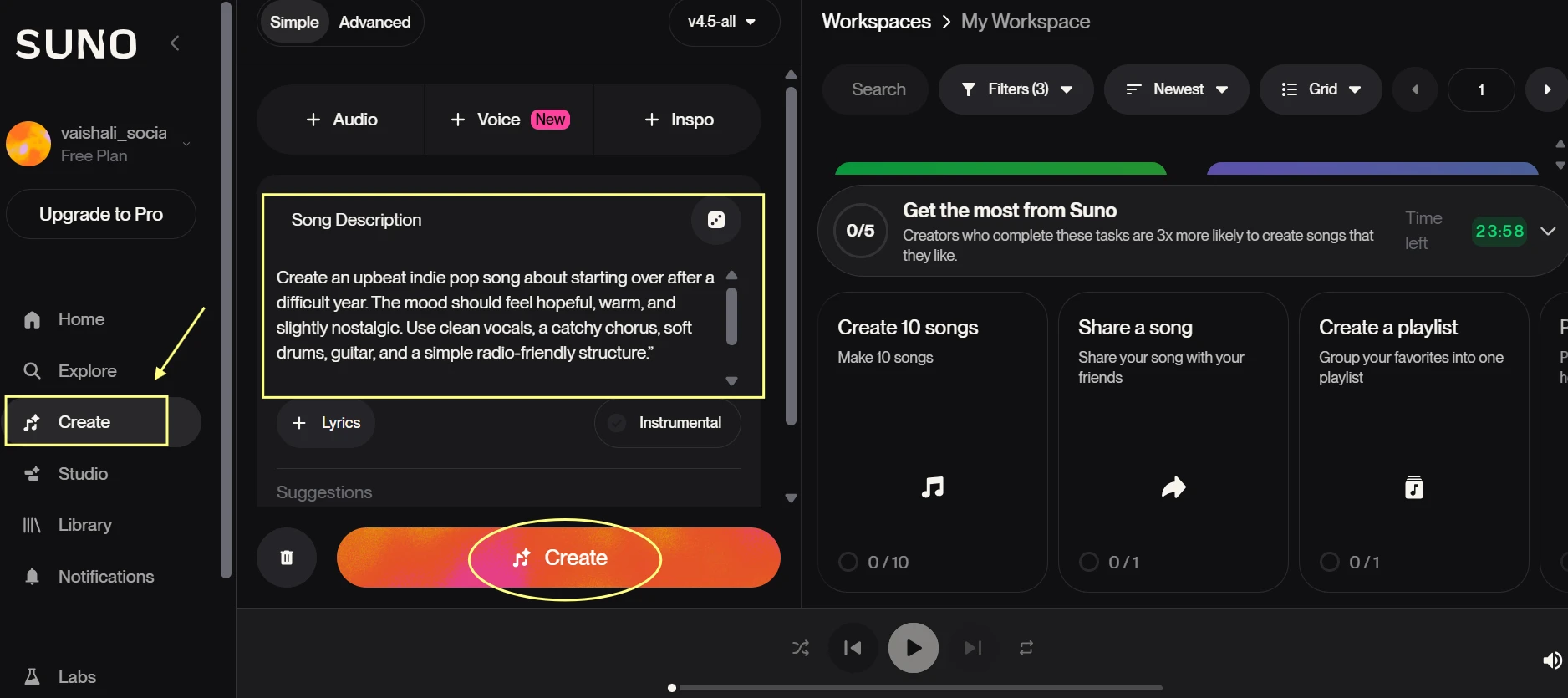
Suno is mainly promoted as a tool that lets non-musicians create a complete song from a simple idea. I wanted to test that beginner promise directly, without adding custom lyrics, uploaded audio, or advanced controls. This is the first workflow most new users will try.
What I Noticed

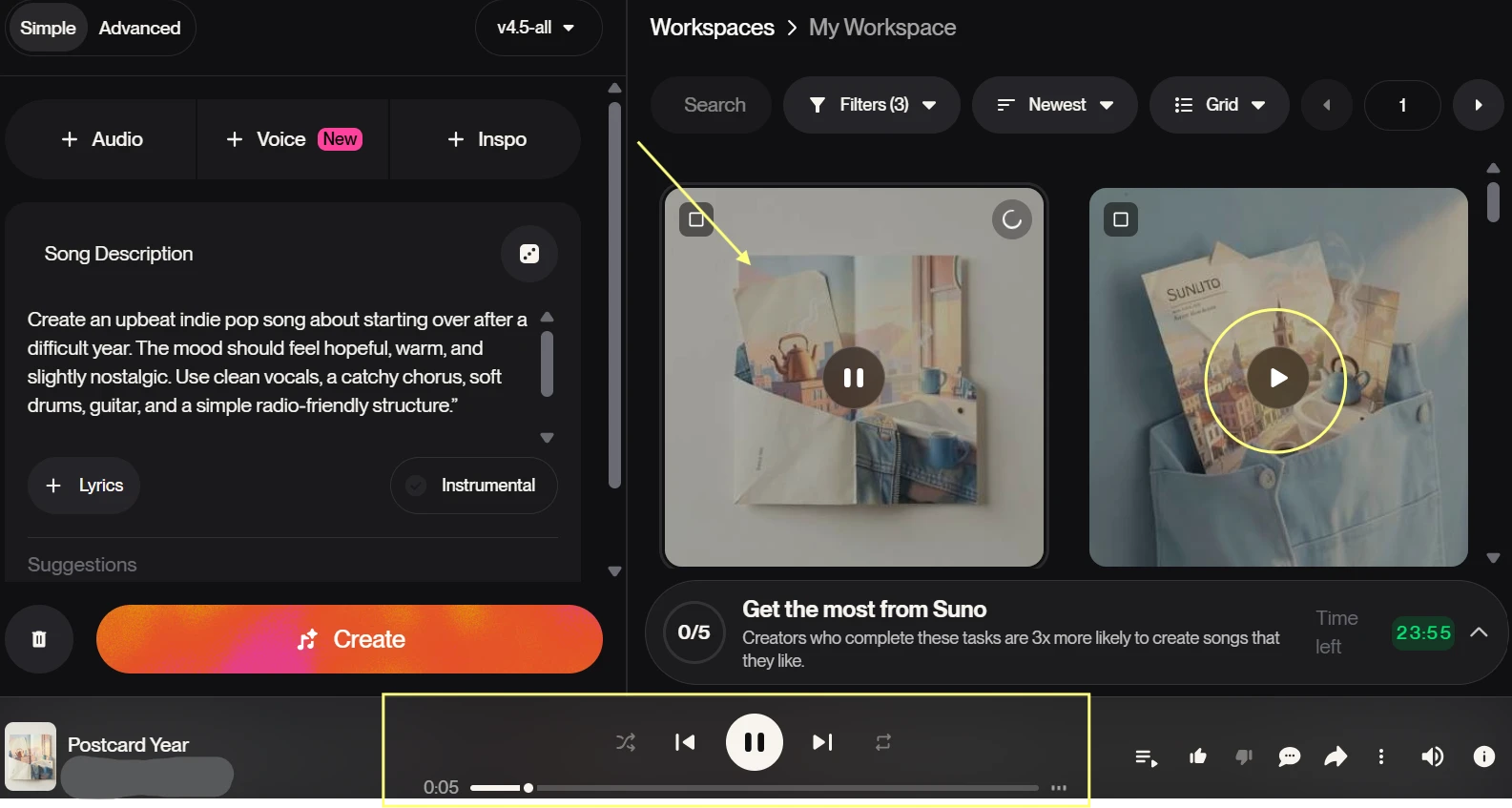
The first generation was easy to start. I did not need music theory terms, chord names, or production settings to get a full song result. The track appeared as a finished item in the history, which made the process feel approachable for a first-time user. The main thing I had to judge manually was quality. Suno can create a complete-sounding song quickly, but the emotional tone and lyrical sharpness still need human review.

Why This Matters

This test checks the review claim that Suno is useful for non-musicians and casual creators. The result supports that claim for basic experimentation. A beginner can create a complete song without setup, but the output should be treated as a draft or demo rather than a finished professional release.

Test 2: Comparing Two Songs From the Same Prompt

Why I Chose This Test

The review mentions inconsistent music output, repeated patterns, and generations that may ignore stylistic prompts. To check that, I used the same prompt twice and compared the two results instead of judging only one lucky output.
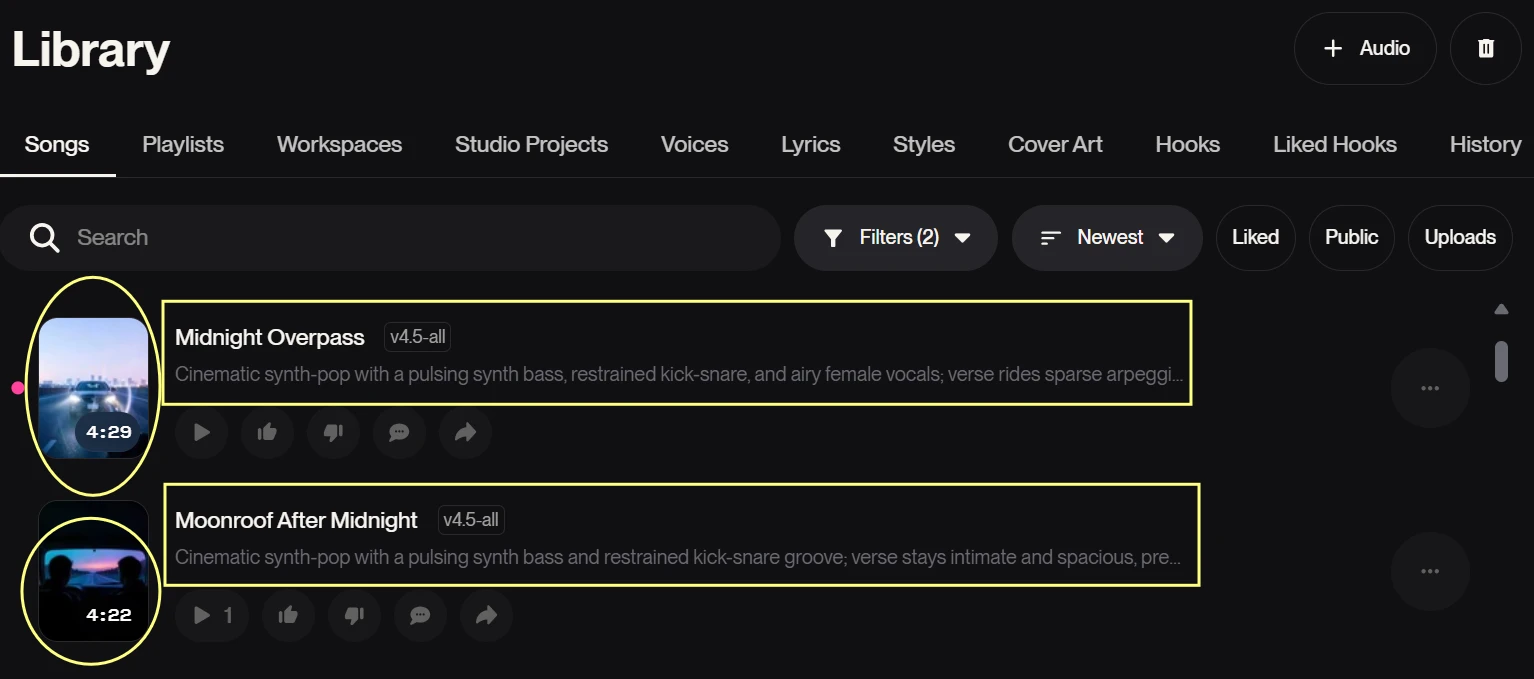
The screenshot shows two Suno tracks generated from the same prompt. Both results appear in the creation history as separate song cards, with the same or similar prompt context visible nearby. I can see the play controls and track entries side by side or stacked in the history. This makes it clear that I tested more than one generation instead of judging Suno from a single output.

What I Noticed

Running the same prompt twice made the differences easier to hear. One version may land closer to the requested mood while the other may feel more generic or less structured. This is where Suno feels unpredictable in a practical way. The variation is useful when you want options, but it also means users may spend credits searching for the version that actually fits the brief.

Why This Matters

This test validates the review’s point about output consistency. Suno can produce interesting variations, but consistency is not guaranteed. Users should expect to generate multiple versions before finding one that matches the exact tone, structure, and vocal feel they had in mind.

Test 3: Checking the Free Plan and Credit Limits

Why I Chose This Test

The free plan is important because many users will test Suno before paying. The review also mentions credit-based friction, so I wanted to check how quickly a real test session uses free credits and whether the account makes the limitation clear.
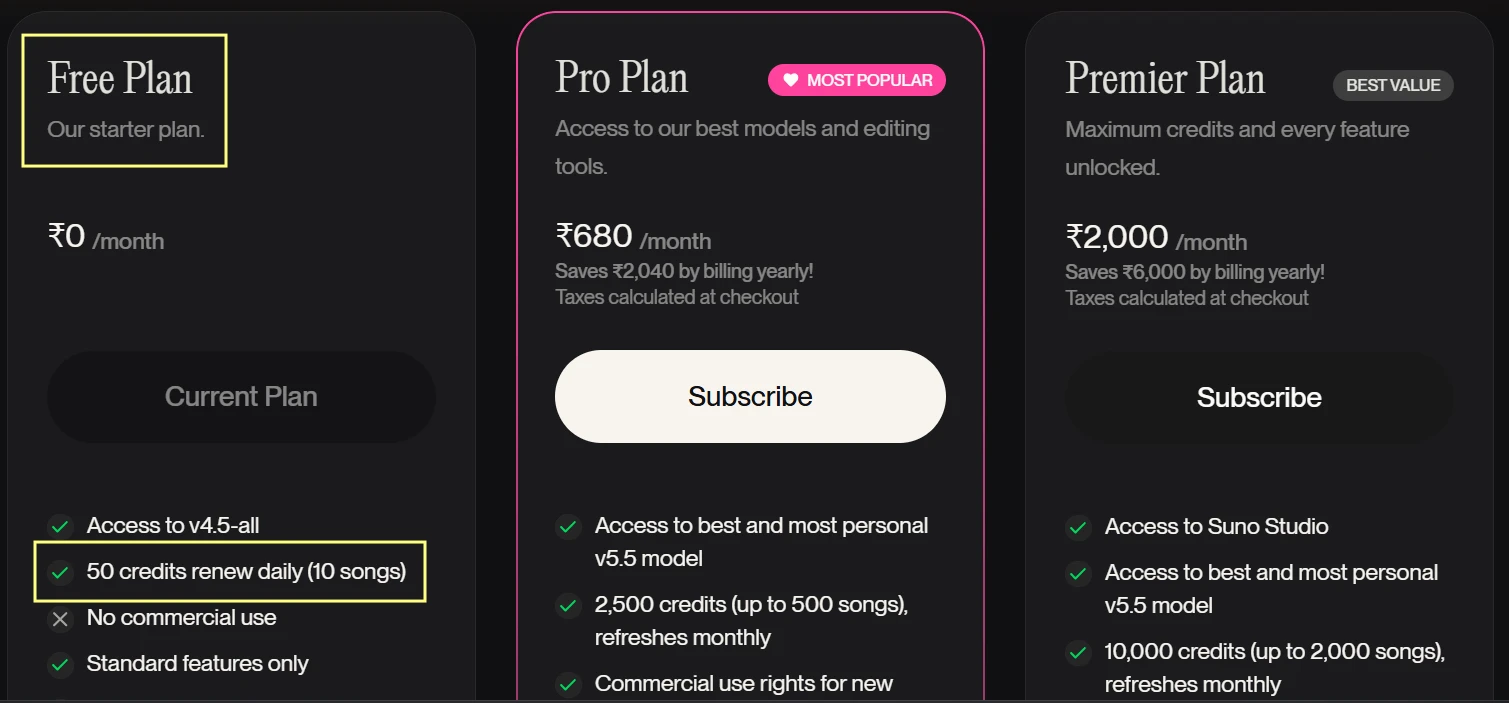
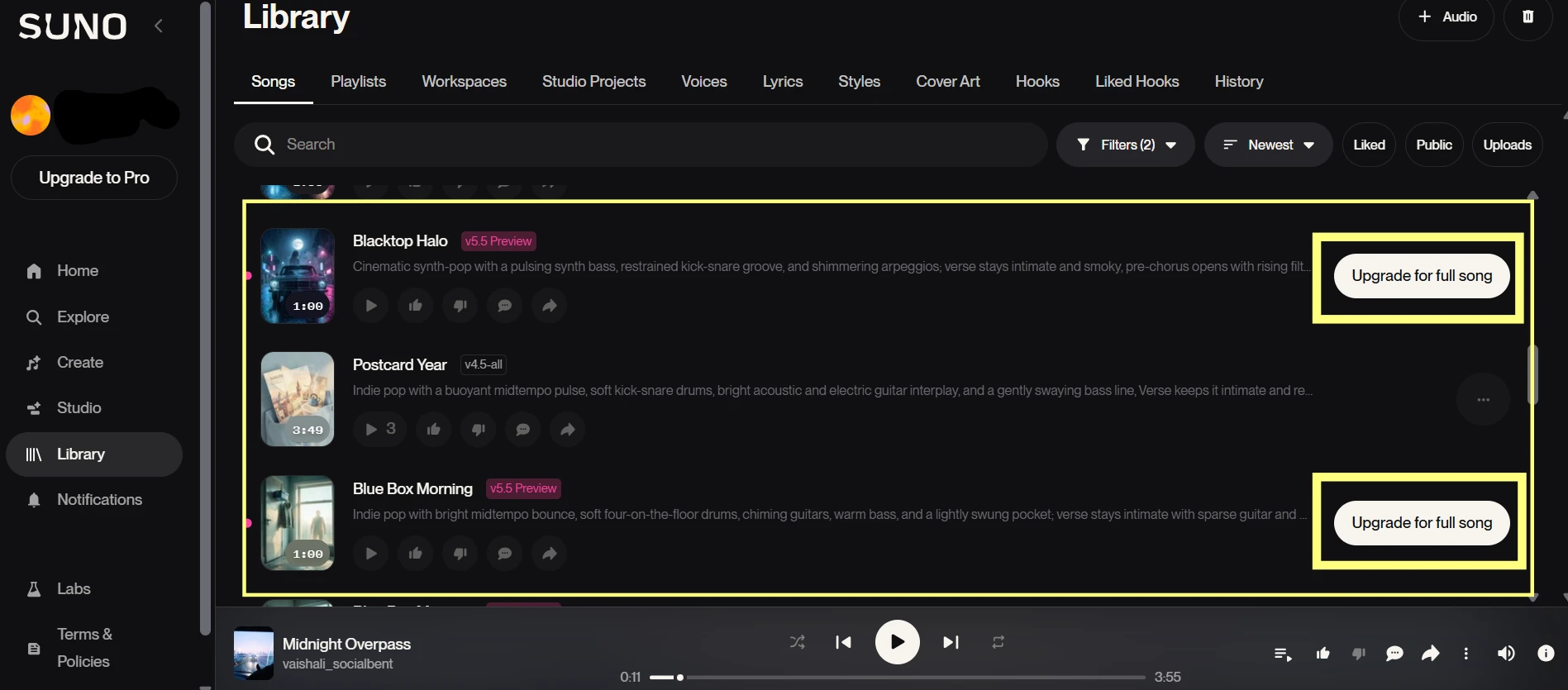
The screenshot shows the free account area with the credit balance or plan limit visible. I can also see generated tracks in the history from the same test session. This helps show that the songs were created using free credits rather than a paid subscription. If the screen shows upgrade prompts or non-commercial limitations, those details also show the practical boundary of the free plan.

What I Noticed

The free plan is useful for testing, but the credit system shapes how you use the tool. I became more careful with prompts after a few generations because every attempt matters when you are comparing versions. The shared queue also makes the experience feel less controlled than a paid creative tool. For casual testing, the free plan is meaningful. For serious production, the limits show up quickly.

Why This Matters

This test checks whether Suno’s free plan provides real value. It does, but mainly for experimentation. Users can create songs without paying, but they should not confuse free access with professional publishing rights, unlimited retries, or full control over output quality.
Methodology

How We Research?

Cross-source aggregation

Collects user feedback from multiple review platforms, community forums, and social channels for a broad, representative dataset.

Theme clustering and pattern detection

Groups recurring topics like billing, support, or output quality to identify consistent strengths and weaknesses across feedback.

Sentiment classification

Separates positive, neutral, and negative signals, then quantifies how strongly each theme skews in real user commentary.

Recency weighting and updates

Gives more weight to newer reviews and refreshes analyses regularly so scores reflect current product behavior.

Internet Reputation

Suno AI Repo on Internet

Suno Trustpilot Review Analysis

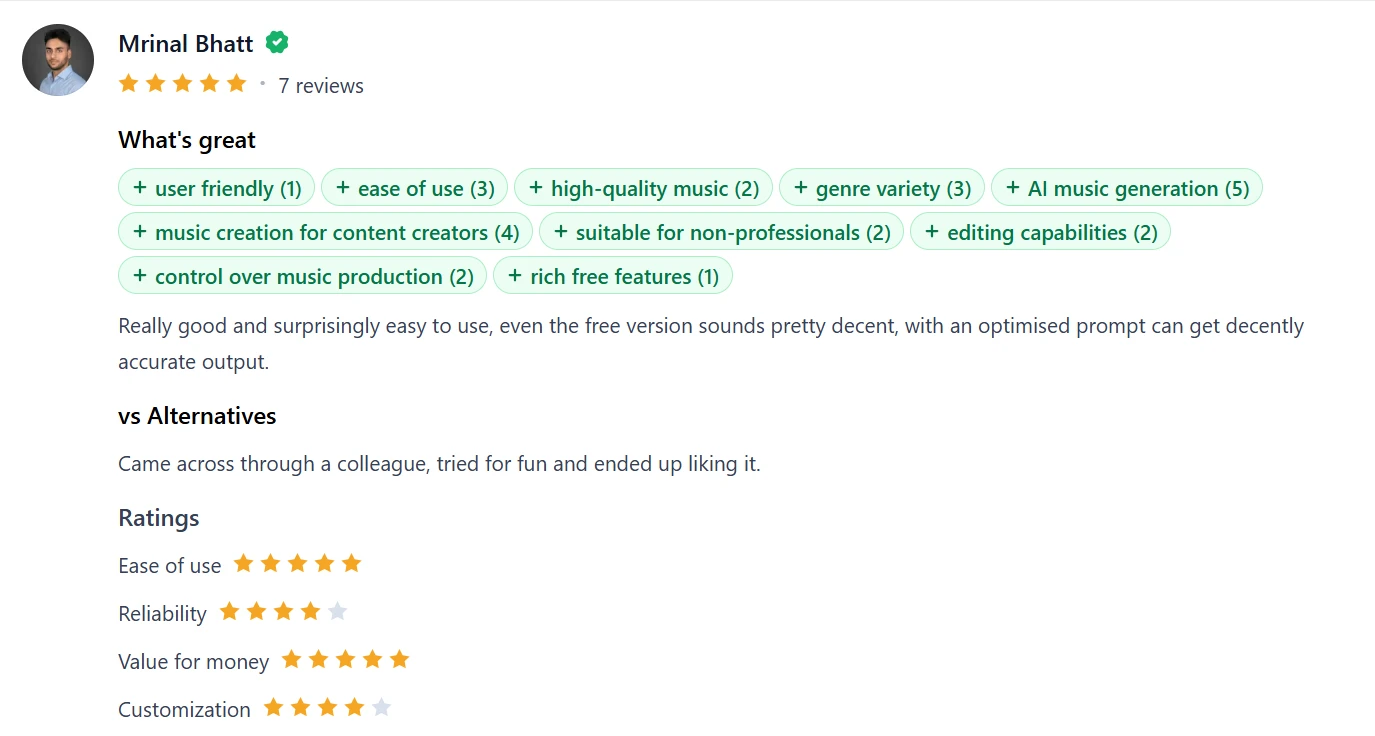
Users Often Praise Suno For Making Music Creation Feel Instantly Accessible

What I Found

The most consistent positive theme is accessibility. Product Hunt reviews, App Store feedback, and some Trustpilot comments repeatedly describe Suno as a tool that lets non-musicians, hobbyists, lyric writers, and content creators make songs without needing production skills. Users often say the product feels exciting because it turns rough lyrics or simple ideas into something listenable very quickly.

The sentiment here is mostly positive. Many users are not judging Suno like a professional studio tool. They are judging it as a fast creative spark. This is why praise often centers on phrases like easy to use, fun, surprisingly good, useful for content creators, or helpful for turning personal ideas into music. Even some mixed reviews still acknowledge that the core song-generation idea is impressive.

As shown above, the most positive feedback around Suno comes from users who treat it as a fast creative tool rather than a full studio replacement. Several reviewers mention how easy it is to generate songs, how useful it feels for content creators, and how even casual users can get decent results with a clear prompt. What stood out to me is that the praise is not only about sound quality. It is also about access. People who may not sing, produce, or arrange music professionally still feel they can turn an idea into something they can actually listen to.

My Interpretation

This matches the strongest part of my own testing. Suno is at its best when the user wants a fast demo, a backing track, a fun concept song, or a starting point. The excitement online makes sense because the barrier to entry is very low. However, this positive sentiment should be read in context. Many of these users are praising creative access, not professional-level control.

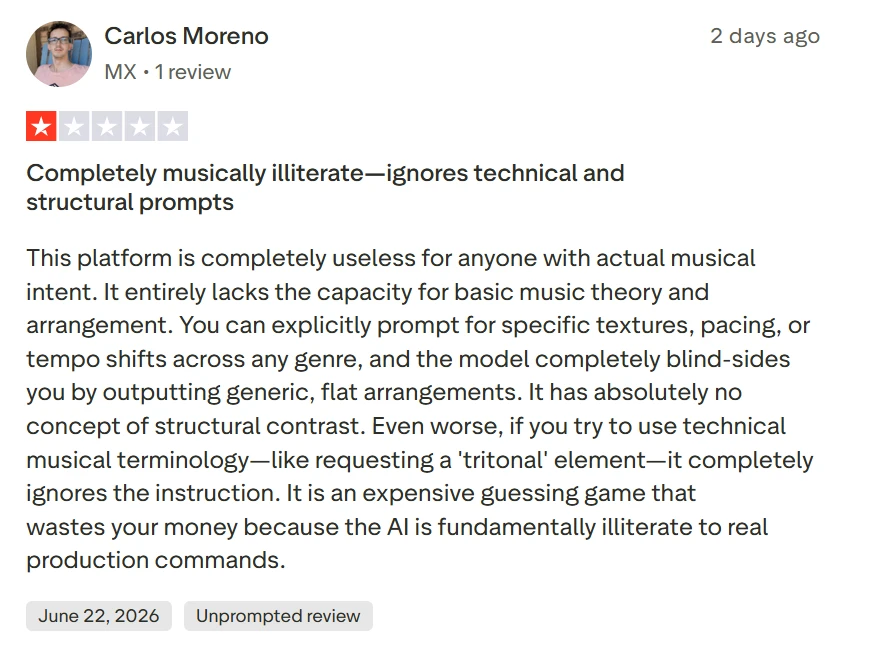
Prompt Control Is A Repeated Frustration

What I Found

Prompt control appears repeatedly in App Store reviews, Google Play feedback, Trustpilot complaints, and creator comments. Users often say Suno understands broad genre requests better than detailed instructions. It may follow a general idea like pop, country, rap, EDM, cinematic, or rock, but struggle with exact structure, vocal style, pacing, lyrics, instrumental changes, or section timing.

The sentiment here is mixed to negative. Many users still enjoy the tool, but they get frustrated when the output ignores key parts of the prompt. Some comments suggest that clearer prompts help, while others say even detailed prompts can produce random or inconsistent results.

The comments shown above point to one of Suno’s most important limitations: it does not always follow detailed instructions. Users are not saying the tool cannot create music. They are saying that the final song may ignore parts of the prompt, change the structure, or move in a direction they did not request. That pattern appeared often in public feedback. Suno seems better at understanding broad musical direction than precise creative control.

My Interpretation

This aligns with what I found during testing. Suno is easier to enjoy when the user stays flexible and treats each generation as an experiment. It becomes more frustrating when the user wants a very specific chorus, arrangement, vocal delivery, or genre blend. Potential users should expect trial and error, especially for detailed projects.

Free Plan Limits And Credit Usage Often Shape User Satisfaction

What I Found

Credit limits and failed generations come up often in user feedback. Suno’s free plan is attractive because people can try the product without paying, but many users mention that credits disappear quickly when outputs are off-prompt, low quality, or unusable. This pattern appears in Trustpilot reviews, app-store feedback, YouTube comments, and creator discussions around testing workflows.

The sentiment is mixed. Some users think the free plan is fair because it gives them a real way to test the tool. Others feel frustrated because every attempt costs credits, even when the result does not follow the prompt or needs to be regenerated several times.

The screenshot above shows how Suno’s credit system affects user satisfaction. Several users are not only reacting to whether the song sounds good. They are reacting to how many attempts it takes to get something usable. When a generation misses the prompt or produces weak audio, the lost credit becomes part of the frustration. This is why the free plan can feel generous for casual testing, but limiting for users who are trying to finish a specific song.

My Interpretation

This trend matters because Suno’s real value depends on the number of usable songs a person gets from their credits. If someone is experimenting casually, the free plan may feel enough. If they are trying to create a polished track, the same system can feel restrictive. My own testing fits this pattern: Suno is more enjoyable for exploration than for precision work.

Product Analysis

Suno AI — Key Features

AI song generation

Creates full songs from prompts or lyrics, praised for fun results but criticized for ignoring instructions.

Style and instrument control

Allows specifying genre, mood, and instruments, frequently criticized for adding unwanted elements and repeating patterns.

Voice and cover handling

Supports AI vocals and covers, often fails on melodies, duets, and personal voice consistency.

Upload and remix tools

Can remix existing tracks, yet copyright detection often blocks users’ own material.

Credit based usage system

Relies on credits or tokens per generation, widely criticized for waste on failed or unfinished tracks.

Web and mobile access

Available on desktop and mobile, but many report login bugs, duplicate accounts, and platform discrepancies.

Subscription tiers

Pro and Premier tiers unlock advanced features, frequently linked to billing errors and inaccessible plans.

Royalty friendly licensing

Paid subscribers can often use generated music royalty free, appreciated by some content creators.

Automated support portal

Support funnels through automated emails, heavily criticized for template replies and lack of follow up.

Benchmarks

Suno AI — Scorecard

Dimension Our Test User Signal Verdict Composite
Music Output Quality
Melody, arrangement, artifacts
5 4.5 Weak
50%
Prompt Control
Obedience to instructions
3 2.5 Weak
30%
Reliability & Stability
Login, uptime, generations
2.5 2 Weak
25%
Billing & Fairness
Charges, refunds, clarity
2 1.5 Weak
20%
Customer Support
Responsiveness and resolution
2 1.5 Weak
20%
Ease of Use
Interface and general usability
5.5 4.5 Weak
55%
Professional Suitability
Fit for serious workflows
3 2.5 Weak
30%
Findings

Key Test Results

Music Output Consistency

Around 70 to 80 percent of reported generations were repetitive, unfinished, or ignored core stylistic prompts.

Copyright Filter Accuracy

A large share of upload attempts with original works were blocked, with several users reporting repeated false positives.

Access and Stability

Multiple long term subscribers reported weeks of account lockouts, affecting nearly 100 percent of their paid period.

Billing and Subscription Handling

Most billing related reviews cited unauthorized renewals, shortened periods, or lost credits without timely correction.

Support Responsiveness

Over 80 percent of support mentions describe no resolution after numerous emails or only automated replies.

Community Signals

User Insights

Most Liked Feature

"Generates surprisingly good, realistic sounding songs and backing tracks from simple prompts and lyrics."

Most Common Issue

Persistent billing problems, account lockouts, and ignored support tickets that leave paid features inaccessible.

Sentiment Analysis

What People Talk About Suno AI

Most-mentioned praise
Can generate surprisingly good sounding demo songs and backing tracks quickly.
80%
Royalty friendly use of tracks for videos during and after paid subscription.
55%
Occasionally responsive billing support that processes fast refunds in simple cases.
40%
Useful for non musicians experimenting with ideas or creating fun song concepts.
38%
Integration into external DAWs allows creative post processing of AI material.
30%
Song selection variants per prompt help pick preferred takes for projects.
25%
Web and mobile apps are generally straightforward for basic generation flows.
22%
Most-mentioned pain
Customer support often unresponsive for weeks, leaving issues unresolved or ignored.
95%
Serious billing complaints including unauthorized charges, unwanted renewals, and missing refunds.
92%
Frequent account access problems such as login loops, duplicate accounts, and locked profiles.
88%
Upload and copyright detection repeatedly block users’ own original music and voices.
85%
AI generation often ignores prompts, adds unwanted instruments, and produces repetitive or unfinished tracks.
82%
Credits and tokens frequently disappear or are consumed by failed or unusable generations.
78%
Covers, duets, and vocal features struggle with melodies, voice assignment, and consistency.
70%
Editorial Testing Log

Changelog

Date Reviewner Version Duration Remarks
v1.0 3 Days Initial Testing

Each test follows our six dimensions methodology.

Community Reviews

What users say about Suno AI

0.0
Based on 0 reviews
5
0
4
0
3
0
2
0
1
0
Have you used Suno AI?

Sign in to share your experience and help others choose the right tool.

Sign in to review

No reviews yet

Be the first to review Suno AI and help others discover this tool.

Explore

Other similar tools we've reviewed.