Video Generation

Topview AI Review

AI video and UGC ad creator aimed at ecommerce sellers and social media marketers, mixing avatars, product shots, and templates. Capable when it works, but queues, credits, and reliability issues make results highly inconsistent.

Test Duration
3 Days
Reviewner Version
v1.0
Last Tested
02 Jul, 26
6.6
Recommended for Ecommerce Marketers
Reviewner Test Score

Topview AI can dramatically speed up simple product and UGC-style video creation, especially for ecommerce teams that stay within basic templated workflows. Positive reviews highlight intuitive tools, avatar options, and strong productivity gains once configured. However, negative feedback heavily criticizes misleading unlimited plans, slow or failed generations, aggressive credit consumption, and poor support and billing transparency. It suits experimentation and lightweight social ads more than time-critical or high-volume professional pipelines, and only for buyers comfortable managing queues and strict credit rules.

Ecommerce Marketers Dropshipping Sellers Shopify Brand Owners TikTok Shop Sellers Social Ads Managers YouTube Short Creators
Methodology

How We Tested Topview AI?

Video generation speed and stability

Testing short video renders showed frequent multi hour queues, stalled jobs at 99 percent, and occasional successful fast generations under lighter load.

Credit consumption and billing behavior

Evaluation of subscriptions found non rolling credits, charges for previews and regenerations, and strong complaints about auto renewal and refund handling.

Output quality and iteration needs

Assessment of generated videos revealed some usable clips but many unusable outputs needing 3 to 5 regenerations, rapidly burning paid credits.

Unlimited plan and queue system

Review of unlimited tiers showed shared queues producing waits from several hours to full days, contradicting expectations of practical unlimited usage.

Onboarding, usability, and support

Interface testing indicated beginner friendly workflows for some, but inconsistent regional access, lost projects, slow responses, and unresolved tickets for others.

Reviewner Testing Log

Topview AI Hands-On Testing

My Hands-On Testing Walkthrough

Landing on the homepage
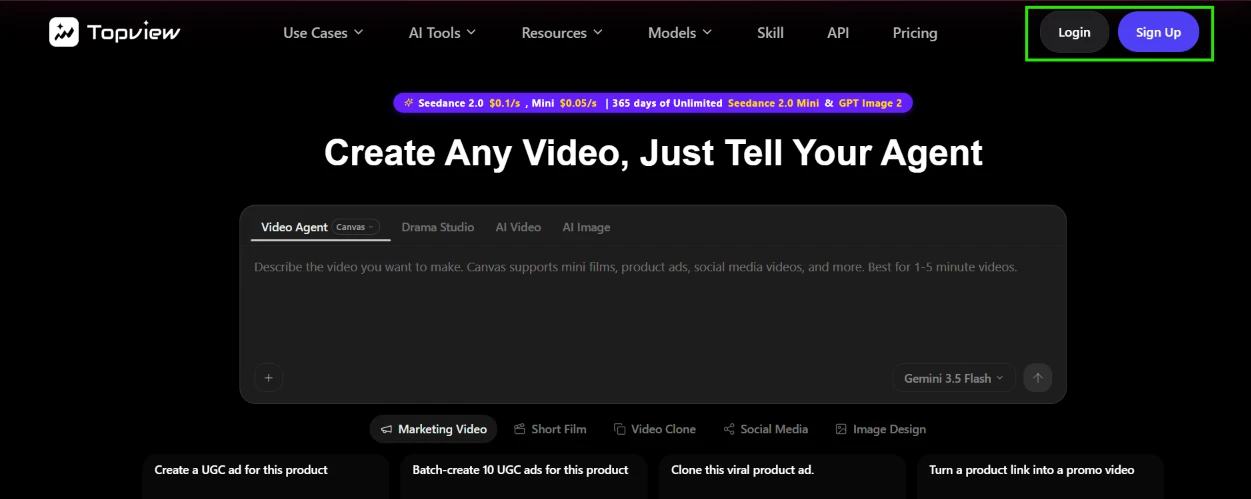
I started on the Topview homepage. The page opens on a big prompt box under the headline Create Any Video, Just Tell Your Agent, with tabs above it for Video Agent, Drama Studio, AI Video and AI Image. Login and Sign Up buttons sit in the top right corner.

Before I had clicked anything, a promo strip was already quoting prices: Seedance 2.0 at $0.1 per second, Mini at $0.05. A 365 days of unlimited banner was squeezed into the same line. My first observation of the session was that the selling starts before the product does.

Logging in
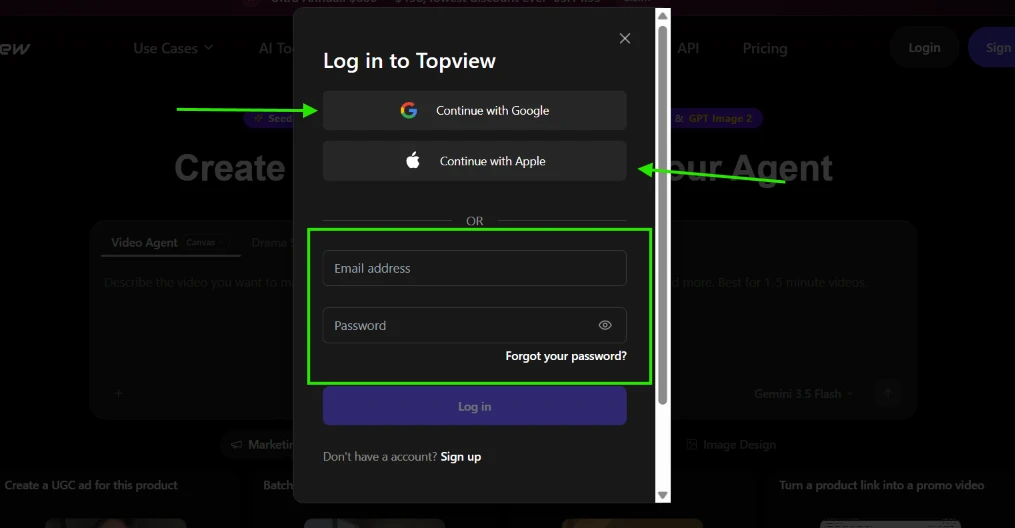
I clicked Login. A modal came up with Continue with Google and Continue with Apple at the top, then a plain email and password form under a divider, with a forgot password link tucked beneath the password field.

Signing in took seconds. No friction at all here, and looking back, this was the smoothest step of the entire session.

The dashboard after login
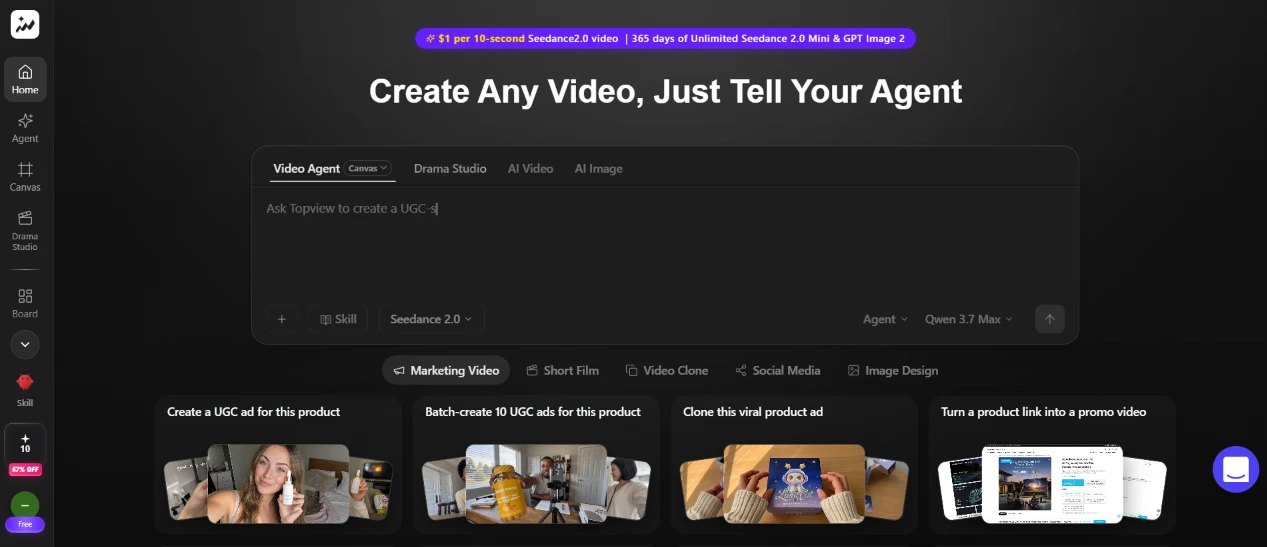
After logging in I landed on a dashboard that mirrors the homepage, now with a left sidebar: Home, Agent, Canvas, Drama Studio, Board, plus a Skill icon further down. A small +10 chip near the bottom of the sidebar showed my free credit balance, and a 67% OFF tag sat directly under it.

The top banner had a new pitch too, now reading $1 per 10-second Seedance 2.0 video. The layout itself is clean and easy to scan. What caught my eye was that a discount badge lives inside the navigation bar, stuck to my credit balance like a price tag.

Opening the full tool list
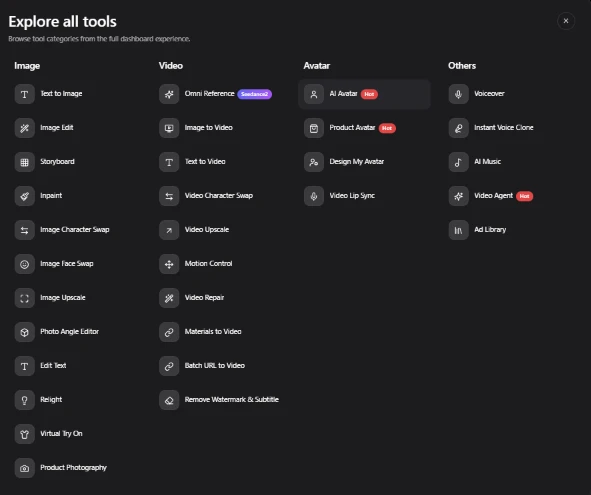
I opened the Explore all tools panel to see what the platform claims to cover. The list is split into four columns: Image, Video, Avatar and Others. The Image column alone holds twelve tools, starting at Text to Image and ending at Product Photography. Video stacks another ten on top of that. Avatar and Others carry the remaining nine between them, including AI Avatar, Voiceover, Instant Voice Clone and Ad Library.

That is a long catalog. On paper it looked like a week of testing material.

Picking Text to Image
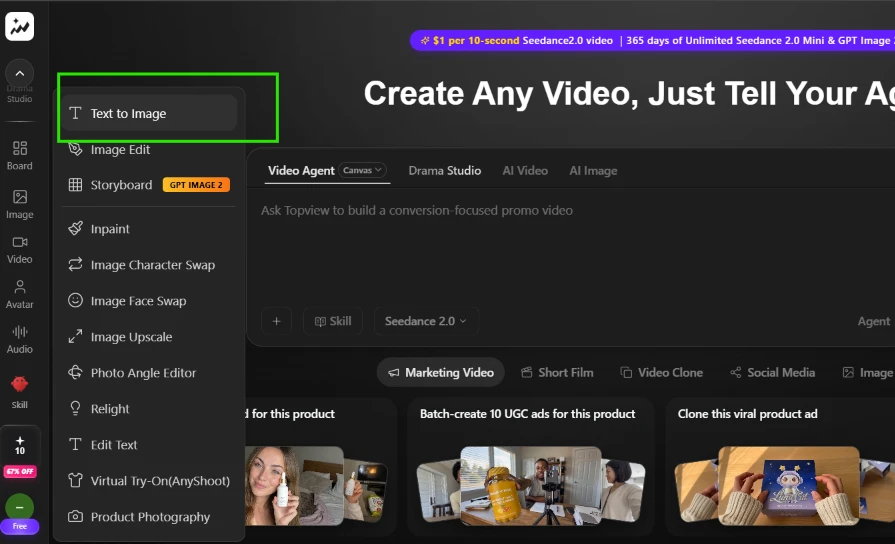
I decided to start with the simplest job on the menu, a plain image generation. The Image section expands into a dropdown listing every image tool, with Text to Image sitting first, so I clicked it.

Two clicks from dashboard to tool. No complaints about this step.

Writing the prompt
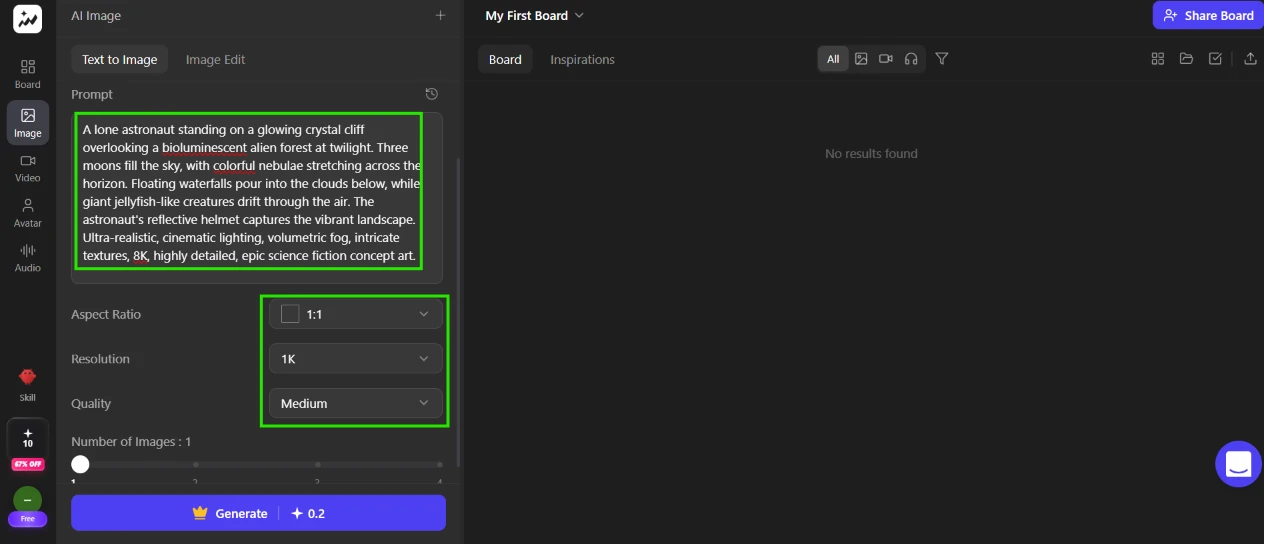
The Text to Image workspace puts the prompt field and its settings on the left, with an empty board filling the right side. I pasted in a long test prompt: a lone astronaut on a glowing crystal cliff above a bioluminescent alien forest, three moons in the sky, floating waterfalls pouring into clouds, giant jellyfish drifting through the air, all wrapped in the usual 8K cinematic concept-art tags.

I left everything at the defaults: 1:1 aspect ratio, 1K resolution, Medium quality, a single image. The Generate button carried a crown icon and a +0.2 label, which I read as 0.2 credits per image. Ten credits in my account divided by 0.2 meant roughly 50 generations, so I fully expected this to go through.

Hitting Generate, meeting the paywall

I hit Generate. Instead of an image I got a full-screen paywall: PICK YOUR PLAN in giant letters, a limited-offer countdown ticking away from 10 days, an annual toggle promising Up To 67% OFF, and a banner about 365 days of unlimited GPT Image 2 and Seedance 2.0 Mini.

This was the moment the product started losing me. The button quoted 0.2 credits and I was holding 10. The click still went straight to a sales page. There was no error and no explanation of why my balance did not apply. Just a plan grid with a timer counting down.

Trying video instead
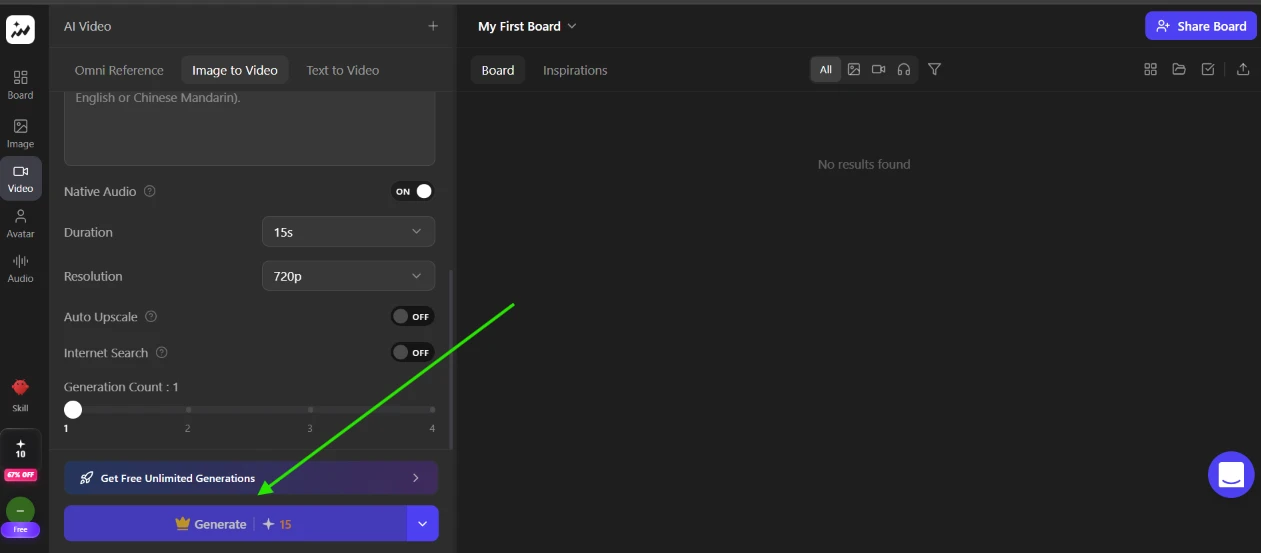
I closed the paywall and moved to the AI Video workspace, on the Image to Video tab. The defaults: Native Audio switched on, duration at 15s. Resolution sat at 720p, with Auto Upscale and Internet Search both toggled off. The Generate button wears the same crown here, this time with a +15 next to it, and right above it sits a button labeled Get Free Unlimited Generations.

The math at least is honest this time: one 15-second video costs 15 credits and I only had 10. What bugged me was the crown itself. It reads as locked rather than priced, and after what happened on the image tool I no longer trusted the interface to tell me what my credits could buy.

Checking every model for a free option
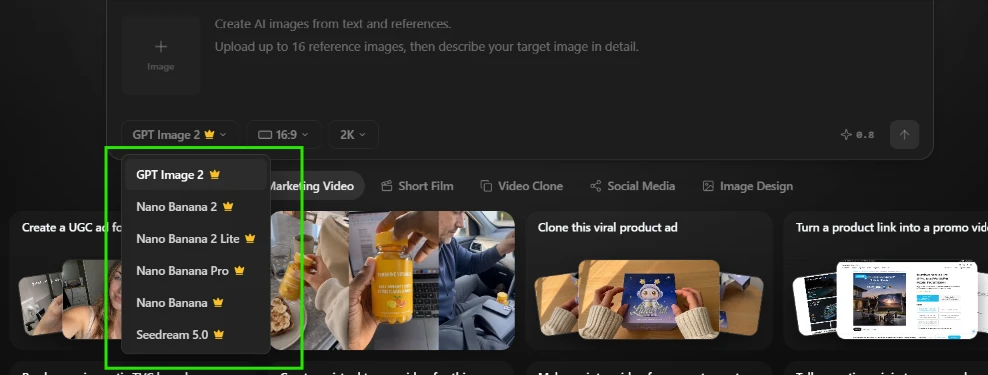
My next theory was that the block was model-specific, that pro models were gated while some free tier hid underneath. I opened the model selector to check. GPT Image 2, Nano Banana 2, Nano Banana 2 Lite, Nano Banana Pro, Nano Banana, Seedream 5.0. Every single entry wears a crown.

There is no uncrowned model in the list. Theory dead.

Confirming the credit balance
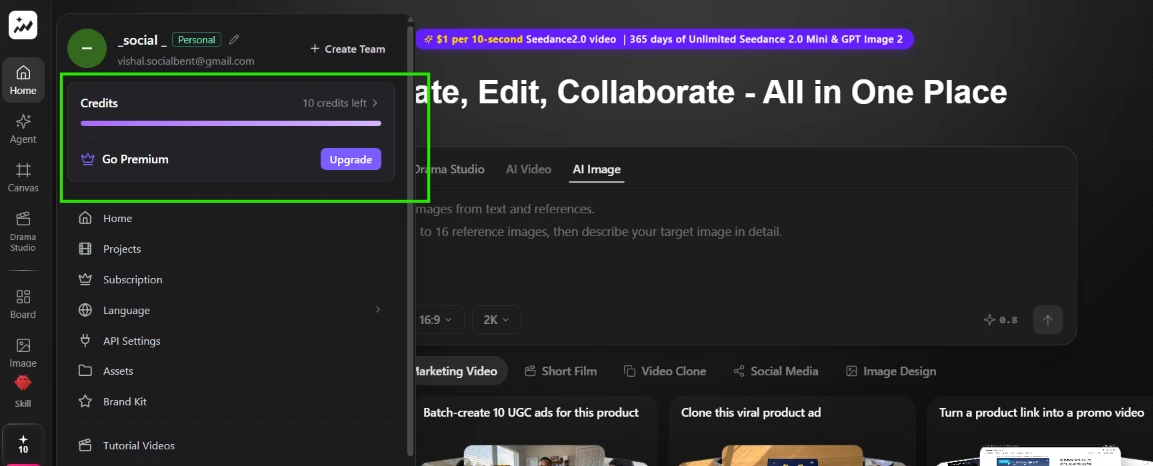
To rule out a balance problem I opened the account menu. The panel spells it out: a Credits header, 10 credits left, a progress bar, then a Go Premium row with an Upgrade button directly underneath.

So the credits are real. They show in the sidebar and they show here. I just could not find one action anywhere in the product that would accept them, and nothing on this panel explains what they are for. This is the point where I stopped being annoyed and became properly confused, because the interface keeps waving a number at me that appears to be spendable nowhere.

Trying a featured template
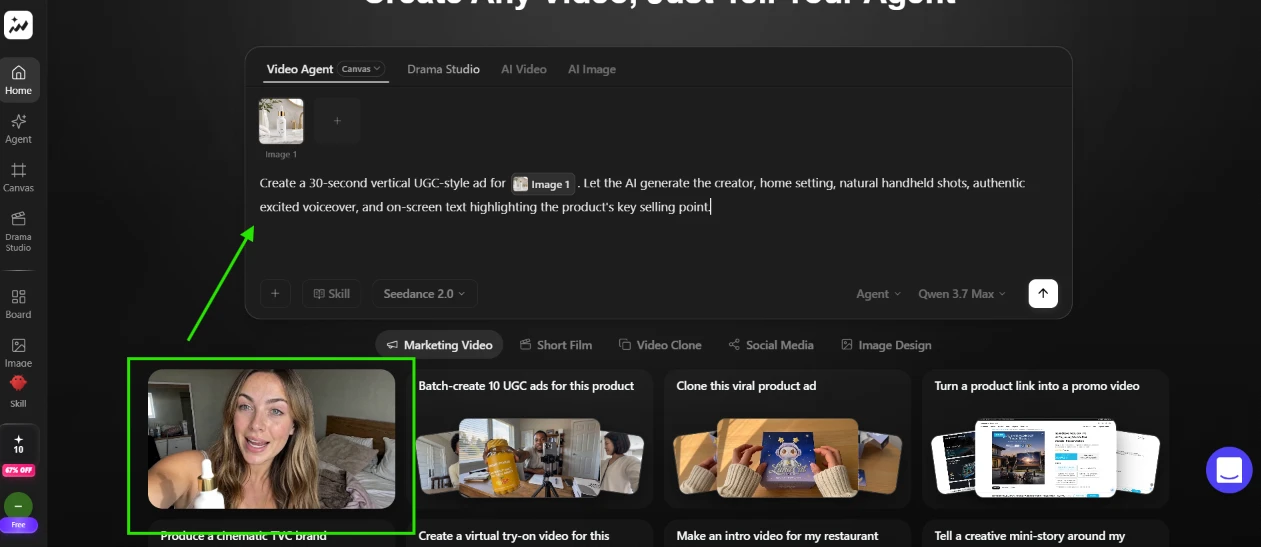
With direct generation blocked on both tools, I tried the template cards featured under the main prompt box. I clicked the first one, a UGC ad example fronted by a woman holding a skincare bottle. It auto-filled the prompt for me: a 30-second vertical UGC-style ad for the attached product image, letting the AI handle the creator, the home setting, natural handheld shots, an excited voiceover and on-screen text about the key selling point.

Credit where due, this flow is well built. One click handed me a complete, editable brief with the product image already attached. If anything in the product was going to convert me, it was this.

Watching the agent start working
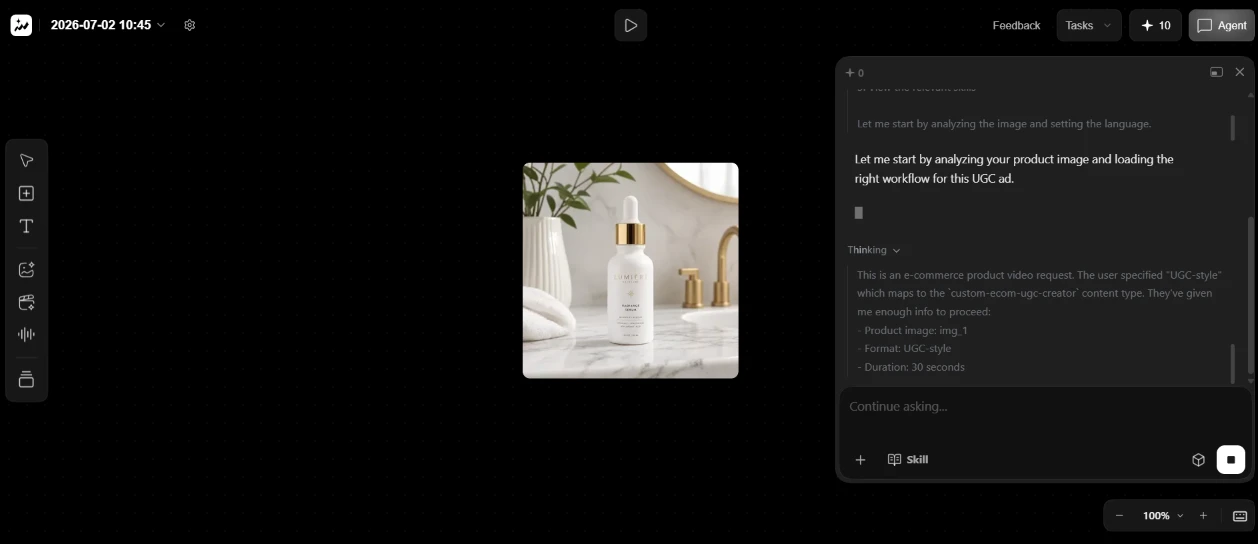
Submitting the template dropped me into a canvas view, product photo centered, agent chat docked on the right. The agent narrated as it went: it was analyzing my image and loading the right workflow for this UGC ad. An open thinking log underneath mapped my request to something called a custom-ecom-ugc-creator content type and listed what it had parsed from me, including the product image and the 30-second runtime.

Watching the reasoning stream in real time was the closest the product came to delivering on its homepage headline. For about ten seconds I thought the free credits were finally about to earn their keep.

The paywall, round two
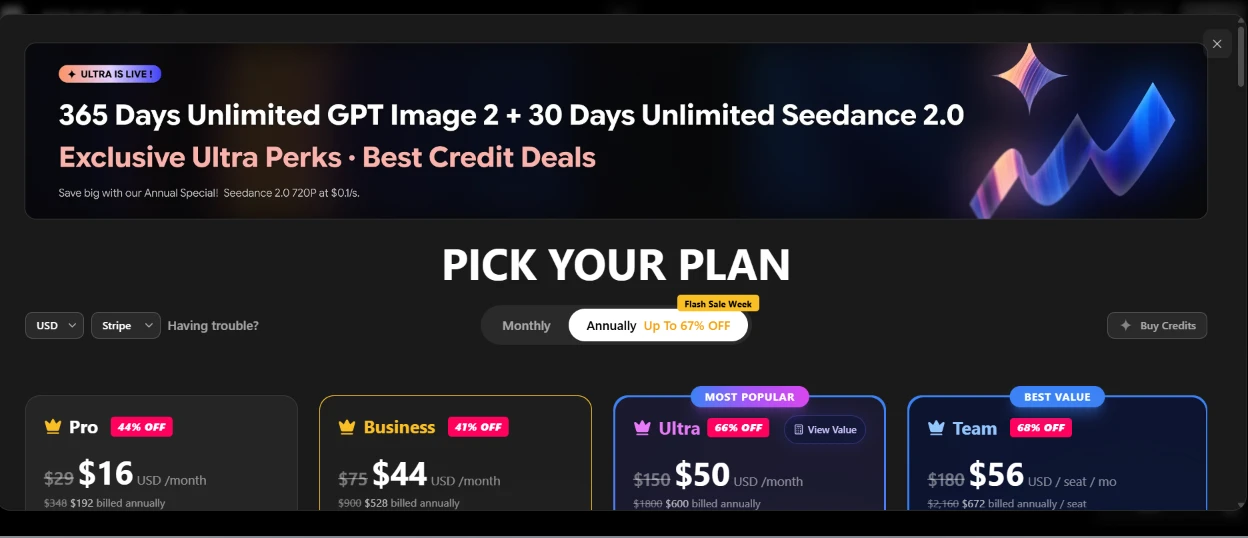
Then the wall came down again, this time as the full pricing page. Four plans sit side by side: Pro at $16 a month, Business at $44, Ultra at $50 wearing a Most Popular badge, Team at $56 per seat. All annual prices, with discount tags running from 41% up to 68%.

Getting stopped twice in one session, once over a 0.2 credit image and once mid-agent-run, told me this was no glitch on a single tool. The free tier walks you right up to the finish line and then holds out its hand.

The Buy Credits dead end
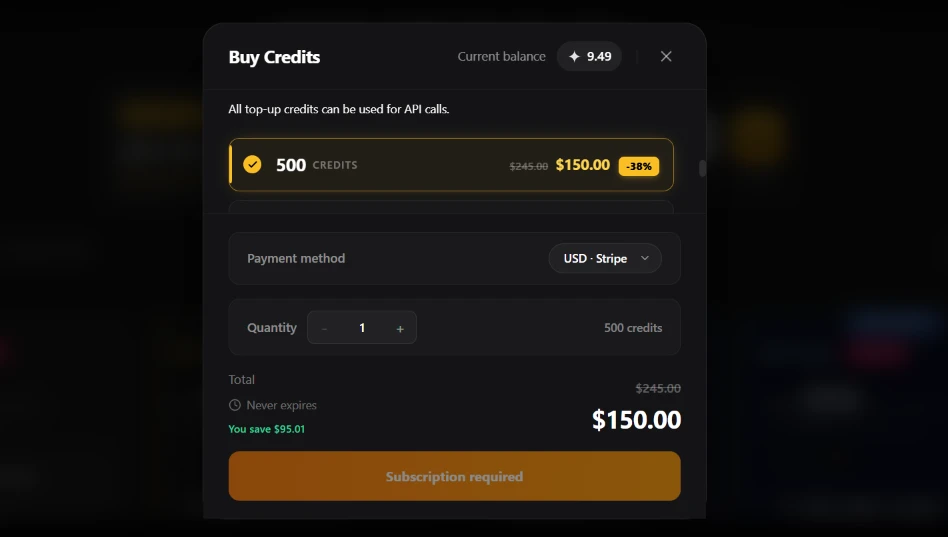
Before closing the tab I checked the pay-as-you-go route, since the pricing page carries a separate Buy Credits button for people who do not want a plan. The modal offers 500 credits at $150, marked down from $245. The fine print says top-up credits never expire and can be used for API calls. Then the checkout button itself reads Subscription required.

So the a-la-carte option is not standalone after all. You subscribe first, then you get permission to buy extra credits on top of the subscription.

One last detail from this screen stuck with me. My balance now reads 9.49. It was 10 when I signed up and I never received a single image or video. Half a credit still went missing somewhere along the way. That was where I stopped.
Methodology

How We Research?

Cross source aggregation

Collects reviews and user comments across multiple review platforms, community forums, and social channels for a broad view.

Theme clustering

Groups recurring topics like speed, pricing, usability, and support to identify consistent patterns and outlier experiences.

Sentiment classification

Labels positive and negative signals within each theme, weighting strong language and detailed accounts more heavily.

Recency weighting

Gives newer feedback higher influence and refreshes the analysis regularly to reflect product and policy changes.

Internet Reputation

Topview AI Repo on Internet

What Other Users Say About Topview

My session ended at a paywall, so before writing that off as bad luck I went looking for other people's experiences with the tool. The picture online turned out to be split, and the split itself tells a story.

The Trustpilot picture

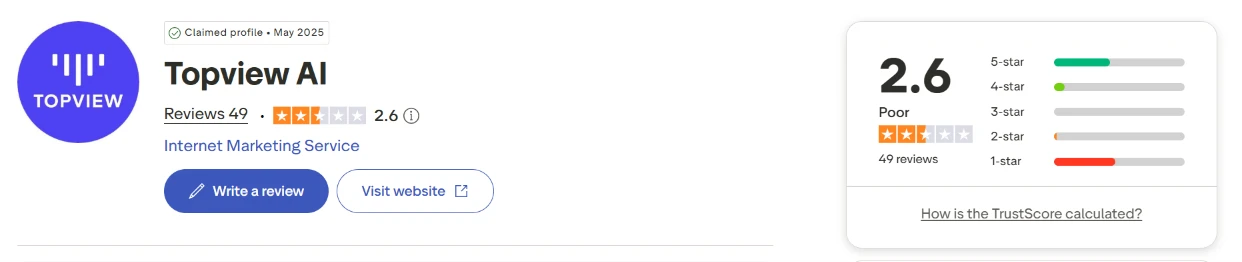
Topview's Trustpilot profile sits at 2.6 out of 5 from 49 reviews as I write this, a score the platform labels Poor. The profile has been claimed since May 2025, so the company knows this page exists. For a business that raised a $14 million Series A, it is a rough public scoreboard.

What the happy users say

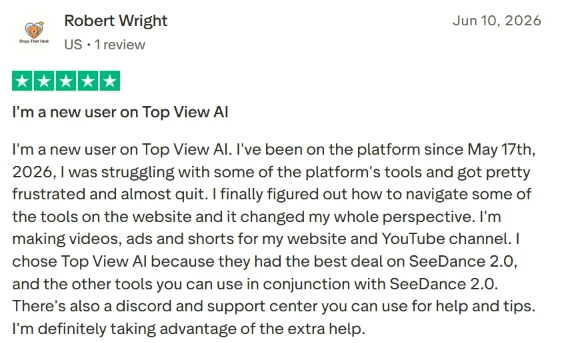
The first five-star review I saved is from a user who joined on May 17, 2026 and nearly quit. He describes struggling with the tools, getting frustrated, then finally working out the navigation, which changed his whole perspective. Now he turns out ads and shorts for his website and YouTube channel. He picked the platform for its SeeDance 2.0 pricing and leans on the Discord and support center when he gets stuck.

What strikes me about this one is the arc. He hit the same early confusion I did and pushed through it. I never got the chance to, because my wall was a paywall rather than a learning curve.

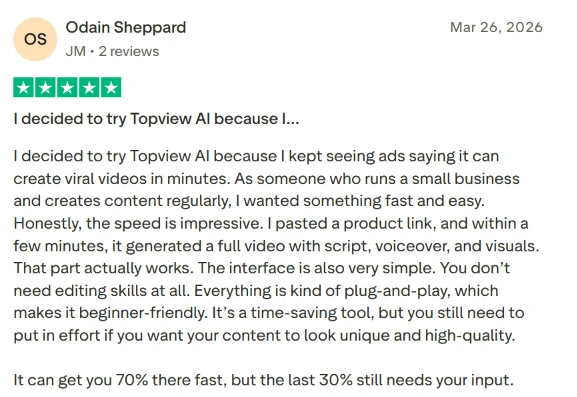
The second comes from a small business owner who signed up after seeing the ads about viral videos in minutes. He pasted a product link and had a complete video a few minutes later, narration and visuals included. He calls the interface plug-and-play, with no editing skills needed. His caveat is the part worth keeping: the tool gets you 70 percent of the way fast, and the last 30 percent still needs your own effort.

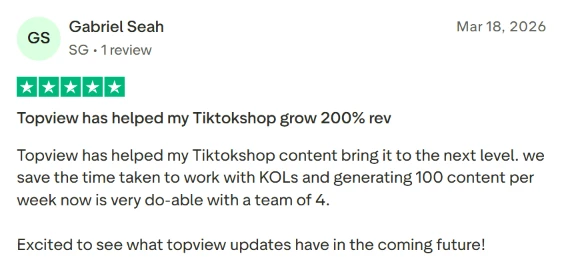
The third five-star is a TikTok Shop seller who credits the tool with 200 percent revenue growth right in the review title. The body is more concrete: his team of four now pushes out 100 pieces of content a week, and the hours once spent coordinating with paid creators have been clawed back. If those numbers hold, this is the exact customer the product was built for.

What the one-star crowd says

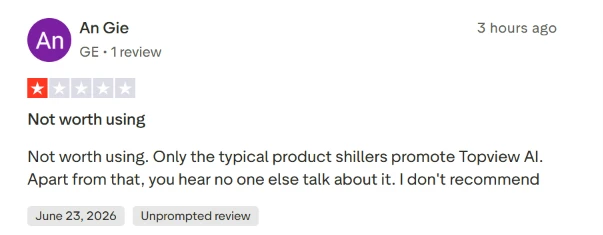
The one-star column opens with the bluntest entry on the page, posted hours before I captured it. The writer calls the tool not worth using and claims the only people promoting it are the usual product shills, with nobody talking about it organically. Trustpilot tags it as an unprompted review, meaning nobody invited him to write it.

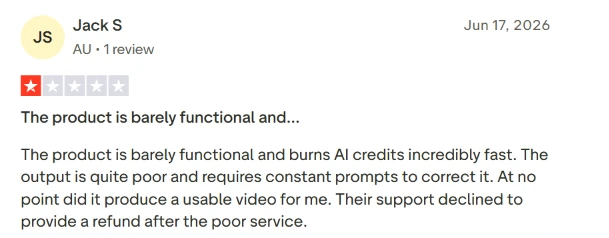
The next one lines up with my own test almost point for point. The reviewer calls the product barely functional and says it burns credits at speed. The output was poor enough to need constant corrective prompts, and it never produced one usable video for him. When he asked for his money back, support said no. Burning credits without a single usable result is the paid version of the loop I got stuck in for free.

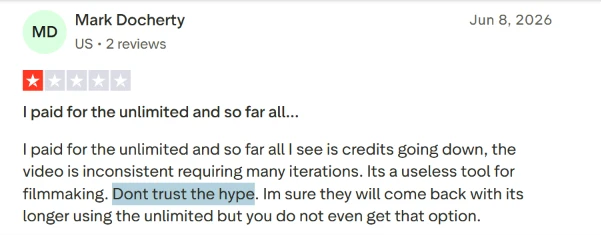
Then comes the unlimited complaint. A paying subscriber writes that he bought the unlimited tier and all he watches is his credit balance going down, while the video output stays inconsistent and demands many iterations. He flat out calls it useless for filmmaking and warns readers off the hype.

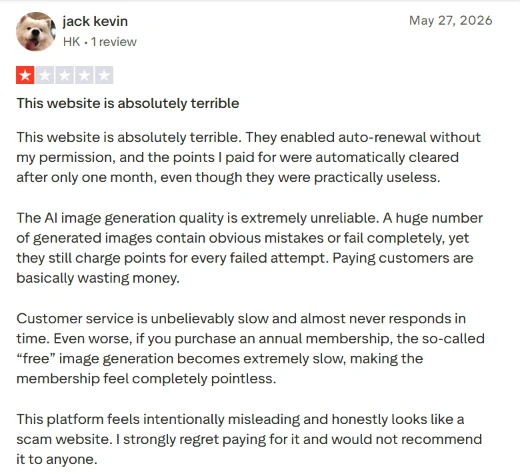
The harshest review on the page is also the most detailed. This user reports auto-renewal switched on without his permission and paid points wiped after a single month. He describes image generation that fails or produces obvious mistakes while still charging points for every failed attempt, which turns paying customers into people quietly wasting money. Customer service, in his telling, is slow to the point of absence, and the so-called free generation on the annual plan runs slowly enough to make the membership feel pointless. His verdict lands hard: to him the platform feels intentionally misleading, close to a scam.

I cannot verify any single account here. What I can say is that four different strangers, writing weeks apart, all circle the same drain: credits that vanish and output that never arrives.

A split with no middle

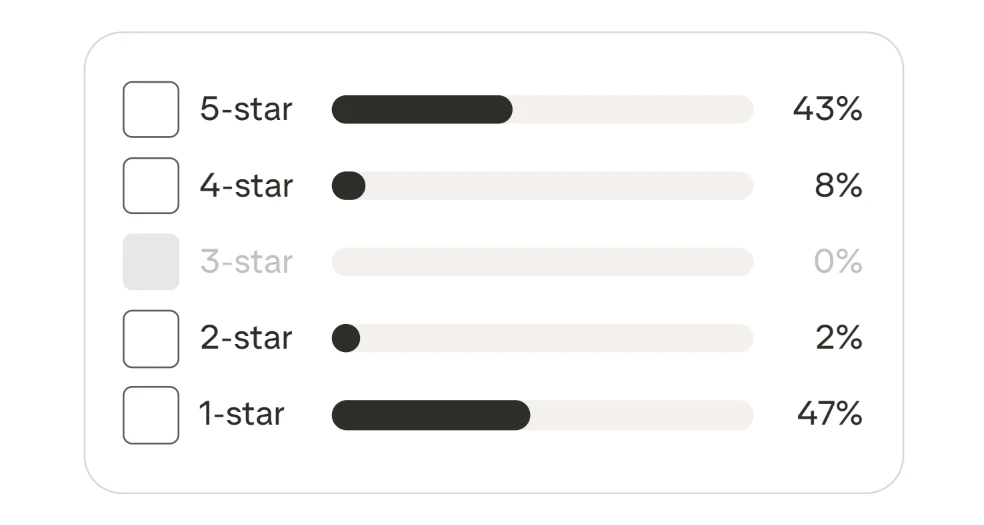
The score breakdown puts the whole fight into one graphic. 47 percent of all ratings are one star. 43 percent are five. Four-star holds 8 percent and two-star just 2. Three-star is a flat zero. People either get real value out of this tool or feel burned by it. Nobody walks away with a shrug.

The G2 number

G2 tells a different story, and the difference needs an asterisk. The same product scores 4.8 out of 5 there, from a grand total of six reviews, and five of those six are five-star. Set the two platforms side by side: 49 verdicts landing at 2.6 on one, six landing near perfect on the other. The glowing average lives where almost nobody has voted. The crowd gathers where the score is low.

Independent testers who ran the tool land closer to my experience than to the marketing. One three-week test praised the viral-clone workflow and the avatar system. The same write-up called the free plan basically a demo, with 10 one-time credits and watermarked exports that barely let you evaluate anything before the pay ask, and noted that frustration echoing across Reddit and Trustpilot. That is the exact wall I hit, documented by strangers before I ever signed up.

Product Analysis

Topview AI — Key Features

AI video generator

Creates short ads and clips from prompts or assets, praised for speed but criticized for frequent unusable results.

Avatar based videos

Uses AI avatars for explanations and ads, seen as convenient, though some note unnatural movement and expressions.

Product AnyShoot feature

Places products on models and scenes quickly, widely praised by ecommerce and dropshipping users.

Unlimited generation queue

Unlimited modes run in shared queues, heavily criticized for 2 to 24 hour waits and failed jobs.

Credit based priority rendering

Credits accelerate processing and enable features, but many complain about fast burn and non rolling balances.

AI video agent

Agent creates scripts and multi scene videos, appreciated by some but seen as expensive in credits.

Web and mobile access

Platform offers website and marketing app access, though some regions report timeouts and frozen pages.

Template driven workflows

Beginner friendly templates and plug and play flows, praised for simplicity by non editors.

Support and community channels

Discord and support center exist, but responses are described as slow or absent by many reviewers.

Benchmarks

Topview AI — Scorecard

Dimension Our Test User Signal Verdict Composite
Output Quality
Visual and narrative results
5.5 5 Weak
55%
Generation Speed
Render time and queues
3 2.5 Weak
30%
Ease of Use
Learning curve and workflow
7 7.5 Good
70%
Value for Money
Pricing versus real utility
3.5 3 Weak
35%
Plan Transparency
Clarity of limits and billing
3 2.5 Weak
30%
Customer Support
Responsiveness and resolution
3 2.5 Weak
30%
Findings

Key Test Results

Generation reliability

Reports suggest over 50 percent of attempts need multiple regenerations or stall in long queues.

Credit efficiency

Several users describe 60 to 80 percent of credits consumed by retries, previews, and test runs.

Support responsiveness

Multiple accounts mention waiting a week or more with little or no response from support.

Perceived plan honesty

High proportion of negative reviews describe unlimited marketing as misleading or scam like.

User satisfaction split

Sentiment divides sharply, with roughly half enthusiastic and half strongly dissatisfied.

Community Signals

User Insights

Most Liked Feature

“Fast, simple workflows for product and UGC style videos that save significant time once configured.”

Most Common Issue

Misleading unlimited plans combined with slow queues, aggressive credit burn, and non rolling balances.

Sentiment Analysis

What People Talk About Topview AI

Most-mentioned praise
Very fast simple workflow for basic product and UGC ads when servers behave
80%
Beginner friendly interface that avoids complex editing timelines and prompt wrestling
70%
Product AnyShoot and avatar tools help ecommerce brands create ads without filming
65%
Can significantly increase content volume and reduce production costs for some teams
55%
Range of avatars and marketing focused templates for different social platforms
45%
Some users report responsive support and refunds after initial issues
30%
Most-mentioned pain
Unlimited plans described as misleading due to multi hour or full day queues
85%
Credits burn quickly on previews, regenerations, failed outputs, and agent interactions
80%
Non rolling credits and auto renewal behavior leave users feeling overcharged
75%
Frequent failed generations, unusable videos, and instruction following problems
70%
Customer support often slow to respond, with unresolved tickets and refund refusals
65%
Regional access issues including frozen pages, timeouts, and sluggish rendering
45%
Account closure and data handling described as difficult or obstructive by some
35%
Editorial Testing Log

Changelog

Date Reviewner Version Duration Remarks
v1.0 3 Days Initial Testing

Each test follows our six dimensions methodology.

Community Reviews

What users say about Topview AI

0.0
Based on 0 reviews
5
0
4
0
3
0
2
0
1
0
Have you used Topview AI?

Sign in to share your experience and help others choose the right tool.

Sign in to review

No reviews yet

Be the first to review Topview AI and help others discover this tool.