
“QuillBot or Grammarly?” I get that question more than almost any other, from students, from bloggers, and from people who spend half their day inside an email tab.
Both tools promise cleaner writing, yet they pull in different directions. One wants to rewrite your text for you. The other wants to correct what you already wrote. So instead of guessing, I opened both accounts and fed them the same material: the same messy paragraphs, the same essays, the same blog drafts. Then I watched how each one answered.
This walkthrough is the short road to a decision.
By the end you will know which assistant fits the way you actually write, and you will be able to click straight through to the full review of whichever one you pick. Let me start with the fast answer for anyone in a hurry.
Quick Verdict
Grammarly is the stronger all-round writing assistant for grammar, clarity and professional polish. QuillBot is the better tool if your main job is paraphrasing or rewriting, and it costs less to run.
Put plainly: if you write reports and client-facing copy, Grammarly earns its keep. If you reword, summarize or rework sources, which is most students and researchers, QuillBot pulls ahead. Here is that split at a glance.
| What you want | The better pick |
|---|---|
| Best all-round writing quality | Grammarly |
| Best at paraphrasing and rewriting | QuillBot |
| Most generous free plan for everyday writing | Grammarly (one big caveat below) |
| Cheaper paid plan | QuillBot |
| Best for student and research work | QuillBot |
| Best for business and team writing | Grammarly |
The rest of this comparison shows how I reached each of those calls, starting with what each tool actually is.
What is QuillBot?
QuillBot began back in 2017 as a single paraphrasing tool, years before ChatGPT turned AI writing into dinner-table conversation. That head start shows in how polished the rewriting feels.
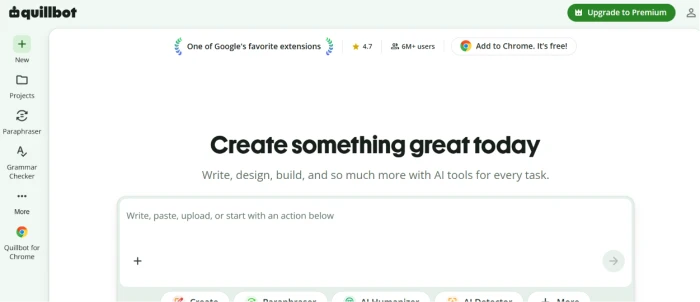
What was once a one-trick rewriter is now a full suite. A single QuillBot account gives you a Paraphraser, a Grammar Checker, a Summarizer, a Plagiarism Checker, a Citation Generator, an AI Detector, an AI Humanizer and a Translator. Its Co-Writer feature pulls those tools into one Google Docs style workspace, so you can reword a sentence and check its grammar without hopping between tabs.
The paraphraser is still the heart of it. On the free plan you get two rewriting modes and a 125 word limit per run. I put every one of those tools through its paces in our full QuillBot review, so here I will keep the focus on the head-to-head. Premium opens the full set of modes, including Academic, Formal, Creative, Shorten and Expand, and lifts the word cap entirely.
What is Grammarly?
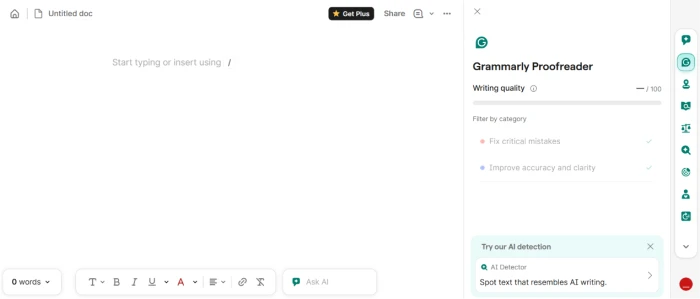
Grammarly came at writing from the opposite end. Rather than rewriting your text, it reads what you typed and tells you how to improve it.
It checks grammar, spelling and punctuation, then pushes further into clarity, tone, word choice and full-sentence rewrites. A plagiarism checker and an AI text detector live inside the paid tier. The free plan is useful in its own right rather than a locked demo, and it now hands you a monthly allowance of AI prompts for rewriting a paragraph or drafting a quick reply.
One thing to flag, because older comparison posts get it wrong: Grammarly has retired the “Premium” name. The paid individual plan is now called Pro, and the old Business plan has been folded into it. If you want the granular, tool-by-tool breakdown, our full Grammarly review goes deep on each feature. For now I will cover what that does to the price in the pricing section below.
QuillBot vs Grammarly: Feature Comparison Table
| Feature | QuillBot | Grammarly |
|---|---|---|
| Grammar check | Solid, common errors | Advanced, with explanations |
| Paraphrasing / rewriting | Excellent, 9+ modes | Good, single rewrite |
| Tone detection | Limited | Strong |
| Summarizing | Built in | Not included |
| Plagiarism checker | Premium only | Pro only |
| AI detector / humanizer | Both included | Detector only |
| Citation generator | Yes, major styles | No |
| AI writing prompts | Co-Writer and AI Chat | 100 free, 2,000 on Pro |
| Integrations | Chrome, Docs, Word, macOS app | Browser, desktop, mobile, wide |
| Ease of use | Easy | Effortless |
| Free plan limit | 125 word paraphrase cap | Full grammar, 100 prompts |
| Starting paid price | $19.95/mo or $99.95/yr | $30/mo or $144/yr |
A table flattens everything into one word per box. The real differences only showed up once I watched each tool work on the same text, which is where I went next.
Detailed Comparison Breakdown
Grammar Accuracy
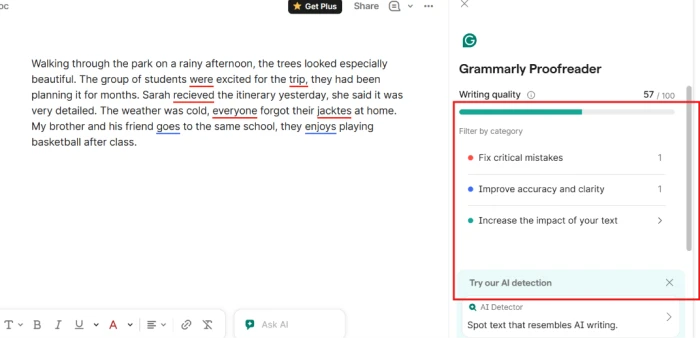
I started with a paragraph I had broken on purpose: comma splices, a subject that did not agree with its verb, two misspellings and a dangling modifier. Then I ran the identical text through both tools.
Grammarly caught everything and explained why each fix mattered, with a short note on the rule behind it. QuillBot caught most of it. Its grammar checker has come a long way from the bare-bones version of a few years ago, and it now scores your writing across categories like clarity and fluency, which is a helpful nudge for anyone still learning the ropes. For pure correction depth, though, Grammarly stayed a step in front.
So if grammar is the only box you need ticked, Grammarly wins this round. The gap narrows on shorter, simpler text where both nail the basics.
Paraphrasing Ability
Here the order flips, and it flips hard.
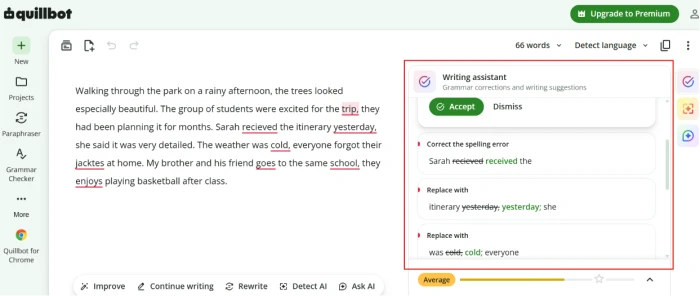
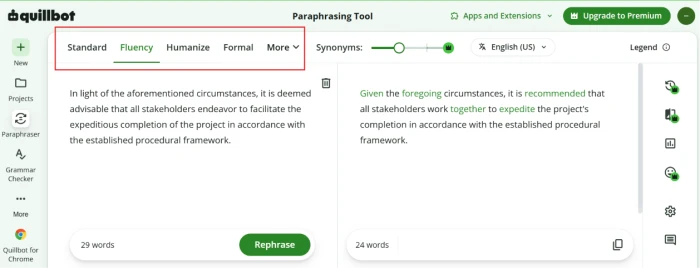
I took one stiff sentence and asked both tools to rewrite it. QuillBot offered several distinct versions, let me slide between gentle and aggressive rewording, and showed the changed words inline so I could accept them one at a time. Switching from Standard to Creative to Formal produced genuinely different sentences.
Grammarly does rewrite sentences now, and the output reads well, but it hands you one polished option rather than a spread to choose from. For anyone reshaping a lot of text, QuillBot's range is the difference between a tool you wrestle with and one that keeps pace with you.
Which is better for paraphrasing, QuillBot or Grammarly? On this front, QuillBot, and it is not close.
Writing Style Improvement
Grammar is mechanics. Style is whether the writing actually lands with a reader.
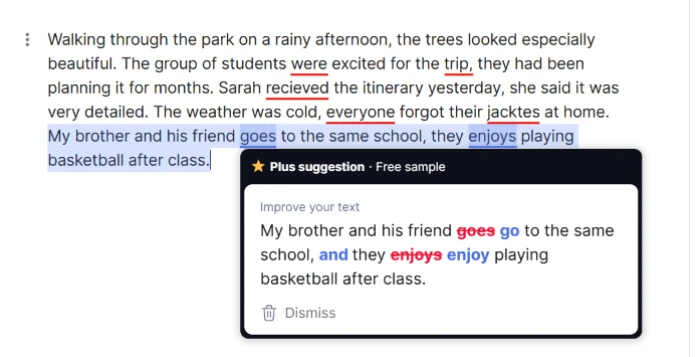
This is where Grammarly's tone detector earned its place. It flagged when a draft email read as blunt, suggested warmer phrasing, and pointed out sentences that were technically correct but a slog to read. QuillBot can shift tone through its modes, yet it does not watch your tone as you write and warn you when you have drifted off course.
For polishing how your writing comes across, Grammarly is the more attentive editor.
AI Suggestions and Generative Quality
Both tools have moved well past spell check, and skipping their AI features would date this comparison the moment it published.
Grammarly's generative side runs on prompts. Free accounts get 100 a month and Pro lifts that to 2,000, which is plenty for rewriting paragraphs, generating replies or trimming something down. The suggestions stay close to your existing voice instead of inventing a new one.
QuillBot approaches AI through its Co-Writer workspace and AI Chat, alongside the AI Detector and AI Humanizer I mentioned earlier. The Humanizer is built on the same paraphrasing engine, so it rewrites text to read more naturally. Independent testing has been mixed on how it fares against detection tools, and if the goal is passing AI output off as your own work, no rewriting tool makes that honest or safe. I treat the Humanizer as a readability feature, not a way around academic rules.
The takeaway: Grammarly's AI is the better everyday writing partner, while QuillBot's AI tools cluster around rewriting and checking rather than drafting from scratch.
Speed and Performance
Neither tool kept me waiting.
Grammarly's suggestions surface as you type, across almost any text box on the web. QuillBot works inside its own editor or extension, and Premium speeds up the longer jobs. On a long document, Grammarly's always-on checking felt lighter on the page, while QuillBot's batch approach suited reworking a block at a time. Both held up under real use.
That covers how they write. The question readers ask next is always the same: what does each one cost?
QuillBot vs Grammarly: Pricing Comparison
Prices below were current as of June 2026. Both companies adjust them, so confirm on their sites before you pay.
The free tiers say a lot about each tool's philosophy. Grammarly's free plan hands you full grammar and spelling help plus 100 AI prompts a month, which carries most everyday writing. QuillBot's free plan gives you the paraphraser too, but capped at 125 words per run, and it keeps the plagiarism checker behind the paywall. That 125 word cap I flagged earlier is the single biggest reason free QuillBot users end up upgrading.
On price, QuillBot is the cheaper habit. Premium runs $19.95 a month, or $99.95 for the year, which lands near $8.33 a month. Grammarly Pro is $30 a month, or $144 a year at $12 a month. Grammarly also offers a quarterly option at $60 for three months. Both give students a break, and QuillBot offers a reduced rate when you verify a student email.
| Plan | QuillBot | Grammarly |
|---|---|---|
| Free | $0 (125 word cap, no plagiarism) | $0 (full grammar, 100 prompts) |
| Monthly | $19.95 / month | $30 / month (Pro) |
| Annual | $99.95 / year (~$8.33/mo) | $144 / year (~$12/mo) |
| Other billing | Semi-annual option | Quarterly, $60 / 3 months |
| Student discount | Yes, verified .edu | Occasional promos and school access |
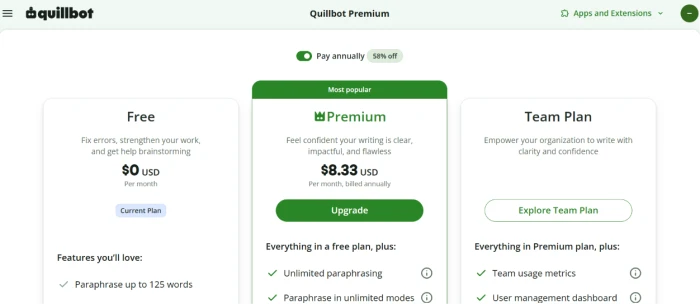
On a straight quillbot vs grammarly pricing comparison, QuillBot wins on cost, running roughly 30 percent cheaper across a year. Whether cheaper makes it the better buy depends on what you need it for, which loops the whole thing back to you.
Use Cases: Which One Fits You?
This is where the question stops being abstract and turns into “which tool is better for me.” Four common writers, four answers.
Best for Students
Is QuillBot better than Grammarly for students? For most student work, yes. Essays and research papers lean on paraphrasing sources, condensing long readings and generating citations, and QuillBot does all of that in one place at a price built for tight budgets. Grammarly is still the sharper proofreader for the final draft, which is why plenty of students use QuillBot to reshape and summarize, then Grammarly to polish.
For Grammarly vs QuillBot for essay writing specifically, the cleanest workflow is to draft and rework in QuillBot, then hand the finished essay to Grammarly for one grammar and clarity pass.
Best for Bloggers
Bloggers live in two modes: drafting fresh posts and tidying them up. Grammarly suits the tidy-up, catching errors and tightening clarity as you write directly in your CMS. QuillBot shines when you are reworking research or breathing new life into an old post. A blogger writing mostly original copy will get more daily mileage out of Grammarly.
Best for Business Writing
For emails, proposals and reports, Grammarly is the clear pick. Its tone detector keeps client messages from reading cold, the suggestions match a professional register, and it follows you into nearly every app you already type in. The team features and brand-voice controls matter, too, once more than one person is writing under the same banner.
Best for Content Creators
Content creators pushing high volume across formats benefit from both, for different reasons. QuillBot's rewriting speed helps you repurpose one piece into several. Grammarly keeps the published result clean and on-brand. If I had to hand a creator a single tool, I would decide on output: heavy rewriting points to QuillBot, heavy original drafting points to Grammarly.
Step back from the use cases and the strengths and weaknesses line up cleanly.
Pros and Cons
QuillBot
Pros
- The best paraphrasing in this comparison, with several modes and inline word swaps
- A real all-in-one suite that bundles summarizing and citations together
- Cheaper than Grammarly, with a student rate stacked on top
- A free plan you can test with no credit card
Cons
- The 125 word free cap forces constant chunking on longer text
- Tone and style feedback is thin next to Grammarly
- Weaker as a live proofreader that follows you around the web
Grammarly
Pros
- The strongest grammar and clarity feedback of the two
- A tone detector that flags how your writing reads
- Works almost everywhere you type online, including email and your CMS
- Team and brand controls once more than one person is writing
Cons
- Pricier than QuillBot at every paid tier
- No built-in paraphrasing spread or summarizer
- Readers report auto-renewal surprises, so note your billing date
Final Verdict
So, QuillBot vs Grammarly, which writing assistant is better? They are built for different jobs, and the right pick comes down to one question: are you correcting writing or reshaping it?
Choose Grammarly if your writing needs to be clean and professional, if you produce a lot of original copy, or if a team has to sound like one voice. It is the better all-round assistant and the stronger editor.
Choose QuillBot if you spend your time rewriting, summarizing or working with sources, and you want a wider toolkit for less money. For students and anyone who paraphrases daily, it is the more useful tool.
After all this testing, my own setup keeps both: QuillBot to reshape a draft, Grammarly to finish it. If you can only run one, let the work decide, because the heavier your rewriting load, the more QuillBot earns its spot.


Comments 0
Join the discussion and share your perspective.
Sign in to post a comment and reply to other readers.
No comments yet
Be the first to share your perspective on this article.