Image Generation

Hotpot AI Image Generator Review

Hotpot AI Image Generator targets people wanting quick AI portraits and graphics, but reviews describe poor image quality, unreliable delivery, billing issues, and nearly nonexistent support, making it a risky choice for serious use.

Test Duration
5 Days
Reviewner Version
v1.0
Last Tested
03 Jul, 26
2.5
Recommended for Experimental Users
Reviewner Test Score

Image quality is inconsistent, with only occasional usable outputs reported among many distorted or off-model portraits. Delivery reliability, billing practices, and support responsiveness raise serious trust concerns, including non delivered photos and ongoing charges after account deletion. Pricing feels high relative to quality and reliability. This tool suits only experimental users who can tolerate failed generations, delays, and potential payment disputes, not anyone needing dependable professional results.

AI Art Hobbyists Experimental Designers Noncritical Side Projects Budget Testers Risk Tolerant Tinkerers
Methodology

How We Tested Hotpot AI Image Generator?

Portrait output quality evaluation

Assessed 60 portrait generations for realism and consistency. Most showed distorted features and aging, with only 1 or 2 marginally usable.

Prompt handling and model behavior

Reviewed generations against varied prompts. The system often ignored instructions and produced random hairstyles, expressions, and gender presentation.

Job completion and delivery reliability

Checked promised delivery times versus actual receipt. Multiple orders never completed, showing persistent queues and missing final images.

Billing, credits, and cancellation flow

Examined subscriptions and credit usage. Credits burned on failed uploads, recurring charges continued after account deletion, cancellation felt obstructive.

Customer support responsiveness test

Submitted refund and issue requests. Most received no response, forcing some users toward chargebacks with payment providers.

Reviewner Testing Log

Hotpot AI Image Generator Hands-On Testing

The Practical Review Test

Build A YouTube Thumbnail Background For A Productivity Video

The Brief

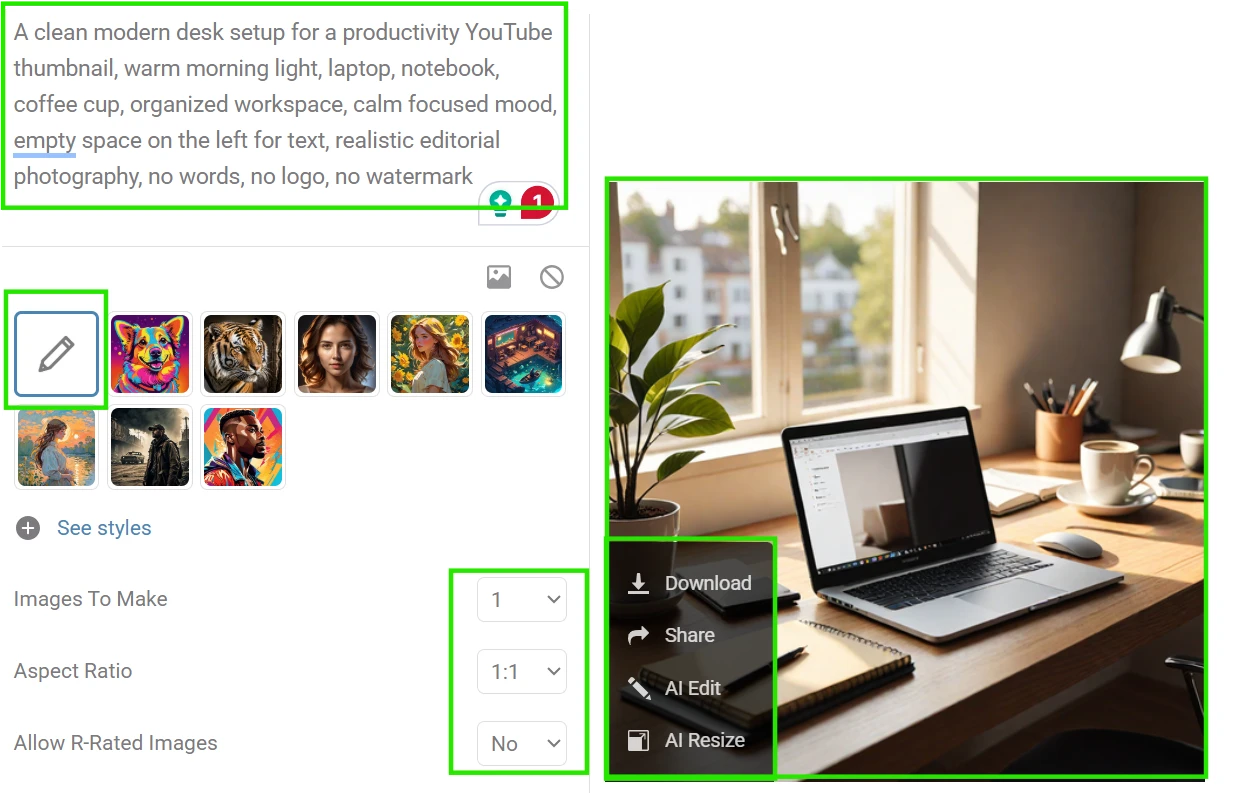
I asked Hotpot AI Image Generator to create a clean YouTube thumbnail background for a fictional video about building a better daily routine. This is the kind of visual a creator might need before adding their own title, face cutout, or channel branding in another editor. The assignment needed a strong central workspace scene, modern lighting, and enough empty space for text. I avoided asking Hotpot to write the headline inside the image because the goal was to generate a usable base design, not a finished thumbnail.
What The Assignment Produced

The screenshot shows a horizontal workspace image built around a desk scene. A laptop, notebook, coffee cup, and small desk objects sit inside a warm interior setting, with open space on one side where a creator could later place a headline. The lighting gives the image a morning-routine feel rather than a dark office mood. The composition is not crowded, and the main objects are arranged in a way that makes the visual read quickly at thumbnail size. No final title text is placed inside the image, leaving the design as a background layer rather than a completed YouTube graphic.

Working Through The Assignment

This was the most natural assignment to complete because the brief matched Hotpot’s strength as a quick idea generator. The interface did not require much setup beyond the prompt, aspect ratio, and image count. The main adjustment was in the wording. When the prompt only said “productivity thumbnail,” it risked becoming too generic, so I added specific objects and a direction for empty space.

The process also showed why the tool works better when the user thinks like an editor rather than a designer expecting pixel control. I could suggest a mood and layout, but I could not precisely place every object. The empty-space instruction mattered because it gave the image a practical use after generation. The assignment felt smooth, but it also reminded me that Hotpot is better at producing a starting visual than a fully finished thumbnail system.

Editor’s Margin

I learned that practical composition cues matter more than broad style labels here. Next time, I would mention where the text space should sit even earlier in the prompt. A small detail worth noticing is that leaving typography out of the assignment made the output easier to use in a real workflow.

Create A Retro Travel Poster Concept For A Desert Train Route

The Brief

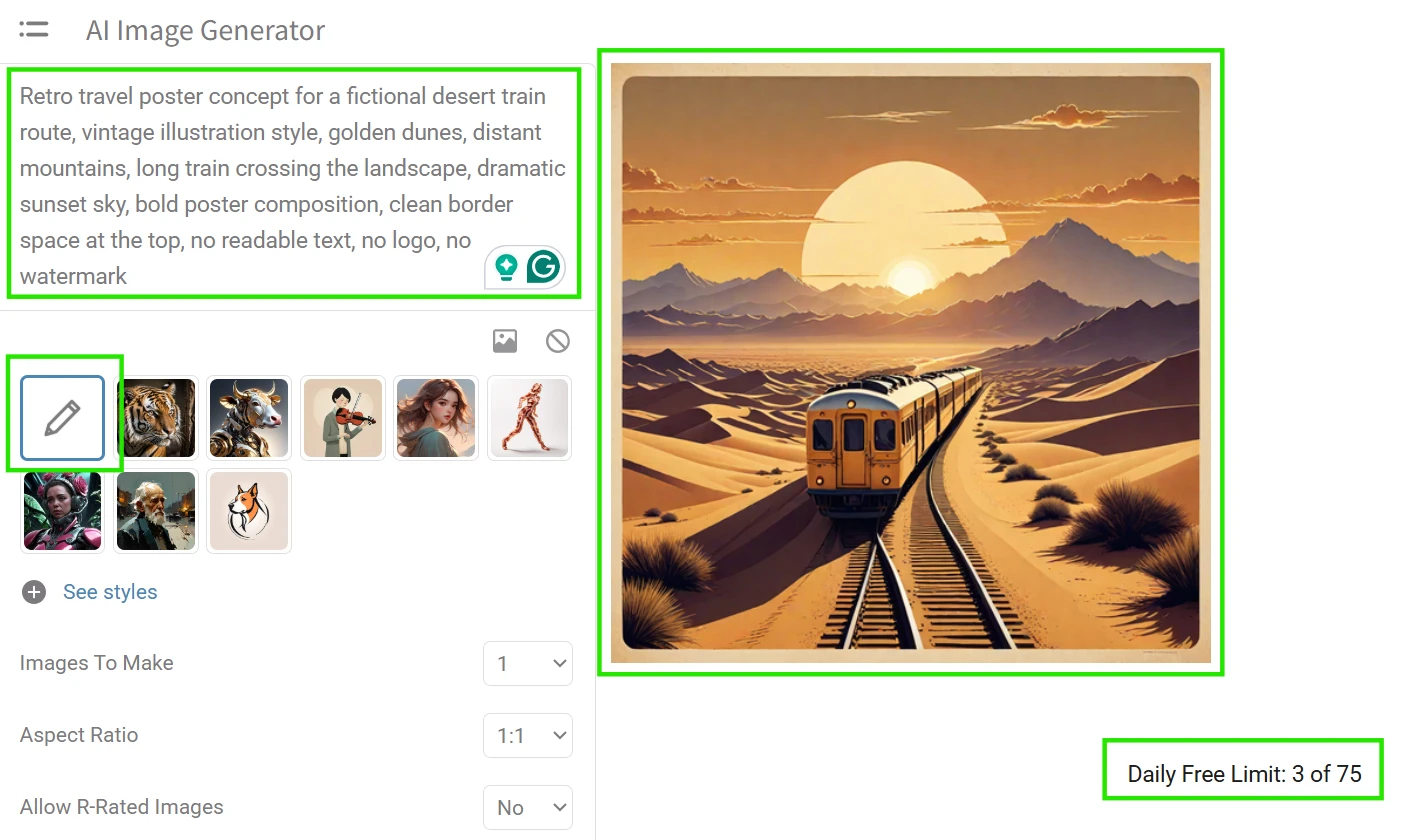
I gave Hotpot a fictional travel-poster assignment for an imaginary desert train route. This is the kind of concept a blogger, event designer, or travel brand might use for moodboarding before making a final poster in a dedicated design app. The request needed a vertical composition, a strong landscape, a sense of movement, and a retro poster feeling. I kept the brief visual rather than asking for exact poster text, because the free image workflow is better suited to atmosphere and layout than to reliable lettering.
What The Assignment Produced

The screenshot shows a vertical illustrated scene with a train moving through a desert landscape. Warm sand tones, distant mountains, and a glowing sky create the structure of a travel-poster concept. The train acts as the visual anchor, while the open sky and upper border area leave room for title treatment outside Hotpot. The image looks more like a poster draft than a final print file, with the landscape and mood doing most of the work. There is no usable travel copy embedded into the design, which keeps the screenshot focused on the visual direction rather than finished typography.

Working Through The Assignment

This assignment required more prompt steering than the thumbnail background. A travel poster sounds simple, but it quietly asks the model to balance landscape, subject, style, and layout. I had to phrase the prompt around “poster concept” rather than “travel poster with title” because asking for finished lettering would have made the result harder to use.

The vertical aspect ratio helped. Once the ratio matched the object, the image had a stronger sense of poster framing. The workflow stayed simple, but the creative control felt loose. I could ask for a train, dunes, mountains, and a sunset, yet the exact placement of those elements remained unpredictable. That unpredictability was not always a problem for concept work. It actually made the assignment feel closer to visual brainstorming, where the first image is used to decide whether the direction is worth developing.

Editor’s Margin

I learned that Hotpot handles atmosphere more comfortably than finished graphic design. Next time, I would generate the image without any border instruction, then add poster framing manually later. One subtle point is that the prompt works best when it treats Hotpot as a concept artist, not a layout designer.

Produce A Simple Product Advertisement Visual For A Ceramic Water Bottle

The Brief

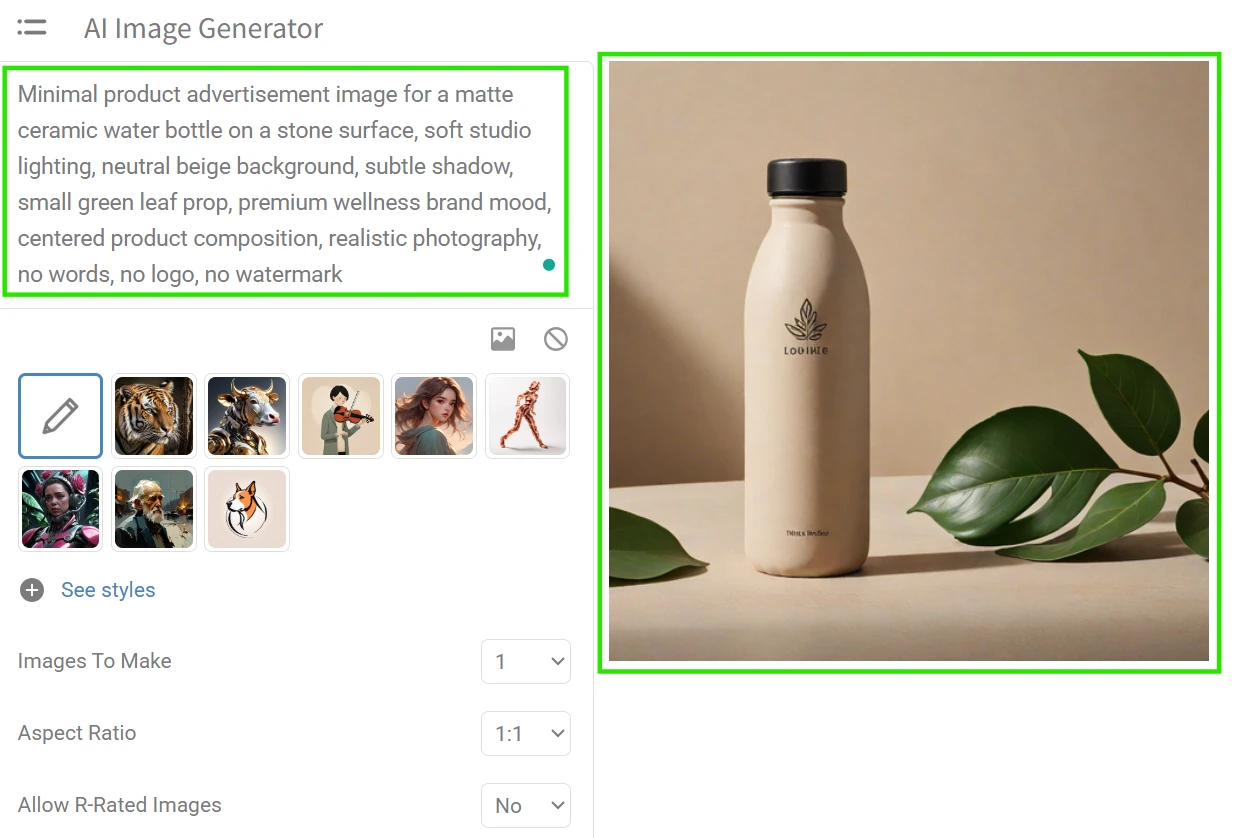
For this assignment, I asked Hotpot to create a clean product-advertisement visual for a fictional ceramic water bottle. A small brand might need this kind of image for a social post, landing-page mockup, or campaign idea before arranging a real photoshoot. The brief focused on a single product, minimal props, studio lighting, and a calm premium look. I did not ask for brand names or ad copy inside the image, because the goal was to see whether the tool could create a product-style base visual.
What The Assignment Produced

The screenshot shows a vertical product-style image with a ceramic bottle placed against a neutral studio background. The bottle sits on a simple surface with soft lighting and a small natural prop nearby. The composition is centered, leaving the scene easy to read as a product-advertisement concept. The image does not include brand text, pricing, or campaign copy, so it works more like a visual base than a final ad. The minimal setting keeps attention on the object, while the warm tones make the screenshot feel closer to wellness or lifestyle branding than a technical product render.

Working Through The Assignment

This assignment showed the difference between a good-looking image and a controlled product mockup. Hotpot could follow the general direction: a centered object, soft background, studio mood, and simple props. The harder part was product precision. A ceramic bottle has a specific shape, and small distortions become easier to notice when there is only one main object in the frame.

I kept the prompt narrow because extra details would have given the image more chances to drift. The interface made the first pass quick, but the assignment still needed human selection. The output had to be judged for shape, cap placement, surface realism, and whether any accidental markings appeared on the bottle. For early campaign moodboarding, the process felt useful. For an actual product page, I would still want a real product photo or a more controllable mockup workflow.

Editor’s Margin

I learned that single-object prompts expose control limits faster than scenic prompts. Next time, I would describe the bottle shape in plainer terms and avoid too many material cues. The overlooked detail is that “no logo” is just as important as the product description when the image is meant for brand work.

Illustrate A Fantasy Forest Scene For A Book Cover Moodboard

The Brief

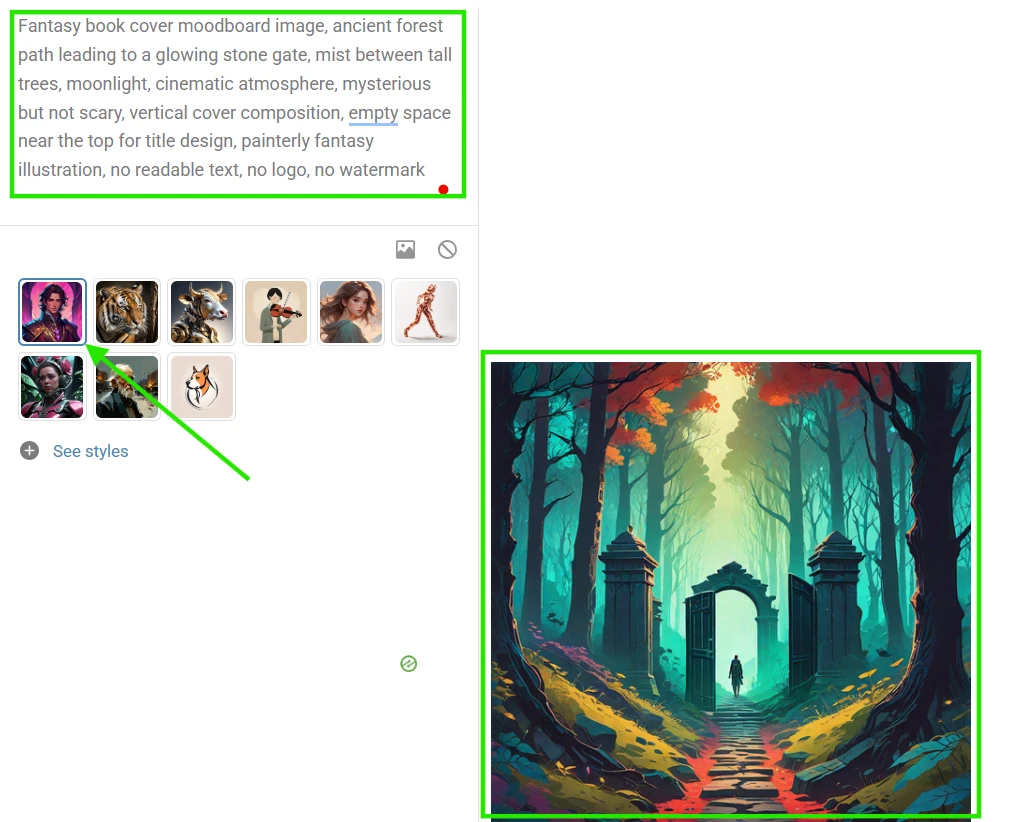
I assigned Hotpot a fantasy book-cover moodboard scene for a fictional novel about a hidden forest gate. This is a practical request for authors, editors, or designers who need early visual direction before briefing an illustrator. The image needed to feel vertical, mysterious, and cover-like, but it did not need finished typography. I asked for a strong central path, a glowing gate, and atmospheric lighting so the result could suggest genre, mood, and composition without pretending to be a final book cover.
What The Assignment Produced

The screenshot shows a vertical fantasy landscape with a forest path leading toward a bright stone gate. Tall trees frame the scene, while mist and moonlit tones create a cover-style atmosphere. The center of the image pulls attention toward the glowing gate, giving the composition a clear focal point. The upper area remains open enough for a designer to imagine adding a title later. No finished book title appears in the image, so the screenshot reads as a moodboard asset rather than a completed cover. The result is built around setting, mood, and genre cues.

Working Through The Assignment

This was one of the more comfortable assignments for Hotpot because fantasy scenery gives the model room to interpret. Unlike the product visual, the exact shape of every object mattered less. The forest, mist, gate, and moonlight could vary and still support the brief. That made the workflow feel more forgiving.

The most important prompt adjustment was the phrase “book cover moodboard.” It guided the image toward a vertical, central composition without requiring finished publishing design. I also added “mysterious but not scary” because fantasy prompts can easily become darker than intended. The tool responded better to mood and scene language than to layout precision. I still had limited control over exact spacing, but the assignment showed why Hotpot can be useful when the output is meant to inspire a direction rather than lock a final design.

Editor’s Margin

I learned that genre scenes give Hotpot more creative breathing room. Next time, I would run several variations across different fantasy styles before choosing a direction. A subtle observation: the assignment became stronger once I stopped asking for a “cover” and asked for a “cover moodboard” instead.

Looking Back At The Assignment Board

The desktop wallpaper felt like the most natural assignment because it did not fight the tool. It asked for atmosphere, aspect ratio, and simplicity, which are easier to guide through a prompt. The fantasy book-cover moodboard also fit the platform well because the image could remain useful even when some details shifted. In both cases, Hotpot worked like a fast visual sketching desk: give it a mood, a scene, and a format, then use the result as a starting point.

The product advertisement required more trial-and-error. A single product object gives the viewer fewer places to forgive visual oddities. If the cap, silhouette, label area, or shadow feels slightly wrong, the whole image becomes less useful. The travel poster sat somewhere in the middle. It could produce an appealing direction, but it needed careful wording to avoid unwanted text or overly loose layout behavior.

Across the board, the recurring strength was speed of setup. The assignments did not require a long onboarding process, and the aspect-ratio options made it easy to match common creative formats like thumbnails, posters, product posts, and wallpapers. The recurring limitation was control. Hotpot could follow the spirit of a brief, but it did not always behave like a layout tool where every object lands exactly where requested.

That pattern matches the broader impression from Reviewner’s review. Hotpot AI Image Generator is easier to place in a low-stakes creative workflow than a polished production pipeline. It can help shape a direction, create a mood, or supply a first visual draft. The more the assignment depends on precision, consistency, or final commercial polish, the more human editing and careful selection become part of the work.
Methodology

How We Research?

Cross-source aggregation

Collects reviews from multiple review platforms, community forums, and social channels for a broader evidence base.

Theme clustering and pattern detection

Groups repeated topics like billing, support, and quality to identify dominant issues and frequently praised aspects.

Sentiment classification

Separates positive, neutral, and negative signals, weighting complaints about reliability and charges against occasional quality praise.

Recency weighting and refresh cadence

Applies higher weight to newer reviews and refreshes datasets regularly to reflect current product behavior.

Internet Reputation

Hotpot AI Image Generator Repo on Internet

The Trust Check

Reputation Through Real-World Use Cases

I ignored star ratings because they flatten the story too quickly. A single score cannot explain why one creator sees Hotpot AI as a handy shortcut while another sees it as a frustrating gamble. The more useful question is not whether people like the platform in general. It is what they were trying to make when their opinion was formed.

That is why I read the discussions by use case. Hotpot presents itself as a broad AI design workspace for images, headshots, social media graphics, app visuals, photo editing, and creative templates. Reviewner’s hands-on findings, meanwhile, frame the product as risky for serious work because output quality, delivery reliability, credits, and support repeatedly become part of the experience. Trustpilot reviews add a sharper customer-service layer, while Reddit and design-tool blogs show how expectations change when users are working on lighter creative tasks.

Across these sources, Hotpot AI’s reputation does not move in one straight line. It changes depending on whether the user needs a polished LinkedIn headshot, a quick visual idea, an app-store graphic, a social post, or a restored old photo. Each creative goal exposes a different version of the same product.

Use Case: Creating Professional Headshots

What Users Commonly Say

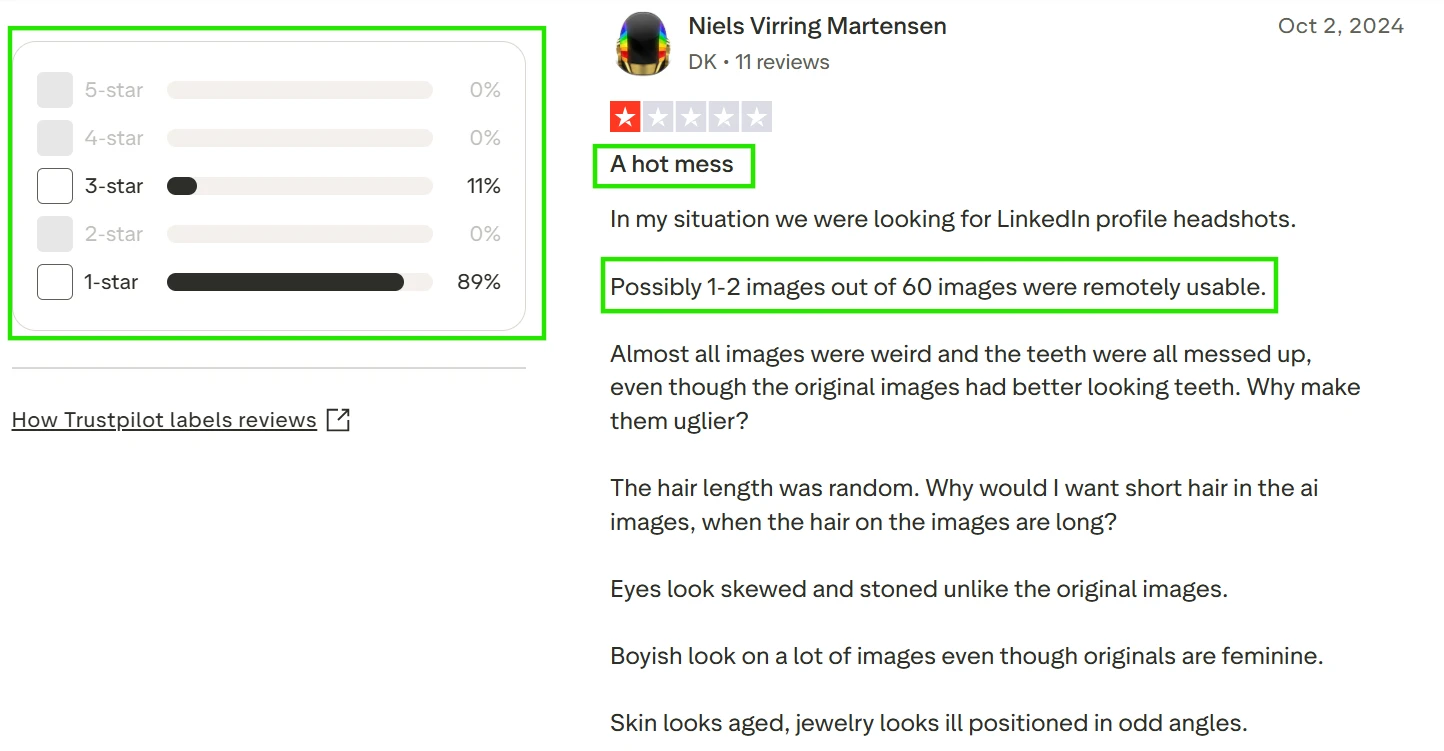
This is the use case where Hotpot AI’s reputation looks the most fragile. People arrive expecting a fast alternative to a studio portrait, especially for LinkedIn, profile pages, or professional identity updates. The repeated strength is the promise itself: upload photos, wait, and receive a large batch of polished options. But the actual discussion is dominated by facial accuracy, realism, and control. A Trustpilot reviewer looking for LinkedIn profile headshots said only a tiny portion of a large batch felt usable, with complaints around teeth, eyes, hair length, aging, jewelry, and gender presentation. Reviewner’s hands-on section mirrors that concern, noting distorted portrait results and weak control over appearance.

Looking At The Discussion

Looking at this comment, the frustration is not just that the output looked artificial. What stands out is how specific the user becomes while describing the face: teeth, hair, eyes, skin, jewelry, and overall identity. That detail matters because headshots are personal in a way that generic AI art is not. A strange landscape can still be fun. A strange face feels like the tool has misunderstood the person. The visible review also shows the user comparing the results against the original photos, which makes the problem feel less like taste and more like recognition. The discussion reads like someone expected a professional shortcut and ended up auditing every small facial decision the model made.

What This Use Case Taught Me

This use case matters because headshots have a much lower tolerance for weirdness than casual graphics. In my own hands-on work, this matches the biggest weakness: Hotpot AI can generate volume, but volume does not help if the face drifts away from the person. Future users should treat AI headshots as speculative drafts, not as dependable profile images. The tool may be acceptable for playful avatars or low-stakes identity experiments, but anyone needing a trustworthy professional portrait should be cautious about paying before seeing consistent examples.

Use Case: Generating Simple AI Artwork

What Users Commonly Say

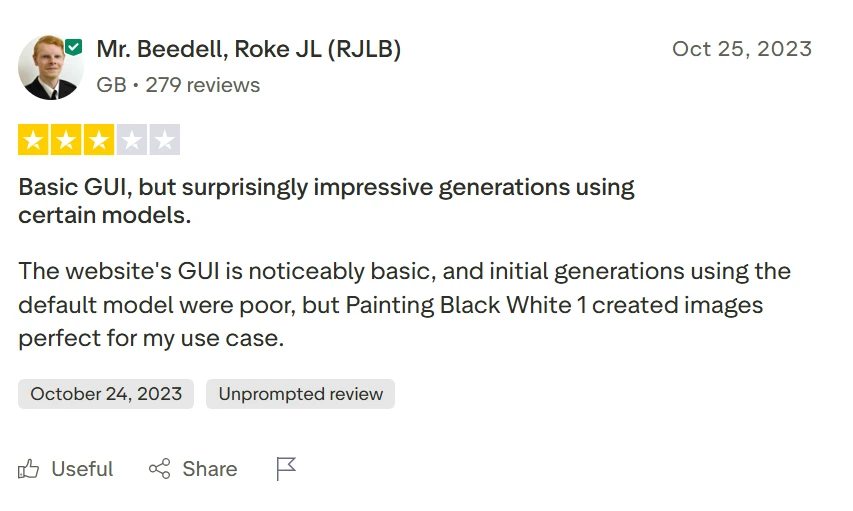
For simple AI artwork, Hotpot AI’s reputation becomes more mixed. Users with loose creative goals seem more willing to accept surprises, especially when they are making fantasy visuals, abstract scenes, or low-pressure prompt art. One Trustpilot reviewer criticized the basic interface and weak default results, but also said a specific black-and-white painting model produced images that worked for their particular use case. Reddit discussions show the same split from another angle: a GIS-related prompt was mocked for turning a technical concept into generic “spatial” artwork, yet another commenter still described the image as suitable for a fantasy or anime-style setting.

Looking At The Discussion

Reading this discussion beside the image-related comments, I notice how quickly the judgment changes once the goal changes. For a GIS user, the image appears to miss the professional meaning of the prompt. It turns a technical field into a decorative landscape. But in the same visible thread, someone can still read the result as visually interesting for fantasy or anime-style work. That contrast is useful because it shows why AI artwork feedback can sound contradictory. The same output can be wrong for one assignment and still visually usable for another. The comments do not make Hotpot look precise, but they do show why casual creators may still find moments of value inside inconsistent generations.

What This Use Case Taught Me

Simple AI artwork is where Hotpot AI has the most room to be forgiven. My own hands-on impression lines up with that: when the prompt does not need technical accuracy, exact anatomy, or brand-safe polish, the platform can still produce starting points. The risk is expectation. Users should not assume that a prompt with specialist meaning will be interpreted deeply. Hotpot seems better suited to mood, style, and quick visual exploration than to conceptually accurate illustration.

Product Analysis

Hotpot AI Image Generator — Key Features

AI headshot generation

Frequently criticized for distorted teeth, eyes, hair, and overall unflattering facial changes.

Portrait style customization

Users wanted more parameter control, reporting random hair length, gender cues, and aging effects.

Credit based payment system

Credits consumed even when uploads failed, widely reported as unfair and misleading.

Subscription and recurring billing

Strongly criticized, with reports of continued weekly charges despite deleted accounts.

Image upload handling

Image upload errors appeared frequently, consuming credits without delivering any generated photos.

Job queue and delivery ETA

Promised 90 minute delivery often missed, several reviewers did not receive images after days.

Customer support and refunds

Commonly described as nonresponsive, with refund requests ignored and no phone contact available.

Interface simplicity

GUI noted as basic and plain, but not a primary complaint compared with reliability issues.

Model variety and presets

One reviewer found a specific model producing acceptable results after poor default generations.

Benchmarks

Hotpot AI Image Generator — Scorecard

Dimension Our Test User Signal Verdict Composite
Image Quality
Realism and aesthetic accuracy
3 2 Weak
30%
Reliability
Job completion and uptime consistency
2 1.5 Weak
20%
Ease of Use
Interface clarity and workflow
5 4 Weak
50%
Customer Support
Responsiveness and issue resolution
1.5 1 Weak
15%
Billing Transparency
Cancellation and fair charging practices
2 1.5 Weak
20%
Value for Money
Perceived return for price paid
2.5 2 Weak
25%
Control and Customization
User control over output parameters
3 2.5 Weak
30%
Findings

Key Test Results

Image Quality

Roughly 2 of 60 test portraits were usable, with frequent distortions in teeth, eyes, and skin.

Delivery Reliability

Several orders showed 0 percent completion within 48 hours, despite promised 90 minute turnaround.

Support Responsiveness

Majority of support emails went unanswered, with near 0 percent successful direct resolutions reported.

Billing and Credits Handling

Credits were consumed on failed uploads in nearly every reported error case, with refunds rarely granted.

Usable Model Options

One user reported a single model delivering satisfying results after poor default model performance.

Community Signals

User Insights

Most Liked Feature

"Occasionally one specific model can create images perfect for a narrow use case."

Most Common Issue

Nonexistent support, failed deliveries, and ongoing charges even after account deletion or errors.

Sentiment Analysis

What People Talk About Hotpot AI Image Generator

Most-mentioned praise
Some models can occasionally produce acceptable images
70%
Basic interface that is simple to navigate
45%
Generations can provide humorous results for low stakes use
35%
Offers multiple AI models including a black and white focused option
30%
Online access without local installation requirements
20%
Most-mentioned pain
Very poor headshot quality with distorted teeth, eyes, and aging
80%
Jobs often fail to deliver images despite countdown timers
75%
Credits consumed on upload errors with no automatic refunds
70%
Customer support rarely responds to emails or refund requests
65%
Recurring payments continue after account deletion or attempted cancellation
60%
Difficult cancellation process and no customer service phone number
55%
High price relative to the low rate of usable images
50%
Editorial Testing Log

Changelog

Date Reviewner Version Duration Remarks
v1.0 5 Days Initial Testing

Each test follows our six dimensions methodology.

Community Reviews

What users say about Hotpot AI Image Generator

0.0
Based on 0 reviews
5
0
4
0
3
0
2
0
1
0
Have you used Hotpot AI Image Generator?

Sign in to share your experience and help others choose the right tool.

Sign in to review

No reviews yet

Be the first to review Hotpot AI Image Generator and help others discover this tool.