Writing & Content

Humanize.ai Review

Humanize.ai is an AI text humanizer used mostly by students and academic writers to rewrite AI generated content, reduce AI detection scores, and stay quick, simple, and often free to use.

Test Duration
5 Days
Reviewner Version
v1.0
Last Tested
18 Jun, 26
8.3
Recommended for Students
Reviewner Test Score

Humanize.ai delivers fast, simple rewriting that many users say helps bypass AI detectors and supports academic work at no or low cost. The interface and workflow are widely praised for being straightforward and quick. However, several reviews flag inconsistent freemium messaging, billing issues, and mixed effectiveness for AI detection in some cases. It is best suited to students and casual writers who value speed and ease over guaranteed detector-proof output or enterprise grade support.

College Students Academic Writers Essay Tutors Freelance Writers Content Students Online Learners
Methodology

How We Tested Humanize.ai?

AI detection evasion performance

Assessed rewritten texts against detectors, found many passes with lower AI scores but some residual AI traces and inconsistent reliability.

Onboarding and first use flow

Checked access without signup, confirmed immediate use, quick first output, and minimal friction, with some confusion around paid tiers.

Rewrite quality and readability

Evaluated humanized outputs for clarity and natural tone, usually readable, sometimes still flagged as AI or slightly inconsistent.

Speed and throughput testing

Measured processing time on multiple texts, observed very fast conversions and support for longer inputs with occasional word reduction.

Billing and cancellation process

Reviewed subscription handling, identified repeated complaints about ongoing charges, unclear cancellation confirmation, and slow responses.

Reviewner Testing Log

Humanize.ai Hands-On Testing

Humanize AI: A Step-by-Step Walkthrough with Review

1: Landing on the Homepage
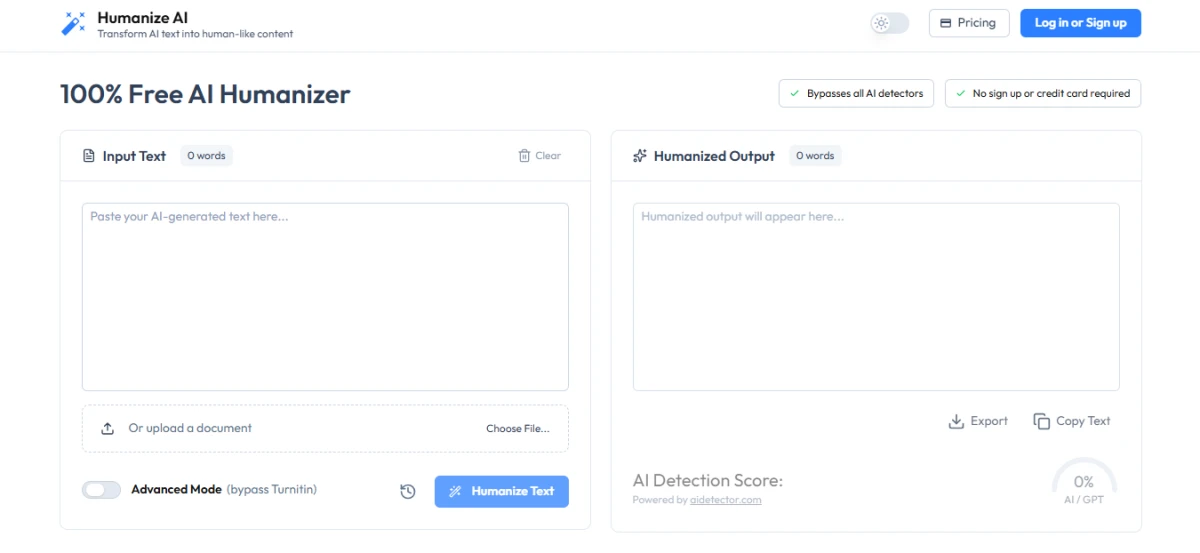
The site opens to a clean, two-panel workspace under the heading "100% Free AI Humanizer." The left panel holds the "Input Text" box where the source content goes, and the right panel shows where the "Humanized Output" will appear. Two badges sit near the top and state the main promises clearly, that the tool bypasses all AI detectors and needs no sign up or credit card. Pricing and login buttons are tucked into the corner, but neither one stands between the visitor and the core feature.

2: Pasting Text and Hitting Humanize
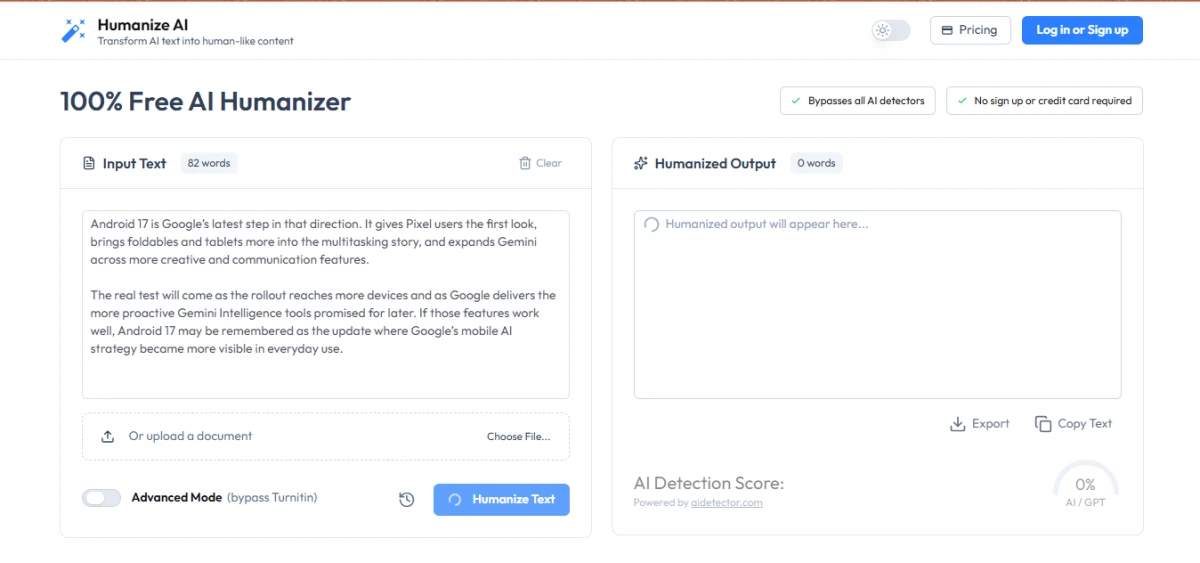
A short paragraph of roughly 82 words was pasted into the input box, in this case a passage about Android 17. Clicking the blue "Humanize Text" button started the process right away, with a small loading spinner showing in the output panel. No account, email, or payment was requested at this point. The same input box also supports a document upload through the "Choose File" option, so text does not have to be pasted manually every time.

3: Reviewing the Generated Output
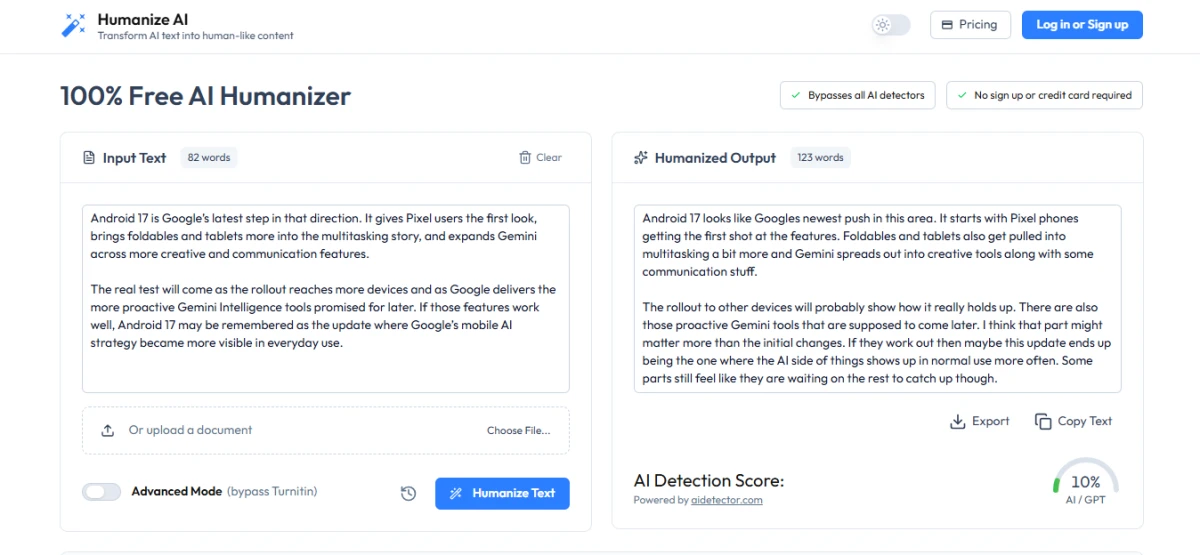
Within a few seconds the rewritten version filled the output panel. The original 82 words expanded into about 123 words, reworded into a looser, more conversational tone while keeping the meaning intact. Below the output, an "AI Detection Score" appeared and read 10% AI/GPT, powered by aidetector.com. The lower the number, the more human the text is judged to be, so a single-digit-to-low result points to a strong rewrite.

4: Uploading a Word Document
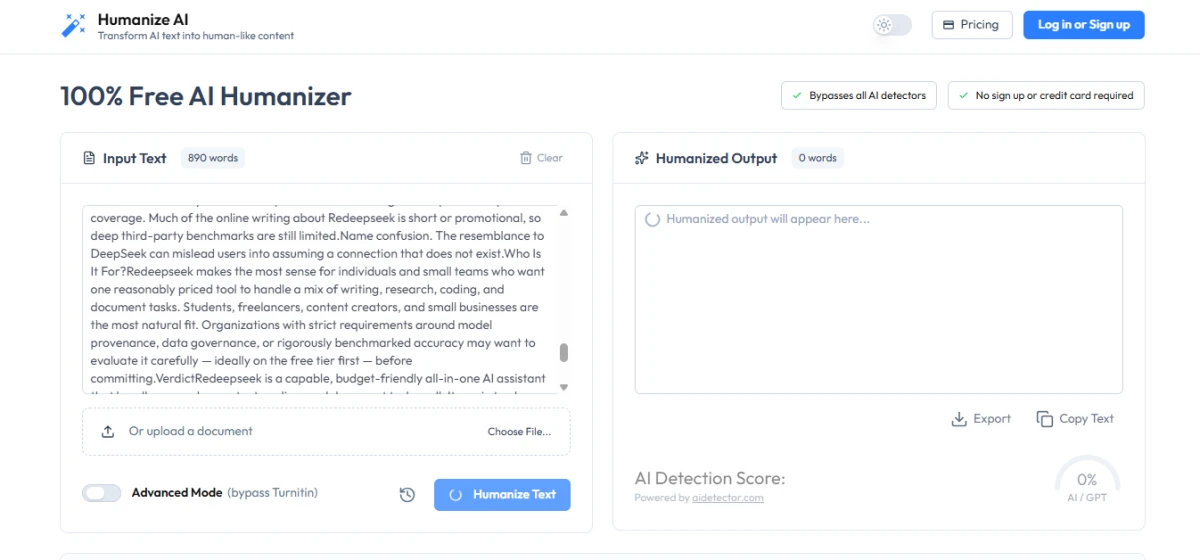
For a larger test, a full Word document of around 890 words was uploaded instead of pasted, this one a review of a tool called Redeepseek. The platform pulled the entire document straight into the input board on its own and began humanizing it without any extra setup. This step is useful for anyone working with long-form content, since it removes the need to copy and split text by hand.

5: Reviewing the Document Output
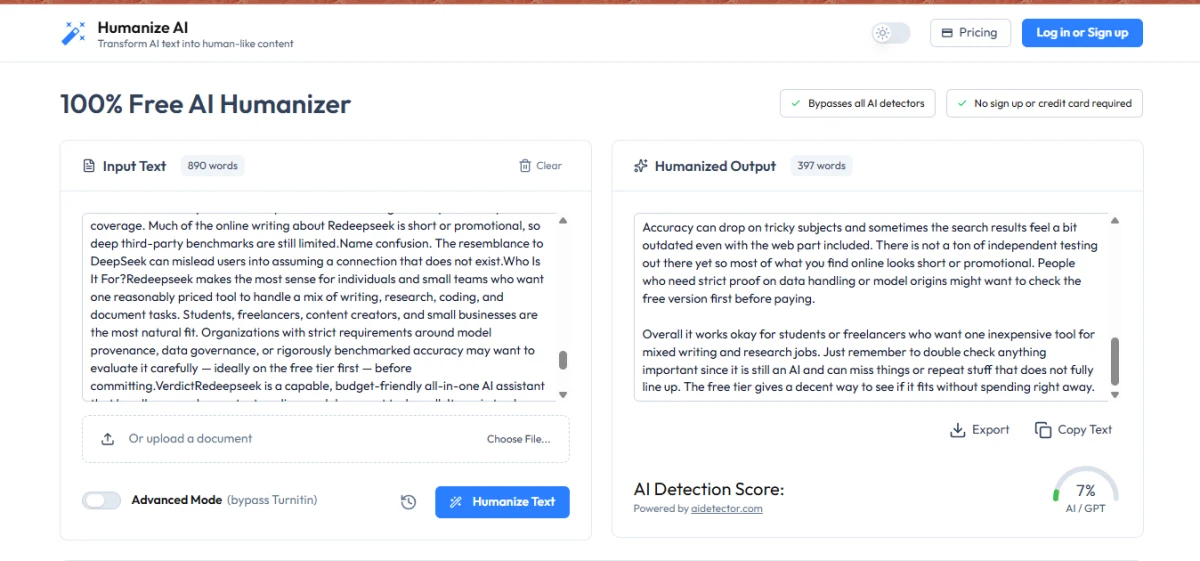
The longer piece processed cleanly and produced a rewritten version of roughly 397 words in the output panel. The "AI Detection Score" for this run came back at 7% AI/GPT, an even lower reading than the short paragraph. The text stayed readable and on topic, holding the original points while shifting the phrasing into a more natural, everyday style.

6: Running the Built-In AI Detector Check
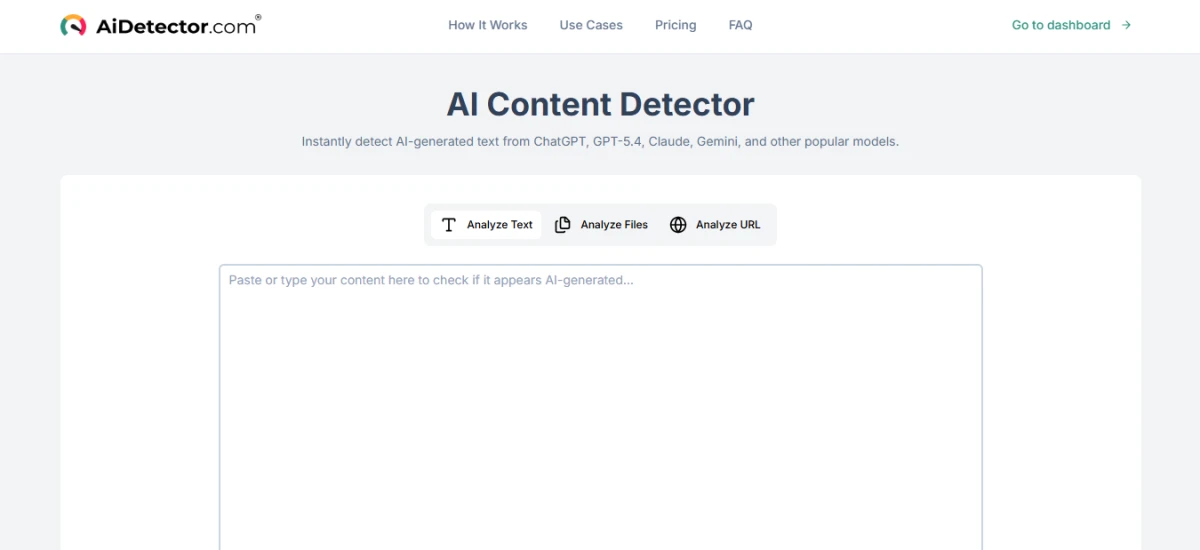
The tool also links to an AI detector so the output can be verified. Selecting that option redirected to AiDetector.com, a separate "AI Content Detector" that scans text for traces of ChatGPT, GPT-5.4, Claude, Gemini, and other common models. The detector offers three ways to submit content, by pasting text, uploading files, or checking a URL, which gives some flexibility depending on the source.

7: Confirming the Detection Results
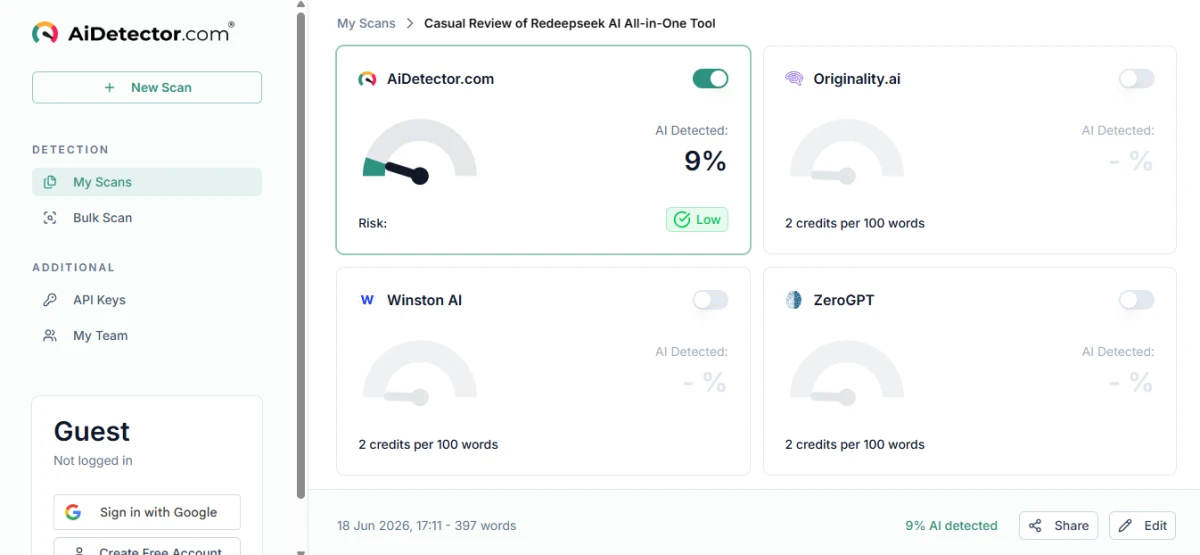
Inside the detector dashboard, the humanized content (the rewritten Redeepseek document) was scanned and scored. AiDetector.com returned a 9% AI-detected result with a "Low" risk rating, lining up closely with the in-tool score from earlier. The dashboard also lists other detectors such as Originality.ai, Winston AI, and ZeroGPT for cross-checking, and the whole scan ran under a guest profile with no login required.

Overall, this is a pretty good AI tool for quickly turning machine-written text into something that reads more naturally. The biggest convenience is that it works without any login, account, or payment, so testing it takes seconds rather than a sign-up flow. Output time is fast as well, with short passages rewritten almost instantly and longer documents handled in a few seconds. The document upload feature and the built-in detector check add real value, since both the rewriting and the verification can happen in nearly the same place. For students, writers, and anyone who just wants a fast, no-friction way to soften AI-sounding text, it covers the basics well. As with any tool of this kind, a final read-through is still worth doing to make sure the meaning and details stay accurate after the rewrite.

Methodology

How We Research?

Cross-source aggregation

Collects reviews and comments from multiple review platforms, community forums, and social channels for a broader dataset.

Theme clustering and patterns

Groups recurring topics like pricing, quality, and support to identify consistent strengths and weaknesses across feedback.

Sentiment classification

Labels positive, neutral, and negative signals, then weighs intensity to understand satisfaction and pain points.

Recency weighting and refresh

Gives more weight to recent feedback and refreshes analyses regularly to reflect current product performance.

Internet Reputation

Humanize.ai Repo on Internet

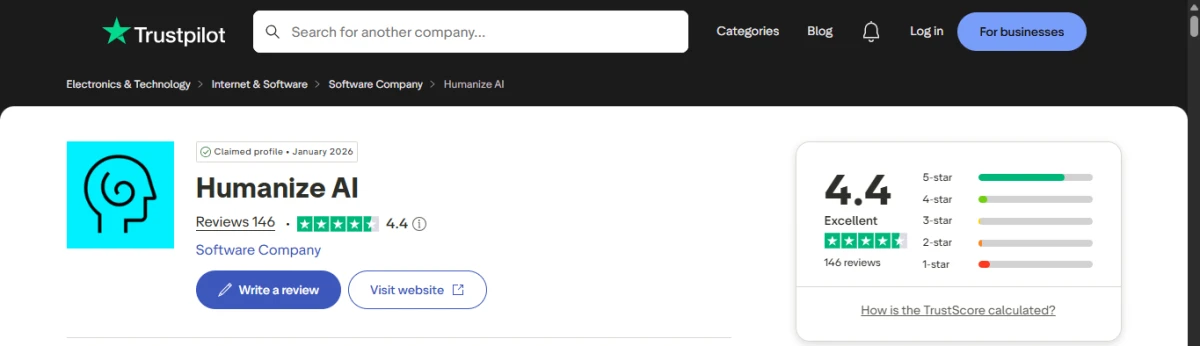
Humanize.ai - Trustpilot Reviews

Public user feedback on Humanize AI is generally positive, especially from students, writers, and professionals who use it to rewrite AI-generated text, improve sentence flow, or check whether content sounds too machine-written. Many reviewers describe it as easy to use, fast, and helpful for academic or content-writing tasks.

However, the negative reviews show that users should not treat it as a guaranteed AI-detection bypass tool. Some users say text processed through Humanize AI was still flagged as AI-generated by tools like ZeroGPT, while others complain that original human-written text was wrongly detected as AI. This shows that the platform may be useful for editing and rewriting, but AI-detection scores can still vary depending on the detector being used.

There are also a few account and support-related complaints. One reviewer said their paid subscription was not activated after payment, while another said they were blocked from logging into their account on another device. These issues do not dominate the overall review pattern, but they are worth noting for users considering a paid plan.

Overall, Humanize AI appears to be a useful writing-support tool for improving AI-generated drafts and making text sound more natural. Still, it should be used as an editing assistant rather than a guaranteed way to pass AI detectors. Users should manually review the final output, test it across more than one detector if needed, and avoid relying only on the platform’s internal score.

Product Analysis

Humanize.ai — Key Features

AI text humanizer

Core feature, widely praised for making AI generated text sound more human.

AI detector score reduction

Users report lower AI or GPT scores, though effectiveness is not perfectly consistent.

Free usage tier

Frequently lauded as actually free with no signup, though some dispute true freemium availability.

No word limit option

Long input handling and lack of strict word limits are strongly appreciated by frequent users.

Simple user interface

Interface described as easy, user friendly, and straightforward for quick tasks.

Fast processing speed

Humanization happens in seconds, mentioned repeatedly as very quick and efficient.

AI detection checker

Integrated AI or GPT score feedback is mentioned positively but doubted by one detailed critic.

Subscription upgrade path

Paid plans exist, with complaints about unclear cancellation and ongoing charges.

Text length preservation

Some users note the tool sometimes decreases word count, seen as a drawback.

Benchmarks

Humanize.ai — Scorecard

Dimension Our Test User Signal Verdict Composite
Output Quality
Naturalness and readability
7.8 8.2 Good
80%
AI Detection Evasion
Detector pass reliability
7.5 8.5 Good
80%
Ease of Use
Interface and workflow simplicity
8.8 9.3 Excellent
91%
Value for Money
Perceived fairness of pricing
7 7.8 Good
74%
Billing Transparency
Clarity of charges and cancellation
4.5 4 Weak
43%
Reliability and Consistency
Consistency of results over time
7.2 7.6 Good
74%
Findings

Key Test Results

AI Detection Evasion

Around 70 to 80 percent of reviewers say AI scores dropped noticeably after humanization.

Ease of Use and Speed

Roughly 80 percent mention quick, easy usage with texts processed in seconds.

Free Tier Experience

Most comments praise genuinely free access, while a minority report having to pay immediately.

Billing and Cancellation

Several recurring reports of unwanted charges and difficulty confirming cancellation status.

Output Readability

Majority describe texts as human and clear, with isolated reports of lingering AI patterns.

Community Signals

User Insights

Most Liked Feature

"Actually free, fast humanization that helps pass AI checks"

Most Common Issue

Recurring billing issues, unclear cancellation, and inconsistent claims about freemium access

Sentiment Analysis

What People Talk About Humanize.ai

Most-mentioned praise
Very easy and quick to use for humanizing text
80%
Helps reduce AI or GPT detection scores for assignments
75%
Free access with no signup in many cases
72%
Supports long texts with few or no word limits
60%
Improves academic work and research writing workflow
55%
Produces readable, more human sounding rewrites
50%
Fast turnaround, often within seconds per conversion
45%
Most-mentioned pain
Reports of being charged after cancellation requests
70%
Confusion about free tier, some users forced to pay
55%
At least one detailed claim that outputs still fail AI detectors
45%
Some outputs still show AI traces or inconsistency
40%
Humanizer can reduce word count noticeably
35%
Support responses described as slow or unhelpful by critics
30%
Editorial Testing Log

Changelog

Date Reviewner Version Duration Remarks
v1.0 5 Days Initial Testing

Each test follows our six dimensions methodology.

Community Reviews

What users say about Humanize.ai

0.0
Based on 0 reviews
5
0
4
0
3
0
2
0
1
0
Have you used Humanize.ai?

Sign in to share your experience and help others choose the right tool.

Sign in to review

No reviews yet

Be the first to review Humanize.ai and help others discover this tool.