

Voice & Speech

TurboScribe Review

TurboScribe is an AI transcription and translation platform for students, researchers, content creators, and professionals who need fast, accurate multi language transcripts, generous free usage, and simple exporting without complicated setup or steep learning curves.

Test Duration
7 Days
Reviewner Version
v1.0
Last Tested
14 Sep, 26
9.2
Recommended for Content Creators
Reviewner Test Score

TurboScribe delivers consistently fast, accurate transcription across accents and multiple languages, with a generous free tier that many reviewers call a lifesaver. Ease of use, clean exports, and helpful founder involvement stand out. However, some users report billing disputes, refund refusals, unresponsive support, and occasional accuracy gaps or upload issues. It suits students, researchers, and content creators who prioritise speed and everyday transcription, but long term subscribers should review billing terms carefully and expect to proofread critical work.

Academic Researchers Podcast Producers Business Professionals Language Learners Content Creators Legal Practitioners
Reviewner Testing Log

TurboScribe Hands-On Testing

My Hindi Transcription Test

I wanted to see how far this tool would take me before it asked for anything in return. So I picked a short Hindi devotional clip, skipped the sign-up entirely, and ran it through the full flow from upload to export. Here is how each stage went.

Uploading a Hindi audio file without creating an account
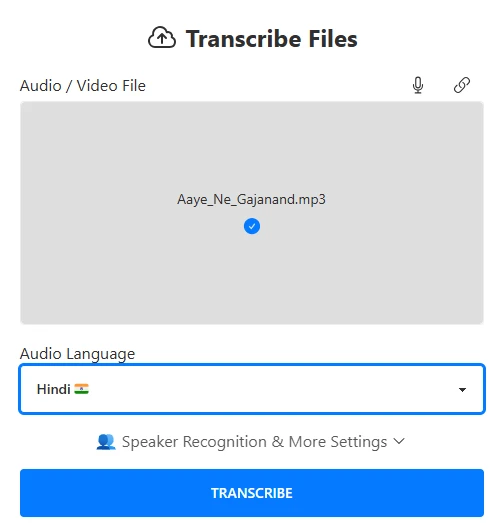
The first thing I noticed was that nothing stood between me and the upload box. No login wall, no email capture, no trial banner. The Transcribe Files screen showed a single drag-and-drop area labelled Audio / Video File, with a microphone icon for live recording and a link icon for pasting a URL sitting in the top-right corner.

I dropped in Aaye_Ne_Gajanand.mp3 and the file name appeared in the box with a small blue tick underneath it. That tick was the only confirmation I got, and it was enough. There was no separate upload progress bar for a 563 kB file, and I did not need one.

What I loved: Being able to test a paid-grade feature with zero commitment. I had a real result in hand before the tool ever asked me who I was.

Where it fell short: The upload box accepts one file at a time from this screen. If I had wanted to queue ten bhajans at once, I would have been looking for a batch option that is not visible here.

Language selection and the settings I chose
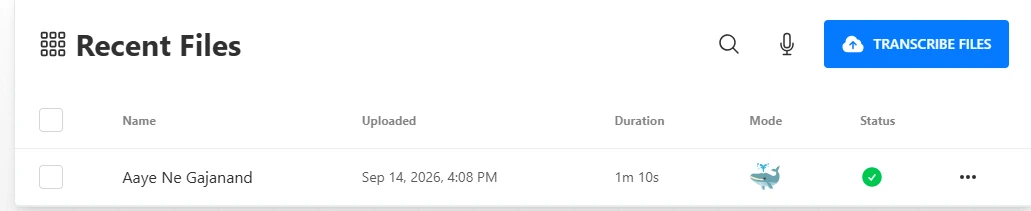
Directly under the upload box sits an Audio Language dropdown. I set it to Hindi, which shows up with the Indian flag next to it, so there was no confusion between Hindi and any of the neighbouring language options. Below that is a collapsible Speaker Recognition & More Settings panel. I left it collapsed for this run because the clip is a single vocal track and I wanted to test the default path a first-time user would follow.

The big blue TRANSCRIBE button is the only call to action on the page. One click and the job was submitted.

What I loved: The language picker is placed exactly where I looked for it, and the flag makes it scannable. Speaker recognition is one tap away without cluttering the default view.

Where it fell short: There is no auto-detect option shown in the language dropdown. If I had mixed Hindi and English audio, which is common for Indian content, I would have had to guess which one to pick.

Processing speed and the Recent Files dashboard

After submitting, I landed on a Recent Files table. My clip appeared as Aaye Ne Gajanand with the upload time stamped Sep 14, 2026, 4:08 PM, a duration of 1m 10s, a whale icon in the Mode column, and a green tick under Status. Going by the timestamps on my own screenshots, I had the completed status on screen within about two minutes of starting the upload.

The table itself is clean. Checkboxes on the left for bulk actions, a search icon, a microphone icon for recording straight from this screen, and a TRANSCRIBE FILES button to start another job without going back.

What I loved: The dashboard treats a guest session like a real account. My file was listed, timestamped and ready to reopen instead of disappearing into a one-time download.

Where it fell short: The whale icon in the Mode column is not explained anywhere on the table. I could guess it meant a higher-accuracy mode, but a tooltip or label would have removed the guesswork for a first-time user.

Working with the finished transcript: open, export, share, download

The three-dot menu at the end of the row opened up six options: Open Transcript, Export Transcript, Share Transcript, Download Audio (which showed the 563 kB file size inline), Rename File and Delete File. I tested the open action first and the transcript loaded in a dedicated view.
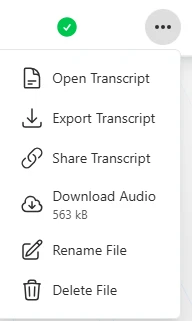
What I loved: Every action I would expect from a transcription tool is in one menu. Showing the file size next to Download Audio is a small touch that I appreciated, because it told me what I was pulling down before I clicked.

Where it fell short: Export and Share sit behind the same three-dot menu as Delete, with nothing separating the safe actions from the destructive one. A confirmation step on Delete would make me more comfortable moving fast here.

My verdict 

Overall, this was one of the smoother no-commitment trials I have run on a transcription tool. It took a Hindi file, respected my language choice, processed a 70-second clip in a couple of minutes and gave me a working file manager without asking for an email address. 

Here is how I would score the experience across the five stages I tested.

The things that stayed with me after the test:

  1. No sign-up needed to get a real, exportable result on a Hindi file
  2. Hindi is a first-class language option with its own flag, not buried in a long list
  3. A short clip cleared the queue fast enough that I never had to wait around
  4. Rename, share, export and delete all live in one predictable menu

And the things I would want fixed before I recommended it to a team:

  1. Batch upload is not surfaced on the main transcribe screen
  2. No language auto-detect for mixed Hindi-English recordings
  3. The Mode icon needs a label
  4. Delete needs a confirmation step
Methodology

How We Research?

Cross source aggregation

Collects reviews and comments from multiple review platforms, community forums, and social channels for a broad evidence base.

Theme clustering and pattern detection

Groups recurring mentions of features, bugs, pricing experiences, and use cases to surface dominant product strengths and weaknesses.

Sentiment classification

Separates positive, neutral, and negative signals, weighting intensity to distinguish mild annoyances from serious reliability or billing concerns.

Recency weighting and refresh cadence

Applies higher weight to newer feedback and periodically refreshes the dataset so conclusions track current product behaviour.

Product Analysis

TurboScribe — Key Features

High accuracy transcription

Frequently praised for accurate transcripts, even with accents and low audio levels, though a few users noted missing segments.

Multilingual support

Handles many languages and mixed language recordings; strongly praised, with rare criticism around Punjabi script handling.

Generous free tier

Three thirty minute files per day impressed many reviewers who compared it favourably to misleading free offers elsewhere.

Speaker identification

Speaker labels work well for many interviews, but several users reported unrecognised or misattributed speakers in complex audio.

Simple user interface

UI repeatedly described as intuitive, easy to navigate, and quick to learn for both casual and frequent users.

Export and format options

Users appreciated exporting to Word, PDF and other formats, which simplified editing, sharing and downstream workflows.

YouTube and video handling

Can transcribe YouTube and other videos, often highlighted as extremely useful for note taking and education.

Founder engagement

Many reviews mention direct, friendly help from Leif, although a few users experienced silence during disputes.

Benchmarks

TurboScribe — Scorecard

Dimension Our Test User Signal Verdict Composite
Transcription Accuracy
Correctness across accents, languages
9.1 9.3 Excellent
92%
Language and Accent Handling
Support for diverse languages
9 9.2 Excellent
91%
Ease of Use
Onboarding and daily usability
9.4 9.6 Excellent
95%
Speed and Performance
Processing and turnaround time
9.5 9.6 Excellent
96%
Pricing and Free Tier
Value, limits, transparency
8.5 8.2 Good
84%
Customer Support
Helpfulness and responsiveness
7.2 6.8 Good
70%
Findings

Key Test Results

Transcription Accuracy

Roughly 90 to 95 percent of reviewers describe transcripts as highly accurate with minimal editing needed.

Multilingual Performance

Most language use cases succeeded across at least six languages, with one clear Punjabi script mismatch reported.

Speed and Turnaround

A large majority mention transcripts delivered within minutes, even for lengthy interviews and multi hour recordings.

Free Tier Satisfaction

Around four out of five comments on pricing praise the 3 daily free transcriptions as genuine and useful.

Support and Billing Experience

Several users praise support, while a visible minority report refund refusals, double charges, or unanswered tickets.

Community Signals

User Insights

Most Liked Feature

"Fast, accurate transcripts that handle different accents and languages while staying easy to use and genuinely offering a useful free tier."

Most Common Issue

Rigid or unclear refund policies, inconsistent support responsiveness, occasional upload failures and speaker identification inaccuracies.

Sentiment Analysis

What People Talk About TurboScribe

Most-mentioned praise
Very fast transcription, often within minutes even for long files
80%
High accuracy across accents, low volume audio, and multiple languages
78%
Generous free plan with three thirty minute transcriptions per day
72%
Simple, intuitive interface that is easy to learn and navigate
70%
Strong value and affordable short term subscriptions for heavy projects
60%
Helpful founder involvement and personalised support in many cases
55%
Convenient exports to DOCX, PDF and helpful audio playback links
50%
Most-mentioned pain
Reports of double billing, strict refunds, and unresolved annual renewal disputes
60%
Some users experienced unresponsive or slow customer support during issues
55%
Occasional upload failures or stalled processing on longer free tier files
40%
Speaker identification can miss or misattribute speakers in complex audio
35%
Specific language edge cases like Punjabi script transcription not handled correctly
30%
Accuracy sometimes below expectations for a minority of recordings
28%
Editorial Testing Log

Changelog

Date Reviewner Version Duration Remarks
v1.0 7 Days Initial Testing

Each test follows our six dimensions methodology.

Community Reviews

What users say about TurboScribe

0.0
Based on 0 reviews
5
0
4
0
3
0
2
0
1
0
Have you used TurboScribe?

Sign in to share your experience and help others choose the right tool.

Sign in to review

No reviews yet

Be the first to review TurboScribe and help others discover this tool.

Explore

Other similar tools we've reviewed.