
I Tried Clipfly AI for Video Generation
I signed up, spent the free credits, and generated a real video. Here is exactly what happened, step by step, with what I loved and what I hated along the way.
I did not read a single feature page before this test. I opened Clipfly, made an account, and tried to get from zero to a finished video as fast as I could, the way any normal person would on a lunch break. The whole thing, from landing page to downloadable clip, took me about ten minutes. Some of those minutes were delightful. One of them was mildly irritating. Let me walk you through it.
The landing page
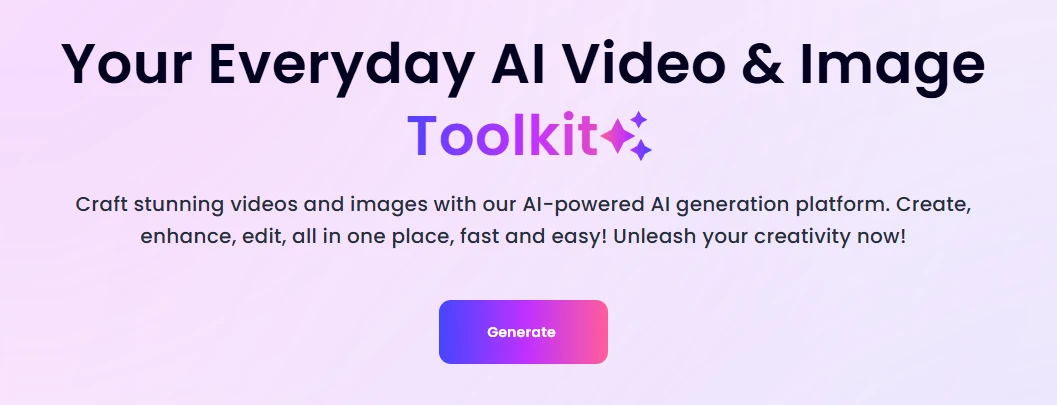
The Clipfly homepage. Big promise, one button.
First impression: clean. A single headline, two lines of copy, and one purple Generate button. No pop-ups, no cookie wall shoved in my face, no autoplay video screaming at me. I appreciate a site that gets out of its own way.
The copy itself is a bit much. "AI-powered AI generation platform" is a phrase that clearly nobody proofread, and "Unleash your creativity now!" is the kind of line I have read on roughly four hundred SaaS sites. It does not tell me what Clipfly actually does better than anyone else. But I am not here to grade copywriting.
| LOVE IT: One clear call to action, zero friction. I knew exactly where to click within two seconds. |
Signing up
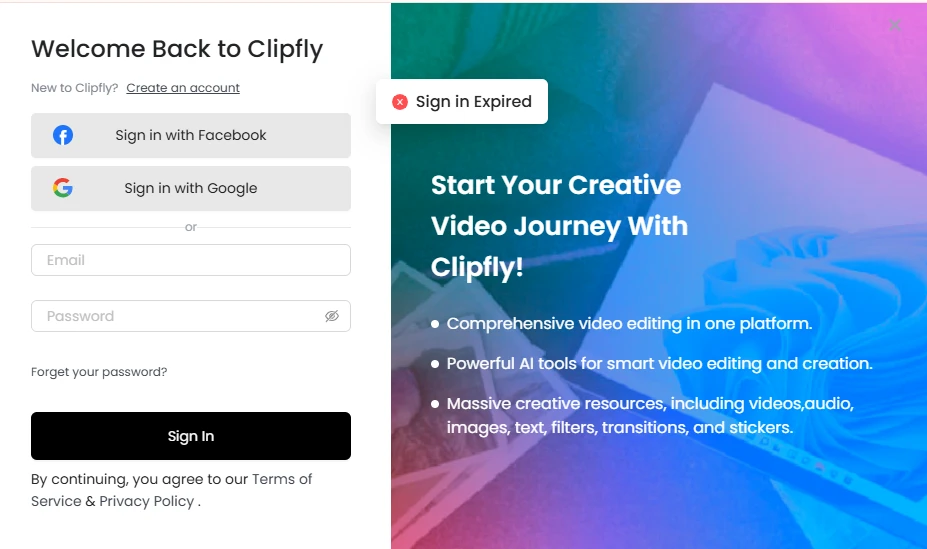
The sign-in modal. Note the "Sign in Expired" toast that greeted me before I had even typed anything.
You get three ways in: Facebook, Google, or plain email and password. I went with Google, and I was inside the editor in under fifteen seconds. No credit card, no phone number, no "tell us about your company" survey. That is how onboarding should work.
Here is the part that annoyed me. The very first thing I saw on the login modal was a red "Sign in Expired" error, before I had signed in at all. It is a harmless bug, but it is the kind of thing that makes a first-time visitor pause and wonder whether the product is half-finished. If I were the product team I would fix that today.
| HATE IT: A "Sign in Expired" error on a screen where I have never signed in. Cosmetic, but it chips at trust right at the moment you are asking for it. |
Inside the editor
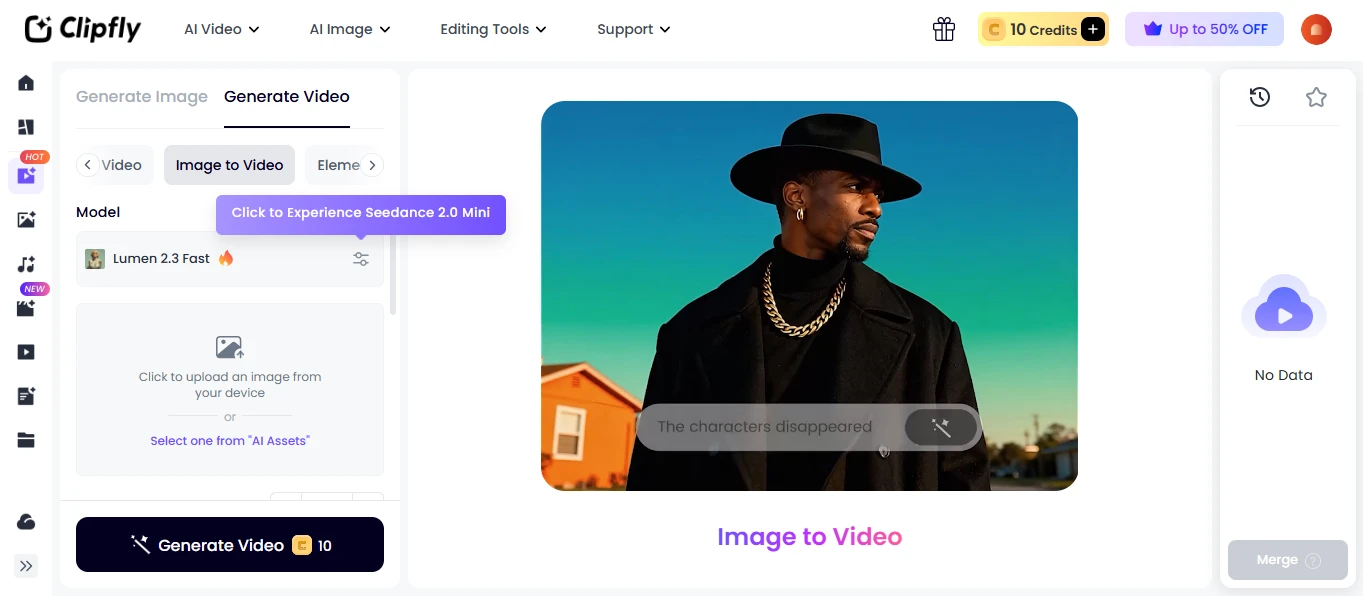
The AI Video workspace. 10 free credits in the top right, and a nudge to try Seedance 2.0 Mini.
The dashboard is laid out the way I would want it: model and inputs on the left, preview in the middle, history on the right. The left rail groups everything into AI Video, AI Image, and Editing Tools, and the Image to Video tab was already highlighted for me.
Two things jumped out. First, the free tier gives you exactly 10 credits, and one video costs exactly 10 credits. So you get one free generation. Not zero, not five. One. That is fair for a trial, but know it going in. Second, the default model was Lumen 2.3 Fast, with a tooltip pushing me toward Seedance 2.0 Mini. Model choice is a real feature here, not a marketing bullet, and I liked being able to see and swap it.
| LOVE IT: The layout needs no tutorial. I found the model picker, the upload zone, and the credit counter without hunting. |
Writing the prompt
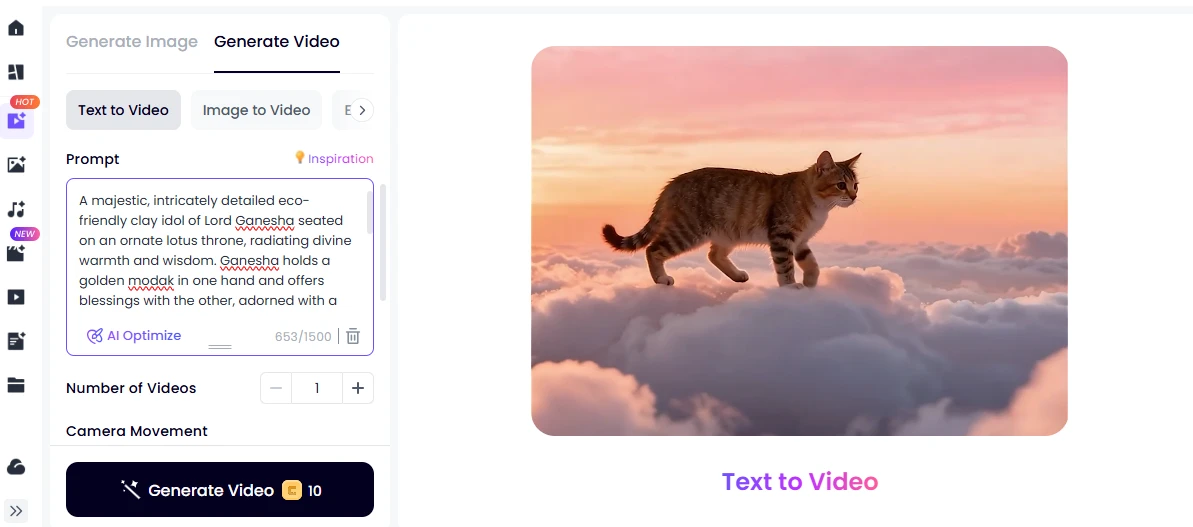
Text to Video with my Ganesha prompt loaded. 653 of 1,500 characters used.
I switched to Text to Video and wrote something that would actually stress the model: an eco-friendly clay idol of Lord Ganesha on a lotus throne, holding a modak, with diyas and marigolds. Culturally specific, lots of fine detail, plenty of ways for an AI to get it wrong. I wanted to see if it would hand me a generic elephant statue.
The prompt box gives you 1,500 characters, which is generous, and there is an AI Optimize button if you cannot be bothered to write a proper description. There is also a Number of Videos control and a Camera Movement section below it. I kept everything default and hit Generate.
| LOVE IT: 1,500 characters is enough room to be specific, and the AI Optimize option is there for people who just want to type five words and go. |
The result
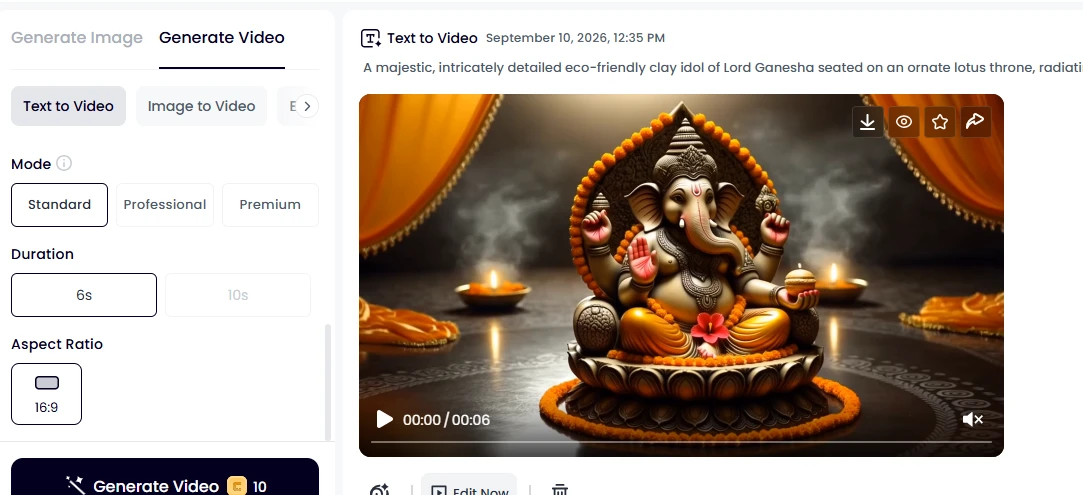
The finished 6-second clip, timestamped 12:35 PM. I hit Generate at 12:35 and had this by 12:38.
Honestly, this is the screenshot that made the whole test worth it. The idol is unmistakably Ganesha: the trunk, the four arms, the modak in the lower hand, the orange marigold garland, the diyas glowing in the foreground, the saffron drapes behind. The lighting is warm and cinematic, and the clay texture reads as clay rather than plastic. I have paid for worse output from tools three times the price.
It took roughly three minutes to render, which is quick enough that I did not tab away. The clip is 6 seconds long in 16:9 on Standard mode. The 10s option and the Professional and Premium modes were greyed out or would have cost more, so a free user is boxed into the shortest, cheapest version. The download, favourite, and share buttons sit right on the player, and there is an Edit Now button to push it straight into the editor.
| LOVE IT: Prompt fidelity was excellent on a genuinely tricky, culture-specific prompt. This was the moment Clipfly stopped feeling like a toy. |
The pricing wall
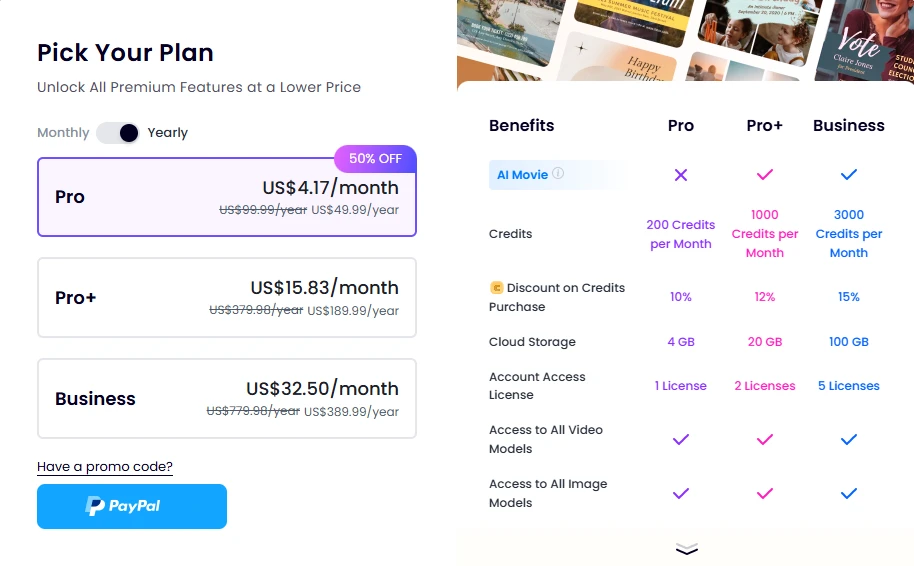
The plan picker. Prices shown on the yearly toggle with the 50% off banner.
Naturally, after one free video, Clipfly wants money. The yearly prices work out to US$4.17 a month for Pro (200 credits a month), US$15.83 for Pro+ (1,000 credits), and US$32.50 for Business (3,000 credits). The struck-through "original" prices are double, so the 50% off is baked into every tier rather than being a real limited-time deal. Treat the discounted number as the real price.
At 10 credits per 6-second Standard video, Pro gets you about 20 clips a month. That is fine for a hobbyist. Anyone producing social content daily is looking at Pro+. Note that the AI Movie feature is locked out of the cheapest plan entirely, and cloud storage is only 4 GB on Pro. The good news is that every tier gets access to all video and image models, so you are not paying extra to unlock Seedance or Lumen.
One real gripe: PayPal is the only payment button on this screen. No direct card option that I could see. That is a strange choice for a global consumer product in 2026.
| HATE IT: The "50% off" is permanent theatre, and PayPal-only checkout is a needless hurdle. The actual prices are fair; the presentation is not. |
The bottom line from my test
Ten minutes, one free credit bundle, one very good video. Clipfly's onboarding is close to frictionless, the editor is self-explanatory, and the generation quality on a hard prompt was better than I expected. What holds it back is small stuff: a phantom error on the login screen, a single free generation that ends before you have really explored, and a pricing page dressed up with a fake discount.
If you want a quick, low-commitment way to turn a text prompt into a clean 6-second clip, this is worth the free credits. If you are going to pay, go in knowing that US$49.99 a year is the real Pro price, not a sale.
• Loved: clean landing page, 15-second Google signup, intuitive editor, 1,500-character prompts, excellent prompt fidelity, all models on every plan.
• Hated: the "Sign in Expired" bug, only one free generation, permanent "50% off" pricing, PayPal-only checkout, AI Movie locked behind Pro+.