
Making a Video with Powtoon
Each step of the Powtoon experience is captured below , followed by a quick note on what I liked and what I disliked about that screen. The flow runs from account creation through to the template library.
Sign-Up Screen
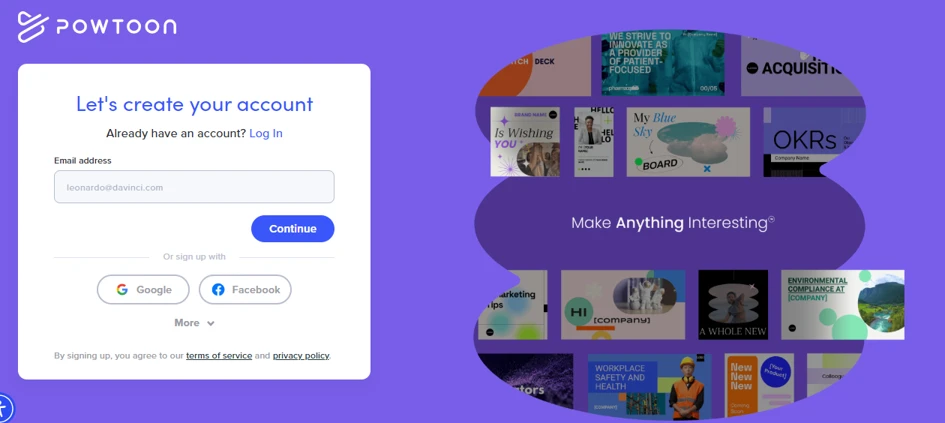
Figure 1 — “Let's create your account” landing page.
What I liked: Clean, uncluttered layout. The email field, Google and Facebook sign-in, and a clear “Continue” button make it fast to get in. The template collage on the right instantly shows the range of output you can make, which builds confidence before you even sign up.
What I disliked: The template collage is visually busy and some tiles are cut off, so it feels more decorative than useful. “More” sign-up options are hidden behind a dropdown, and there's no mention of a free plan or trial here to reassure first-timers.
Use-Case Questions
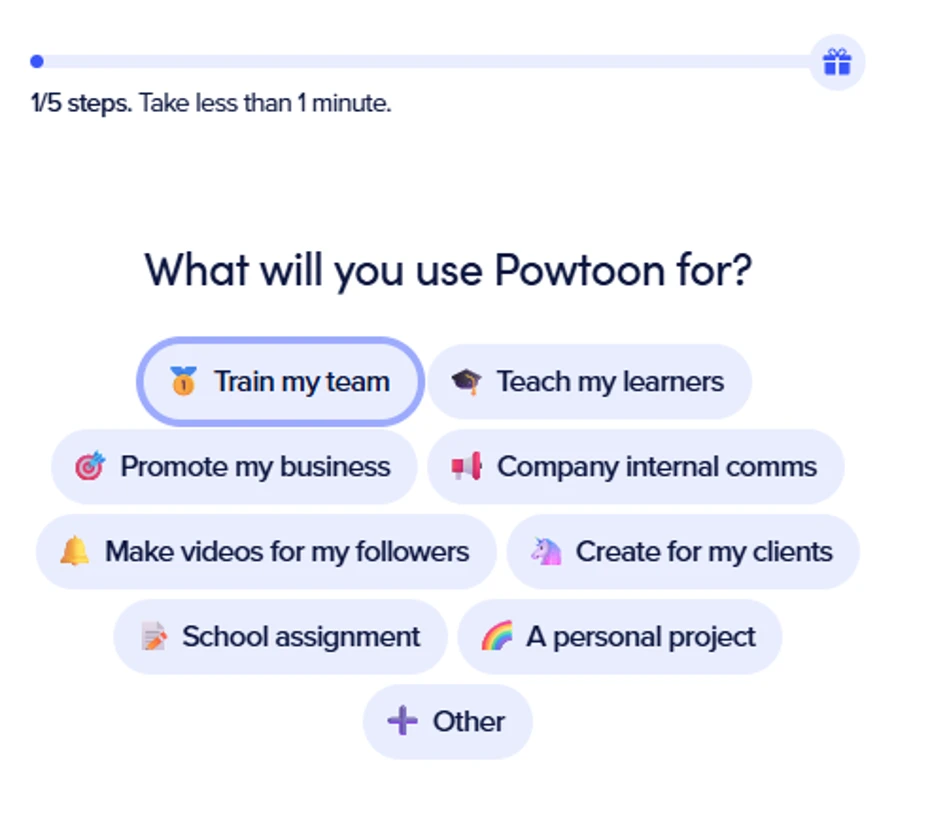
Figure 2 — “What will you use Powtoon for?” onboarding.
What I liked: Good personalization step. The options cover the main audiences (teams, educators, business, creators) and the “Take less than a minute” note plus the gift icon set expectations well. Big tappable pills are easy to use.
What I disliked: Five steps can feel long when you just want to start. It's not obvious whether you can pick more than one option, and there's no “skip” shortcut for people who want to jump straight to creating.
Project Topic Question (Step 2 of 3)
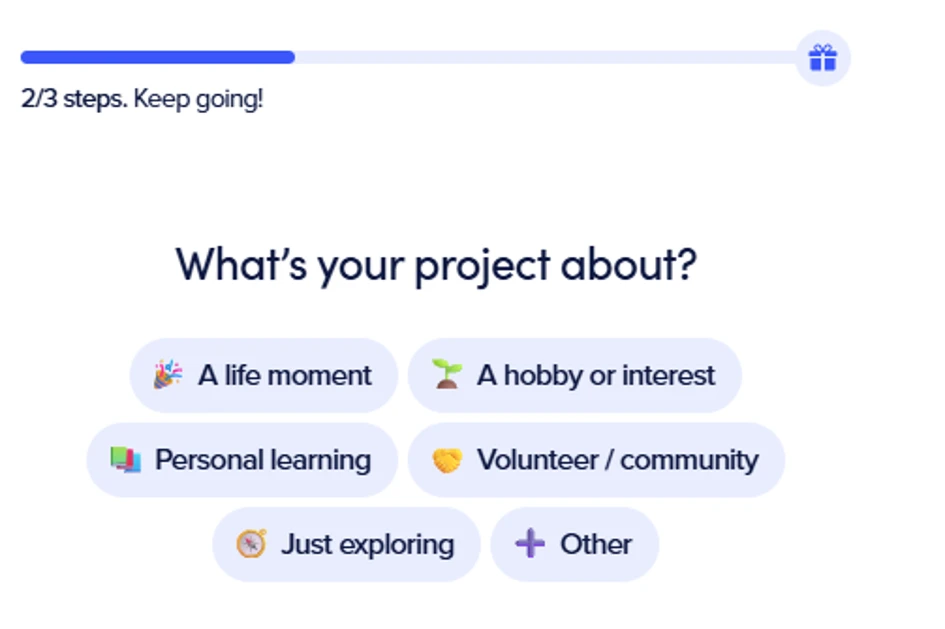
Figure 3 — “What's your project about?” onboarding.
What I liked: The progress bar (2/3) and the friendly “Keep going!” copy keep momentum up. Simple, low-effort choices with clear icons.
What I disliked: The step count is inconsistent — the previous screen said 1 of 5, this one says 2 of 3. That's confusing and makes the flow feel unpolished. The choices are also quite generic and it's unclear how the answer actually changes the product later.
Pro Trial Activation
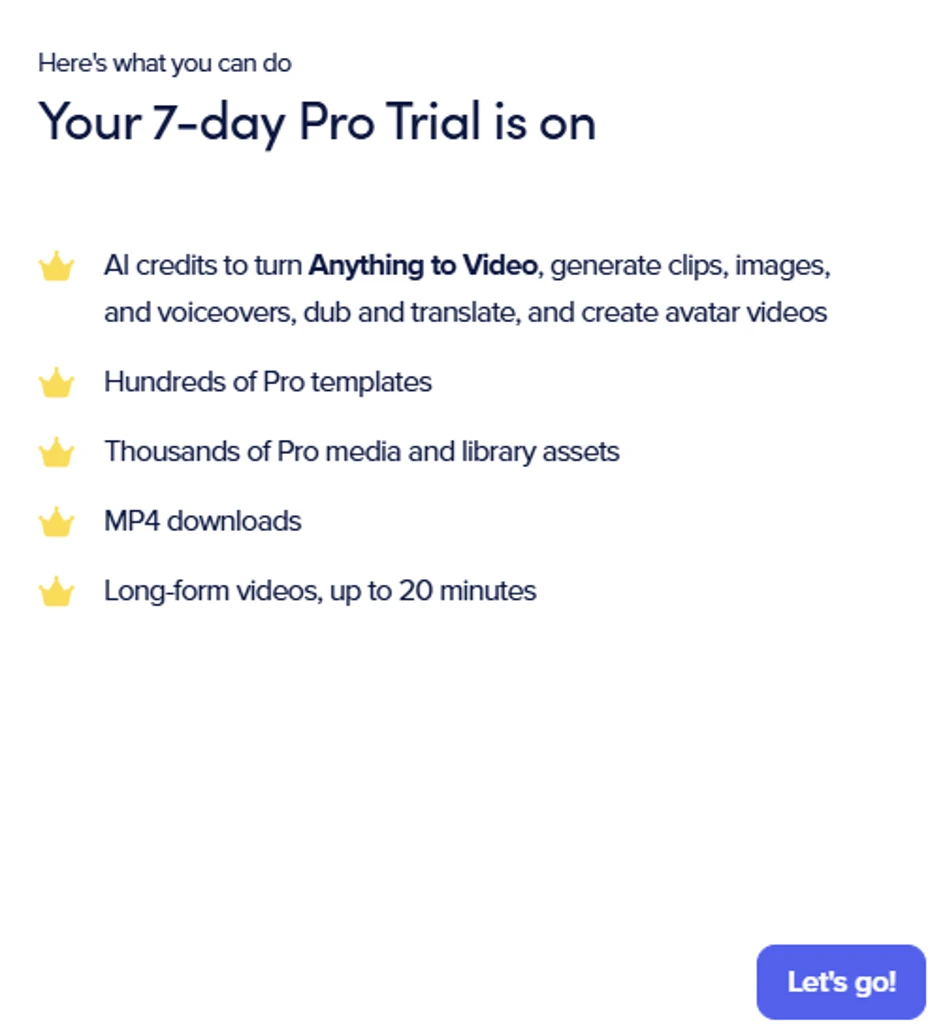
Figure 4 — “Your 7-day Pro Trial is on” benefits screen.
What I liked: Clearly lists what the trial unlocks — AI credits, Pro templates, MP4 downloads, and long-form video. Framing it as already “on” is reassuring and the crown icons make the value feel premium.
What I disliked: No mention of whether a card is required or what happens when the 7 days end, which can make users cautious. The single “Let's go!” button gives no option to decline or start on the free plan.
Home Dashboard
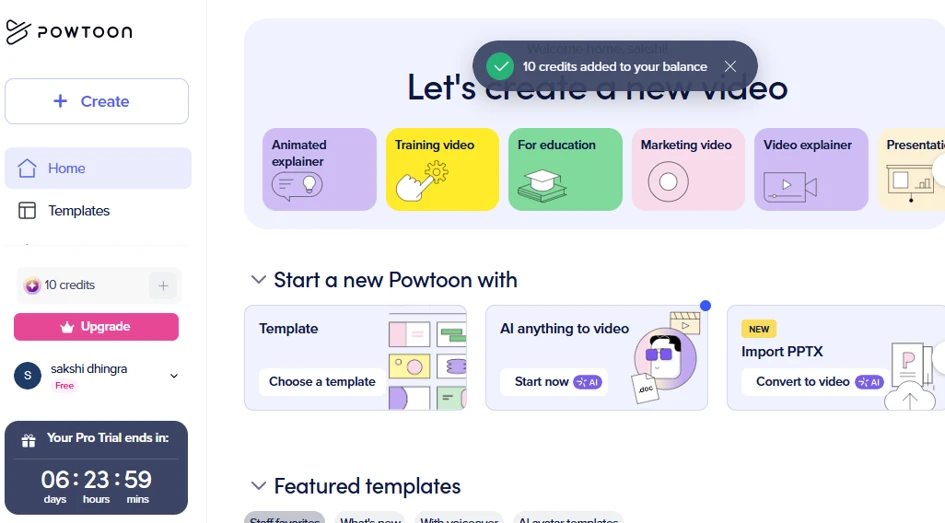
Figure 5 — “Let's create a new video” home screen with 10 credits added.
What I liked: Strong starting point. Clear entry points (Template, AI anything to video, Import PPTX), quick-pick categories along the top, a visible credit balance, and a live trial countdown. The “10 credits added” toast is a nice reward moment.
What I disliked: A lot is happening at once, the welcome toast overlaps the heading, and the Upgrade button plus the trial countdown create early pressure to pay. Some cards are cut off on the right edge, suggesting a cramped layout.
AI: Anything to Video — Prompt
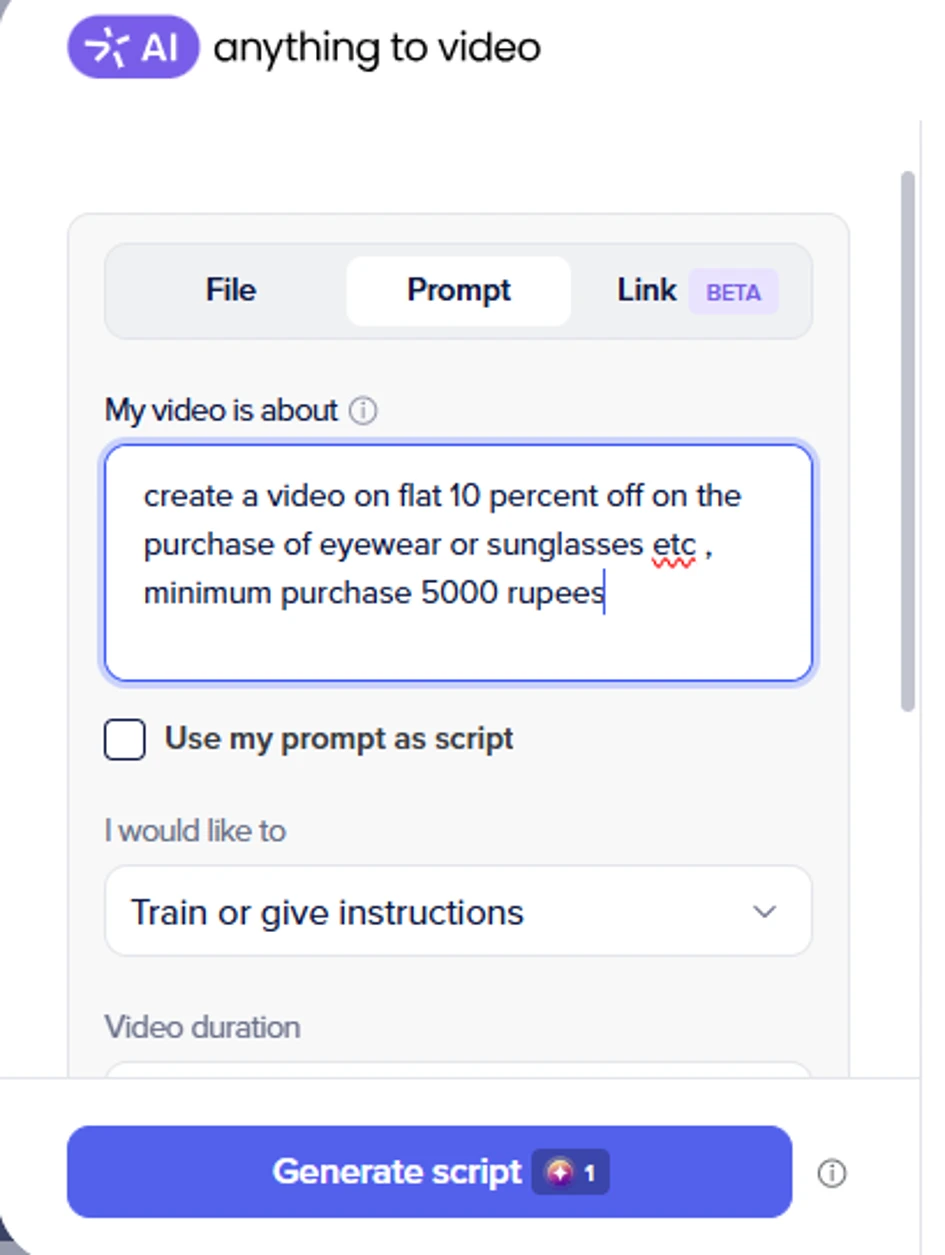
Figure 6 — Prompt input for the AI video generator.
What I liked: Very approachable. Three input modes (File, Prompt, Link), an example-style prompt box, and a clear intent dropdown (“Train or give instructions”). Showing the credit cost (1 credit to generate the script) upfront is honest and helpful.
What I disliked: The prompt I entered had a typo (“eyewear or sunglasses etc”) with no grammar hint, and there's little guidance on how detailed a prompt should be. The “Use my prompt as script” checkbox isn't explained, which could confuse new users.
Script & Narrator Selection
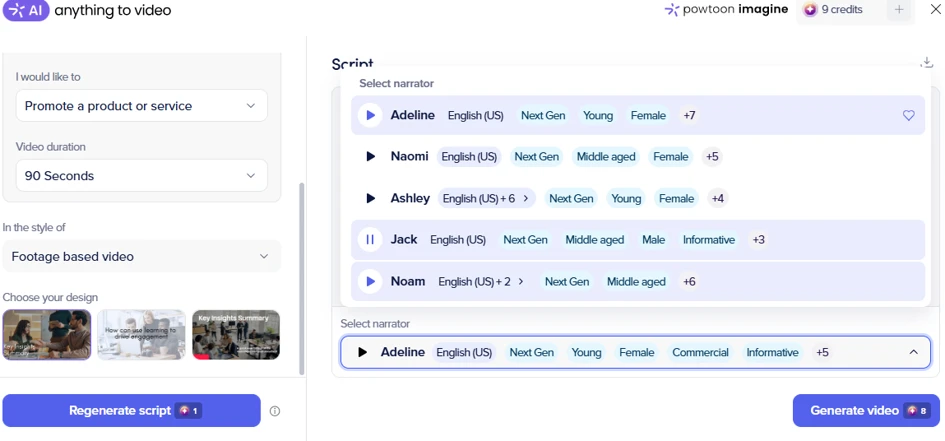
Figure 7 — Script settings, style, design, and voice/narrator options.
What I liked: Excellent control before spending credits — video length, style, design thumbnails, and a rich narrator library with previews, accents, age and tone tags. You can regenerate the script for 1 credit or generate the full video for 8, so costs are transparent.
What I disliked: The screen is dense and the actual script text is hard to see in this view. Eight credits per video will burn through the trial balance quickly, and with only a handful of credits it's easy to run out before getting a result you like.
Video Generation (Loading)
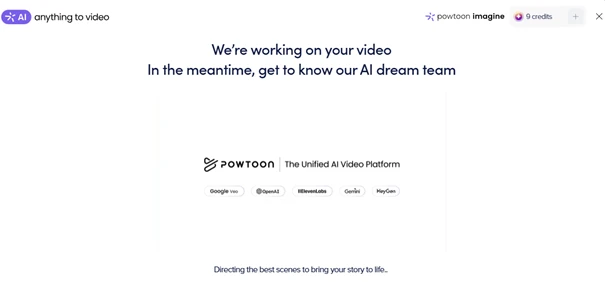
Figure 8 — “We're working on your video” progress screen.
What I liked: Nice waiting experience. Naming the AI partners (Google Veo, OpenAI, ElevenLabs, Gemini, HeyGen) builds trust, and the “Directing the best scenes…” copy keeps it light while you wait.
What I disliked: There's no progress bar or time estimate, so you don't know if it'll take 30 seconds or 5 minutes. If generation fails, it's unclear whether the credits are refunded.
Pricing Plans
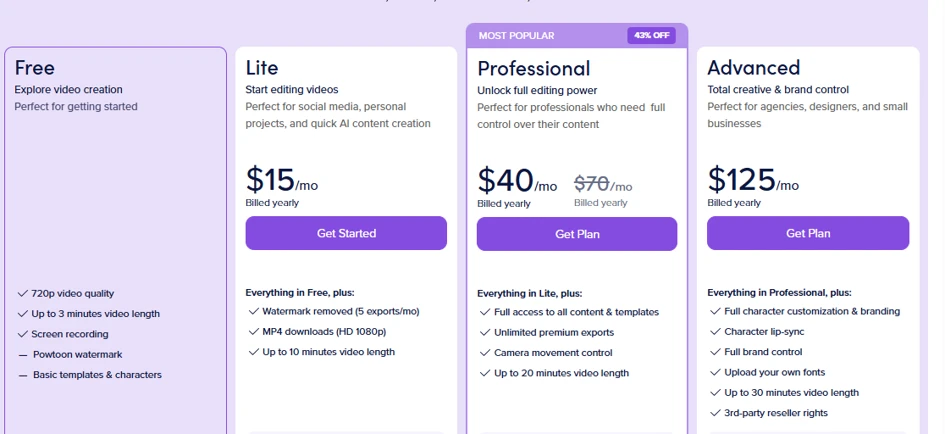
Figure 9 — Free, Lite, Professional, and Advanced plan comparison.
What I liked: Well-structured comparison. Four clear tiers, an “Everything in… plus” pattern that's easy to follow, a highlighted “Most Popular” plan, and a 43% off badge to nudge the decision. Feature differences (video length, watermark, exports) are easy to scan.
What I disliked: Prices are shown as “billed yearly” monthly figures, which can feel misleading versus a true monthly cost. The jump from $40 to $125 is steep, and the Free plan's limits (watermark, 720p, 3 minutes) are quite restrictive for real use.
Template Library
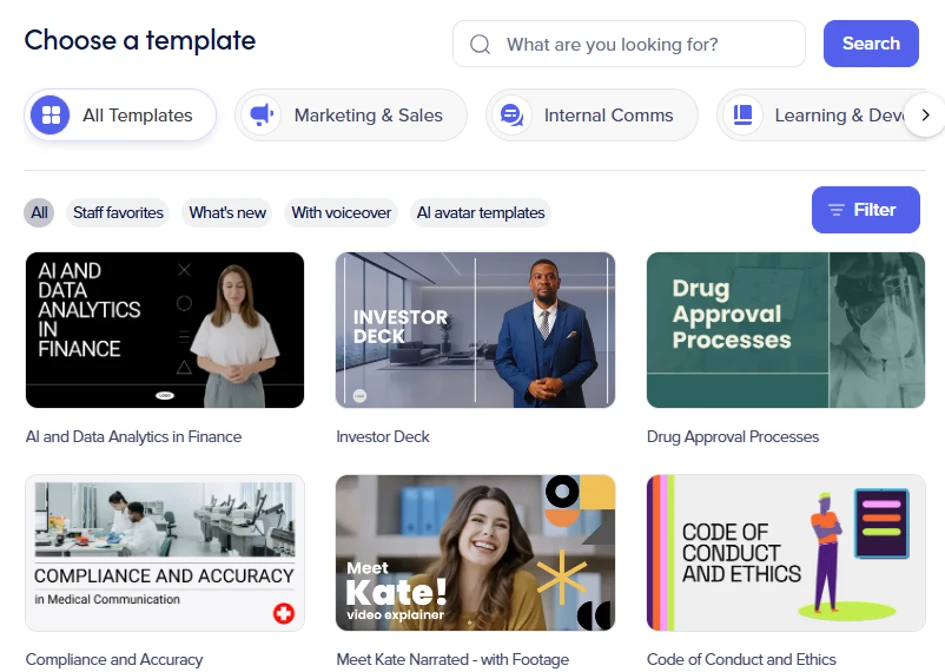
Figure 10 — “Choose a template” gallery with categories and filters.
What I liked: A strong, searchable library. Category tabs (Marketing, Internal Comms, Learning), quick filters (Staff favorites, With voiceover, AI avatar), and clear preview thumbnails with descriptive names make finding a starting point easy.
What I disliked: The templates skew heavily corporate/training, so there's less on offer for casual or personal projects. There's no visible indicator of which templates are free versus Pro-only, so you may pick one you can't fully use on the current plan.
Overall Impression
Powtoon makes it genuinely easy to go from an idea to an AI-generated video. Sign-up and onboarding are quick, the AI “anything to video” flow is beginner-friendly, and cost is shown in credits before you commit. The main friction points are an inconsistent onboarding step count, early pressure to upgrade, and a credit system that can run out fast on the trial. For teams and educators it's a strong, polished tool; casual users may find the free limits and pricing a little steep.
Verdict: A capable, well-designed AI video maker, best value once you're on a paid plan and know you'll use it regularly.