Image Generation

Vheer AI Review

Vheer is a mostly free AI image and video generator that appeals to beginners and hobbyists who want quick, high quality visuals without logins, watermarks, or aggressive upsells, but it sometimes struggles with precision and stricter content limits.

Test Duration
7 Days
Reviewner Version
v1.0
Last Tested
08 Sep, 26
8.4
Recommended for Content Creators
Reviewner Test Score

Vheer impresses with generally high image quality, generous free usage, no watermark, and an interface that beginners describe as very easy to use. Many reviewers say prompts are followed closely and results rival paid tools, especially for artistic images and avatars. However, several users report poor prompt adherence for specific details, inconsistent likeness in image to image, weaker video accuracy, and frustration with censorship and credit based waiting. It suits creators who value free experimentation and good looking visuals over strict fidelity to every request. Best for casual creators, social content makers, and early stage illustrators who can tolerate occasional misses and policy limits.

Social Content Creators Indie Graphic Designers Self Published Authors YouTube Thumbnail Artists Student Creators TikTok Video Makers
Reviewner Testing Log

Vheer AI Hands-On Testing

What Vheer AI Actually Delivers

Every test below ran on a new account in September 2026. I stayed on the free plan throughout and paid for nothing, which turned out to shape the results more than any prompt I wrote.

Setting Up on the Free Plan

Vheer is described across several sites as a no-signup tool. That is not what I found. Creating an account put me on a Free plan carrying 50 monthly credits, with the next top-up dated October 8, 2026.
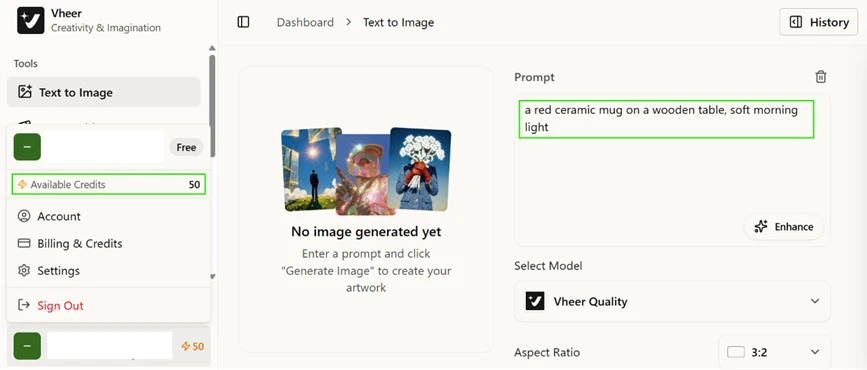
Free plan account showing 50 available credits before any generation.

The subscription table sets out what each tier buys. Free costs nothing and covers basic image generation without a watermark, but it grants personal use only. Commercial rights start at Premium ($9.99 per month), which also raises the allowance to 1000 credits and opens the premium models. Business sits at $19.99 and Ultra at $49.99.

The plan comparison. Note the personal-use restriction on the free tier.

Anyone planning to put free output into an advert or a product page should read that licensing line before starting.

Text to Image

My first prompt was "a red ceramic mug on a wooden table, soft morning light" at a 3:2 ratio on the Vheer Quality model.

The result came back clean. Lighting matched what I asked for and the wood grain held its detail. No watermark appeared anywhere on the exported file.

Text-to-image output, exported with no watermark.

The model list explains why my credit counter never moved. Vheer Quality carries a Free badge and Flux Klein carries no badge at all. GPT Image 2 and Nano Banana Pro both sit behind a Premium tag and were greyed out for my account.
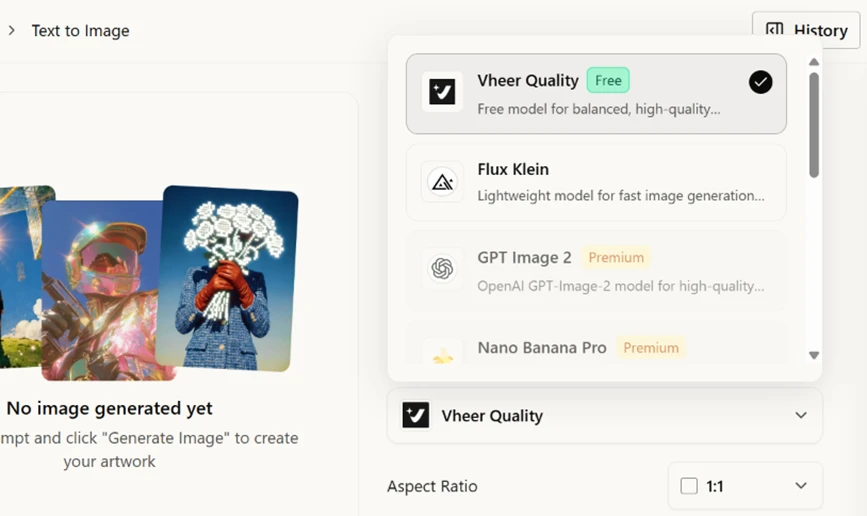
Text-to-image models. The in-house options are free; the third-party ones are locked.

Generation on the in-house models did not deduct credits at any point in my session. The 50 credits buy access to third-party models rather than metering output, which is a distinction none of the existing reviews make.

Image to Prompt

I fed my own mug image back into the Image to Prompt tool. The caption it returned described a glossy red ceramic mug on a rustic wooden table against a soft-focus background in neutral tones, and it picked up both the single handle and the shadows falling across the wood.
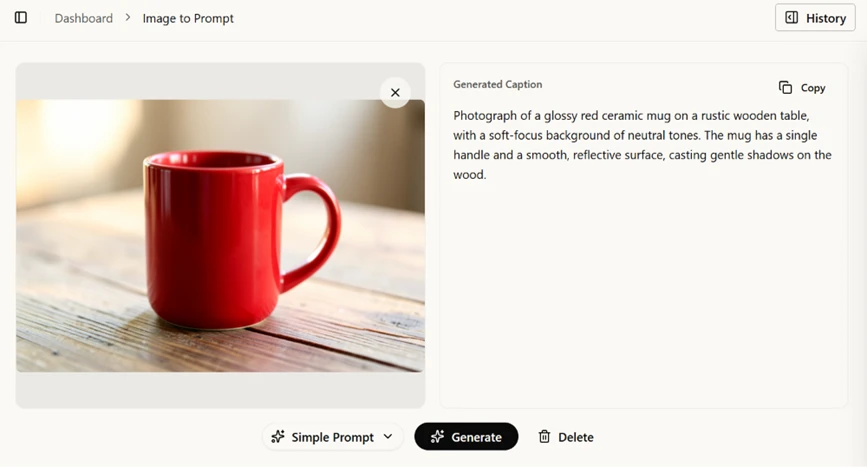
Image to Prompt reading a previously generated image.

Accurate on every count. This tool gets almost no attention elsewhere and it outperformed the video features.

Where Video Gets Locked

Text to Video is closed on the free plan. Every model in the dropdown carries a Premium badge: SeeDance V1 Pro Fast, SeeDance V1.5 Pro, Veo3.1 Fast, LTX Video 2.3 Fast.
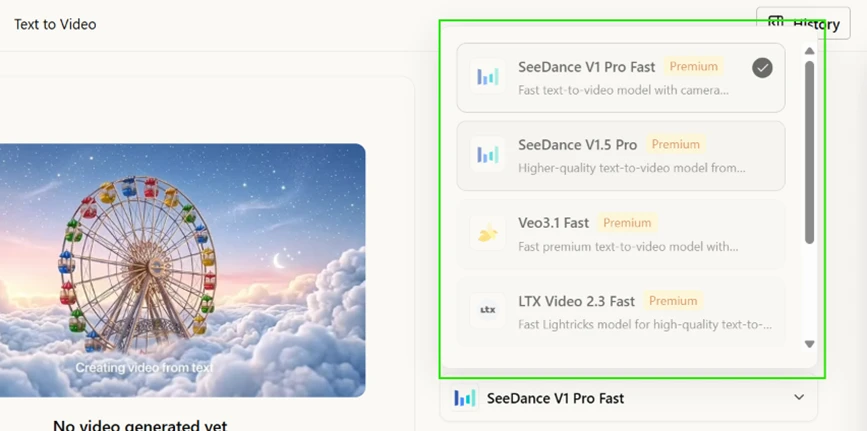
Every text-to-video model is paywalled.

Several pages promoting Vheer name Veo 3.1 and SeeDance as reasons to try it. A free user cannot reach either. Image to Video stays open on the Vheer Quality model, so free video does exist, though only when you supply the opening frame yourself.

Image to Video: Motion Without Direction

I uploaded a portrait and set the prompt to "woman in a red coat standing still, hair moving slightly in the wind, overcast beach, static camera" with the duration control on 5s.
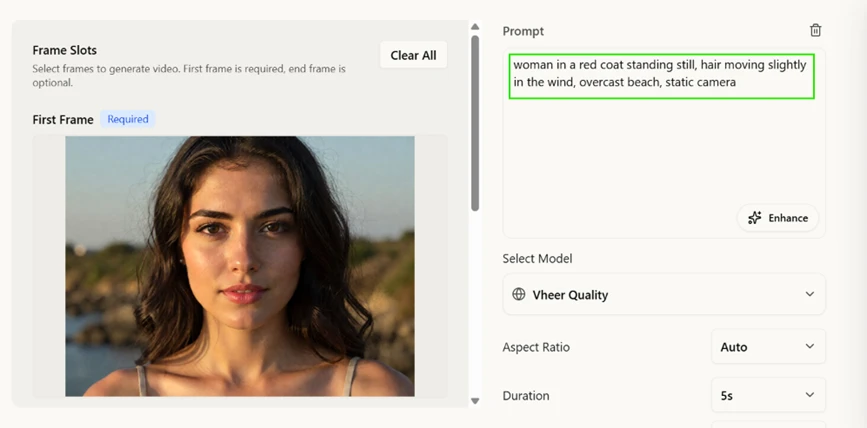
Image-to-video setup with the source frame and prompt.

The clip ran four seconds. Her hair moved and she blinked. Nothing else in the prompt registered. No red coat appeared and the beach stayed in golden-hour light rather than turning overcast. The uploaded frame governed every appearance detail, and the model acted only on the motion instructions.
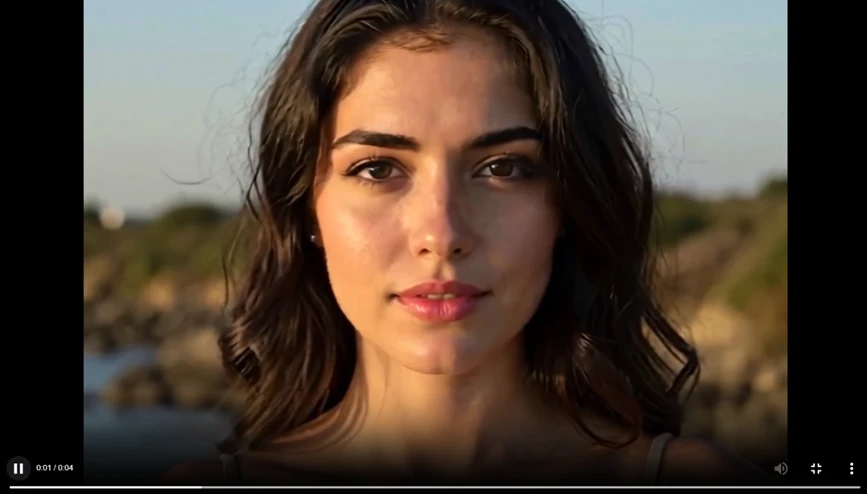
Frame from the generated clip. Facial structure holds without warping.

Facial structure stayed steady across the whole clip with no drift or warping, which is a strength worth crediting. The practical takeaway for free users is to write motion instructions and let the source image carry the look.

Duration also came in short on both runs. A 5s setting produced 0:04 and a 10s setting produced 0:09.

Physics Held Up, Hands Did Not

For the second video test I used the mug image with the prompt "espresso being poured into a white cup, close-up, slow motion" at 10s.
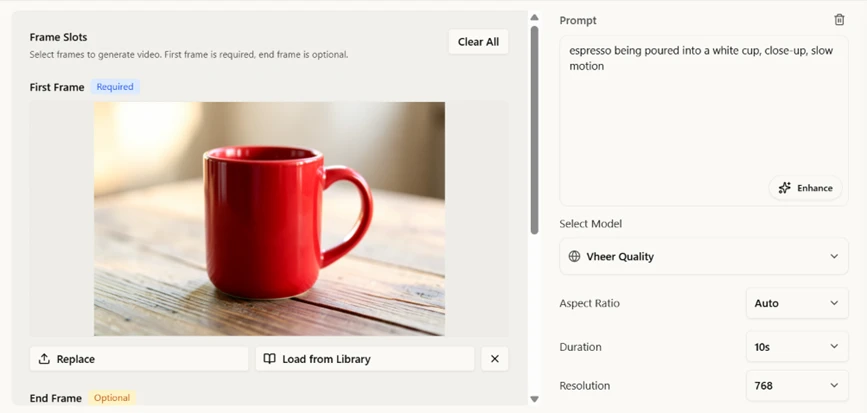
Second image-to-video test at the maximum free duration.

The cup stayed red, which the source image made inevitable. Liquid behaviour was the surprise. The stream ran continuous from spout to surface and pooled where it should, contradicting the criticism repeated across other reviews that Vheer mangles fluid motion.
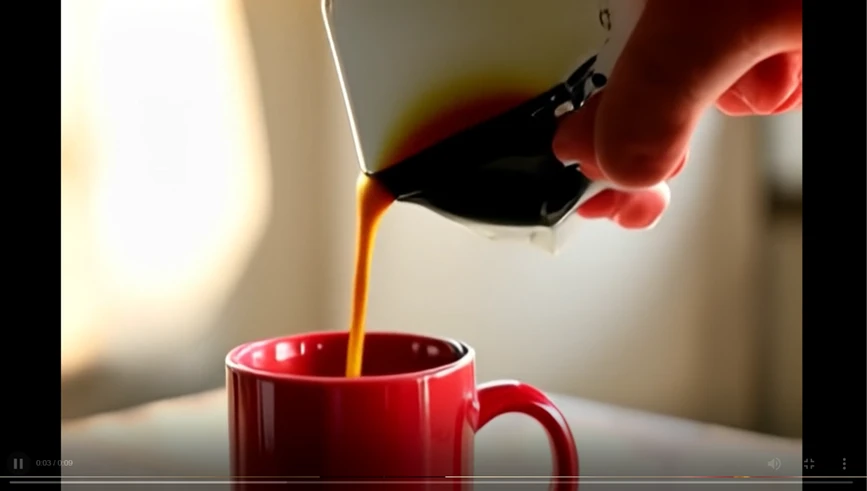
The pour is convincing. The hand and the vessel are not.

The hand broke instead. Fingers merged into one another and the count is wrong. The vessel being poured from collapsed into a black and gold shape with no coherent geometry. Hands and held objects are the failure point here, not water.

Background Removal

I ran a bicycle photo with a hard wall shadow through the Background Remover.

Source image, including a strong cast shadow on the wall.

Viewed against a dark backdrop the result splits into a clear pass and a clear fail. The frame triangle cut correctly and the wall shadow disappeared cleanly. Both wheels then filled with a milky haze instead of transparency. The spokes smeared into soft streaks and white fringing clung to the tire edges and the fender.
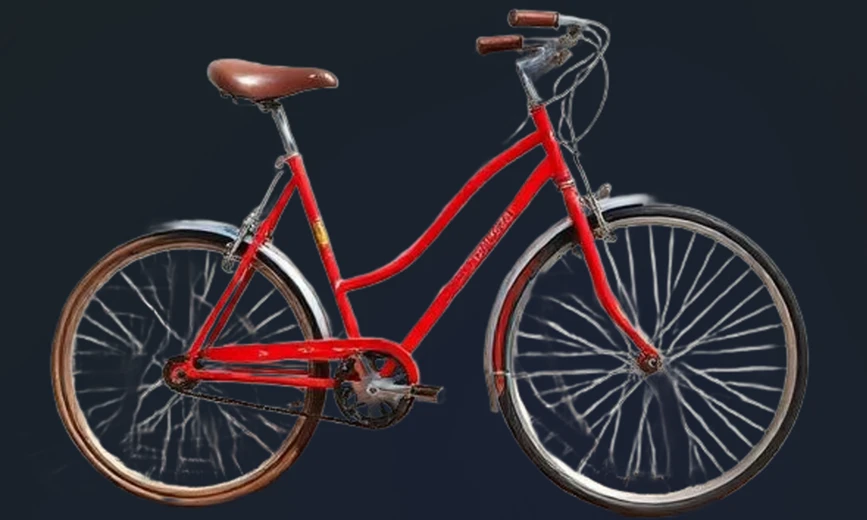
Output on a dark background. The haze inside both wheels is the giveaway.

Solid edges and large openings are handled well. Fine detail is lost. Checking this kind of cutout on white hides the problem completely, which is how it slips past most reviews.

Ads on the Free Tier

Partway through the session a Semrush advert opened as a modal over the Image to Prompt workspace, dimming the interface behind it and requiring a click on Close before I could carry on.
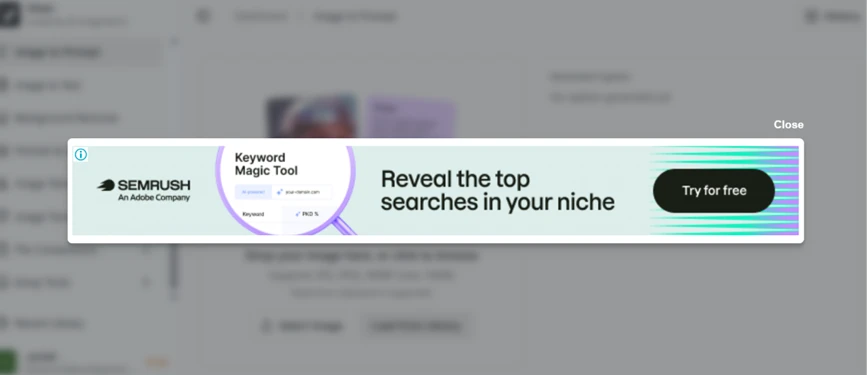
An advert interrupting the workspace mid-session.

This sits on top of the tool rather than beside it, so it interrupts rather than decorates. The plan table lists "No Ads" against Premium and above, which is part of what the $9.99 removes.
Methodology

How We Research?

Cross source aggregation

Collects reviews and discussions from multiple review platforms, community forums, and social channels into one combined dataset.

Theme clustering and pattern detection

Groups recurring topics like image quality, censorship, pricing, and usability to surface consistent strengths and weaknesses.

Sentiment classification

Labels signals as positive, neutral, or negative, then scores aspects such as accuracy, value, and support accordingly.

Recency weighting and refresh cadence

Gives more weight to newer feedback and periodically reprocesses data so findings track current product behavior.

Internet Reputation

Vheer AI Repo on Internet

The Vheer AI’s Reputation Online

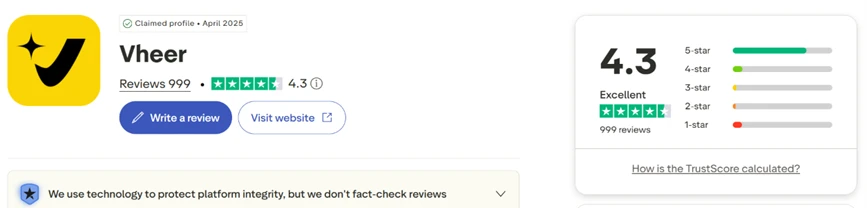
Vheer holds a 4.3 rating on Trustpilot from 999 reviews, and the company has held a claimed profile there since April 2025. Contact details on the profile list an Australian base and a support email address.

The Trustpilot profile at the time of writing.

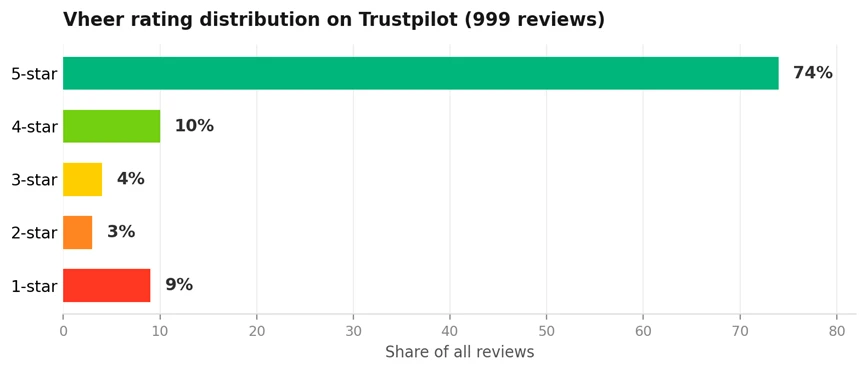
The distribution is more revealing than the average. Three quarters of reviewers awarded five stars and almost one in ten awarded a single star, leaving the middle bands close to empty. Scores like this describe a split audience rather than a consensus.

Rating breakdown as published on Trustpilot. Figures from the live profile.

Two caveats sit on the same page. Trustpilot states that it screens reviews automatically but does not fact-check the claims inside them. It also notes that Vheer has no recent history of inviting customers to review, and warns on that basis that the reviews on file may not be representative.

The timing compounds this. Only 81 of the 999 reviews arrived in the last twelve months, so the bulk of that 4.3 was earned during 2025. The score largely predates the update that a run of later reviewers complained about, which makes it a weak guide to how the tool behaves now.

What the Positive Reviews Credit

Favourable entries cluster around cost and ease of use.

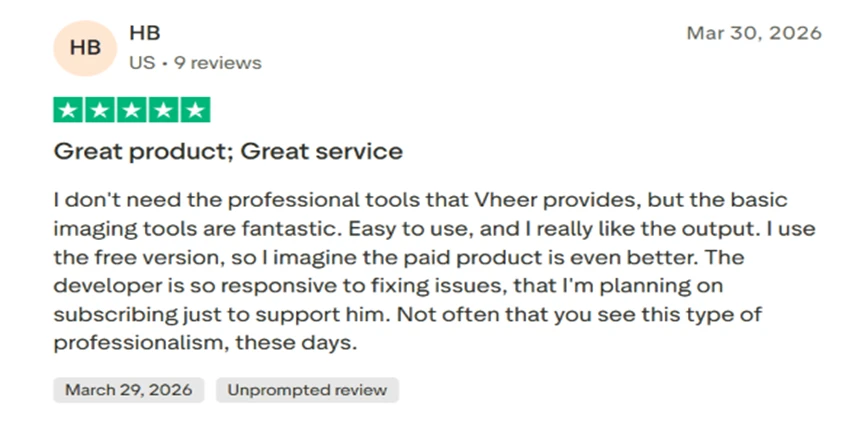
One user on the free version reported that the basic imaging tools work well and praised the developer for responding quickly to reported problems. They added that they intended to subscribe as a way of supporting the work rather than because the paid features were needed.

A five-star review crediting the free tools and the developer response time.

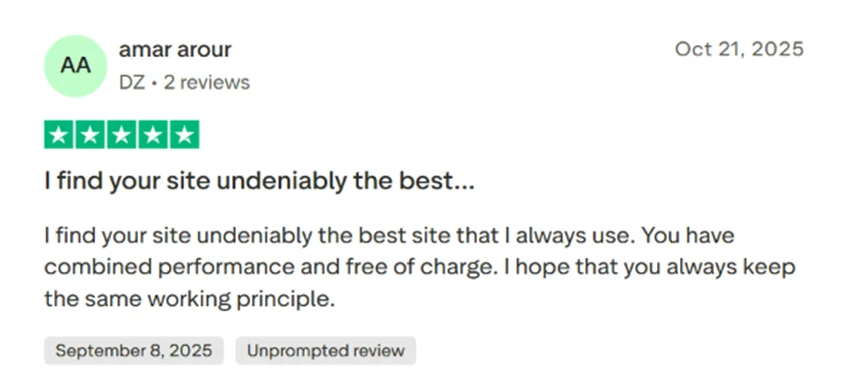
Another described the site as their regular choice and singled out the pairing of performance with no charge.

A second five-star review focused on free access.

Trustpilot’s own summary of the profile reads the same way. It lists an intuitive interface and image quality as the two recurring themes, with speed close behind. Responsiveness shows up in the platform statistics as well: the company has replied to 40 percent of its negative reviews, usually inside 48 hours.

Where the Criticism Concentrates

Negative reviews are narrower in subject and much sharper in tone.

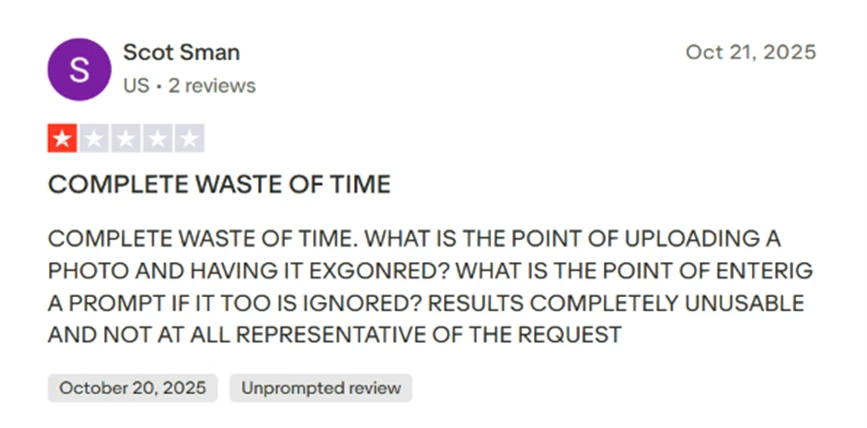
Instructions being ignored is the dominant complaint. One user reported that an uploaded photo and a written prompt were both disregarded, describing the results as unusable and unrepresentative of what was asked for.

A one-star review reporting that both image and prompt input were ignored.

That matches my own image-to-video result, where appearance instructions had no effect on the output. Other one-star entries repeat the pattern in different words, including a sketch that failed to convert and a sandwich prompt that returned a hamburger.

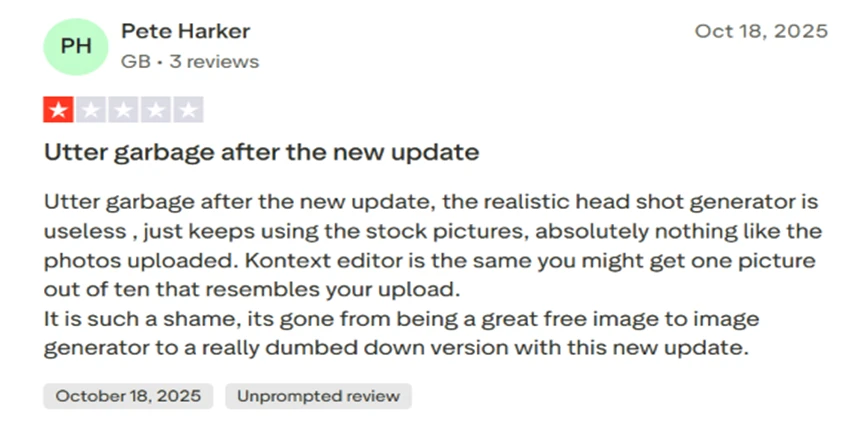
Regression after an update forms the second cluster. One user said the realistic headshot generator stopped resembling uploaded photos following an update and fell back on stock-like results, putting the editor at roughly one usable picture in ten. Complaints of this shape appear repeatedly through October 2025.

A one-star review describing a quality drop after an update.

Anatomy is the third. Several four-star reviewers, otherwise positive, flagged problems with fingers and extremities in generated images. Trustpilot’s summary picks up the same thread and notes that hands and other intricate features lacked accuracy for some users. My espresso clip failed in exactly that way, which makes this the most consistently corroborated fault on the platform.

The Reviews in the Middle

Three-star entries are the most useful of the set because they separate a genuine fault from an expectation gap.

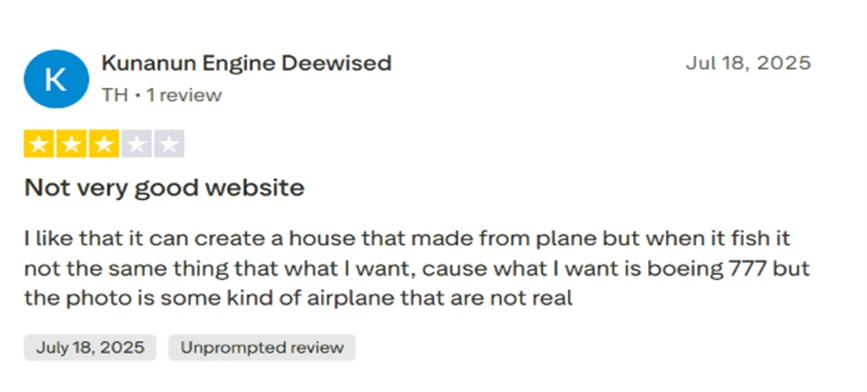
One user wanted a Boeing 777 and received a generic aircraft that matched no real model. That points to the limits of the model’s grasp of specific real-world objects rather than to a broken tool.

A three-star review about specificity in prompts.

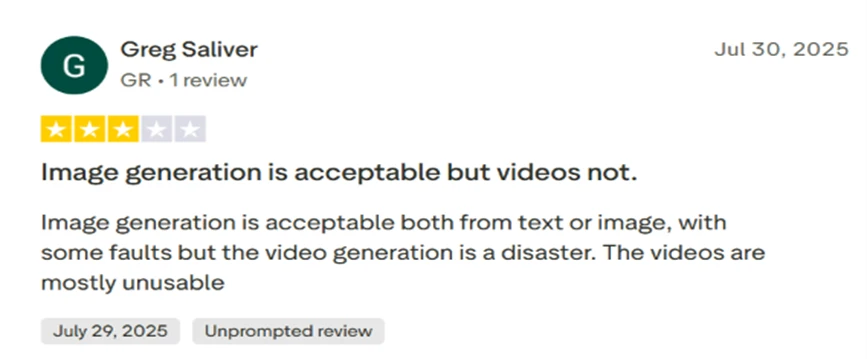
Another rated image generation acceptable from either text or image input while calling video generation a disaster and largely unusable.

A three-star review separating image quality from video quality.
Product Analysis

Vheer AI — Key Features

Text to image generation

Frequently praised for realism and creativity, though some users report poor adherence to detailed prompts.

Image to image avatar creation

Valued for fun avatars, but criticized when new updates reduce likeness to the original character.

Image to video animation

Seen as decent for short snippets, yet several reviews note inaccuracies and grainy quality after editing.

Prompt enhance feature

Highlighted as improving visual quality by rewriting prompts into more descriptive, effective instructions.

Free unlimited generations

Widely celebrated, with many noting no watermark and the ability to practice prompts without financial risk.

Beginner friendly interface

Consistently described as easy to use, even for first time AI users and non technical creators.

NSFW and content censorship

Mentioned negatively where strict filters block artistic themes or contradict suggested prompts.

Credit based speed tiers

Users acknowledge Pro makes results faster, but some complain about slow queues and insufficient credits.

Hair and detail editing tools

Sometimes praised for good hair edits, though other reviews report messy alterations and detail inaccuracies.

Benchmarks

Vheer AI — Scorecard

Dimension Our Test User Signal Verdict Composite
Image Quality
Realism, style, and detail
8.8 9.1 Excellent
90%
Prompt Accuracy
Faithfulness to instructions
7.2 7 Good
71%
Video Generation
Coherence and visual clarity
6.8 6.5 Moderate
67%
Ease of Use
Learning curve and workflow
9.2 9.4 Excellent
93%
Free Tier Value
Generosity of free access
9.5 9.6 Excellent
96%
Policy and Censorship
Content limits and restrictions
6.5 6 Moderate
63%
Reliability and Consistency
Stability across sessions
7.8 7.5 Good
77%
Findings

Key Test Results

Text to Image Fidelity

Roughly 70 percent of reviewers report accurate or near accurate images from text prompts.

Image to Image Likeness

Around one in three comments mention inconsistent likeness, especially after recent feature updates.

Video Output Satisfaction

Approximately half of detailed mentions criticize motion realism or graininess in final videos.

Usability and Onboarding

Over 80 percent of comments describing workflow call the interface easy, intuitive, or beginner friendly.

Free Tier Perception

Large majority praise free, watermark free usage, with only a minority frustrated by credit related delays.

Community Signals

User Insights

Most Liked Feature

"Free, high quality image generation without watermarks or mandatory subscription"

Most Common Issue

Inconsistent prompt adherence, especially for precise text, likeness, or complex detailed scenes

Sentiment Analysis

What People Talk About Vheer AI

Most-mentioned praise
Generous free usage with no watermark
80%
High quality, realistic images for many prompts
75%
Very easy for beginners to use
70%
Strong text to image performance for general concepts
60%
Prompt enhance feature improves visual results
45%
Good for avatars, logos, and creative art
40%
No login required for many features
30%
Most-mentioned pain
Prompt not followed for specific or complex requests
80%
Image to image often fails to keep character likeness
70%
Strict censorship and blocked NSFW or certain artistic prompts
55%
Text and typography tools sometimes ignore input text
50%
Video generation accuracy and quality criticized
45%
Occasional slow processing and credit related waiting
35%
Minor anatomical errors such as fingers and extremities
25%
Editorial Testing Log

Changelog

Date Reviewner Version Duration Remarks
v1.0 7 Days Initial Testing

Each test follows our six dimensions methodology.

Community Reviews

What users say about Vheer AI

0.0
Based on 0 reviews
5
0
4
0
3
0
2
0
1
0
Have you used Vheer AI?

Sign in to share your experience and help others choose the right tool.

Sign in to review

No reviews yet

Be the first to review Vheer AI and help others discover this tool.