
The Short Answer
Both tools let you generate AI videos and images for free, and both tap into premium models like Google's Veo and ByteDance's Seedance. The difference is philosophy: Clipfly wants to be your entire production pipeline, while Vheer wants to get you a finished asset in under a minute with zero friction.
Choose Clipfly It is the better pick when you need to generate and edit in one place, with voiceovers, captions, trimming, upscaling, and polished social-ready exports. | Choose Vheer It is the better pick when you want unlimited free generations with no account, no watermark, and a huge library of niche image generators. |
What Is Clipfly?
Clipfly is a web-based AI creative platform that bundles video generation, image generation, and a full online video editor into a single workspace. Type a prompt or upload a photo, and it produces short cinematic clips, and unlike most generators, the work does not stop there. You can trim, merge, caption, enhance, and voice the result without ever leaving the browser.
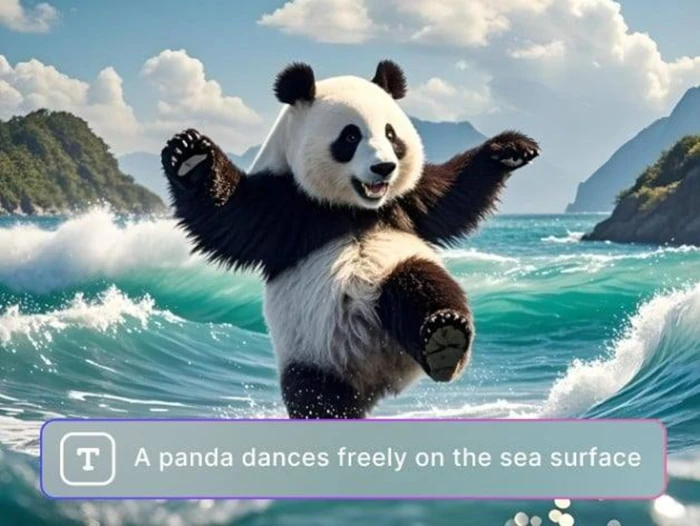
A Clipfly text-to-image generation example from its feature gallery
Standout Features
▪ Multi-model video generation: switch between engines like Veo 3, Kling, Wan 2.5, Seedance, and Flux for anywhere from photoreal ads to stylized animation.
▪ Full built-in editor: trim, merge, split, add text overlays, filters, transitions, and stock music from an included media library.
▪ AI voiceover in 29+ languages: turn a written script into natural narration, ideal for localizing one video across markets.
▪ Auto captions: subtitles are generated straight from your video's audio and synced per frame.
▪ Enhancer, upscaler and object remover: clean up footage, boost resolution up to 2K/4K on Pro, and erase watermarks, people, or moving objects.
▪ Extras: face swap, talking-photo avatars, AI image generation, and iOS/Android companion apps.
The free tier exports at up to 1080p without a watermark, and Clipfly states that you own the copyright to what you create, including for commercial use.
What Is Vheer AI?
Vheer is a free, browser-based AI image and video generator built by VertexShare Technology. Its pitch is radical simplicity: open the site, type a prompt, download the result. No account, no watermark, and unlimited generations on the core tools. Over time it has grown into a sprawling toolbox of one-click generators and utilities.

Vheer's AI headshot generator, one of dozens of niche tools on the platform
Standout Features
▪ Truly free, no-signup generation: start creating instantly with watermark-free exports, even on the free tier.
▪ Premium model access: integrates models like Veo 3.1, Sora 2, SeeDance V1.5 Pro, and GPT-Image-2 (top-tier models sit behind the paid plan).
▪ Image-to-video animation: its strongest video feature. Upload a still, describe the motion, and get a smooth 4 to 10 second clip.
▪ Dozens of niche generators: headshots, anime portraits, tattoos, logos, album covers, wallpapers, pet portraits, and more.
▪ Everyday utilities: background remover and changer, image-to-prompt, OCR text extraction, blur tools, and fancy-font generators.
▪ Think Mode: expands a short prompt into a detailed, structured one for better generation accuracy.
The trade-off: Vheer's clips are short and silent, with no audio, voiceover, or timeline editor, so any sound design or assembly happens in external software. Independent hands-on tests, such as Filmora's review of the Vheer video generator, reach the same conclusion about its strengths and limits.
Head-to-Head Comparison
Here is how the two platforms stack up on the criteria that matter most to creators. For a deeper independent look at Clipfly's toolkit and real user feedback, AI Mojo's Clipfly review is a useful companion read.
| Criteria | Clipfly | Vheer AI |
|---|---|---|
| Best for | Finished, social-ready videos | Fast free images and short clips |
| Core focus | Video generation + full editing suite | Image generation + quick animation |
| Sign-up required | Yes, for most features | No, generate instantly |
| Built-in editor | Yes, with trim, merge, captions, filters | No timeline editor |
| Audio & voiceover | AI voiceover in 29+ languages | None, videos are silent |
| Auto captions | Yes, frame-synced | No |
| AI models | Veo 3, Kling, Wan 2.5, Seedance, Flux | Veo 3.1, Sora 2, SeeDance V1.5 Pro, GPT-Image-2 |
| Video length | Short clips, extendable via editor | About 4 to 10 second clips |
| Watermark on free tier | No | No |
| Max export quality | 1080p free, 2K/4K on Pro | Up to 1080p |
| Niche generators | Some (avatars, face swap) | Dozens (headshots, tattoos, logos, and more) |
| Utility tools | Enhancer, upscaler, object remover | Background tools, OCR, image-to-prompt |
| Platforms | Web + iOS/Android apps | Browser only |
| Commercial use | Yes, you own your outputs | Yes, per its terms of service |
Difference 1: The Creation Workflow
Clipfly is built like a pipeline. You generate a clip, then move it straight onto a timeline where you can trim, merge, add music, and export a finished post. Vheer is built like a vending machine. You type a prompt, download the asset, and finish the job in whatever editor you already use. Neither approach is wrong, but they suit very different working styles.
Clipfly Generate, edit, caption, voice, and publish inside one browser tab. | Vheer Generate fast, download clean files, and assemble them elsewhere. |
Difference 2: Sound and Finishing Touches
This is the widest gap between the two platforms. Clipfly can turn a written script into narration in more than 29 languages, generate frame-synced captions automatically, and pull background music from its stock library. Vheer outputs silent clips only, so every voiceover, caption, and soundtrack must be added in external software before your video is ready to post.
Clipfly Voiceovers, auto captions, stock music, and talking avatars are built in. | Vheer Video output has no audio track, which keeps it simple but unfinished. |
Difference 3: Access and Limits
Vheer removes every barrier to entry. There is no account, no watermark, and unlimited generations on its core tools, with payment required only for the top Pro and Max models. Clipfly asks you to sign up and works on a credit system, and its best output quality sits behind the paid plan. If your priority is trying things instantly, Vheer feels lighter. If your priority is a serious toolset that grows with you, Clipfly makes sense.
Clipfly Free at 1080p, with a paid plan for 4K, premium models, and extra credits. | Vheer Free and unlimited on core tools, with no signup and no watermark. |
Pricing
Both tools are genuinely usable for free, but the ceilings differ. Clipfly's free plan covers 1080p exports and the core toolkit, while its Pro plan, around $39.99 per year, unlocks 2K/4K exports, the most sophisticated models, extra credits, additional avatars and voices, and priority support. An enterprise tier adds API access and single sign-on.
Vheer flips the model: core image and video generation is unlimited and free with no account at all, and you only pay when you want its highest-quality Pro and Max models. For casual creators, that means Vheer can be a $0 tool indefinitely, whereas Clipfly's free tier feels more like an extended trial of a production suite.
So, Which Should You Pick?
Pick Clipfly if you:
▪ Publish regularly on TikTok, Reels, or YouTube Shorts and need finished videos, not raw clips
▪ Want voiceovers, captions, and music handled in the same tab
▪ Localize content into multiple languages
▪ Need higher-resolution 2K/4K exports for client work
▪ Prefer editing on mobile with companion apps
Pick Vheer if you:
▪ Want zero friction, meaning no account, no watermark, no cost
▪ Mostly need images: thumbnails, headshots, concept art, logos
▪ Like animating still photos into quick, eye-catching clips
▪ Already edit in CapCut, Premiere, or DaVinci and just need raw AI assets
▪ Enjoy experimenting across many models and niche generators
Final Verdict
This is not really a fight. It is a fork in the road. Clipfly wins for anyone whose end product is a video: the combination of multi-model generation, a real editor, voiceovers, and captions means you can go from idea to published post without touching another app. Vheer wins on pure accessibility and image versatility: nothing else hands you unlimited, watermark-free generations from premium models without even asking for an email.
Our honest recommendation? Use both. Prototype visuals and animate stills in Vheer for free, then bring your best concepts into Clipfly when it is time to cut, caption, and voice a finished video. At these prices, there is no reason to choose.

Comments 0
Join the discussion and share your perspective.
Sign in to post a comment and reply to other readers.
No comments yet
Be the first to share your perspective on this article.