

Choose Humanize AI if • You already have a draft (often AI-generated) that sounds stiff and you want it to read naturally. • You write blog posts, marketing copy, product descriptions, or emails. • You want a free, no-signup tool for quick rewrite passes. | Choose Jenni AI if • You write essays, theses, literature reviews, or reports that need real citations. • You work from a library of PDFs and want every claim traceable to a source. • You want an editor that flags weak or unsupported claims before a reviewer does. |
Search for "AI writing tool" and you will find hundreds of products that all promise to save you time. Humanize AI and Jenni AI both sit under that label, and people compare them often, but they solve different problems. Putting them head to head is a bit like comparing a paint sprayer with an architect's drafting table. Both are useful. You would not swap one for the other.
This guide walks through what each tool does, where they overlap, where they diverge, what they cost as of September 2026, and which kind of writer each one suits. Every fact below was checked against the vendors' own sites and independent reviews, and both tools change quickly, so treat the pricing numbers as a snapshot.
What Humanize AI is
Humanize AI, found at humanizeai.pro, is a browser-based text rewriter. You paste a block of text, pick a rewrite mode, and it returns a rephrased version that is meant to sound like a human wrote it. The basic humanizer works without creating an account, which makes it easy to try in under a minute.
Rewrite modes cover the usual ground: Standard, Academic, Simple, Flowing, Informal, Formal, Expand, Shorten, and a Custom option. A newer Custom style toggle and a Tone selector sit above the editor. You can paste text or upload a .txt, .docx, .pdf, or .md file. The same workspace bundles several companion tools: an AI content detector, a paraphraser, a plagiarism checker, a grammar checker, an essay writer, and an API for developers.
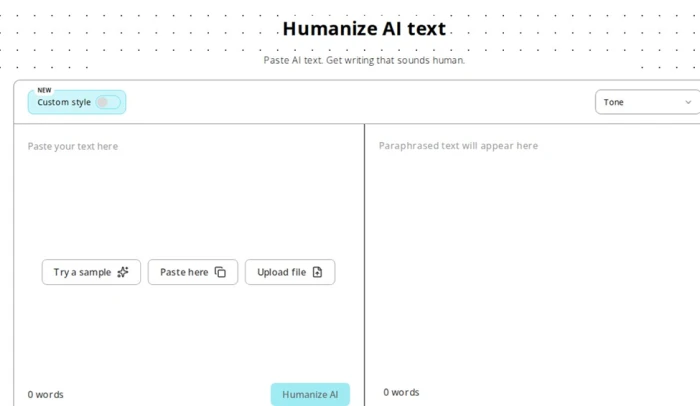
Humanize AI's main editor. Paste on the left, choose a tone, and the rewritten text appears on the right. Screenshot from humanizeai.pro, September 2026.
The product's marketing leans heavily on one claim: that its output passes AI detectors such as GPTZero, Originality.ai, and Turnitin. We will come back to how well that holds up.
| One thing to watch: the name. At least four separate products use nearly the same brand, including humanizeai.io, humanizeai.com, and humanizeaitext.ai. Their features, language support, and pricing differ, and reviews online often blur them together. This article is about the tool at humanizeai.pro. If a review credits "Humanize AI" with 50 languages or a mobile app, it is probably describing a different site. |
What Jenni AI is
Jenni AI, at jenni.ai, is an academic writing workspace rather than a rewriter. The screen is split into three parts: a source library on the left, a document editor in the middle, and an AI chat panel on the right. As you type, Jenni's autocomplete suggests the next sentence, and the suggestions are grounded in papers from your library, with the citation attached. Click the citation and it jumps to the exact page and paragraph in the PDF it came from.
You build the library by dragging in PDFs, importing collections from Zotero or Mendeley, or searching an index of more than 200 million papers that pulls from Semantic Scholar, PubMed, arXiv, and CrossRef. Citations can be formatted in more than 10,000 styles, and finished documents export to .docx, LaTeX, or HTML.
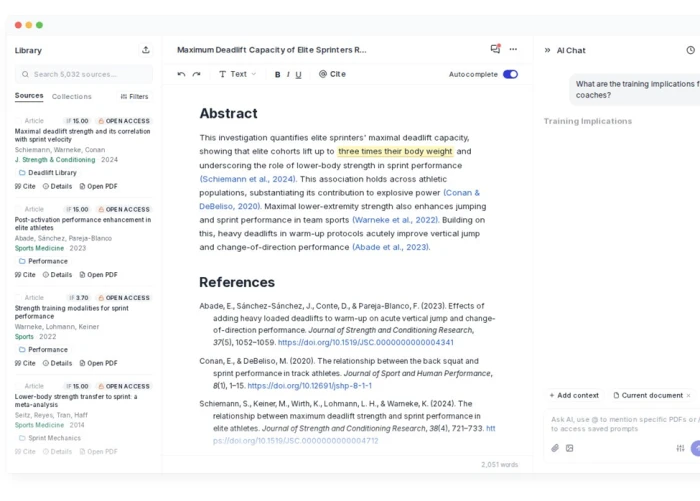
Jenni AI's three-panel workspace: library, editor with inline citations, and AI chat. Screenshot from jenni.ai, September 2026.
Two features push Jenni beyond a chatbot with citations bolted on. The first is Reviews, which scans every claim in a draft, cross-checks it against your sources, and sorts problems into categories such as unsupported, overstated, contradicted, and misrepresented, alongside a proofreading pass. The second is collaboration: co-authors can edit live, leave inline comments, and roll back through version history. Jenni added viewer and commenter roles in September 2026, so a supervisor can give feedback without editing rights.
Eight differences that matter
1. The problem each one solves
Humanize AI Fixes text after the fact. The draft already exists, and the job is to make it read more naturally and score lower on AI detectors. | Jenni AI Helps create the draft in the first place. The job is to get from a set of sources to a structured, cited document. |
This is the difference that drives every other one. Humanize AI is a finishing tool. Jenni AI is a drafting environment.
2. Where your text comes from
Humanize AI You bring the text. It does not know where the words came from and does not need to. Paste and go. | Jenni AI Text grows out of the sources you upload. Autocomplete can be restricted to your library so it writes from your papers, not from general training data. |
3. How you work inside them
Humanize AI A two-pane box: input on the left, output on the right. The typical loop is paste, humanize, check, and run again if the result is not right. | Jenni AI A full document editor with outlining, formatting, a references section that updates itself, and a chat panel that reads your library. |
Humanize AI can be used in a browser tab alongside whatever you write in. Jenni AI expects to be the place where you write.
4. Citations and sources
Humanize AI No citation handling. If your text contains references, the rewrite may rephrase around them, so check they survive intact. | Jenni AI Citations are the core of the product: inline insertion, 10,000+ styles, links to the exact passage in a PDF, Zotero and Mendeley import, and library export to .ris, .bib, and .csv. |
5. AI detection: opposite sides of the same coin
Humanize AI Built to lower detection scores. Includes its own detector, which the company admits can flag well-structured human writing as AI. | Jenni AI Built for traceability. The pitch is that every claim points to a source, which is the opposite strategy for surviving scrutiny. |
Independent testing of Humanize AI's bypass claim is mixed. Originality.ai and Verva both reported that output from the free Standard mode still tripped major detectors. Cybernews rated it a balanced middle-ground choice for everyday content, and a July 2026 benchmark cycle run by a competitor placed it in the top three but behind the leader. The safest reading is that it reduces scores on some detectors some of the time, and you should not trust its own checker as the final word.
6. Extra tools bundled in
Humanize AI AI detector, paraphraser, plagiarism checker, grammar checker, essay writer, and an API. It reads as a general writing toolbox. | Jenni AI Reviews (claim checking and proofreading), academic search, charts generated from AI chat, citation filters by year and impact factor, a browser extension for clipping sources, and a set of free mini tools on its site. |
7. Collaboration and export
Humanize AI Single-user. Copy the output and paste it wherever it needs to go. A history page keeps past rewrites for logged-in users. | Jenni AI Real-time co-authoring, inline comments, version history, viewer and commenter roles, and export to .docx, LaTeX, and HTML. |
Pricing model
Humanize AI Free tier with a captcha and a queue, then word-based paid plans that its pricing page lists from about $12 a month. | Jenni AI Free tier with daily and monthly caps, Plus at $12 a month, Pro at $29 a month on annual billing, and custom team plans. |
Side-by-side comparison table
| Feature | Humanize AI | Jenni AI |
|---|---|---|
| Primary job | Rewrite existing text to sound human | Draft and cite research writing |
| Input | Pasted text or uploaded .txt, .docx, .pdf, .md | Uploaded PDFs, Zotero and Mendeley libraries, academic search |
| Core AI feature | Mode-based rewriting with tone and custom style controls | Source-grounded autocomplete with inline citations |
| Citations | None | 10,000+ styles, linked to page and paragraph in the source |
| AI detector | Built in (prone to false positives) | None; focuses on claim verification instead |
| Plagiarism checker | Yes, bundled | Not a headline feature |
| Claim review | No | Reviews flags unsupported, overstated, and contradicted claims |
| Collaboration | No | Live co-authoring, comments, version history, roles |
| Export | Copy and paste | .docx, LaTeX, HTML; library to .ris, .bib, .csv |
| Languages | English, Chinese, Russian, Arabic, Japanese listed on site | Multilingual with English as the primary focus |
| Account needed | Not for the basic humanizer | Yes, free signup, no credit card |
| Free plan | Yes, with captcha and queue | Yes: 10 autocompletes a day, 10 PDF uploads, limited chat |
| Paid from | About $12 a month, word-based | $12 a month (Plus), $29 a month (Pro), annual billing |
| API | Yes | No public API listed |
| Best for | Marketers, bloggers, SEO teams, anyone polishing AI drafts | Students, researchers, academics, analysts writing cited reports |
Pricing in detail
Jenni AI publishes a clear three-tier grid, and its pricing page is the easier of the two to read. The numbers below are the annual-billing rates shown on jenni.ai in September 2026. Monthly billing costs more, and the site advertises a 60 percent saving for paying yearly.
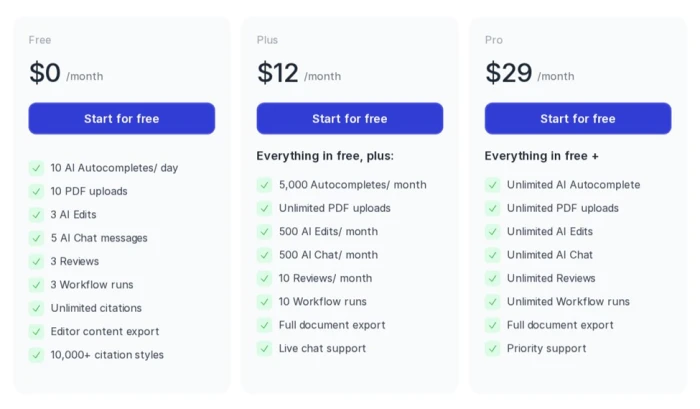
Jenni AI's pricing page on annual billing. Screenshot from jenni.ai, September 2026.
Team and institutional plans are quoted separately and add usage analytics, single invoicing, and multi-seat discounts. The free tier is fine for testing the editor but too tight for a full paper. Most regular users land on Plus; Pro only pays off if you burn through chat and Reviews at volume.
Humanize AI pricing
Humanize AI's pricing page loads dynamically and does not publish a static grid, but its own page metadata lists plans from $12 a month, and plans are sold as word allowances rather than seats. The free tier works without an account, with a captcha on each run and a queue at busy times. Two things to check before paying: the exact word cap on the tier you pick, and whether the rewrite modes you want (Academic, Custom, and so on) sit behind the paywall, since only Standard is open to anonymous users.

Where each tool falls short
Humanize AI
• Detection results are inconsistent. Several independent tests found that output still triggers GPTZero and Originality.ai, and the tool gives no detection score after a rewrite unless you run its separate checker.
• The built-in detector produces false positives. The company has acknowledged in public replies that well-structured human writing can be flagged as AI. Use a second detector if it matters.
• Meaning can drift. Reviewers who tested technical and academic passages reported oversimplified terminology and occasional awkward phrasing, so a manual read-through is not optional.
• Support is slow. The site quotes a three to five business day response time for email, with no live chat.
• Brand confusion. The crowded namespace makes it hard to know which "Humanize AI" a review, a coupon, or a complaint is about.
Jenni AI
• The free tier is restrictive. Ten autocompletes a day and five chat messages run out fast during real writing sessions.
• Sources still need verifying. Jenni links claims to PDFs, which helps, but it can still suggest a paper that does not say quite what the sentence implies. Read the cited passage.
• Institutional rules vary. Some universities allow AI assistance with disclosure, others prohibit it. The tool does not know your policy.
• It is an academic product first. Marketers or novelists will find the citation machinery gets in the way.
• Pro is expensive for occasional use. At $29 a month it only makes sense for people writing at volume.
Can you use both?
Technically, yes. Some people draft in Jenni, export to .docx, and run sections through Humanize AI to loosen up stiff phrasing. If you do this, two cautions apply. First, rewriters can mangle inline citations, so re-check every reference after a pass. Second, in academic settings, using a humanizer to disguise AI-assisted work is the kind of thing integrity policies are written to catch, and the penalty is rarely worth it. Jenni's own Reviews and proofreading pass is the safer way to improve an academic draft. Humanize AI earns its keep on marketing and web copy, where the goal is readability rather than concealment.
Final verdict
If you are choosing between these two tools, you are probably asking the wrong question, because they rarely compete for the same task. Ask instead what you are trying to produce.
For a research paper, thesis, literature review, or any document where the argument rests on sources, Jenni AI is the better tool by a wide margin. Nothing in Humanize AI's toolbox comes close to source-grounded autocomplete, traceable citations, and claim review. Start on the free plan and move to Plus when the daily caps start to bite.
For a blog post, landing page, product description, or email that reads too mechanically, Humanize AI is the faster fix, and the free tier means you can test it on your own text before spending anything. Just verify the result with an outside detector if detection scores matter to you, and read the output before you ship it.
The short version: Jenni AI builds the draft. Humanize AI polishes one. Pick the tool that matches the stage of writing you are actually stuck on.


Comments 0
Join the discussion and share your perspective.
Sign in to post a comment and reply to other readers.
No comments yet
Be the first to share your perspective on this article.