
Writing & Content

Poppy AI Review

Poppy AI is a visual, board based AI workspace built for creators and small teams who live in content. It shines for scripting, ideation, research, and workflows, especially when paired with its unusually hands on onboarding and support.

Test Duration
7 Days
Reviewner Version
v1.0
Last Tested
16 Sep, 26
9
Recommended for Content Creators
Reviewner Test Score

Output quality, visual boards, and content focused workflows are consistently praised, especially once onboarding has been completed. Human support and training are a genuine differentiator. The main weaknesses sit around refund handling, subscription cancellation friction, and aggressive marketing expectations. Poppy AI suits creators and small businesses who will invest time in onboarding and then use it heavily. Light or casual users, or those sensitive to hard sell tactics, may feel frustrated.

YouTube Creators Solo Entrepreneurs Content Agencies Online Coaches Social Media Managers Freelance Copywriters
Reviewner Testing Log

Poppy AI Hands-On Testing

What I Loved, What I Hated, and the Verdict

What Poppy AI Promises

Poppy AI markets itself as “the #1 AI tool to make viral content while saving 100s of hours per month,” aimed at content creators, founders and marketers. The idea: feed it what already works in your niche, and it helps you find winning hooks, study top performers, and turn that into finished content that still sounds like you.

That is a big promise, so I signed up, ran through the whole experience, and boiled it down to the two things that actually matter — what there is to love, and what there is to hate.
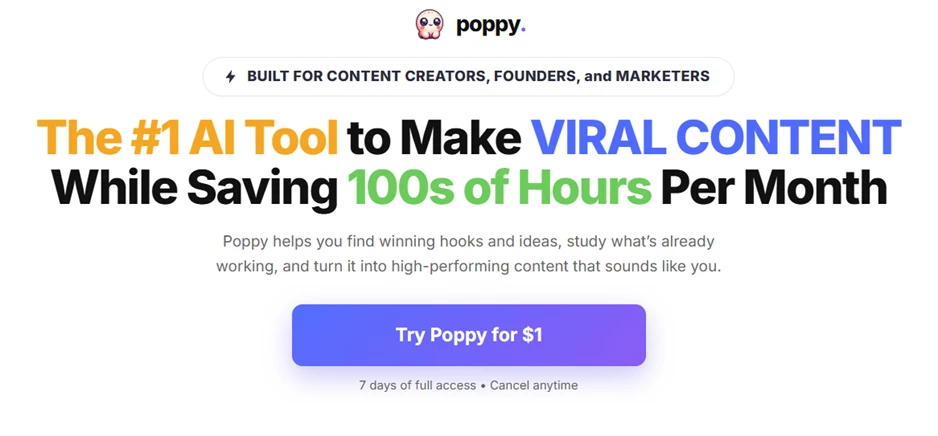
Poppy AI's landing page: a viral-content promise and a $1, 7-day trial.

Getting In: The $1 Trial and Sign-Up

Entry is deliberately frictionless. The homepage funnels you to one button — “Try Poppy for $1” with seven days of full access and cancel-anytime underneath. The sign-in screen keeps it simple: continue with Google, or use the email tied to your purchase, with a banner reminding trial buyers to log in with the same email they paid with.
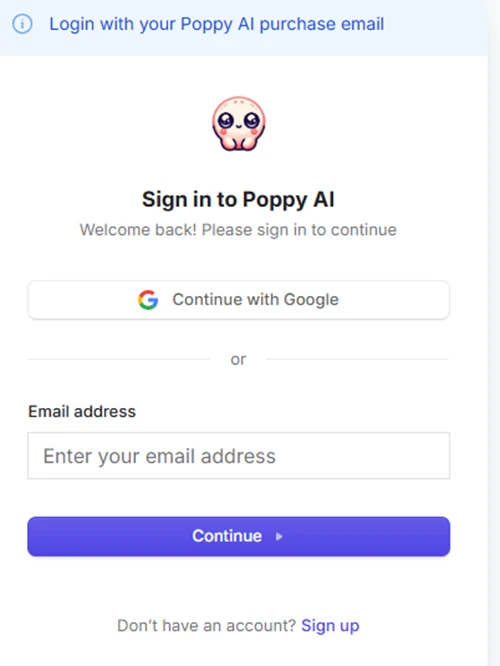
The sign-in screen: Google or email, with a reminder to use your purchase email.

First Run: The Onboarding Flow

Once you are in, Poppy runs a quick six-step setup framed as “Start My 7-Day Trial for JUST $1.” It is really a segmentation quiz. The first question asks what best describes you, creator, marketer/freelancer, agency owner, coach/consultant, founder/business owner, or other.
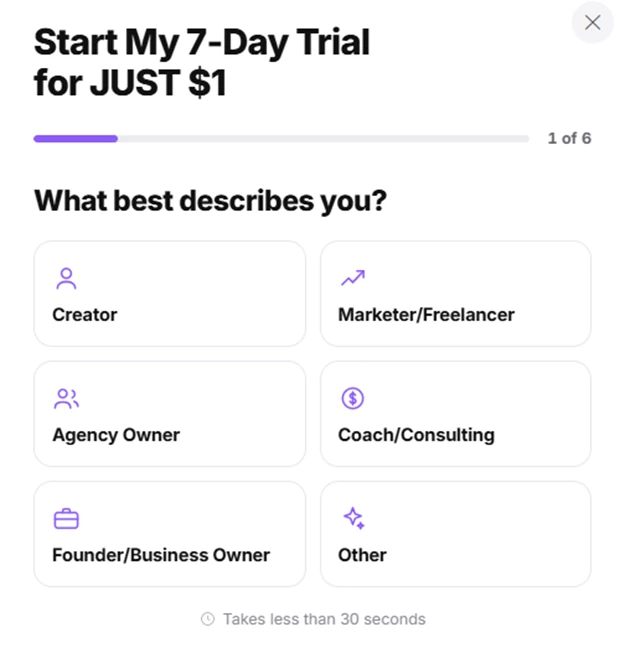
Onboarding step 1 of 6 — Poppy segments users by role.

The next screen asks what you create most: videos and scripts; ads, VSLs and copy; emails, posts and newsletters; or a bit of everything. Together these tailor your starting templates, which softens the blank-canvas problem before you begin.
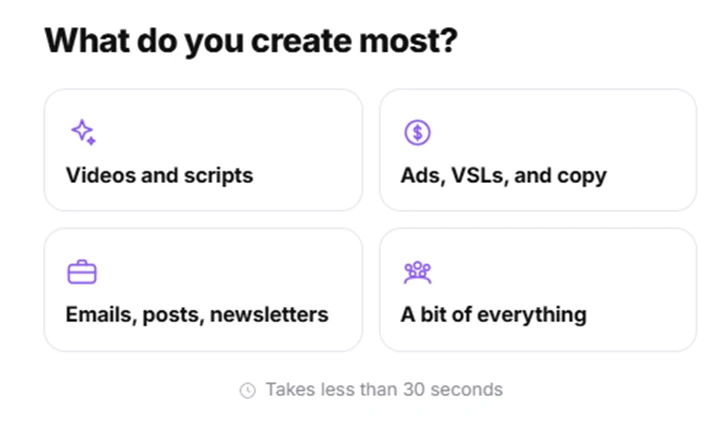
Onboarding continues — Poppy asks what type of content you produce most.

How It Actually Works

Strip away the marketing and Poppy is a visual, canvas-based AI workspace rather than a chatbot. You work on an infinite whiteboard, drop in sources — YouTube videos, transcripts, PDFs, docs, images, links — and branch ideas, hooks, outlines and drafts around them. It pulls from multiple leading AI models, shapes output toward your brand voice, and lets teams collaborate on the same board. Almost every action draws from a monthly credit balance that resets and does not roll over.

What I Loved

The visual canvas. Seeing an entire content strategy laid out spatially — with gaps and connections made obvious — genuinely changes how you work versus a linear chat thread.

Real time savings. Turning long content into structured summaries, outlines and drafts is fast, and the multimodal inputs cut out endless copy-pasting between transcripts, docs and your writing tool.

Multiple models, one roof. You are not locked into a single engine, so you can lean on whichever model suits the task.

Standout onboarding and support. The setup is polished and conversion-smart, and reviewers repeatedly single out the human onboarding and support as unusually good for a tool at this price.

Team-friendly. One source can fan out into scripts, posts, emails and ads, and editors or teammates can work the same board together.

What I Hated

 The credit system. Nearly everything costs credits, they reset monthly with no rollover, and heavy generation or re-running tasks can drain them faster than you expect.

Desktop-only. There is no mobile app, so quick edits on the go simply are not an option.

No built-in distribution. Content stays inside the platform, no scheduler, no publishing, so you still need a separate tool to actually post.

Opaque, shifting pricing. Poppy has moved toward a demo-gated model where the price is not always published and sources quote very different figures, which makes it hard to know what you will really pay.

A learning curve. The value lives in the project-and-canvas flow, so the first session or two feel like more moving parts than a plain chatbot, and vague prompts still produce generic output.

Who Will Love It, and Who Will Hate It

You will love it if you regularly turn long-form material into structured outputs, podcasts into summaries into outlines into drafts and you want one workspace that keeps everything connected. Creators and marketers juggling multiple platforms, and small content teams, get the most from it.

You will hate it if you only need the occasional one-off summary, you want to edit on mobile, or you dislike credit systems where heavy use forces an upgrade. For quick text generation alone, a standard chatbot is cheaper and faster.

The Verdict

Verdict: 3.8 / 5

A genuinely different, visual way to work with AI that pays off for consistent, high-volume creators  held back by a credit system, desktop-only access and murky pricing. The $1 trial makes it low-risk to judge for yourself.

Strip away the “viral content” headline and Poppy is more interesting than it sounds: a spatial canvas for people who think visually, strong multimodal inputs, multiple models, and onboarding a cut above. The reservations are just as real, but the trial is cheap. Run one of your own real projects through it end to end, and within a week you will know whether the workflow fits how your brain actually works which, with Poppy, is the whole question.
Methodology

How We Research?

Cross source aggregation

Collects qualitative and quantitative feedback from review platforms, community forums, and social channels into a single comparable dataset.

Theme clustering and pattern detection

Groups comments into recurring themes such as onboarding, billing, usability, and output quality to surface consistent strengths and weaknesses.

Sentiment classification

Scores each theme across positive and negative signals, weighting detailed experiential reviews more heavily than short reactions.

Recency weighting and refresh cadence

Applies higher weight to recent reviews and refreshes analysis periodically so ratings reflect current product behavior.

Internet Reputation

Poppy AI Repo on Internet

Poppy AI Reviews Roundup

The Short Version

Poppy AI enjoys unusually high ratings on the platforms that host its reviews, and one theme dominates almost every positive write-up: the onboarding and human support. Users repeatedly describe the visual, whiteboard-style workspace as a genuine change from chatbot tools, and many report saving significant time on content. The criticism is just as consistent, it clusters around the credit system, the cost, and, for some, the sales and refund experience. Here is what people are actually saying, platform by platform.

Ratings at a Glance

PlatformScoreReview volumeWhat stands out
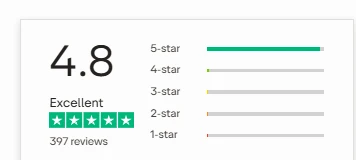
Trustpilot≈ 4.9 / 5~390+ reviewsOverwhelmingly 5-star; praise centred on onboarding and support
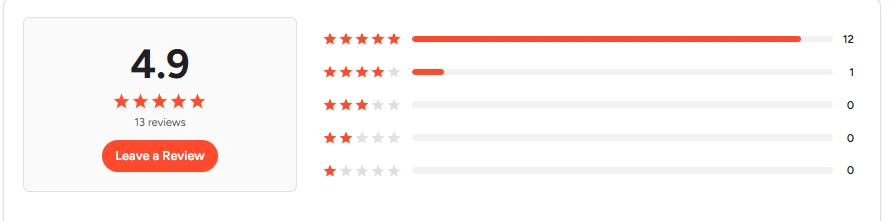
G24.9 / 513 reviews (12×5★, 1×4★)All small-business; loved the Miro-board-style canvas
CapterraLimitedMinimal presenceNow under G2 ownership; little distinct Poppy data
AppSumoPositiveLifetime-deal buyersLiked overall, but the loudest credit and cost gripes live here

What Users Praise Most

The onboarding and support. This is the single most-repeated theme across Trustpilot and G2. Reviewers name individual team members who got on calls, walked through use cases and followed up, several say the free 1:1 onboarding is what made the tool click, and some even mention gifted bonus credits.

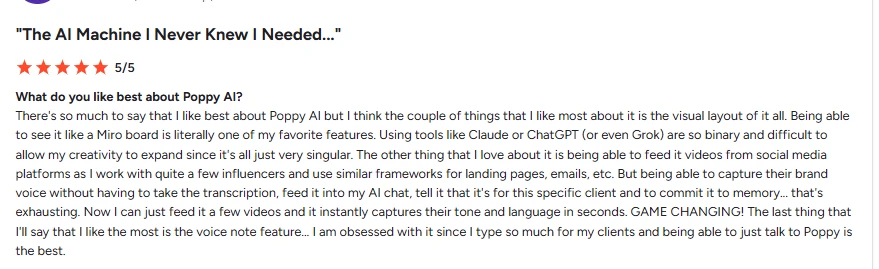
The visual, Miro-style canvas. Users love working on an infinite board rather than in a linear chat. One G2 reviewer called the Miro-board layout their favourite feature; others say seeing everything visually connected lets their creativity expand in a way ChatGPT or Claude do not.

Real, measurable time savings. Multiple reviewers describe cutting content time dramatically, one claimed a 90% reduction, another said they script short-form in a third of the usual time. The consensus is that Poppy earns its keep for people producing content regularly.

Multimodal inputs. Dropping YouTube videos, PDFs, voice notes and URLs onto one board and having the AI transcribe and connect them is repeatedly called out as something standalone AI tools can't match.

On-brand output. Reviewers say that, taught correctly, Poppy captures their tone and voice rather than producing generic AI filler — several describe it as a virtual assistant that writes the way they would.

Agency and team efficiency. Agency owners report running at much higher efficiency, and teams value the multiplayer canvas for building scripts and strategies together.

What Users Complain About

Credit anxiety. The most common gripe, loudest on AppSumo. Credits are consumed per action, reset monthly and don't roll over, and users report burning through a chunk just transcribing a few long videos. Heavy or daily creators worry the allowance runs out fast.

Cost and hidden extras. Beyond the sticker price, buyers flag that some capabilities — API/MCP access, extra credits — need additional purchases. One AppSumo reviewer warned the real cost can stack a lifetime deal, one-time credit packs and a recurring subscription, and that “lifetime credits” are added only once, not recurring.

Aggressive upselling and marketing. Some users found the promotion heavy-handed — rap-style ads, big income-claim thumbnails, resetting countdown timers, and in-app nudges to upgrade even before they'd used any credits.

Refund friction. The refund policy requires attending an onboarding call, and at least one Trustpilot reviewer described a frustrating experience — a rep no-show, repeated offers of more credits instead of a refund, and difficulty getting the request processed within the window.

A learning curve. Even fans note it takes a session or two to understand the board-and-project flow. One buyer refunded after an onboarding that only covered scriptwriting, then admitted “FOMO” after reading what else the tool can do.

Value-versus-alternatives doubts. A minority ask whether Poppy meaningfully beats simply using a ChatGPT or Claude project, especially for straightforward text generation.

Platform by Platform

On Trustpilot

This is where the bulk of Poppy's public reviews live — a rating hovering around 4.9/5 across several hundred reviews, the vast majority five stars. The tone is enthusiastic, and support staff are named again and again as the highlight. Business owners describe finally staying consistent with content, and one memorably called Poppy their virtual assistant in “shining pink armour.” The rare negative reviews are almost all about the refund process rather than the product itself.

On G2 and Capterra

G2 shows a 4.9/5 from a small pool of 13 reviews (twelve five-star, one four-star), all from small-business users. The praise mirrors Trustpilot: the visual canvas, feeding in social videos, and onboarding that surfaces features people didn't know existed. G2's own AI summary flags the initial learning curve as the main limitation. Capterra, now owned by G2,  carries little distinct Poppy data, so the structured B2B review footprint is still thin overall.

On AppSumo

AppSumo lifetime-deal buyers are broadly positive about the non-linear workflow and multimodal inputs, and the 60-day money-back guarantee lowers the risk of trying it. But this is also where the sharpest criticism sits: credit-consumption worries, confusion over one-time versus recurring “lifetime credits,” and concern about the full cost once API access and extra credits are added. The buyer Q&A threads are full of people trying to pin down exactly how many credits real workflows will cost.

Product Analysis

Poppy AI — Key Features

Visual board workspace

Board based layout for links and documents, widely praised by visual thinkers and researchers.

Multi format content creation

Generates scripts, carousels, landing pages, lead magnets, emails and more from the same workspace.

YouTube and social workflows

Specialized flows for YouTube scripts, thumbnails, shorts, and social posts, credited with improving traction.

Model selection inside chats

Ability to switch between different underlying AI models in chats, viewed positively for flexibility.

Contextual training on brand voice

Users can upload docs and links so outputs sound like their brand, frequently praised for authenticity.

One to one onboarding calls

Live sessions with specialists repeatedly highlighted as transformative for understanding and setup.

Challenges and group training

Multi day challenges and classroom sessions help users move from theory to active, confident use.

AI powered research boards

Boards used to map research, offers and campaigns, appreciated by strategists and marketers.

Credit based usage system

Credits manage AI usage, some users liked efficiency, others wanted clearer tier transparency.

Benchmarks

Poppy AI — Scorecard

Dimension Our Test User Signal Verdict Composite
Output Quality
Accuracy, relevance, human likeness
9 9.3 Excellent
92%
Ease of Use
Learning curve and daily usability
8.5 9 Excellent
88%
Onboarding and Education
Training depth and usefulness
9.5 9.7 Excellent
96%
Customer Support
Responsiveness and helpfulness
8.8 9.2 Excellent
90%
Billing and Policies
Refunds, cancellation, clarity
6 5.5 Weak
58%
Value for Money
Perceived value versus price
8.2 8.7 Good
85%
Findings

Key Test Results

Output Quality

Roughly 90 percent of detailed reviews describe scripts and content as accurate, impactful, and close to human voice.

Onboarding Effectiveness

Around 80 percent of long reviews explicitly credit onboarding with making the product finally click.

Support Experience

Clear majority praise caring, persistent support, though about 5 to 10 percent report refund or cancellation friction.

Workflow Efficiency Gains

Most creators report noticeable time savings, often describing workloads feeling twice as fast or more.

Marketing and Billing Trust

Several critical reviews flag aggressive marketing and subscription handling as significant trust reducers.

Community Signals

User Insights

Most Liked Feature

"The visual board workspace with hands on onboarding that turns scattered ideas into usable scripts and campaigns"

Most Common Issue

Refund, cancellation, and aggressive marketing practices that feel pushy or unclear compared with the quality of the software

Sentiment Analysis

What People Talk About Poppy AI

Most-mentioned praise
Exceptionally strong one to one onboarding and education
80%
High quality scripts and content that feel on brand
75%
Visual board interface that suits research and planning
70%
Support team perceived as caring, responsive, and patient
68%
Significant time savings in content planning and creation
62%
Works across many formats including YouTube and social
58%
Continuous product improvements and new features
45%
Most-mentioned pain
Refund and cancellation process described as exhausting by some
40%
Marketing and ads seen as overhyped or clickbait by reviewers
35%
Annual lock in and limited flexibility on subscriptions
30%
Coaching and viral systems perceived as poor value by a few
28%
Site requires contacting support to cancel in some cases
25%
Initial interface can feel overwhelming before training
22%
Editorial Testing Log

Changelog

Date Reviewner Version Duration Remarks
v1.0 7 Days Initial Testing

Each test follows our six dimensions methodology.

Community Reviews

What users say about Poppy AI

0.0
Based on 0 reviews
5
0
4
0
3
0
2
0
1
0
Have you used Poppy AI?

Sign in to share your experience and help others choose the right tool.

Sign in to review

No reviews yet

Be the first to review Poppy AI and help others discover this tool.